
- Forums
- Product Forums
- General Purpose MicrocontrollersGeneral Purpose Microcontrollers
- i.MX Forumsi.MX Forums
- QorIQ Processing PlatformsQorIQ Processing Platforms
- Identification and SecurityIdentification and Security
- Power ManagementPower Management
- Wireless ConnectivityWireless Connectivity
- RFID / NFCRFID / NFC
- Advanced AnalogAdvanced Analog
- Neural Processing UnitsNeural Processing Units
- MCX Microcontrollers
- S32G
- S32K
- S32V
- MPC5xxx
- Other NXP Products
- S12 / MagniV Microcontrollers
- Powertrain and Electrification Analog Drivers
- Sensors
- Vybrid Processors
- Digital Signal Controllers
- 8-bit Microcontrollers
- ColdFire/68K Microcontrollers and Processors
- PowerQUICC Processors
- OSBDM and TBDML
- S32M
- S32Z/E
-
- Solution Forums
- Software Forums
- MCUXpresso Software and ToolsMCUXpresso Software and Tools
- CodeWarriorCodeWarrior
- MQX Software SolutionsMQX Software Solutions
- Model-Based Design Toolbox (MBDT)Model-Based Design Toolbox (MBDT)
- FreeMASTER
- eIQ Machine Learning Software
- Embedded Software and Tools Clinic
- S32 SDK
- S32 Design Studio
- GUI Guider
- Zephyr Project
- Voice Technology
- Application Software Packs
- Secure Provisioning SDK (SPSDK)
- Processor Expert Software
- Generative AI & LLMs
-
- Topics
- Mobile Robotics - Drones and RoversMobile Robotics - Drones and Rovers
- NXP Training ContentNXP Training Content
- University ProgramsUniversity Programs
- Rapid IoT
- NXP Designs
- SafeAssure-Community
- OSS Security & Maintenance
- Using Our Community
-
- Cloud Lab Forums
-
- Knowledge Bases
- ARM Microcontrollers
- i.MX Processors
- Identification and Security
- Model-Based Design Toolbox (MBDT)
- QorIQ Processing Platforms
- S32 Automotive Processing Platform
- Wireless Connectivity
- CodeWarrior
- MCUXpresso Suite of Software and Tools
- MQX Software Solutions
- RFID / NFC
- Advanced Analog
- Neural Processing Units
-
- NXP Tech Blogs
- Home
- :
- Translated Content
- :
- Multi Source Translation Content
- :
- 1431699_en-US
1431699_en-US
- Subscribe to RSS Feed
- Mark as New
- Mark as Read
- Bookmark
- Subscribe
- Printer Friendly Page
- Report Inappropriate Content
1431699_en-US
1431699_en-US
Hi:
In previous topics there are some discussions how to print float number in MCUXpresso IDE and SDK.
To try them and summarize the final solution:
1.PRINTF the float number to UART console
set below macro in project configuration->C/C++ build ->setting
PRINTF_FLOAT_ENABLE=1
such code will work.
float test1 = 0.15;
PRINTF("%f\r\n",test1);
2.Transform float number to string by sprintf() function.
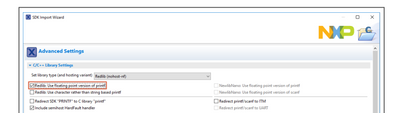
there is one error in SDK user manual, " Ensure Redlib: Use floating point version of printf is selected
" during project creation does not work.
The default C library Redlib doesn't support floating, so it couldn't work with redlib.
The correct solution are:
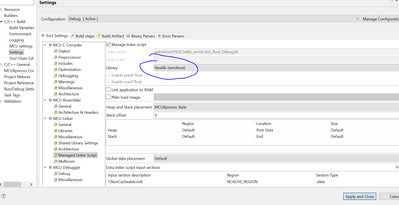
(1)Change link library to NewLib, it's full C library and support float printf.
But notice need include
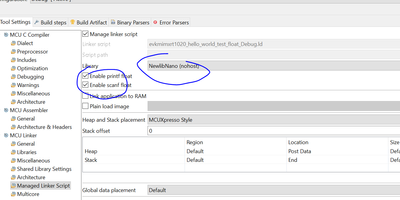
(2)Change link library to NewLib Nano, it's compact C library , and need click "enable print float" to enable float function, which actually add " -u _printf_float" link symbol.
But notice need include
So the solution surely add flash & RAM consumption in project, but for i.MXRT series it's not problem.
Attach is one example for RT1020 EVK.
Thank you! That solved my problem.
Hi @daweiyou
Thank you so much for your contribution. The information was pretty helpful and it might be helpful for many people.
Thank you again.
Best Regards.
Pablo Avalos.