
- Forums
- Product Forums
- General Purpose MicrocontrollersGeneral Purpose Microcontrollers
- i.MX Forumsi.MX Forums
- QorIQ Processing PlatformsQorIQ Processing Platforms
- Identification and SecurityIdentification and Security
- Power ManagementPower Management
- Wireless ConnectivityWireless Connectivity
- RFID / NFCRFID / NFC
- Advanced AnalogAdvanced Analog
- Neural Processing UnitsNeural Processing Units
- MCX Microcontrollers
- S32G
- S32K
- S32V
- MPC5xxx
- Other NXP Products
- S12 / MagniV Microcontrollers
- Powertrain and Electrification Analog Drivers
- Sensors
- Vybrid Processors
- Digital Signal Controllers
- 8-bit Microcontrollers
- ColdFire/68K Microcontrollers and Processors
- PowerQUICC Processors
- OSBDM and TBDML
- S32M
- S32Z/E
-
- Solution Forums
- Software Forums
- MCUXpresso Software and ToolsMCUXpresso Software and Tools
- CodeWarriorCodeWarrior
- MQX Software SolutionsMQX Software Solutions
- Model-Based Design Toolbox (MBDT)Model-Based Design Toolbox (MBDT)
- FreeMASTER
- eIQ Machine Learning Software
- Embedded Software and Tools Clinic
- S32 SDK
- S32 Design Studio
- GUI Guider
- Zephyr Project
- Voice Technology
- Application Software Packs
- Secure Provisioning SDK (SPSDK)
- Processor Expert Software
- Generative AI & LLMs
-
- Topics
- Mobile Robotics - Drones and RoversMobile Robotics - Drones and Rovers
- NXP Training ContentNXP Training Content
- University ProgramsUniversity Programs
- Rapid IoT
- NXP Designs
- SafeAssure-Community
- OSS Security & Maintenance
- Using Our Community
-
- Cloud Lab Forums
-
- Knowledge Bases
- ARM Microcontrollers
- i.MX Processors
- Identification and Security
- Model-Based Design Toolbox (MBDT)
- QorIQ Processing Platforms
- S32 Automotive Processing Platform
- Wireless Connectivity
- CodeWarrior
- MCUXpresso Suite of Software and Tools
- MQX Software Solutions
- RFID / NFC
- Advanced Analog
- Neural Processing Units
-
- NXP Tech Blogs
- Home
- :
- Translated Content
- :
- Multi Source Translation Content
- :
- 1366337_en-US
1366337_en-US
- RSS フィードを購読する
- 新着としてマーク
- 既読としてマーク
- ブックマーク
- 購読
- 印刷用ページ
- 不適切なコンテンツを報告
1366337_en-US
1366337_en-US
[KW36, Hybrid] Multiple Bluetooth LE connections + Generic FSK Demo Application
USL: https://community.nxp.com/docs/DOC-344510
Purpose of this document
This document provides an example of a hybrid application ( Wireless_UART + GFSK Advertising ) by describing a multi-Bluetooth LE connected node topology communicating in parallel with GFSK (General Frequency Shift Keying). This is another additional example outside of the SDK where we define a hybrid application that demonstrates Bluetooth LE advertising and scanning in parallel with GFSK .
reader
The purpose of this document is to provide guidance to software developers who want to use, adapt and integrate the GFSK functionality in their Bluetooth low energy applications.
Build a development environment
Toolchain:
- IAR Embedded Workbench 8.32 or higher;
https://www.iar.com/iar-embedded-workbench/
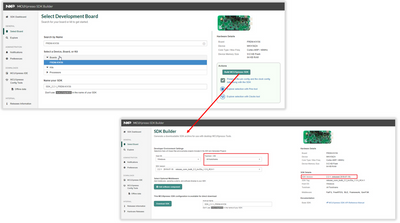
SDK:
- This version of firmware has been tested with SDK_2.2.1_FRDM-KW36 and can be used with the following
链接下载:http://mcuxpresso.nxp.com/en/select
(Please consider selecting Toolchain/IDE: All toolchains);
hardware:
- 2 to 5 FRDM-KW36 development boards: https://www.nxp.com/demoboard/FRDM-KW36
Operation process:
This demo application is designed for the FRDM-KW36 platform and can be easily integrated into any board using the KW35/36 series MCU .
This function is based on the coexistence mechanism on the SDK (Mobile Wireless System - MWS module). Based on the hardware link layer implementation, Bluetooth Low Energy has a higher priority than the GFSK protocol, so GFSK communication is performed in the idle state (inactive period) of Bluetooth Low Energy.
For more details about the MWS module, see the Connectivity Framework Reference Manual.pdf in the SDK .
Bluetooth low energy supports both central and peripheral roles.
Integration of KW36 SDK
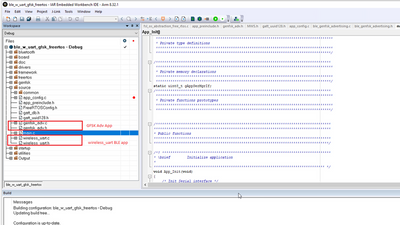
-下载附件并解压到…\SDK_2.2.1_FRDM-KW36\boards\frdmkw36\wireless_examples\hybrid 文件夹:

-打开IAR项目(SDK_2.2.1_FRDM-KW36_2019_07_19\board\frdmkw36\wireless_examples\hybrid\ble_w_uart_gfsk\freertos\iar\ble_w_uart_gfsk_freertos.eww)。
-The project is organized as follows:
Function
Switch function:
- This function is defined in the BleApp_Handle Keys function in the main.c file;
-FRDM-KW36:
- SW2 - Start scanning - Central device;
- Long press SW2 - start scanning - peripheral devices; (Long press SW2 means pressing the SW2 button for more than 3 seconds)
- SW3 - Start / Stop GFSK TX operation (scan);
- Long press SW3 - start / stop GFSK RX operation (Long press SW3 means pressing the SW3 key for more than 3 seconds)
log :
-Serial port outputs different states of the circuit board;
-Baud rate 115200 ;
verify
This solution has been verified with 1 master and 4 slaves as follows:
1. Create a network
a. Turn on serial communication for all devices. After reset, you will see the following message:

b. On the Central device, press SW2 to start scanning;
c. On the peripheral device, long press SW2 to start broadcasting and wait for confirmation on the serial port;

d. Repeat steps b and c on all slave devices.
e. When the network of the Central device is successfully created, you will see the following:
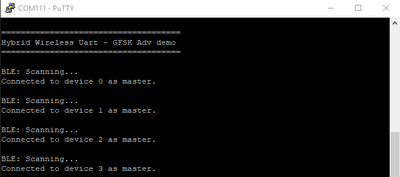
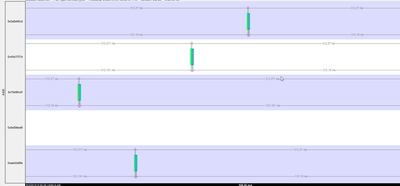
f. Check the air link (connection interval = 312.5ms
2. Verify the functionality of Bluetooth Low Energy:
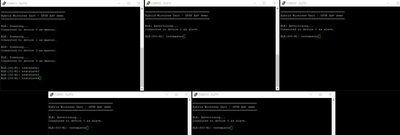
- Write a message from the serial port of each slave (peripheral) (for example: testslaveX ) and check if the message is printed on the serial port of the master.
-Perform the same test on the serial terminal of the master device (Central).
-Here is an example of this step:
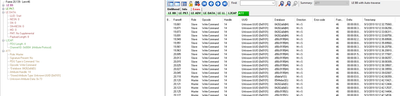
-Air log:
3. Start GFSK communication:
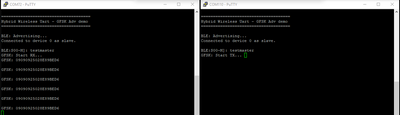
- Press SW3 on one of the boards to start GFSK TX operation (Advertisement packet with AdvAddress = 0909090909 ); send an ADV packet over the air every 1 second ( gGenFskApp_TxInterval_c ).
- Select another board and long press SW3 to start GFSK RX operation ( RX interval = 100ms = gGenFskApp_RxInterval_c )
-When an ADV packet from address = 0909090909 is received, it will print it out on the serial port as follows:
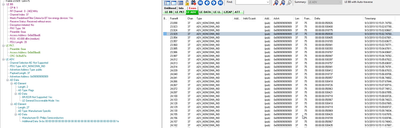
- Over-the-air GFSK TX packets are listed as ADV_NONCONN_IND:
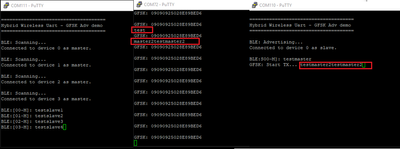
4. Verify GFSK and Bluetooth LE parallel capabilities:
- Write a message on the master (Central) serial port and check the feedback on the slave (peripheral) serial terminal:
Attached is the source code of this application.
Sincere regards
Ovidiu
appendix
BLE+GFSK_Demo_application.zip(https://community.nxp.com/pwmxy87654/attachments/pwmxy87654/wireless-connectivity%40tkb/253/1/BLE+GF...)