
- Forums
- Product Forums
- General Purpose MicrocontrollersGeneral Purpose Microcontrollers
- i.MX Forumsi.MX Forums
- QorIQ Processing PlatformsQorIQ Processing Platforms
- Identification and SecurityIdentification and Security
- Power ManagementPower Management
- Wireless ConnectivityWireless Connectivity
- RFID / NFCRFID / NFC
- Advanced AnalogAdvanced Analog
- Neural Processing UnitsNeural Processing Units
- MCX Microcontrollers
- S32G
- S32K
- S32V
- MPC5xxx
- Other NXP Products
- S12 / MagniV Microcontrollers
- Powertrain and Electrification Analog Drivers
- Sensors
- Vybrid Processors
- Digital Signal Controllers
- 8-bit Microcontrollers
- ColdFire/68K Microcontrollers and Processors
- PowerQUICC Processors
- OSBDM and TBDML
- S32M
- S32Z/E
-
- Solution Forums
- Software Forums
- MCUXpresso Software and ToolsMCUXpresso Software and Tools
- CodeWarriorCodeWarrior
- MQX Software SolutionsMQX Software Solutions
- Model-Based Design Toolbox (MBDT)Model-Based Design Toolbox (MBDT)
- FreeMASTER
- eIQ Machine Learning Software
- Embedded Software and Tools Clinic
- S32 SDK
- S32 Design Studio
- GUI Guider
- Zephyr Project
- Voice Technology
- Application Software Packs
- Secure Provisioning SDK (SPSDK)
- Processor Expert Software
- Generative AI & LLMs
-
- Topics
- Mobile Robotics - Drones and RoversMobile Robotics - Drones and Rovers
- NXP Training ContentNXP Training Content
- University ProgramsUniversity Programs
- Rapid IoT
- NXP Designs
- SafeAssure-Community
- OSS Security & Maintenance
- Using Our Community
-
- Cloud Lab Forums
-
- Knowledge Bases
- ARM Microcontrollers
- i.MX Processors
- Identification and Security
- Model-Based Design Toolbox (MBDT)
- QorIQ Processing Platforms
- S32 Automotive Processing Platform
- Wireless Connectivity
- CodeWarrior
- MCUXpresso Suite of Software and Tools
- MQX Software Solutions
- RFID / NFC
- Advanced Analog
- Neural Processing Units
-
- NXP Tech Blogs
- Home
- :
- Translated Content
- :
- Multi Source Translation Content
- :
- 1272092_en-US
1272092_en-US
- RSS フィードを購読する
- 新着としてマーク
- 既読としてマーク
- ブックマーク
- 購読
- 印刷用ページ
- 不適切なコンテンツを報告
1272092_en-US
1272092_en-US
This article is presenting 2 parts:
Part1: How to flash the HCI_bb binary into the Kinetis product (here is the example of the KW38).
Part 2: Perform RF measurements using the R&S CMW270
2 attached files:
- bci_black_box.bin (zip file)
- mbed_WinSerial.exe (zip file)
Part1: How to flash the HCI_bb binary into the Kinetis product (here is the example of the KW38).
The HCI_bb application example is on the SDK folder below:
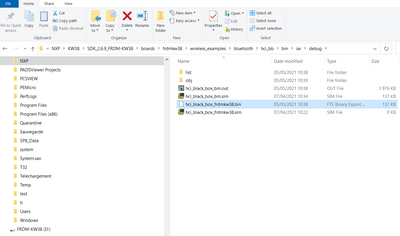
Plug the FRDM-KW38 board on your PC using the USB cable.
The FRDM-KW38 board will be seeing as a hard disk. Disk
Select the hci_black_box_frdmkw38.bin file and drag and drop this file to the FRDM-KW38 (D:)
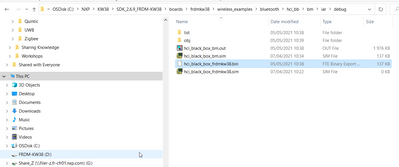
The KW38 is flashed when 100% is reached.
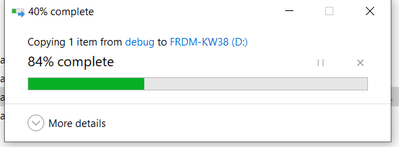
The FRDM-KW38 board is ready to be used with the DTM mode.
Part 2: Perform RF measurements using the R&S CMW270
The FRDM-KW38 board could be connected to the R&S CMW270 using the USB cable.
The hci_bb set the KW38 in DTM mode.
The CMW270 could communicate by sending DTM commands.
Note: You need to install the mbedWinSerial driver (attached in this article) in the CMW270 to detect the FRDM-KW38 board.
I am trying to doing this DTM test on KW36(specific application hardware, not a development board) ,can you please help or share the entire process as well as firmware & list of tools required to perform this test?