
- Forums
- Product Forums
- General Purpose MicrocontrollersGeneral Purpose Microcontrollers
- i.MX Forumsi.MX Forums
- QorIQ Processing PlatformsQorIQ Processing Platforms
- Identification and SecurityIdentification and Security
- Power ManagementPower Management
- Wireless ConnectivityWireless Connectivity
- RFID / NFCRFID / NFC
- Advanced AnalogAdvanced Analog
- Neural Processing UnitsNeural Processing Units
- MCX Microcontrollers
- S32G
- S32K
- S32V
- MPC5xxx
- Other NXP Products
- S12 / MagniV Microcontrollers
- Powertrain and Electrification Analog Drivers
- Sensors
- Vybrid Processors
- Digital Signal Controllers
- 8-bit Microcontrollers
- ColdFire/68K Microcontrollers and Processors
- PowerQUICC Processors
- OSBDM and TBDML
- S32M
- S32Z/E
-
- Solution Forums
- Software Forums
- MCUXpresso Software and ToolsMCUXpresso Software and Tools
- CodeWarriorCodeWarrior
- MQX Software SolutionsMQX Software Solutions
- Model-Based Design Toolbox (MBDT)Model-Based Design Toolbox (MBDT)
- FreeMASTER
- eIQ Machine Learning Software
- Embedded Software and Tools Clinic
- S32 SDK
- S32 Design Studio
- GUI Guider
- Zephyr Project
- Voice Technology
- Application Software Packs
- Secure Provisioning SDK (SPSDK)
- Processor Expert Software
- Generative AI & LLMs
-
- Topics
- Mobile Robotics - Drones and RoversMobile Robotics - Drones and Rovers
- NXP Training ContentNXP Training Content
- University ProgramsUniversity Programs
- Rapid IoT
- NXP Designs
- SafeAssure-Community
- OSS Security & Maintenance
- Using Our Community
-
- Cloud Lab Forums
-
- Knowledge Bases
- ARM Microcontrollers
- i.MX Processors
- Identification and Security
- Model-Based Design Toolbox (MBDT)
- QorIQ Processing Platforms
- S32 Automotive Processing Platform
- Wireless Connectivity
- CodeWarrior
- MCUXpresso Suite of Software and Tools
- MQX Software Solutions
- RFID / NFC
- Advanced Analog
- Neural Processing Units
-
- NXP Tech Blogs
- Home
- :
- Translated Content
- :
- Multi Source Translation Content
- :
- 1263989_en-US
1263989_en-US
- Subscribe to RSS Feed
- Mark as New
- Mark as Read
- Bookmark
- Subscribe
- Printer Friendly Page
- Report Inappropriate Content
1263989_en-US
1263989_en-US
I've been trying to flash the SD card on my i.MX8MM and been having some issues. I've looked into the documentation but it doesn't quite clear up my confusion.
For UUU I've downloaded the latest 1.4.127: https://github.com/NXPmicro/mfgtools/releases/tag/uuu_1.4.127
And I've also downloaded the latest pre-build Linux binaries L5.10.9_1.0.0_MX8MM: https://www.nxp.com/webapp/Download?colCode=L5.10.9_1.0.0_MX8MM&appType=license
I used UUU to flash this 5.10 Linux release into my eMMC via:
uuu.exe uuu.autoThat flashed and booted just fine. I then tried to flash this to the SD card simply by updating the uuu.auto file as follows:
# SD Programming:
FB: ucmd setenv fastboot_dev mmc
FB: ucmd setenv mmcdev ${sd_dev}
FB: ucmd mmc dev ${sd_dev}
FB: flash -raw2sparse all imx-image-multimedia-imx8mmevk.wic
FB: flash bootloader imx-boot-imx8mmevk-sd.bin-flash_evk
FB: ucmd if env exists sd_ack; then ; else setenv sd_ack 0; fi;
FB: ucmd mmc partconf ${sd_dev} ${sd_ack} 1 0
FB: done

# Emmc programming:
#FB: ucmd setenv fastboot_dev mmc
#FB: ucmd setenv mmcdev ${emmc_dev}
#FB: ucmd mmc dev ${emmc_dev}
#FB: flash -raw2sparse all imx-image-multimedia-imx8mmevk.wic
#FB: flash bootloader imx-boot-imx8mmevk-sd.bin-flash_evk
#FB: ucmd if env exists emmc_ack; then ; else setenv emmc_ack 0; fi;
#FB: ucmd mmc partconf ${emmc_dev} ${emmc_ack} 1 0
#FB: done
This failed at the following step:
uuu.exe uuu.auto
uuu (Universal Update Utility) for nxp imx chips -- libuuu_1.4.127-0-g08c58c9

Success 0    Failure 1


2:2      7/ 8 [                                      ] FB: ucmd mmc partconf ${sd_dev} ${sd_ack} 1 0
Which makes me think I can't simply swap one for the other. So my question is, how can I use uuu to flash the v5.10 pre-released Linux binaries to the SD card on the i.MX8MM EVK?
I agree that the documentation for UUU is very sparse and difficult to use without a lot of trial and error.
It would benefit users greatly if NXP would have an applications engineer with English skills as a first language thoroughly update it and provide proper use cases, as well as adopt a standard Linux style command-line help syntax.
I could help but don't have enough spare time myself...
It no problem to use script.
What you need is the common basic knowledge.
Because from the "FB: ucmd mmc partconf ${sd_dev} ${sd_ack} 1 0", know about you have no any knowledge about emmc and sd card as you don't know about the wic.
Here is the script to flash the sdcard. uuu uuu.sd.auto to use it.
uuu.sd.auto
uuu_version 1.2.39
# This command will be run when i.MX6/7 i.MX8MM, i.MX8MQ
SDP: boot -f imx-boot-imx8mmevk-sd.bin-flash_evk
# This command will be run when ROM support stream mode
# i.MX8QXP, i.MX8QM
SDPS: boot -f imx-boot-imx8mmevk-sd.bin-flash_evk
# These commands will be run when use SPL and will be skipped if no spl
# SDPU will be deprecated. please use SDPV instead of SDPU
# {
SDPU: delay 1000
SDPU: write -f imx-boot-imx8mmevk-sd.bin-flash_evk -offset 0x57c00
SDPU: jump
# }
# These commands will be run when use SPL and will be skipped if no spl
# if (SPL support SDPV)
# {
SDPV: delay 1000
SDPV: write -f imx-boot-imx8mmevk-sd.bin-flash_evk -skipspl
SDPV: jump
# }
FB: ucmd setenv fastboot_dev mmc
FB: ucmd setenv mmcdev ${emmc_sd}
FB: ucmd mmc dev ${emmc_sd}
FB: flash -raw2sparse all imx-image-multimedia-imx8mmevk.wic
FB: done
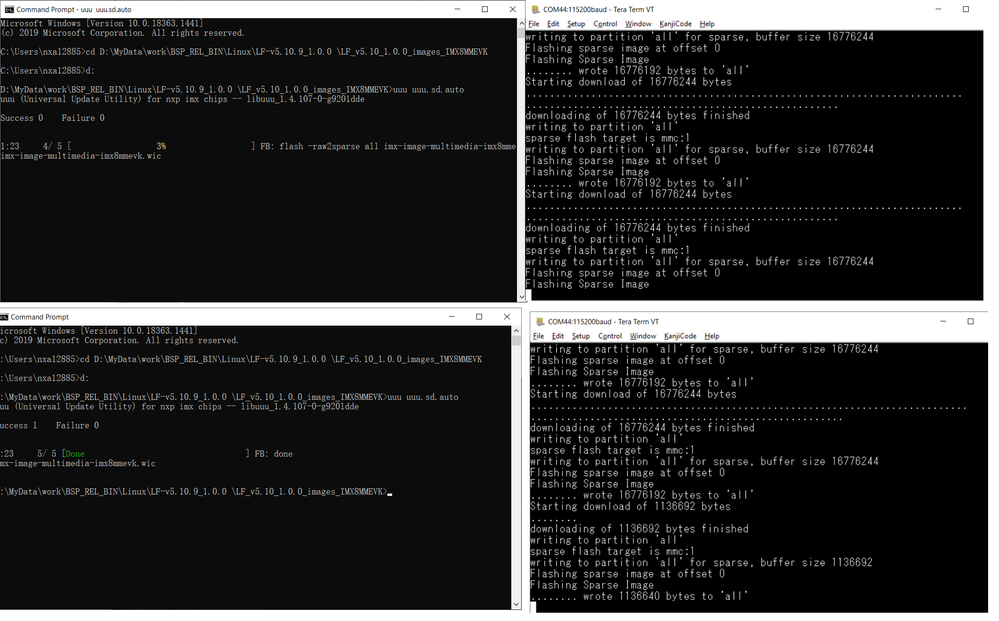
to know what is wic, you should have the yocto knowledge.
and wic is same as .sdcard.
Thanks for the input. The documentation and the `uuu` output both mention the sdcard if flashed via a `.sdcard` file:
   sd_all  burn whole image to sd card
                arg0: _flash.bin
                arg1: _rootfs.sdcard
Clearly in this case it was a `.wic` file instead. Is that mentioned somewhere that I missed?
Second question: while the built in command works, can the uuu.auto file be used as well for SD card flashing?
just one command line using uuu build-in command
uuu -b sd_all imx-boot-imx8mmevk-sd.bin-flash_evk imx-image-multimedia-imx8mmevk.wic
suggest to read the uuu manual or type uuu without parameter to show the help