
- Forums
- Product Forums
- General Purpose MicrocontrollersGeneral Purpose Microcontrollers
- i.MX Forumsi.MX Forums
- QorIQ Processing PlatformsQorIQ Processing Platforms
- Identification and SecurityIdentification and Security
- Power ManagementPower Management
- Wireless ConnectivityWireless Connectivity
- RFID / NFCRFID / NFC
- Advanced AnalogAdvanced Analog
- Neural Processing UnitsNeural Processing Units
- MCX Microcontrollers
- S32G
- S32K
- S32V
- MPC5xxx
- Other NXP Products
- S12 / MagniV Microcontrollers
- Powertrain and Electrification Analog Drivers
- Sensors
- Vybrid Processors
- Digital Signal Controllers
- 8-bit Microcontrollers
- ColdFire/68K Microcontrollers and Processors
- PowerQUICC Processors
- OSBDM and TBDML
- S32M
- S32Z/E
-
- Solution Forums
- Software Forums
- MCUXpresso Software and ToolsMCUXpresso Software and Tools
- CodeWarriorCodeWarrior
- MQX Software SolutionsMQX Software Solutions
- Model-Based Design Toolbox (MBDT)Model-Based Design Toolbox (MBDT)
- FreeMASTER
- eIQ Machine Learning Software
- Embedded Software and Tools Clinic
- S32 SDK
- S32 Design Studio
- GUI Guider
- Zephyr Project
- Voice Technology
- Application Software Packs
- Secure Provisioning SDK (SPSDK)
- Processor Expert Software
- Generative AI & LLMs
-
- Topics
- Mobile Robotics - Drones and RoversMobile Robotics - Drones and Rovers
- NXP Training ContentNXP Training Content
- University ProgramsUniversity Programs
- Rapid IoT
- NXP Designs
- SafeAssure-Community
- OSS Security & Maintenance
- Using Our Community
-
- Cloud Lab Forums
-
- Knowledge Bases
- ARM Microcontrollers
- i.MX Processors
- Identification and Security
- Model-Based Design Toolbox (MBDT)
- QorIQ Processing Platforms
- S32 Automotive Processing Platform
- Wireless Connectivity
- CodeWarrior
- MCUXpresso Suite of Software and Tools
- MQX Software Solutions
- RFID / NFC
- Advanced Analog
- Neural Processing Units
-
- NXP Tech Blogs
- Home
- :
- Translated Content
- :
- Multi Source Translation Content
- :
- 1101651_en-US
1101651_en-US
1101651_en-US
1101651_en-US
Recently, many people in forums and QQ groups have been discussing low-power design. I remembered that a customer I met before also had a requirement in this regard, so I followed his idea and made an example of using ADC in low-power mode. The customer wanted to make a constant temperature control, which puts the MCU into sleep mode within the set temperature range , and wakes up the MCU for temperature adjustment only when the temperature exceeds the range . Without further ado, let's start the routine introduction.
Operating platform:
FRDM-25Z
IARv7.3
Modify the platinum project in the KL25_SC code package
Introduction to Low Power Mode
Freescale's Kinetis series MCUs are based on 90nm TFS technology, which enables the MCU to have good performance and power consumption in low-power mode. The KL series is rated as the industry's lowest power MCU . The KL25Z has a total of 11 power modes , namely: Run , VLPR , Wait , VLPW , Stop , VLPS , LLS , VLLS3 , VLLS2 , VLLS1 , VLLS0 , which can meet customers' various low-power configuration requirements for MCUs. In deep sleep mode, intelligent peripherals can process corresponding data without waking up the core.
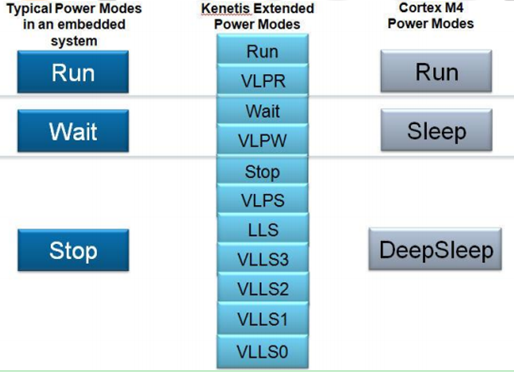
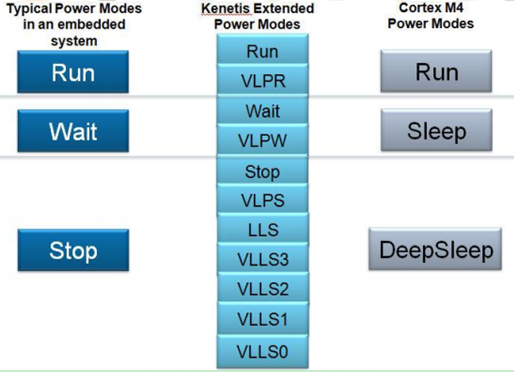
Figure 1
In this design, it is necessary to monitor the temperature in low power mode. The electrical signal of the thermocouple needs to be sampled by ADC. According to the manual, the lowest power mode that ADC can run is VLPS mode. Most peripherals can still be used in VLPS mode, but it should be noted that the bus clock is prohibited in VLPS mode. Therefore , the ADC clock should be set to ADACK before entering VLPS mode, otherwise it will die after entering VLPS mode. In VLPS mode, only hardware triggers can be used to trigger ADC sampling. In this example, the LPMR timer is used to trigger ADC sampling. In VLPS mode, interrupt wake-up can be used. In this example, ADC interrupt wake-up is used. Of course, asynchronous DMA channels can also be used to transfer ADC conversion results, and automatically return to VLPS mode after the transfer is completed. If you are interested, you can also try this method.
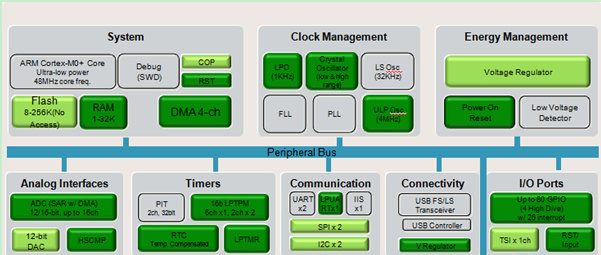
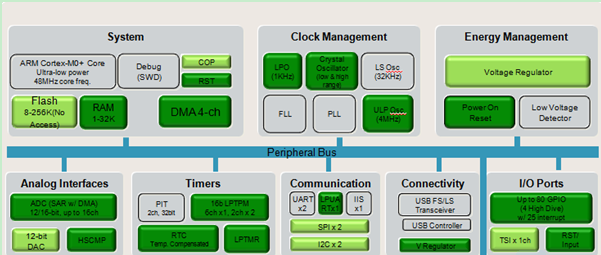
Figure 2
Code introduction:
int main (void)
{
#ifdef CMSIS // If we are conforming to CMSIS, we need to call start here
start();
#endif
lptmr_init(1000,LPTMR_USE_LPOCLK); //trigger ADC per 1000ms // In the initialization code, set LPO as the clock source of lptmr to ensure that lptmr can work normally under VLPS;
init_ADC16(); //Initialize ADC, set ADC hardware trigger source to lptmr, enable ADC range comparison mode, that is, save the result when the conversion result is less than C1V and greater than C2V;
enable_irq(ADC0_irq_no); //Enable ADC interrupt before entering low power mode.
printf("Enter VLPS mode...\r\n");
clockMonitor(OFF);
enter_vlps();
while(1)
{
if(flag_wakeup == 1)
{
flag_wakeup = 0;
ADC0_SC2 &= ~ADC_SC2_ACFE_MASK;
disable_irq(ADC0_irq_no); //After exiting, in order to adjust the temperature, the range comparison mode needs to be turned off, and the ADC interrupt is turned off at the same time, and the query mode is used;
printf("Wake up from VLPS..\n");
printf("adcresult = %d\n",adcresult);
}
if((ADC0_SC1(0) & ADC_SC1_COCO_MASK) == ADC_SC1_COCO_MASK) //Query conversion result
{
adcresult = ADC0_R(0);
printf("wake up adcresult = %d\n",adcresult);
if((adcresult>= 4000) && (adcresult<= 5000)) //When the ADC result is adjusted to enter the adjustment range again, prepare to enter low power mode;
{
ADC0_SC2 |= ADC_SC2_ACFE_MASK; // To enable monitoring, re-enable range comparison mode and ADC interrupt.
enable_irq(ADC0_irq_no);
printf("Enter VLPS mode...\n");
clockMonitor(OFF);
enter_vlps();
}
}
}
}
Experimental results:
Set the comparison value to 4000~5000, and the print results are as follows:
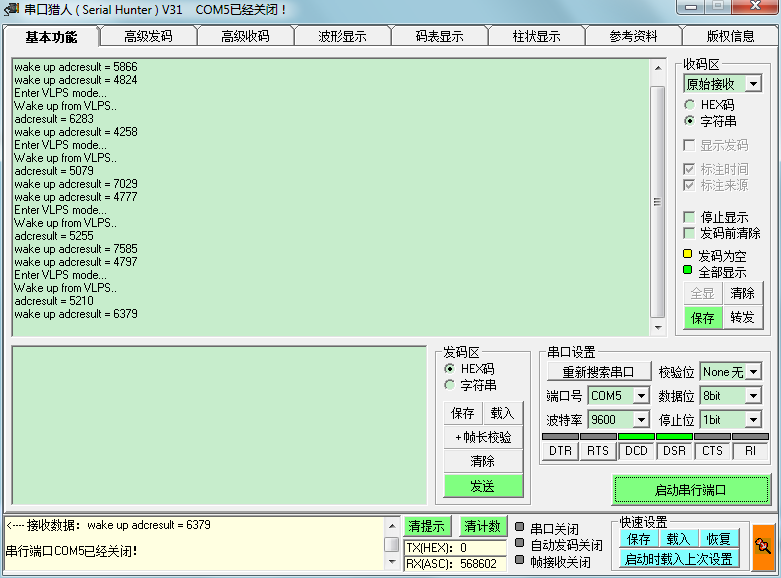
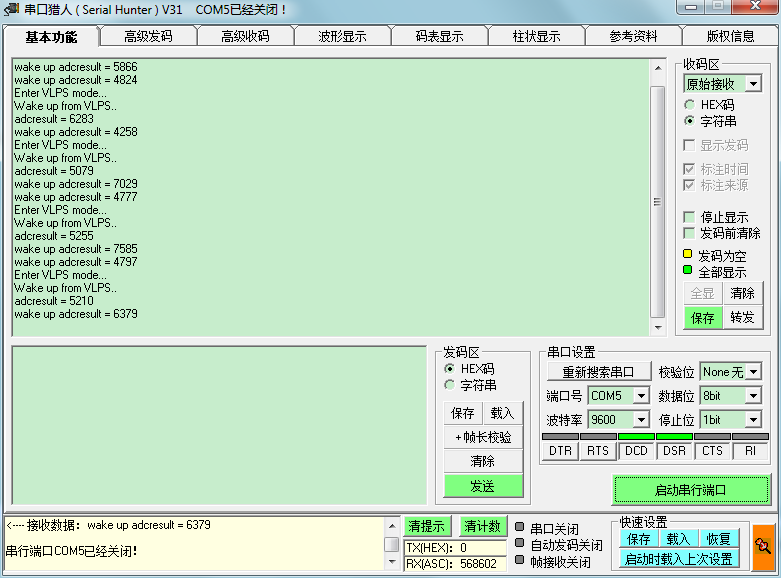
Figure 3
Okay, that’s all. This is the first time I write a technical article, and I have talked about a lot of very simple things. It’s a bit messy, so I hope to criticize and correct me.
Attached is the reference code.
Hi FanXi, thank you very much! What is the actual measured current?