
- Forums
- Product Forums
- General Purpose MicrocontrollersGeneral Purpose Microcontrollers
- i.MX Forumsi.MX Forums
- QorIQ Processing PlatformsQorIQ Processing Platforms
- Identification and SecurityIdentification and Security
- Power ManagementPower Management
- Wireless ConnectivityWireless Connectivity
- RFID / NFCRFID / NFC
- Advanced AnalogAdvanced Analog
- Neural Processing UnitsNeural Processing Units
- MCX Microcontrollers
- S32G
- S32K
- S32V
- MPC5xxx
- Other NXP Products
- S12 / MagniV Microcontrollers
- Powertrain and Electrification Analog Drivers
- Sensors
- Vybrid Processors
- Digital Signal Controllers
- 8-bit Microcontrollers
- ColdFire/68K Microcontrollers and Processors
- PowerQUICC Processors
- OSBDM and TBDML
- S32M
- S32Z/E
-
- Solution Forums
- Software Forums
- MCUXpresso Software and ToolsMCUXpresso Software and Tools
- CodeWarriorCodeWarrior
- MQX Software SolutionsMQX Software Solutions
- Model-Based Design Toolbox (MBDT)Model-Based Design Toolbox (MBDT)
- FreeMASTER
- eIQ Machine Learning Software
- Embedded Software and Tools Clinic
- S32 SDK
- S32 Design Studio
- GUI Guider
- Zephyr Project
- Voice Technology
- Application Software Packs
- Secure Provisioning SDK (SPSDK)
- Processor Expert Software
- Generative AI & LLMs
-
- Topics
- Mobile Robotics - Drones and RoversMobile Robotics - Drones and Rovers
- NXP Training ContentNXP Training Content
- University ProgramsUniversity Programs
- Rapid IoT
- NXP Designs
- SafeAssure-Community
- OSS Security & Maintenance
- Using Our Community
-
- Cloud Lab Forums
-
- Knowledge Bases
- ARM Microcontrollers
- i.MX Processors
- Identification and Security
- Model-Based Design Toolbox (MBDT)
- QorIQ Processing Platforms
- S32 Automotive Processing Platform
- Wireless Connectivity
- CodeWarrior
- MCUXpresso Suite of Software and Tools
- MQX Software Solutions
- RFID / NFC
- Advanced Analog
- Neural Processing Units
-
- NXP Tech Blogs
- Home
- :
- Model-Based Design Toolbox (MBDT)
- :
- Model-Based Design Toolbox (MBDT)
- :
- Re: S32k144 pmsm kit
S32k144 pmsm kit
- Subscribe to RSS Feed
- Mark Topic as New
- Mark Topic as Read
- Float this Topic for Current User
- Bookmark
- Subscribe
- Mute
- Printer Friendly Page
S32k144 pmsm kit

- Mark as New
- Bookmark
- Subscribe
- Mute
- Subscribe to RSS Feed
- Permalink
- Report Inappropriate Content
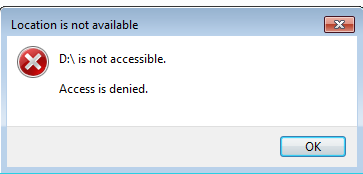
1) I try to build push button controlled LED model using Simulink. code has been generated but there is an error which is shown below. it is showing access denied error.
Generating S-record...
"C:\Users\puneae1\AppData\Roaming\MathWorks\MATLAB Add-Ons\Toolboxes\NXP_MBDToolbox_S32K1xx(3)\tools\gcc-6.3-arm32-eabi/bin/arm-none-eabi-objcopy" -O srec gpio.elf gpio.mot
Created S-record: gpio.mot
Building target all
*** Created executable: gpio.mot
### Successful completion of build procedure for model: gpio
: >> C:\Users\puneae1\AppData\Roaming\MathWorks\MATLAB Add-Ons\Toolboxes\NXP_MBDToolbox_S32K1xx(3)\gpio_mbd_rtw\gpio.mot
Can't download the file to the board.

 mariuslucianand
- Mark as New
- Bookmark
- Subscribe
- Mute
- Subscribe to RSS Feed
- Permalink
- Report Inappropriate Content
Hello [email protected],
Do you have enough user permissions in order to access the mounted disk? I think there is a problem related with your local user rights, so you should contact your IT administrator.
Until then, you can try flashing the board using the S32DS. You go to Flash from file, select the generated elf/mot and flash it on the board. Under Debugger tab you should see a recognised OpenSDA. This might work.
Hope this helps,
Marius
- Mark as New
- Bookmark
- Subscribe
- Mute
- Subscribe to RSS Feed
- Permalink
- Report Inappropriate Content
1)when I connect S32k144 EVB to my system it is showing as mass storage device.so my question is when i press build button in matlab then where exactly generated code is getting downloaded.do i require to take access for this external storage to flash code in EVB.
if i don't have access to this mass storage device then cant i flash code in to EVB
2) in QSG of EVB it has been said that kit comes with preloaded software toggling the RGBLED colours periodically between RED-GREEN-BLUE. but in my case only red LED is ON continuously, do i need to worry about this?
mariuslucianand
- Mark as New
- Bookmark
- Subscribe
- Mute
- Subscribe to RSS Feed
- Permalink
- Report Inappropriate Content
Hello [email protected],
1)
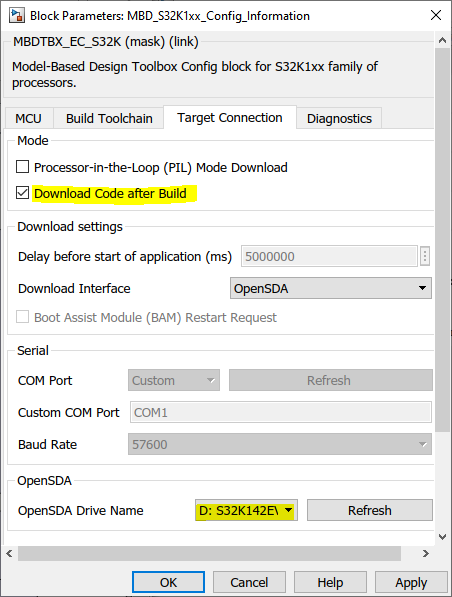
Any model for S32K needs to contain an S32K Config Block. in the Target Connection, if you have the 'Download Code after Build' checked, then after the code has been generated and successfully built, it copies the .mot file to the OpenSDA Drive Name selected. The screenshot shows which settings to be performed in order to get this functionality. You can always manually copy-paste the .mot file to the mounted disk and the OpenSDA will program the board via JTAG.
Also, what was I suggested in my previous message was to try flashing the generated elf or mot using the S32DS, to see that the generated code works fine and to isolate the problem to the mounted disk.
2) Unfortunately I don't have a brand new board to test that. This should not be a problem. You should be able to flash your own code to that board and to get the desired functionality.
Hope this helps,
Marius
- Mark as New
- Bookmark
- Subscribe
- Mute
- Subscribe to RSS Feed
- Permalink
- Report Inappropriate Content
HI Marius,
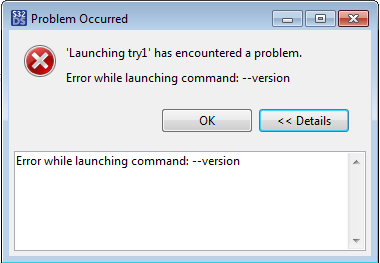
I try to flash generated try1.mot file from flash from file option in S32DS. I have encountered this error.
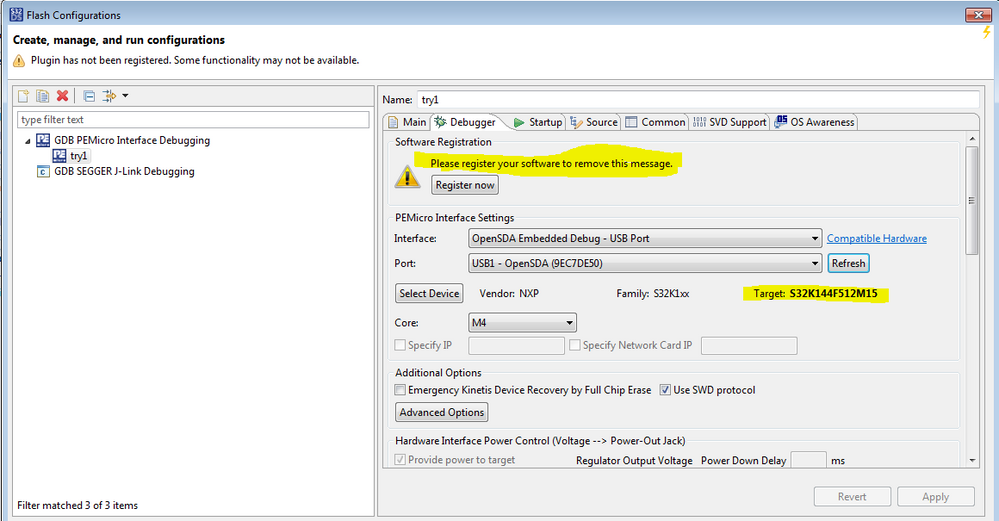
under debugger option I have done following setting
 mariuslucianand
- Mark as New
- Bookmark
- Subscribe
- Mute
- Subscribe to RSS Feed
- Permalink
- Report Inappropriate Content
Hello [email protected],
The register message is not an issue right now. So I assume you have created an empty project for S32K144. The settings from this tab seems to be right and it seems to have access to the OpenSDA.
From the error message you have, it looks like it is not able to access access gdb.
To see if all the project settings are performed right, please import a project from SDK and try debugging that. Please go in S32DS to File -> New -> Create S32DS Project from Example and try flash that.
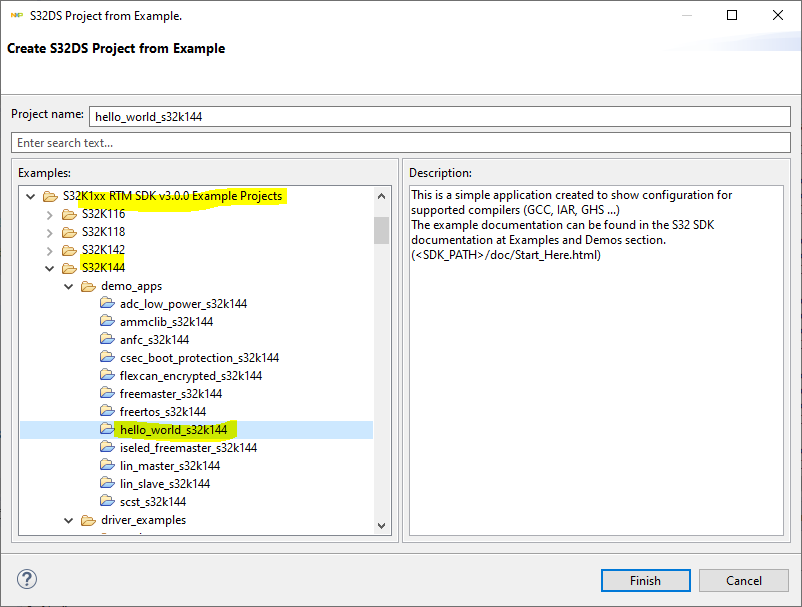
If this works, on the same project you can change the elf with the one generated from Matlab.
Hope this helps,
Marius
- Mark as New
- Bookmark
- Subscribe
- Mute
- Subscribe to RSS Feed
- Permalink
- Report Inappropriate Content
Hi Marius
its working!
Thank you.
