
- Forums
- Product Forums
- General Purpose MicrocontrollersGeneral Purpose Microcontrollers
- i.MX Forumsi.MX Forums
- QorIQ Processing PlatformsQorIQ Processing Platforms
- Identification and SecurityIdentification and Security
- Power ManagementPower Management
- Wireless ConnectivityWireless Connectivity
- RFID / NFCRFID / NFC
- Advanced AnalogAdvanced Analog
- Neural Processing UnitsNeural Processing Units
- MCX Microcontrollers
- S32G
- S32K
- S32V
- MPC5xxx
- Other NXP Products
- S12 / MagniV Microcontrollers
- Powertrain and Electrification Analog Drivers
- Sensors
- Vybrid Processors
- Digital Signal Controllers
- 8-bit Microcontrollers
- ColdFire/68K Microcontrollers and Processors
- PowerQUICC Processors
- OSBDM and TBDML
- S32M
- S32Z/E
-
- Solution Forums
- Software Forums
- MCUXpresso Software and ToolsMCUXpresso Software and Tools
- CodeWarriorCodeWarrior
- MQX Software SolutionsMQX Software Solutions
- Model-Based Design Toolbox (MBDT)Model-Based Design Toolbox (MBDT)
- FreeMASTER
- eIQ Machine Learning Software
- Embedded Software and Tools Clinic
- S32 SDK
- S32 Design Studio
- GUI Guider
- Zephyr Project
- Voice Technology
- Application Software Packs
- Secure Provisioning SDK (SPSDK)
- Processor Expert Software
- Generative AI & LLMs
-
- Topics
- Mobile Robotics - Drones and RoversMobile Robotics - Drones and Rovers
- NXP Training ContentNXP Training Content
- University ProgramsUniversity Programs
- Rapid IoT
- NXP Designs
- SafeAssure-Community
- OSS Security & Maintenance
- Using Our Community
-
- Cloud Lab Forums
-
- Knowledge Bases
- ARM Microcontrollers
- i.MX Processors
- Identification and Security
- Model-Based Design Toolbox (MBDT)
- QorIQ Processing Platforms
- S32 Automotive Processing Platform
- Wireless Connectivity
- CodeWarrior
- MCUXpresso Suite of Software and Tools
- MQX Software Solutions
- RFID / NFC
- Advanced Analog
- Neural Processing Units
-
- NXP Tech Blogs
- Home
- :
- Model-Based Design Toolbox (MBDT)
- :
- Model-Based Design Toolbox (MBDT)
- :
- Re: S32K3X4EVB-Q257 with MBDT?
S32K3X4EVB-Q257 with MBDT?
- Subscribe to RSS Feed
- Mark Topic as New
- Mark Topic as Read
- Float this Topic for Current User
- Bookmark
- Subscribe
- Mute
- Printer Friendly Page

- Mark as New
- Bookmark
- Subscribe
- Mute
- Subscribe to RSS Feed
- Permalink
- Report Inappropriate Content

 georgevictor
- Mark as New
- Bookmark
- Subscribe
- Mute
- Subscribe to RSS Feed
- Permalink
- Report Inappropriate Content
Hi, @SoulWorker,
Thank you for your interest in using our MBDT for S32K3 in your projects.
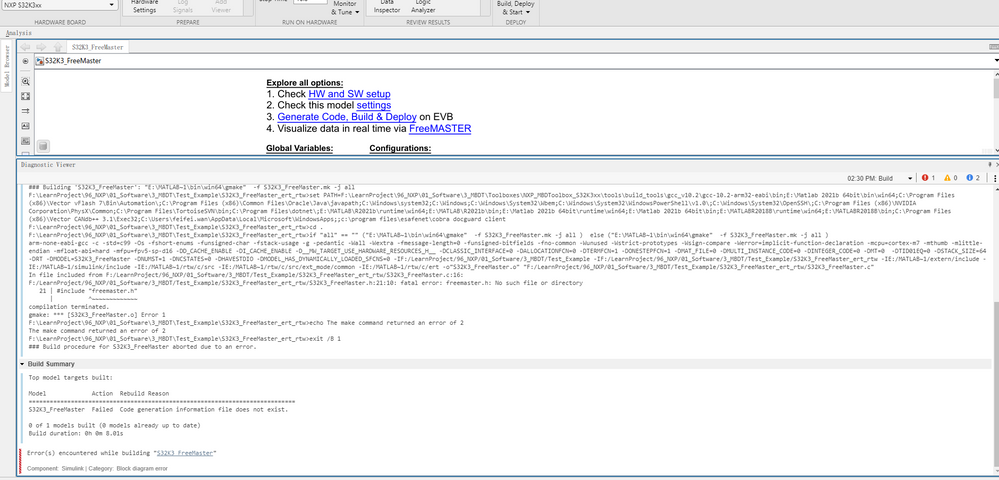
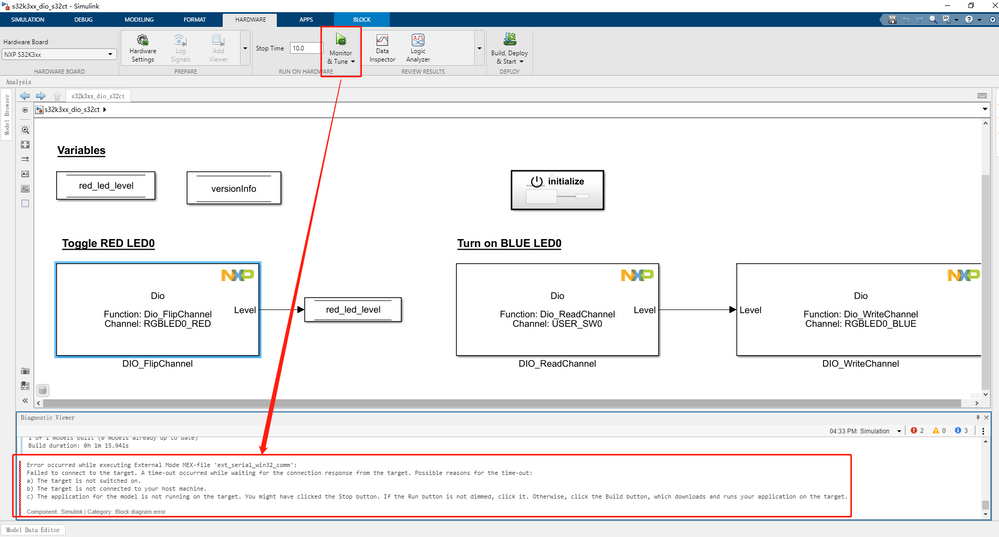
In the attached pictures I can see that you are encountering two different issues.
I will answer them in the following order:
- The External Mode Simulation
First of all, I would like to mention that there is a difference between the deployment of the Dio application on target and an External Mode Simulation, described as it follows:
- When building the s32k3xx_dio_s32ct model, code gets generated from the application, it is cross-compiled and linked into an executable file, which is automatically downloaded onto the board.
- In case of an External Mode Simulation, beside the behavior described at point a, which also happens here: the s32k3xx_dio_s32ct model is built and downloaded on target, there is one more step that is performed. The application running on target is fed with inputs from the host Simulink model, which are transmitted to the board via a serial communication. Also, outputs of the application running on target are sent back to the Simulink environment to be displayed and analyzed over the same serial communication.
Therefore, this serial communication needs to be configured, both hardware and software when running an External Mode Simulation.
Hardware:
You can use either:
- the same OpenSDA port of the S32K3x4-Q257 as for download because it has an integrated USB2Serial converter.
- the dedicated USB2Serial converter on the EVB. I would like to add here that in the pre-configured project for the S32K344-Q257 processor that we are providing, the Uart component has two channels configured (UartChannel_0 and UartChannel_1). UartChannel_0 configures the LPUART6 instance on the board and UartChannel_1 corresponds to LPUART13.
LPUART6 is routed to the EVB's OpenSDA chip. The MCU's LPUART13 instance is connected to ChannelB of the USB2Serial converter on the EVB.
When you connect the board to the PC via the USB2Serial port, DeviceManager will display two COM ports for both FTDI channels; typically, the higher COM port number corresponds to our LPUART13 instance (it depends on how Windows assigns COM port numbers).
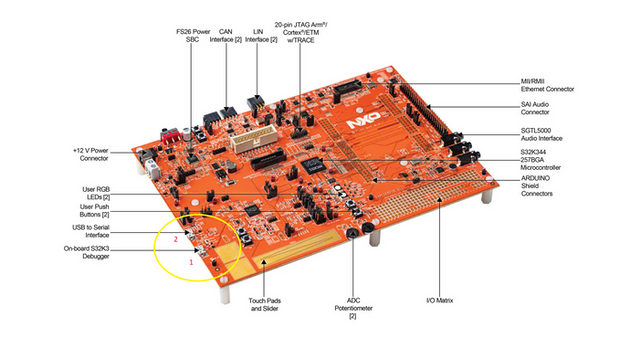
Software: After making this connection press the refresh button under Hardware Implementation --> Target Hardware Resources --> External mode group and select the COM Port as identified inside Device Manager under the Ports tab on your PC.
If you are using the dedicated USB2Serial converter of the EVB, you should select UartChannel_1 inside the model settings and start with the highest COM port number in the list. Otherwise, use UartChannel0 for the OpenSDA USB2Serial converter.
For more details about how to run an External Mode Simulation, use the s32k3xx_extmode_s32ct example delivered with our toolbox and check the s32k3xx_extmode_s32ct_example_readme.html file found next to the model.
- The S32K3_FreeMaster example build
My suggestion for now is to start with a fresh setup for this example and try to rebuild the model.
To do this you need to:
- Clear our default project files like <model_name>_Config folder and the <model_name>_Config.mex configuration file .
- The generated files like <model_name>_ert_rtw and slprj folders, the executables (<model_name>.elf, <model_name>.bin) and the Simulink Cache file (<model_name>.slxc).
- Clear also the <model_name>.sldd and <model_name>.mat files generated by our toolbox for the model.
Please let me know if this helped you.
Cheers,
Victor
georgevictor
- Mark as New
- Bookmark
- Subscribe
- Mute
- Subscribe to RSS Feed
- Permalink
- Report Inappropriate Content
Hi, @SoulWorker,
Thank you for your interest in using our MBDT for S32K3 in your projects.
In the attached pictures I can see that you are encountering two different issues.
I will answer them in the following order:
- The External Mode Simulation
First of all, I would like to mention that there is a difference between the deployment of the Dio application on target and an External Mode Simulation, described as it follows:
- When building the s32k3xx_dio_s32ct model, code gets generated from the application, it is cross-compiled and linked into an executable file, which is automatically downloaded onto the board.
- In case of an External Mode Simulation, beside the behavior described at point a, which also happens here: the s32k3xx_dio_s32ct model is built and downloaded on target, there is one more step that is performed. The application running on target is fed with inputs from the host Simulink model, which are transmitted to the board via a serial communication. Also, outputs of the application running on target are sent back to the Simulink environment to be displayed and analyzed over the same serial communication.
Therefore, this serial communication needs to be configured, both hardware and software when running an External Mode Simulation.
Hardware:
You can use either:
- the same OpenSDA port of the S32K3x4-Q257 as for download because it has an integrated USB2Serial converter.
- the dedicated USB2Serial converter on the EVB. I would like to add here that in the pre-configured project for the S32K344-Q257 processor that we are providing, the Uart component has two channels configured (UartChannel_0 and UartChannel_1). UartChannel_0 configures the LPUART6 instance on the board and UartChannel_1 corresponds to LPUART13.
LPUART6 is routed to the EVB's OpenSDA chip. The MCU's LPUART13 instance is connected to ChannelB of the USB2Serial converter on the EVB.
When you connect the board to the PC via the USB2Serial port, DeviceManager will display two COM ports for both FTDI channels; typically, the higher COM port number corresponds to our LPUART13 instance (it depends on how Windows assigns COM port numbers).
Software: After making this connection press the refresh button under Hardware Implementation --> Target Hardware Resources --> External mode group and select the COM Port as identified inside Device Manager under the Ports tab on your PC.
If you are using the dedicated USB2Serial converter of the EVB, you should select UartChannel_1 inside the model settings and start with the highest COM port number in the list. Otherwise, use UartChannel0 for the OpenSDA USB2Serial converter.
For more details about how to run an External Mode Simulation, use the s32k3xx_extmode_s32ct example delivered with our toolbox and check the s32k3xx_extmode_s32ct_example_readme.html file found next to the model.
- The S32K3_FreeMaster example build
My suggestion for now is to start with a fresh setup for this example and try to rebuild the model.
To do this you need to:
- Clear our default project files like <model_name>_Config folder and the <model_name>_Config.mex configuration file .
- The generated files like <model_name>_ert_rtw and slprj folders, the executables (<model_name>.elf, <model_name>.bin) and the Simulink Cache file (<model_name>.slxc).
- Clear also the <model_name>.sldd and <model_name>.mat files generated by our toolbox for the model.
Please let me know if this helped you.
Cheers,
Victor
- Mark as New
- Bookmark
- Subscribe
- Mute
- Subscribe to RSS Feed
- Permalink
- Report Inappropriate Content
