
- Forums
- Product Forums
- General Purpose MicrocontrollersGeneral Purpose Microcontrollers
- i.MX Forumsi.MX Forums
- QorIQ Processing PlatformsQorIQ Processing Platforms
- Identification and SecurityIdentification and Security
- Power ManagementPower Management
- Wireless ConnectivityWireless Connectivity
- RFID / NFCRFID / NFC
- Advanced AnalogAdvanced Analog
- Neural Processing UnitsNeural Processing Units
- MCX Microcontrollers
- S32G
- S32K
- S32V
- MPC5xxx
- Other NXP Products
- S12 / MagniV Microcontrollers
- Powertrain and Electrification Analog Drivers
- Sensors
- Vybrid Processors
- Digital Signal Controllers
- 8-bit Microcontrollers
- ColdFire/68K Microcontrollers and Processors
- PowerQUICC Processors
- OSBDM and TBDML
- S32M
- S32Z/E
-
- Solution Forums
- Software Forums
- MCUXpresso Software and ToolsMCUXpresso Software and Tools
- CodeWarriorCodeWarrior
- MQX Software SolutionsMQX Software Solutions
- Model-Based Design Toolbox (MBDT)Model-Based Design Toolbox (MBDT)
- FreeMASTER
- eIQ Machine Learning Software
- Embedded Software and Tools Clinic
- S32 SDK
- S32 Design Studio
- GUI Guider
- Zephyr Project
- Voice Technology
- Application Software Packs
- Secure Provisioning SDK (SPSDK)
- Processor Expert Software
- Generative AI & LLMs
-
- Topics
- Mobile Robotics - Drones and RoversMobile Robotics - Drones and Rovers
- NXP Training ContentNXP Training Content
- University ProgramsUniversity Programs
- Rapid IoT
- NXP Designs
- SafeAssure-Community
- OSS Security & Maintenance
- Using Our Community
-
- Cloud Lab Forums
-
- Knowledge Bases
- ARM Microcontrollers
- i.MX Processors
- Identification and Security
- Model-Based Design Toolbox (MBDT)
- QorIQ Processing Platforms
- S32 Automotive Processing Platform
- Wireless Connectivity
- CodeWarrior
- MCUXpresso Suite of Software and Tools
- MQX Software Solutions
- RFID / NFC
- Advanced Analog
- Neural Processing Units
-
- NXP Tech Blogs
- Home
- :
- モデルベース・デザイン・ツールボックス(MBDT)
- :
- モデルベース・デザイン・ツールボックス(MBDT)
- :
- How to change default linker script
How to change default linker script
- RSS フィードを購読する
- トピックを新着としてマーク
- トピックを既読としてマーク
- このトピックを現在のユーザーにフロートします
- ブックマーク
- 購読
- ミュート
- 印刷用ページ
How to change default linker script

- 新着としてマーク
- ブックマーク
- 購読
- ミュート
- RSS フィードを購読する
- ハイライト
- 印刷
- 不適切なコンテンツを報告
Hi,
I'm using S32K1xx v4.1.0 toolbox. In the main Config block of the model after unchecking the 'Default Target Memory Definitions' I can see only 2 options to choose from:'S32K148_192_flash.ld' and 'S32K148_192_flash_bam.ld'. It does not matter what target MCU is selected.
I've looked through installation catalog of MBD Toolbox - and there are multiple directories with linker script files. But I couldn't find one with only these two (visible in 'Config' block) linker scripts.
How can I tell the MBD Toolbox to link using my custom linker script ?
Thanks
Maciek
- 新着としてマーク
- ブックマーク
- 購読
- ミュート
- RSS フィードを購読する
- ハイライト
- 印刷
- 不適切なコンテンツを報告
Hi again mariuslucianandrei,
after replacing the provided model in "...\Add-Ons\Toolboxes\NXP_MBDToolbox_S32K1xx\mbdtbx_s32k" there is no change in behavior.
For example below is what I see after setting MCU to S32K116 (after saving/reopening model, selecting MCU again, changing it etc.). As You see other fields are re-populated correctly - only linker files are broken:
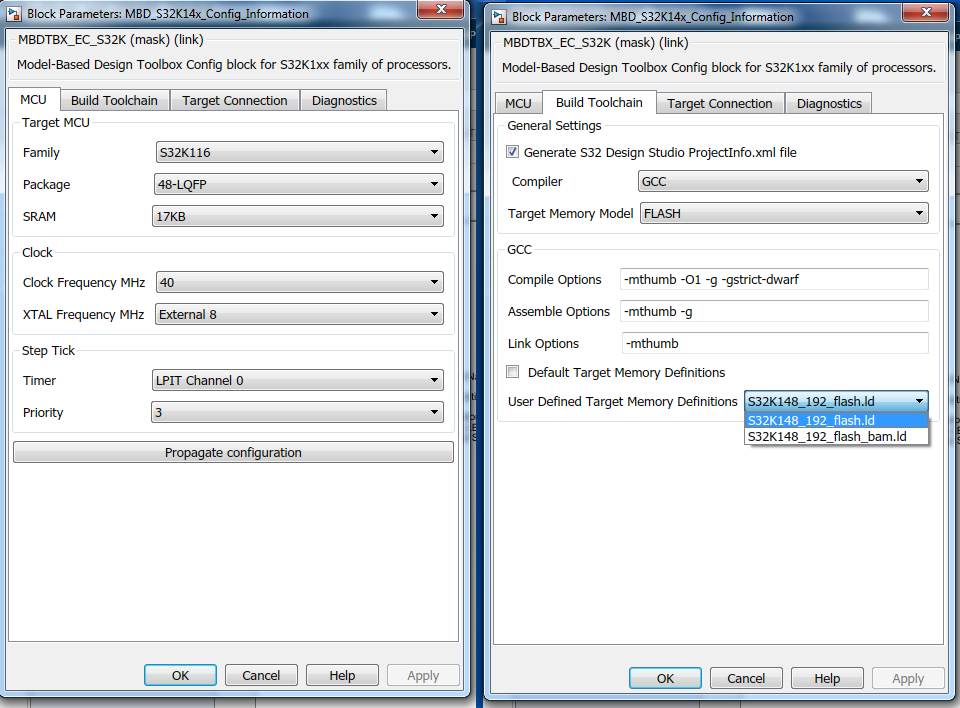
I can still export the project to S32DS and change the linker to whatever I like - but it's a time consuming process and for quick prototyping the best solution is to change the linker script in Config block as intended in the Toolbox.
Thanks
Maciek

 mariuslucianand
- 新着としてマーク
- ブックマーク
- 購読
- ミュート
- RSS フィードを購読する
- ハイライト
- 印刷
- 不適切なコンテンツを報告
Hello Maciek,
Sorry for my delayed response. We were pretty busy with the MPC release.
I have investigated more the issue you are encounter and this might be related to a callback.
Even if I can not reproduce the behavior and on my toolbox version the things seem to work fine, please once again, replace the following scripts and reply me if this solves this issue or not :smileygrin:.
Please replace the following scripts under S32K\src\mbdtbx_s32k\mscripts\config path
Hope this heps,
Marius
- 新着としてマーク
- ブックマーク
- 購読
- ミュート
- RSS フィードを購読する
- ハイライト
- 印刷
- 不適切なコンテンツを報告
after our previous failed attempt - I've returned to the original files - so now I've replaced/inserted files in the original installation. Two files were updated ('..._config_target_cbk' and '..._config_lcf_cbk'). The third file '..._config_populate_linker_files' was inserted in the same directory (I was not able to find such a file in the original installation). There is no change in behavior. I still can't see other linker files.
Please confirm that my procedure was ok. (for example I didn't use Your earlier updated '...ec_toolbox.mdl' file).
At the moment this problem is not very urgent for me. We've modified the original S32K144 linker file from the toolbox and left its original name. This way our modified linker file is taken into the build.
Much more urgent is the problem with failed download from the Simulink to the partitioned S32K144 (which I described in another forum post). We use EEPROM (with custom block library) and now after some minor update to the project, in order to check it on the EVB - I have to export it to the S32DS, set configurations by hand and test. If I have to do such task many times a day - it's very annoying. If You can - please look at this problem first !!!
Waiting for Your reply
Maciek
mariuslucianand
- 新着としてマーク
- ブックマーク
- 購読
- ミュート
- RSS フィードを購読する
- ハイライト
- 印刷
- 不適切なコンテンツを報告
Hello Maciek,
What's the name of your modified linker file? I am trying to understand why the toolbox does not display it.
Marius
- 新着としてマーク
- ブックマーク
- 購読
- ミュート
- RSS フィードを購読する
- ハイライト
- 印刷
- 不適切なコンテンツを報告
I've saved (backup) the oryginal 'S32K144_64_flash.ld' file from:
'...\MATLAB\Add-Ons\Toolboxes\NXP_MBDToolbox_S32K1xx\mbdtbx_s32k14x\src\linker\gcc' folder.
Then I've modified the left 'S32K144_64_flash.ld' (assigning sections to FlexRAM). This way now the default linker file (which I can't change in the model config block) used by the toolbox (with it's default name unchanged) has all the modifications I need.
It's all happening in Matlab 2019b...
Maciek
mariuslucianand
- 新着としてマーク
- ブックマーク
- 購読
- ミュート
- RSS フィードを購読する
- ハイライト
- 印刷
- 不適切なコンテンツを報告
Hello Maciek,
Indeed the desired linker must be added in the S32K\src\mbdtbx_s32k14x\src\linker\gcc or another compiler if you need, respecting the following path [S32K1xx]_[flash size]_[flash/ram]_[desired name].ld
Indeed, first I had the same issue when only the S32K148 was displaying, but closing and reopening the model and by reselecting the Controller from the MCU tab the rights Memory Definitions were selected. Unfortunately I couldn't reproduce it again. I assume this happens because of a callback or that ec_toolbox only contains those S32K148 linker files.
Also, the linkers used in our toolbox are the ones provided from the S32SDK. We only change a bit those ending with _bam, because of the requirements from the RAppId Bootloader.
Just to be sure. This might solve the question from Model on EVB doesn't start after re-partitioning for EEPROM ? Because I was thinking that the linker could be the problem but I had to check it.
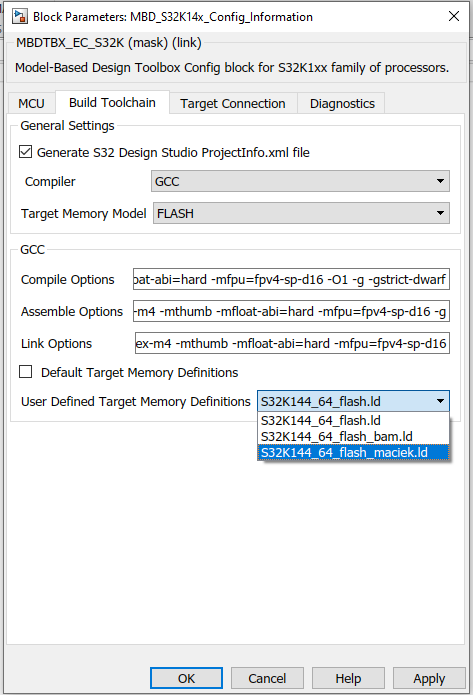
Hope this helps,
Marius
- 新着としてマーク
- ブックマーク
- 購読
- ミュート
- RSS フィードを購読する
- ハイライト
- 印刷
- 不適切なコンテンツを報告
I'm not able to see other linker scripts. I've experimented with different scenarios like: saving model with unchecked option 'Default Target Mem...', closing and reopening again, switching between MCUs, selecting the same MCU again etc.
Nothing works - I can see only the two S32K148 linker scripts... In my Toolbox installation appropriate directories are filled with all linker scripts available (nothing is missing in the installation). For example in '...\MATLAB\Add-Ons\Toolboxes\NXP_MBDToolbox_S32K1xx\mbdtbx_s32k14x\src\linker\gcc' folder I see 24 different linker scripts for all S32K14x parts.
It seems like some callback in the GUI that re-populates the list of available linkers is missing or doesn't work like intended.
In case of my other question: Model on EVB doesn't start after re-partitioning for EEPROM - I don't know if it has anything to do with the linker - because I didn't change the linker script at all. Default linker scripts (used by MBD Toolbox) don't allocate any sections to FlexNVM or FlexRAM.
Waiting for Your answer
Maciek
mariuslucianand
- 新着としてマーク
- ブックマーク
- 購読
- ミュート
- RSS フィードを購読する
- ハイライト
- 印刷
- 不適切なコンテンツを報告
Hello Maciek,
Let's update some files related with the linker files, under S32K\src\mbdtbx_s32k\mscripts\utils.
Indeed the linker file not specify any memory location for the FlexNVM or FlexRAM. is there any differences between the linker that we provide with the one from the S32DS project that you are using? Can you send me that linker file?
Hope this helps,
Marius
- 新着としてマーク
- ブックマーク
- 購読
- ミュート
- RSS フィードを購読する
- ハイライト
- 印刷
- 不適切なコンテンツを報告
I've found 'mbd_s32k_find_custom...' in the following folder:
"...\Add-Ons\Toolboxes\NXP_MBDToolbox_S32K1xx\mbdtbx_s32k\mscripts\utils" and exchanged it with the provided new file.
I've found the other two files in the following folder:
"...\Add-Ons\Toolboxes\NXP_MBDToolbox_S32K1xx\mbdtbx_s32k\mscripts\config" and exchanged them with the provided new files.
(Please note that my locations are a little different than Yours...)
And I can't see any difference. I've restarted Matlab, unchecked 'Default Target Mem...', reopened model, switch processors under 'MCU' tab etc. I still see only the 2 s32k148 linker scripts.
As to the linker file used with repartitioned device - it's the same linker script that is copied from Toolbox directory during 'Build' stage of the model to the model '_rtw' directory. After importing to S32DS this linker script is by default used in
C/C++ Build->Settings->Tool Settings->Standard S32DS C Linker ->General->Script files. I was building in Simulink and in S32DS with standard Flash linker script.
I will put this part of the answer in the oryginal thread: https://community.nxp.com/thread/527793
Waiting for response
Maciek
mariuslucianand
- 新着としてマーク
- ブックマーク
- 購読
- ミュート
- RSS フィードを購読する
- ハイライト
- 印刷
- 不適切なコンテンツを報告
Hello Maciek,
Since I can't really reproduce this error, I will provide the ec_toolbox that has to be replaced here S32K\src\mbdtbx_s32k. Maybe the call of the callbacks is not right done.
If not I will change the script in order to display all the linker files in that folder.
I am sorry, the location you mentioned are right.
Hope this helps,
Marius
- 新着としてマーク
- ブックマーク
- 購読
- ミュート
- RSS フィードを購読する
- ハイライト
- 印刷
- 不適切なコンテンツを報告
Hi, https://community.nxp.com/t5/user/viewprofilepage/user-id/72088
we are working with S32K toolbox v4.2.0 for about 2 weeks now. I can confirm that exporting projects with referenced models to S32 Design Studio works now! (It didn't work in earlier version which was a big problem).
Unfortunately we still see the same problem with the custom linker files as before. This problem was NOT present immediately after the installation ! As I remember we have checked this on the 1st or 2nd day of using new version - and it was working ! We have been able to switch linker files as intended.
Yesterday I've included new custom linker file into the appriopriate catalog and have tried to change the linker file in config. block - results the same as I've described at the start of this post. I always see only two S32K148 linker files (the two for default processor in config. block) - nothing else - independent of the choosen processor. And from this experience it looks like this feature is blocked at some point during using the tools. (we use the toolbox constantly).
Any new info about this ?
mariuslucianand
- 新着としてマーク
- ブックマーク
- 購読
- ミュート
- RSS フィードを購読する
- ハイライト
- 印刷
- 不適切なコンテンツを報告
Hello @Maciek ,
Thank you for reporting this behavior!
Indeed, this is very strange mainly because we do not block any feature in our toolbox after some time. Let me investigate this and I will reply here soon.
Anyway, I will investigate this on R2019b (Is this the version of Matlab that you are using, right?) and reply here.
Regards,
Marius
- 新着としてマーク
- ブックマーク
- 購読
- ミュート
- RSS フィードを購読する
- ハイライト
- 印刷
- 不適切なコンテンツを報告
@https://community.nxp.com/t5/user/viewprofilepage/user-id/72088
We have installed (and are using) the toolbox v4.2.0 in Matlab R2020a.
Maciek
