
- Forums
- Product Forums
- General Purpose MicrocontrollersGeneral Purpose Microcontrollers
- i.MX Forumsi.MX Forums
- QorIQ Processing PlatformsQorIQ Processing Platforms
- Identification and SecurityIdentification and Security
- Power ManagementPower Management
- Wireless ConnectivityWireless Connectivity
- RFID / NFCRFID / NFC
- Advanced AnalogAdvanced Analog
- Neural Processing UnitsNeural Processing Units
- MCX Microcontrollers
- S32G
- S32K
- S32V
- MPC5xxx
- Other NXP Products
- S12 / MagniV Microcontrollers
- Powertrain and Electrification Analog Drivers
- Sensors
- Vybrid Processors
- Digital Signal Controllers
- 8-bit Microcontrollers
- ColdFire/68K Microcontrollers and Processors
- PowerQUICC Processors
- OSBDM and TBDML
- S32M
- S32Z/E
-
- Solution Forums
- Software Forums
- MCUXpresso Software and ToolsMCUXpresso Software and Tools
- CodeWarriorCodeWarrior
- MQX Software SolutionsMQX Software Solutions
- Model-Based Design Toolbox (MBDT)Model-Based Design Toolbox (MBDT)
- FreeMASTER
- eIQ Machine Learning Software
- Embedded Software and Tools Clinic
- S32 SDK
- S32 Design Studio
- GUI Guider
- Zephyr Project
- Voice Technology
- Application Software Packs
- Secure Provisioning SDK (SPSDK)
- Processor Expert Software
- Generative AI & LLMs
-
- Topics
- Mobile Robotics - Drones and RoversMobile Robotics - Drones and Rovers
- NXP Training ContentNXP Training Content
- University ProgramsUniversity Programs
- Rapid IoT
- NXP Designs
- SafeAssure-Community
- OSS Security & Maintenance
- Using Our Community
-
- Cloud Lab Forums
-
- Knowledge Bases
- ARM Microcontrollers
- i.MX Processors
- Identification and Security
- Model-Based Design Toolbox (MBDT)
- QorIQ Processing Platforms
- S32 Automotive Processing Platform
- Wireless Connectivity
- CodeWarrior
- MCUXpresso Suite of Software and Tools
- MQX Software Solutions
- RFID / NFC
- Advanced Analog
- Neural Processing Units
-
- NXP Tech Blogs
- Home
- :
- Model-Based Design Toolbox (MBDT)
- :
- Model-Based Design Toolbox (MBDT)
- :
- Re: Field-Oriented Control of PMSM Using NXP™ S32K144 Kit
Field-Oriented Control of PMSM Using NXP™ S32K144 Kit
- Subscribe to RSS Feed
- Mark Topic as New
- Mark Topic as Read
- Float this Topic for Current User
- Bookmark
- Subscribe
- Mute
- Printer Friendly Page
Field-Oriented Control of PMSM Using NXP™ S32K144 Kit

- Mark as New
- Bookmark
- Subscribe
- Mute
- Subscribe to RSS Feed
- Permalink
- Report Inappropriate Content
Hi,
I'm testing the motor control demo from this example in MATLAB 2022a.
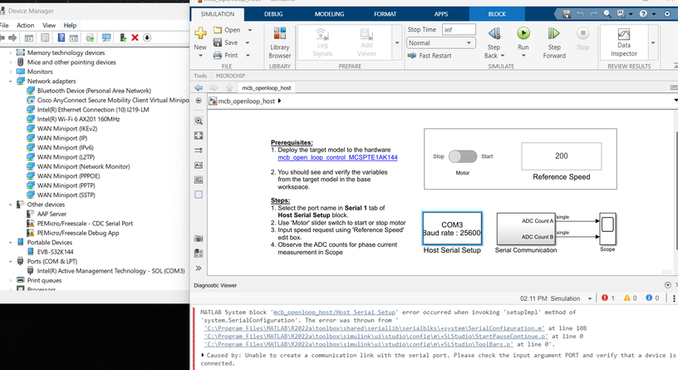
After successfully build a target model of motor control algorithms, I click on Run on the host model for real-time communication.
Then I see below error message regarding unable to create a communication link with the serial port. When I plug in to NXP board, I only see the "EVB-S32K144" pops up from the device manage but no any other COM port shows up. Can you help with the issue? Thank you.
Best Regards,
Shang-Chuan
 stefancinipeanu
- Mark as New
- Bookmark
- Subscribe
- Mute
- Subscribe to RSS Feed
- Permalink
- Report Inappropriate Content
Hello, @shangchuan
It looks like you have an issue with the PEMicro Windows driver and the S32K144-EVB OpenSDA cannot install properly.
You should have something like this on the Device Manager window:

What I suggest firstly to do is trying to install the PEMicro Driver for Windows manually, by proceeding with the following steps:
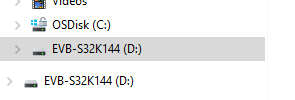
1. Open EVB-S32K144 partition and double-click on the SDA-INFO.HTM file.
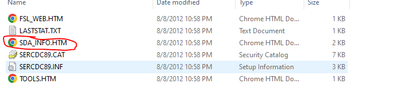
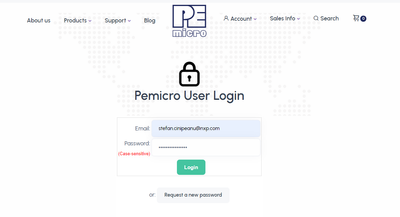
2. A PEMicro web page will open. Click on the following link and try to install the PEMicro Windows USB Drivers.
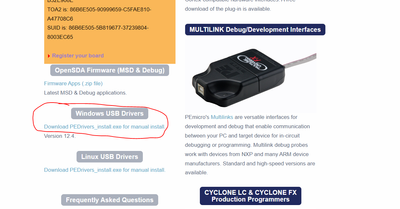
3. You have to create an account on PEMicro in order to download the drivers.
After the installation is successful, unplug the EVB and plug it again. The OS should assign a COM Port for your EVB automatically.
Let me know if this works!
Best regards,
Stefan.
