
- Forums
- Product Forums
- General Purpose MicrocontrollersGeneral Purpose Microcontrollers
- i.MX Forumsi.MX Forums
- QorIQ Processing PlatformsQorIQ Processing Platforms
- Identification and SecurityIdentification and Security
- Power ManagementPower Management
- Wireless ConnectivityWireless Connectivity
- RFID / NFCRFID / NFC
- Advanced AnalogAdvanced Analog
- Neural Processing UnitsNeural Processing Units
- MCX Microcontrollers
- S32G
- S32K
- S32V
- MPC5xxx
- Other NXP Products
- S12 / MagniV Microcontrollers
- Powertrain and Electrification Analog Drivers
- Sensors
- Vybrid Processors
- Digital Signal Controllers
- 8-bit Microcontrollers
- ColdFire/68K Microcontrollers and Processors
- PowerQUICC Processors
- OSBDM and TBDML
- S32M
- S32Z/E
-
- Solution Forums
- Software Forums
- MCUXpresso Software and ToolsMCUXpresso Software and Tools
- CodeWarriorCodeWarrior
- MQX Software SolutionsMQX Software Solutions
- Model-Based Design Toolbox (MBDT)Model-Based Design Toolbox (MBDT)
- FreeMASTER
- eIQ Machine Learning Software
- Embedded Software and Tools Clinic
- S32 SDK
- S32 Design Studio
- GUI Guider
- Zephyr Project
- Voice Technology
- Application Software Packs
- Secure Provisioning SDK (SPSDK)
- Processor Expert Software
- Generative AI & LLMs
-
- Topics
- Mobile Robotics - Drones and RoversMobile Robotics - Drones and Rovers
- NXP Training ContentNXP Training Content
- University ProgramsUniversity Programs
- Rapid IoT
- NXP Designs
- SafeAssure-Community
- OSS Security & Maintenance
- Using Our Community
-
- Cloud Lab Forums
-
- Knowledge Bases
- ARM Microcontrollers
- i.MX Processors
- Identification and Security
- Model-Based Design Toolbox (MBDT)
- QorIQ Processing Platforms
- S32 Automotive Processing Platform
- Wireless Connectivity
- CodeWarrior
- MCUXpresso Suite of Software and Tools
- MQX Software Solutions
- RFID / NFC
- Advanced Analog
- Neural Processing Units
-
- NXP Tech Blogs
- Home
- :
- 基于模型的设计工具箱(MBDT)
- :
- 基于模型的设计工具箱(MBDT)
- :
- Re: Export MBDT generated code from Matlab to S32DS
Export MBDT generated code from Matlab to S32DS

I have generated code using MBDT with Matlab v2021b. However, after generating code using embedded coder and tried to import the projectinfo.xml file to s32DS. But getting below error.

I'm using S32DS V3.5. Should I try changing the S32DS version?
Someone, please help me with this.
Regards
Rohit
已解决! 转到解答。

 dragostoma
Hi, @rohit1749,
Following the build process of your Simulink model and the subsequent code generation, the next step is to import the modelName_Config folder into S32 Design Studio (S32DS).
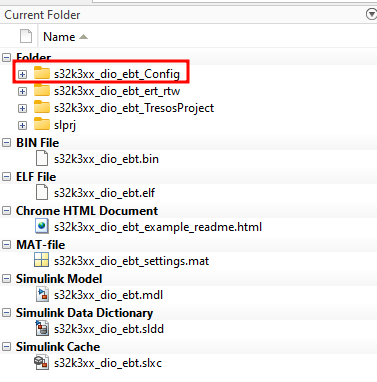
You should pres File -> Import
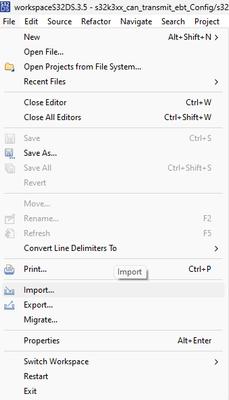
General -> Existing Project into Workspace -> Browse -> select the modelName_Config folder

Then you should be able to build and debug the application in S32DS.
Let us know about your progress.
Best regards,
Dragos
dragostoma
Hi, @rohit1749,
Following the build process of your Simulink model and the subsequent code generation, the next step is to import the modelName_Config folder into S32 Design Studio (S32DS).
You should pres File -> Import
General -> Existing Project into Workspace -> Browse -> select the modelName_Config folder
Then you should be able to build and debug the application in S32DS.
Let us know about your progress.
Best regards,
Dragos
