
- Forums
- Product Forums
- General Purpose MicrocontrollersGeneral Purpose Microcontrollers
- i.MX Forumsi.MX Forums
- QorIQ Processing PlatformsQorIQ Processing Platforms
- Identification and SecurityIdentification and Security
- Power ManagementPower Management
- Wireless ConnectivityWireless Connectivity
- RFID / NFCRFID / NFC
- Advanced AnalogAdvanced Analog
- Neural Processing UnitsNeural Processing Units
- MCX Microcontrollers
- S32G
- S32K
- S32V
- MPC5xxx
- Other NXP Products
- S12 / MagniV Microcontrollers
- Powertrain and Electrification Analog Drivers
- Sensors
- Vybrid Processors
- Digital Signal Controllers
- 8-bit Microcontrollers
- ColdFire/68K Microcontrollers and Processors
- PowerQUICC Processors
- OSBDM and TBDML
- S32M
- S32Z/E
-
- Solution Forums
- Software Forums
- MCUXpresso Software and ToolsMCUXpresso Software and Tools
- CodeWarriorCodeWarrior
- MQX Software SolutionsMQX Software Solutions
- Model-Based Design Toolbox (MBDT)Model-Based Design Toolbox (MBDT)
- FreeMASTER
- eIQ Machine Learning Software
- Embedded Software and Tools Clinic
- S32 SDK
- S32 Design Studio
- GUI Guider
- Zephyr Project
- Voice Technology
- Application Software Packs
- Secure Provisioning SDK (SPSDK)
- Processor Expert Software
- Generative AI & LLMs
-
- Topics
- Mobile Robotics - Drones and RoversMobile Robotics - Drones and Rovers
- NXP Training ContentNXP Training Content
- University ProgramsUniversity Programs
- Rapid IoT
- NXP Designs
- SafeAssure-Community
- OSS Security & Maintenance
- Using Our Community
-
- Cloud Lab Forums
-
- Knowledge Bases
- ARM Microcontrollers
- i.MX Processors
- Identification and Security
- Model-Based Design Toolbox (MBDT)
- QorIQ Processing Platforms
- S32 Automotive Processing Platform
- Wireless Connectivity
- CodeWarrior
- MCUXpresso Suite of Software and Tools
- MQX Software Solutions
- RFID / NFC
- Advanced Analog
- Neural Processing Units
-
- NXP Tech Blogs

Hello,
I have used the RTCS examples as base for working, and tried to get the httpsrv and the nshell working, but without success for both projects :
- I am using the tower twrk64f120m + TWR_SER with the jumpers correctly set
- I can ping from a computer to the board but get between 25 and 100% of packets lost
- I cannot ping from the board (request timed out)
- Sometimes (1 over 10 times), I can get from firefox the web page for the httpsrv example.
Since I have received this board from a partner, I have never suceeded for the ethernet part with it. So I suspect a hardware issue. Does anyone have heard about a similar issue where the ethernet connection seems to be very unstable ?
Does anyone know how I could test the hardware ?
By the way, I am using the KSDK 1.2.0
Regards
已解决! 转到解答。
 danielchen
Hi
I suggest you check the jump settings in your board.
When the K64 Etherent MAC is operating in RMII mode, synchronization of the MCU clock and the 50 Mhz RMII transfer clock is important. The MCU input clock must be kept in phase with the 50 Mhz clock supplied to the external PHY. Therefore, the TWR-k64F120m provides the option to clock the MCU from an external clock from CLKIN0 pin on the Primary Connector.
Please check the Ethernet operation jumper settings
TWR-K64F120M: J32--on, J33-off
TWR-SER J2: 3-4 J3 2-3 J11 9-10
Have a nice day,
Daniel
danielchen
Hi
I suggest you check the jump settings in your board.
When the K64 Etherent MAC is operating in RMII mode, synchronization of the MCU clock and the 50 Mhz RMII transfer clock is important. The MCU input clock must be kept in phase with the 50 Mhz clock supplied to the external PHY. Therefore, the TWR-k64F120m provides the option to clock the MCU from an external clock from CLKIN0 pin on the Primary Connector.
Please check the Ethernet operation jumper settings
TWR-K64F120M: J32--on, J33-off
TWR-SER J2: 3-4 J3 2-3 J11 9-10
Have a nice day,
Daniel
Hi Daniel,
I hadn't set correctly the J32/J33 jumpers, so your analyse seems to be correct, the clock was not in phase, and was creating some instability in the connection. Now I have a ping with 0% of packet loss, and the web server is fully responding.
By the way, there must be an error in your answer, it's the J12 and not J11 that must be set to 9-10. I had already this jumper set anyway.
Thanks for your help !
Samuel
And here is a trace from wireshark.
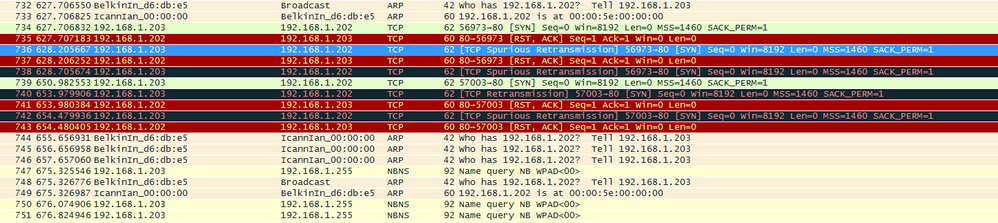
We can see that 192.168.1.203 (my computer) tries to connect (SYN) with the board (192.168.1.202) that answers but with a RST ACK...
And the ARP requests are not always answered, like what I was seeing with the ping test.
