
- Forums
- Product Forums
- General Purpose MicrocontrollersGeneral Purpose Microcontrollers
- i.MX Forumsi.MX Forums
- QorIQ Processing PlatformsQorIQ Processing Platforms
- Identification and SecurityIdentification and Security
- Power ManagementPower Management
- Wireless ConnectivityWireless Connectivity
- RFID / NFCRFID / NFC
- Advanced AnalogAdvanced Analog
- Neural Processing UnitsNeural Processing Units
- MCX Microcontrollers
- S32G
- S32K
- S32V
- MPC5xxx
- Other NXP Products
- S12 / MagniV Microcontrollers
- Powertrain and Electrification Analog Drivers
- Sensors
- Vybrid Processors
- Digital Signal Controllers
- 8-bit Microcontrollers
- ColdFire/68K Microcontrollers and Processors
- PowerQUICC Processors
- OSBDM and TBDML
- S32M
- S32Z/E
-
- Solution Forums
- Software Forums
- MCUXpresso Software and ToolsMCUXpresso Software and Tools
- CodeWarriorCodeWarrior
- MQX Software SolutionsMQX Software Solutions
- Model-Based Design Toolbox (MBDT)Model-Based Design Toolbox (MBDT)
- FreeMASTER
- eIQ Machine Learning Software
- Embedded Software and Tools Clinic
- S32 SDK
- S32 Design Studio
- GUI Guider
- Zephyr Project
- Voice Technology
- Application Software Packs
- Secure Provisioning SDK (SPSDK)
- Processor Expert Software
- Generative AI & LLMs
-
- Topics
- Mobile Robotics - Drones and RoversMobile Robotics - Drones and Rovers
- NXP Training ContentNXP Training Content
- University ProgramsUniversity Programs
- Rapid IoT
- NXP Designs
- SafeAssure-Community
- OSS Security & Maintenance
- Using Our Community
-
- Cloud Lab Forums
-
- Knowledge Bases
- ARM Microcontrollers
- i.MX Processors
- Identification and Security
- Model-Based Design Toolbox (MBDT)
- QorIQ Processing Platforms
- S32 Automotive Processing Platform
- Wireless Connectivity
- CodeWarrior
- MCUXpresso Suite of Software and Tools
- MQX Software Solutions
- RFID / NFC
- Advanced Analog
- Neural Processing Units
-
- NXP Tech Blogs
- Home
- :
- MQX Software Solutions
- :
- MQX Software Solutions
- :
- Re: MFS create not working.
MFS create not working.
- Subscribe to RSS Feed
- Mark Topic as New
- Mark Topic as Read
- Float this Topic for Current User
- Bookmark
- Subscribe
- Mute
- Printer Friendly Page

- Mark as New
- Bookmark
- Subscribe
- Mute
- Subscribe to RSS Feed
- Permalink
- Report Inappropriate Content
Hi,
I just installed MFS on an SD card following an example in the SDK. I am now experimenting with my new FS. I can mkdir, cd, dir, etc... However, I can not seem to create a new file.
I type 'create test.txt' and the shell just hangs. Am I doing something wrong? Or is there something I should check? Do I need to enable 'user mode' somehow?
When I debug, it seems to hang in the lwsem.c code. I am using a TWRK65F180M.
Thanks for any tips.
Solved! Go to Solution.

 isaacavila
- Mark as New
- Bookmark
- Subscribe
- Mute
- Subscribe to RSS Feed
- Permalink
- Report Inappropriate Content
Hello Erick!
It is rare that you could download the project without compiling MQX, SHELL and MFS libraries that are requiered for that example. But anyway, here are the steps to run this example:
- Open KDS and select import, then select Existing Projects into Workspace located under General folder and look for KSDK library for MQX in C:\Freescale\KSDK_1.3.0\lib\ksdk_mqx_lib\kds and import the project for K65F18

- Compile ksdk_mqx_lib_K65F18 project.
- Select import in next window, go to MQX folder and select Import Working Sets, then press Next >:

- Locate MQX working set for TWR-K65F180M in C:\Freescale\KSDK_1.3.0\rtos\mqx\build\kds\workspace_twrk65f180m and select build_libs.wsd:

- Compile these libraries and no error should be shown.
- Import the MFS project located at: C:\Freescale\KSDK_1.3.0\middleware\filesystem\mfs\build\kds\mfs_twrk65f180m and compile it.
- In total, you should have imported 5 libraries (ksdk_mqx_lib_K65F18, mfs_twrk65f180m, mqx_stdlib_twrk65f180m, mqx_twrk65f180m, nshell_twrk65f180m).
- Now, import the sdcard example located at: C:\Freescale\KSDK_1.3.0\middleware\filesystem\mfs\examples\sdcard\build\kds\sdcard_twrk65f180m. Compile this project and download into your TWR board.
- Run the project and open a terminal at 115200bps and test the shell commands.
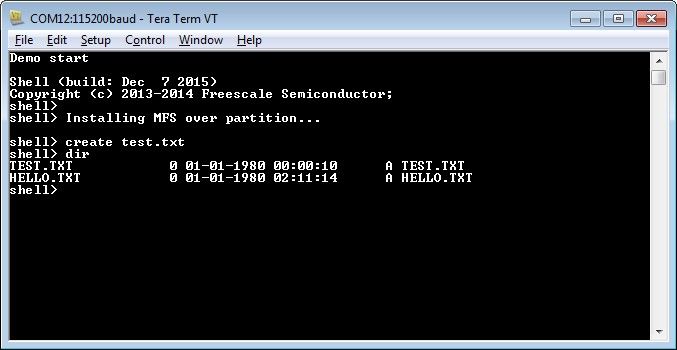
I hope this can help you. If there is other doubt please do not hesitate on contact me.
Best Regards,
Isaac
----------------------------------------------------------------------------------------------------------------------------------------
Note: If this post answers your question, please click the Correct Answer button. Thank you!
----------------------------------------------------------------------------------------------------------------------------------------
isaacavila
- Mark as New
- Bookmark
- Subscribe
- Mute
- Subscribe to RSS Feed
- Permalink
- Report Inappropriate Content
Hello Eric,
are using MFS or FATFS? Also, I have tested sdcard_twrk65f180m example located at: <KSDK_1_3_PATH>\middleware\filesystem\mfs\examples\sdcard and it worked well, this example uses MFS. Are you adding some modifications on this example?
Have a nice day!
Best Regards,
Isaac
- Mark as New
- Bookmark
- Subscribe
- Mute
- Subscribe to RSS Feed
- Permalink
- Report Inappropriate Content
Thank you for your response. After further investigation, I suspect that my problem is related to not having built the MFS library. Can you provide a little bit of information on how I can build the MFS.a library?
Thanks for your help.
isaacavila
- Mark as New
- Bookmark
- Subscribe
- Mute
- Subscribe to RSS Feed
- Permalink
- Report Inappropriate Content
Hello Erick!
It is rare that you could download the project without compiling MQX, SHELL and MFS libraries that are requiered for that example. But anyway, here are the steps to run this example:
- Open KDS and select import, then select Existing Projects into Workspace located under General folder and look for KSDK library for MQX in C:\Freescale\KSDK_1.3.0\lib\ksdk_mqx_lib\kds and import the project for K65F18
- Compile ksdk_mqx_lib_K65F18 project.
- Select import in next window, go to MQX folder and select Import Working Sets, then press Next >:
- Locate MQX working set for TWR-K65F180M in C:\Freescale\KSDK_1.3.0\rtos\mqx\build\kds\workspace_twrk65f180m and select build_libs.wsd:
- Compile these libraries and no error should be shown.
- Import the MFS project located at: C:\Freescale\KSDK_1.3.0\middleware\filesystem\mfs\build\kds\mfs_twrk65f180m and compile it.
- In total, you should have imported 5 libraries (ksdk_mqx_lib_K65F18, mfs_twrk65f180m, mqx_stdlib_twrk65f180m, mqx_twrk65f180m, nshell_twrk65f180m).
- Now, import the sdcard example located at: C:\Freescale\KSDK_1.3.0\middleware\filesystem\mfs\examples\sdcard\build\kds\sdcard_twrk65f180m. Compile this project and download into your TWR board.
- Run the project and open a terminal at 115200bps and test the shell commands.
I hope this can help you. If there is other doubt please do not hesitate on contact me.
Best Regards,
Isaac
----------------------------------------------------------------------------------------------------------------------------------------
Note: If this post answers your question, please click the Correct Answer button. Thank you!
----------------------------------------------------------------------------------------------------------------------------------------
