
- Forums
- Product Forums
- General Purpose MicrocontrollersGeneral Purpose Microcontrollers
- i.MX Forumsi.MX Forums
- QorIQ Processing PlatformsQorIQ Processing Platforms
- Identification and SecurityIdentification and Security
- Power ManagementPower Management
- Wireless ConnectivityWireless Connectivity
- RFID / NFCRFID / NFC
- Advanced AnalogAdvanced Analog
- MCX Microcontrollers
- S32G
- S32K
- S32V
- MPC5xxx
- Other NXP Products
- S12 / MagniV Microcontrollers
- Powertrain and Electrification Analog Drivers
- Sensors
- Vybrid Processors
- Digital Signal Controllers
- 8-bit Microcontrollers
- ColdFire/68K Microcontrollers and Processors
- PowerQUICC Processors
- OSBDM and TBDML
- S32M
- S32Z/E
-
- Solution Forums
- Software Forums
- MCUXpresso Software and ToolsMCUXpresso Software and Tools
- CodeWarriorCodeWarrior
- MQX Software SolutionsMQX Software Solutions
- Model-Based Design Toolbox (MBDT)Model-Based Design Toolbox (MBDT)
- FreeMASTER
- eIQ Machine Learning Software
- Embedded Software and Tools Clinic
- S32 SDK
- S32 Design Studio
- GUI Guider
- Zephyr Project
- Voice Technology
- Application Software Packs
- Secure Provisioning SDK (SPSDK)
- Processor Expert Software
- Generative AI & LLMs
-
- Topics
- Mobile Robotics - Drones and RoversMobile Robotics - Drones and Rovers
- NXP Training ContentNXP Training Content
- University ProgramsUniversity Programs
- Rapid IoT
- NXP Designs
- SafeAssure-Community
- OSS Security & Maintenance
- Using Our Community
-
- Cloud Lab Forums
-
- Knowledge Bases
- ARM Microcontrollers
- i.MX Processors
- Identification and Security
- Model-Based Design Toolbox (MBDT)
- QorIQ Processing Platforms
- S32 Automotive Processing Platform
- Wireless Connectivity
- CodeWarrior
- MCUXpresso Suite of Software and Tools
- MQX Software Solutions
- RFID / NFC
- Advanced Analog
-
- NXP Tech Blogs
- Home
- :
- MQX Software Solutions
- :
- MQX RTOS Training Knowledge Base
- :
- Now Available: MQX RTOS for Kinetis SDK v1.2
Now Available: MQX RTOS for Kinetis SDK v1.2
- Subscribe to RSS Feed
- Mark as New
- Mark as Read
- Bookmark
- Subscribe
- Printer Friendly Page
- Report Inappropriate Content
Now Available: MQX RTOS for Kinetis SDK v1.2
Now Available: MQX RTOS for Kinetis SDK v1.2
We are pleased to announce the release of MQX RTOS for Kinetis SDK v1.1.
Boards Supported
FRDM-KL46Z FRDM-K22F FRDM-K64F FRDM-KL25Z NEW FRDM-KL26Z NEW FRDM-KL27Z NEW FRDM-KL43Z NEW FRDM-KL46Z FRDM-KW24 NEW MRB-KW01 NEW TWR-K21D50M NEW | TWR-K21F120M NEW TWR-K22F120M TWR-K24F120M TWR-K60D100M TWR-K64F120M TWR-K65F180M NEW TWR-KL43Z48M NEW TWR-KV10Z32 NEW TWR-KV31F120M TWR-KV46F150M TWR-KW24D512 NEW USB-KW24D512 NEW |
New Features and Updates
- General Updates
- RAM footprint optimizations
- New MQX Lite application examples
- MFS Updates – Multiple read/write support, improvements in directory & file search/seek, and general speed and code-size optimizations
- RTCS Updates
- New Features – Websockets, Link-Local Multicast Name Resolution (LLMNR), Secure webserver (HTTPs) example
- Sockets API updated for improved Berkeley Sockets compatibility
- New IPv6 protocols – DHCPv6 Client, Telnet Client, TFTP Client/Server, FTP Client [add-on for purchase]
- CyaSSL TLS/SSL [free add-on for evaluation]
How to Get Started
Note: As of Kinetis SDK v1.1, MQX RTOS components are available in the Kinetis SDK itself.
1. Visit http://www.freescale.com/ksdk
2. Click Download

3. Click KSDK v1.2.0 Mainline Release
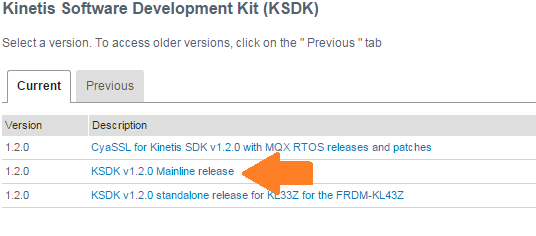
4. Review and click to agree to the license terms if they are acceptable.
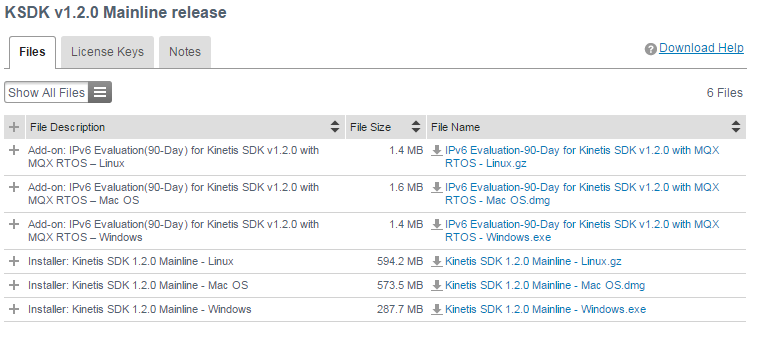
5. Click and installer for your Host OS.
6. Download and Install.
On Windows, the default source installation directory is C:\Freescale\KSDK_1.2.0
7. Check out the getting started guides in the /docs directory.
Enjoy! Best of luck with your embedded projects!
