
- Forums
- Product Forums
- General Purpose MicrocontrollersGeneral Purpose Microcontrollers
- i.MX Forumsi.MX Forums
- QorIQ Processing PlatformsQorIQ Processing Platforms
- Identification and SecurityIdentification and Security
- Power ManagementPower Management
- Wireless ConnectivityWireless Connectivity
- RFID / NFCRFID / NFC
- Advanced AnalogAdvanced Analog
- Neural Processing UnitsNeural Processing Units
- MCX Microcontrollers
- S32G
- S32K
- S32V
- MPC5xxx
- Other NXP Products
- S12 / MagniV Microcontrollers
- Powertrain and Electrification Analog Drivers
- Sensors
- Vybrid Processors
- Digital Signal Controllers
- 8-bit Microcontrollers
- ColdFire/68K Microcontrollers and Processors
- PowerQUICC Processors
- OSBDM and TBDML
- S32M
- S32Z/E
-
- Solution Forums
- Software Forums
- MCUXpresso Software and ToolsMCUXpresso Software and Tools
- CodeWarriorCodeWarrior
- MQX Software SolutionsMQX Software Solutions
- Model-Based Design Toolbox (MBDT)Model-Based Design Toolbox (MBDT)
- FreeMASTER
- eIQ Machine Learning Software
- Embedded Software and Tools Clinic
- S32 SDK
- S32 Design Studio
- GUI Guider
- Zephyr Project
- Voice Technology
- Application Software Packs
- Secure Provisioning SDK (SPSDK)
- Processor Expert Software
- Generative AI & LLMs
-
- Topics
- Mobile Robotics - Drones and RoversMobile Robotics - Drones and Rovers
- NXP Training ContentNXP Training Content
- University ProgramsUniversity Programs
- Rapid IoT
- NXP Designs
- SafeAssure-Community
- OSS Security & Maintenance
- Using Our Community
-
- Cloud Lab Forums
-
- Knowledge Bases
- ARM Microcontrollers
- i.MX Processors
- Identification and Security
- Model-Based Design Toolbox (MBDT)
- QorIQ Processing Platforms
- S32 Automotive Processing Platform
- Wireless Connectivity
- CodeWarrior
- MCUXpresso Suite of Software and Tools
- MQX Software Solutions
- RFID / NFC
- Advanced Analog
- Neural Processing Units
-
- NXP Tech Blogs
- RSS フィードを購読する
- トピックを新着としてマーク
- トピックを既読としてマーク
- このトピックを現在のユーザーにフロートします
- ブックマーク
- 購読
- ミュート
- 印刷用ページ
MPC5748G-LCEVB How to debug_flash based on SDK sample codes.

- 新着としてマーク
- ブックマーク
- 購読
- ミュート
- RSS フィードを購読する
- ハイライト
- 印刷
- 不適切なコンテンツを報告
Dear all,
I have a MPC5748G-LCEVB board, and I wrote a very simple SDK-based code on S32DS which after running it, one of the LEDs on the board will start blinking every 0.5 seconds.
This code works well when I connect the board to my computer with JTAG, then choose the debug_RAM in build code (hammer icon), then choose the debug_RAM file in Debug Configuration (green bug icon), then press the "play" button.
But I want the code to run even after switching off and then on the power of the evaluation board. Therefore, after choosing the debug_FLASH in build code (hammer icon), then choosing the debug_FLASH file in Debug Configuration (green bug icon), and press the "play" button, the code ran well (LED is blinking), too.
However, after turning off the power of the board and then turning it back on, the LED on the board stops blinking, which I supposed the code have been erased. I thought after burning the code in debug_FLASH mode means even if the power of the board is off then on, the code will still run (the LED will still blink).
Since I am a beginner here, is there a step by step tutortial on how to burn code into the board and still works after turning off the power and back on?
BRs,
June Hsiao

 petervlna
- 新着としてマーク
- ブックマーク
- 購読
- ミュート
- RSS フィードを購読する
- ハイライト
- 印刷
- 不適切なコンテンツを報告
Hello,
1. How to know if my software is loaded in flash or not?
You can simply use debugger and look at your flash content. If it is programmed and you do power on reset, you will see your binary there.
2. For initializing the things you said (RAM ECC, SWT, etc...), do I need to add some code or can I just initialize them on "Build Code" or "Debug Configuration" button?
Hmm, not sure what do you mean. The init is usually part of the startup code. Whether it comes from third party (like NXP startups are in the sample projects, or new projects wizards) or it is written by you.
Flash target sample projects from S32DS will run by defaults with all startups init.
Best regards,
Peter
- 新着としてマーク
- ブックマーク
- 購読
- ミュート
- RSS フィードを購読する
- ハイライト
- 印刷
- 不適切なコンテンツを報告
Hi Peter,
The following attachment is my BlinkingLED code.
I followed the steps from this link:
The only change is that in step 30, I select "Debug" in build code rather than "Debug_RAM".
And as for the Debug Configuration, the below picture is my configuration.
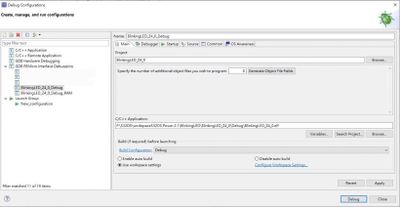
Then, after pressing debug, the LED blinked successfully.
However, after a power reset, the LED stopped blinking.
Do you know what the problem might be?
BRs,
June
petervlna
- 新着としてマーク
- ブックマーク
- 購読
- ミュート
- RSS フィードを購読する
- ハイライト
- 印刷
- 不適切なコンテンツを報告
Hello,
I just loaded your project.
Your code is still RAM target:
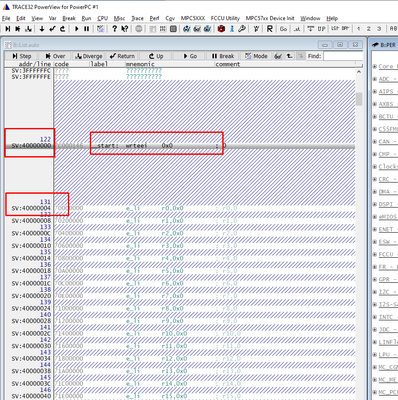
In other words, your code is in RAM. So if you reset the device RAM content is lost.
Your flash is empty:
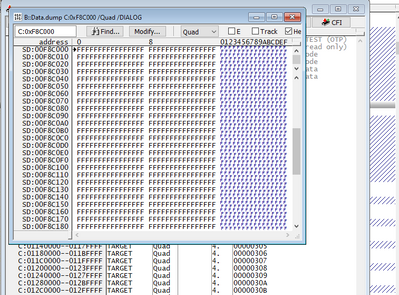
When you creating a project make sure your target is Flash.
I have a feeling you should take some basic trainings on microcotntrollers as this device is quite complex and will require good understanding of IPs.
Have a look at trainings available for S32DS, and also SPC5748G.
Best regards,
Peter
- 新着としてマーク
- ブックマーク
- 購読
- ミュート
- RSS フィードを購読する
- ハイライト
- 印刷
- 不適切なコンテンツを報告
Hi Peter,
After looking at this link:
I modified linker_flash.ld to :
MEMORY {
flash_rchw : org = 0x00F90000, len = 0x4
cpu0_reset_vec : org = 0x00F90000+0x10, len = 0x4
cpu1_reset_vec : org = 0x00F90000+0x14, len = 0x4
cpu2_reset_vec : org = 0x00F90000+0x04, len = 0x4
m_text : org = 0x00F94000, len = FLASH_SIZE
m_data : org = SRAM_BASE_ADDR, len = SRAM_SIZE
}
The MPC5748G's NVM memory map is attached.
After burn code, the memory is:

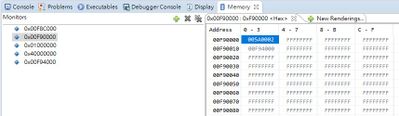
Which seems like it has successfully burn into FLASH.
petervlna
- 新着としてマーク
- ブックマーク
- 購読
- ミュート
- RSS フィードを購読する
- ハイライト
- 印刷
- 不適切なコンテンツを報告
Hello,
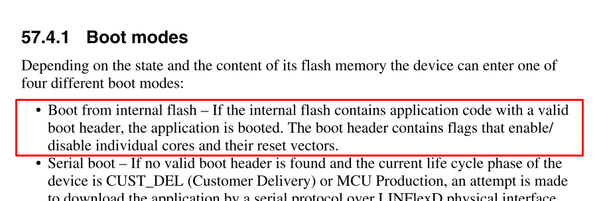
Well, I do see some data in your flash, however those are not a valid RCHW.
So no boot from this location 0xF94000 is made in your project.
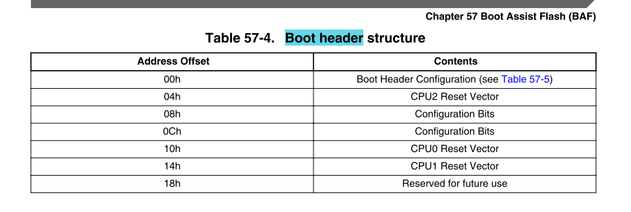
Your RCHW is probably at 0x00F90000. Not sure what is the content of address with 0x10 offset, but there should be your start as you present on linker.
flash_rchw : org = 0x00F90000, len = 0x4
cpu0_reset_vec : org = 0x00F90000+0x10, len = 0x4
cpu1_reset_vec : org = 0x00F90000+0x14, len = 0x4
cpu2_reset_vec : org = 0x00F90000+0x04, len = 0x4
Best regards,
Peter
- 新着としてマーク
- ブックマーク
- 購読
- ミュート
- RSS フィードを購読する
- ハイライト
- 印刷
- 不適切なコンテンツを報告
Hi Peter,
Do you mean my address is configured wrong?
But from the link I gave you on my previous reply, a NXP Employee said the config is correct for MPC5748G.
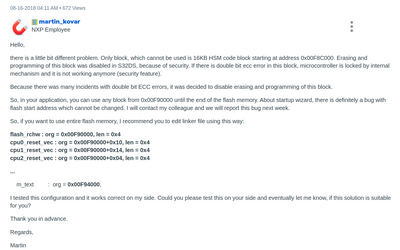
So which two address for reset and m_text do you suggest?
June
petervlna
- 新着としてマーク
- ブックマーク
- 購読
- ミュート
- RSS フィードを購読する
- ハイライト
- 印刷
- 不適切なコンテンツを報告
Hello,
This is unknown to me.
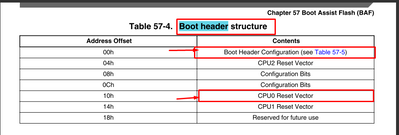
What you need to do is to set correctly CPU reset vector to point to your startup code.
So make sure you have valid RCHW and CPU0 reset vector points your startup code.
Thats all needed for correct boot from flash.
Once you see your device after reset jump from BAF to the address in CPU0 reset vector, you are set up and you can execute your code from that address.
Best regards,
Peter
- 新着としてマーク
- ブックマーク
- 購読
- ミュート
- RSS フィードを購読する
- ハイライト
- 印刷
- 不適切なコンテンツを報告
Dear Peter,
The board I bought is NXP MPC5748G-LCEVB (https://www.nxp.com/design/development-boards/automotive-development-platforms/mpc57xx-mcu-platforms...).
And my development tool is S32DS for Power Architecture IDE(https://www.nxp.com/design/software/development-software/s32-design-studio-ide/s32-design-studio-for... ) that NXP suggested to use.
I ran the hello world example project from S32DS SDK, but after many tries, still couldn’t burn FLASH code to the board.
I would like to ask if you can give a simple sample project that can correctly burn FLASH code to MPC5748G-LCEVB?
Thanks.
BRs,
June
petervlna
- 新着としてマーク
- ブックマーク
- 購読
- ミュート
- RSS フィードを購読する
- ハイライト
- 印刷
- 不適切なコンテンツを報告
Hello,
Ok, I have created simple example from S32DS examples:
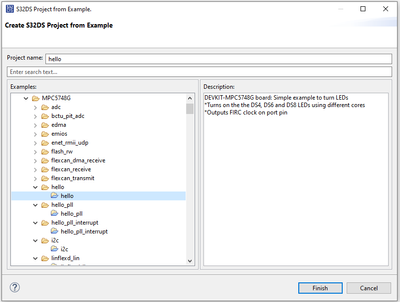
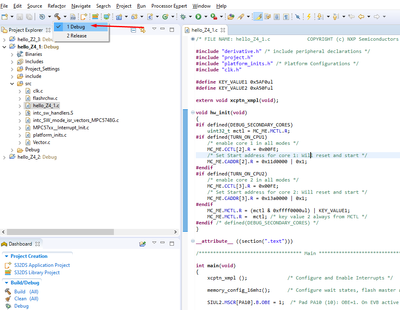
By default it is set to build from flash.
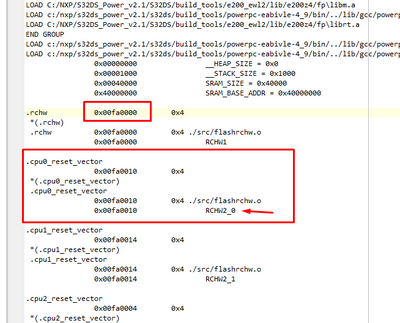
So when I compile the project I can see the boot addresses:
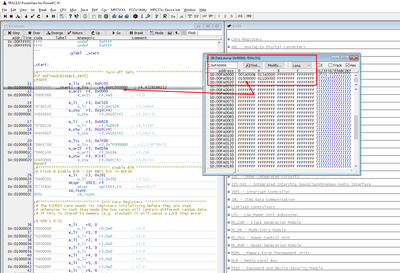
After I burn it to the micro, I can see the RCHW is valid and it is on the place it should be (in flash).
Everything is just working with default settings.
I have attached for you the project as well.
Simply load the elf to the device and you are done.
Best regards,
Peter
- 新着としてマーク
- ブックマーク
- 購読
- ミュート
- RSS フィードを購読する
- ハイライト
- 印刷
- 不適切なコンテンツを報告
Hi Peter,
I followed your instructions, and got the same result as you did.
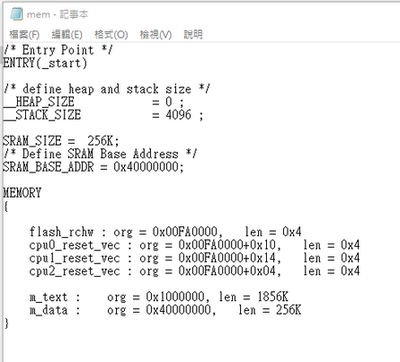
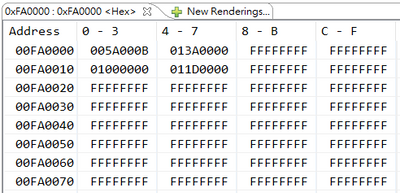
After burn code and run code, one LED light up (which is correct).
But after a power reset (switch SW2 off then on), the LED light disappear.
Can your board still runs the code after a power reset? I would like to ask what board did you use.
My code is in the attachment.
BRs,
June
petervlna
- 新着としてマーク
- ブックマーク
- 購読
- ミュート
- RSS フィードを購読する
- ハイライト
- 印刷
- 不適切なコンテンツを報告
Hello,
Just tested your code for z4_1. It boot correctly from address 0x0100 0000.
After power on reset or any kind of reset.
If any LED you have in code works, I do not know as I use X-MPC574XG EVB board.
This is an application issue rather the micro one.
What comes to my mind is that you have some remnants of code in your micro, like previous Boot address on address lower then 0xFA0000. Check the micro for these addresses.
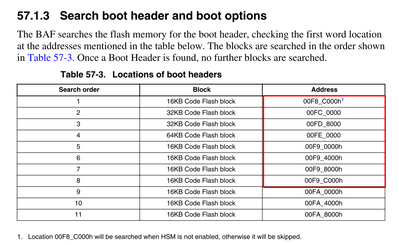
Check also there is your start address after power on reset. If the micro jumps to 0x0100 0000 address like I see in your code tests here:
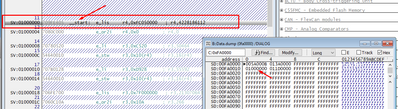
Best regards,
Peter
- 新着としてマーク
- ブックマーク
- 購読
- ミュート
- RSS フィードを購読する
- ハイライト
- 印刷
- 不適切なコンテンツを報告
Dear Peter,
Do you know how to earse previous Boot address on address lower then 0xFA0000?
Should I erase them by adding code to my project? Or configure something on "Debug Configuration panel" in S32DS? Or there is a correct way to erase them?
BRs,
June
petervlna
- 新着としてマーク
- ブックマーク
- 購読
- ミュート
- RSS フィードを購読する
- ハイライト
- 印刷
- 不適切なコンテンツを報告
Hello,
Do you know how to earse previous Boot address on address lower then 0xFA0000?
Yes. You can for example use nexusPPC from PEMicro web pages.
Or you can use S32DS to load empty binary to device:
But first check if there are any RCHW on bootable addresses. If there are none, then it makes no sense to erase it.
You must be able to see where the code boots. I can see your code here on my sample boots at 0x0100 000 address. Do you see the same?
Best regards,
Peter
- 新着としてマーク
- ブックマーク
- 購読
- ミュート
- RSS フィードを購読する
- ハイライト
- 印刷
- 不適切なコンテンツを報告
Hi Peter,
From your reply, does RCHW mean 005Ah in the first halfword?
In my case, my target boot header is FA0000h but I also got a 005Ah in F8C000h.
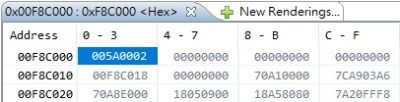
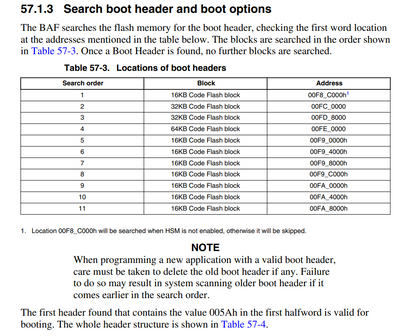
So that's why I wanted to ask how to erase the incorrect boot header in F8C000h.
Also, in your reply, the link is for MPC5777C, do you have the mpc5777c_low_mid_empty.srec file for MPC5748G?
June
petervlna
- 新着としてマーク
- ブックマーク
- 購読
- ミュート
- RSS フィードを購読する
- ハイライト
- 印刷
- 不適切なコンテンツを報告
Hello,
From your reply, does RCHW mean 005Ah in the first halfword?
Yes. So your issue is that you do not erase whole flash, and the remnants of previous boot header are still there.
Also, in your reply, the link is for MPC5777C, do you have the mpc5777c_low_mid_empty.srec file for MPC5748G?
No, I don;t. you have to create it by yourself. Simple create empty s-record with any tool you like.
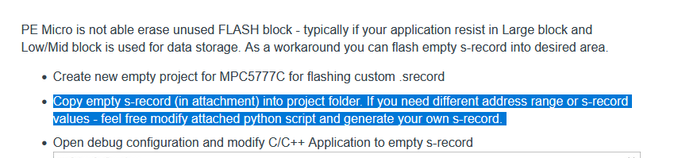
But, I expect for you would be much easier just to use nexusPPC SW from PEMicro, where erase of flash is available directly.
Best regards,
Peter
- 新着としてマーク
- ブックマーク
- 購読
- ミュート
- RSS フィードを購読する
- ハイライト
- 印刷
- 不適切なコンテンツを報告
Hi,
I am using nexusPPC SW from PEMicro to erase flash, but encounter a problem:
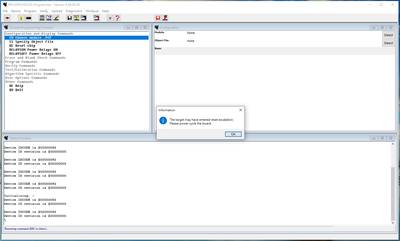

I turned off the power of the board, and then simultaneously turn on the power and press "OK" button.
But this message still pops up, saying the board is not connected.
I saw the answer to my question is pressing "OK" button after power on and before reset red LED light up.
But in my case, after powering up the board, the reset red light immediately light up.
So is it impossible to connect the board to nexusPPC SW?
petervlna
- 新着としてマーク
- ブックマーク
- 購読
- ミュート
- RSS フィードを購読する
- ハイライト
- 印刷
- 不適切なコンテンツを報告
Hello,
If you power board is the reset light always on?
Or only reset escalation message is present on debug interface?
I am not sure here as I never used nexusPPC.
To exclude reset escalation please measure the reset line via scope right after power on reset, you will see 15 consecutive resets in time of 300ms. (20ms each). If you see that, then your micro has SW which is not serving SWT.
I turned off the power of the board, and then simultaneously turn on the power and press "OK" button.
When I used this kind of method with Lauterbach in past, I had to repeat **bleep** multiple times, in order to connect to device within 300ms so the debugger can stop SWT.
Best regards,
Peter
petervlna
- 新着としてマーク
- ブックマーク
- 購読
- ミュート
- RSS フィードを購読する
- ハイライト
- 印刷
- 不適切なコンテンツを報告
Hello,
Did you verify your SW is loaded in flash?
Once you have it in flash it is running after power on reset. There is no issue.
What comes to my mind is that you SW is not proper and will hang out somewhere in executions. But it will definitely run.
have in mind that debugger initialize different things, for example RAM ECC, SWT, etc...
If you are missing those in your SW then after power on reset it will end up in some exception of endless loop.
Have a look at out HOW TO guides:
https://community.nxp.com/t5/S32-Design-Studio-Knowledge-Base/S32DS-list-of-HOWTOs/ta-p/1113475
Best regards,
Peter
- 新着としてマーク
- ブックマーク
- 購読
- ミュート
- RSS フィードを購読する
- ハイライト
- 印刷
- 不適切なコンテンツを報告
Hi Peter,
Thank you for your quick reply.
There are still some questions that came up to me:
1. How to know if my software is loaded in flash or not?
2. For initializing the things you said (RAM ECC, SWT, etc...), do I need to add some code or can I just initialize them on "Build Code" or "Debug Configuration" button?
Unfortunately after looking into the HOW TO guides, I still couldn't find guides for flashing codes for MPC5748G-LCEVB.
BRs,
June
