
- Forums
- Product Forums
- General Purpose MicrocontrollersGeneral Purpose Microcontrollers
- i.MX Forumsi.MX Forums
- QorIQ Processing PlatformsQorIQ Processing Platforms
- Identification and SecurityIdentification and Security
- Power ManagementPower Management
- Wireless ConnectivityWireless Connectivity
- RFID / NFCRFID / NFC
- Advanced AnalogAdvanced Analog
- Neural Processing UnitsNeural Processing Units
- MCX Microcontrollers
- S32G
- S32K
- S32V
- MPC5xxx
- Other NXP Products
- S12 / MagniV Microcontrollers
- Powertrain and Electrification Analog Drivers
- Sensors
- Vybrid Processors
- Digital Signal Controllers
- 8-bit Microcontrollers
- ColdFire/68K Microcontrollers and Processors
- PowerQUICC Processors
- OSBDM and TBDML
- S32M
- S32Z/E
-
- Solution Forums
- Software Forums
- MCUXpresso Software and ToolsMCUXpresso Software and Tools
- CodeWarriorCodeWarrior
- MQX Software SolutionsMQX Software Solutions
- Model-Based Design Toolbox (MBDT)Model-Based Design Toolbox (MBDT)
- FreeMASTER
- eIQ Machine Learning Software
- Embedded Software and Tools Clinic
- S32 SDK
- S32 Design Studio
- GUI Guider
- Zephyr Project
- Voice Technology
- Application Software Packs
- Secure Provisioning SDK (SPSDK)
- Processor Expert Software
- Generative AI & LLMs
-
- Topics
- Mobile Robotics - Drones and RoversMobile Robotics - Drones and Rovers
- NXP Training ContentNXP Training Content
- University ProgramsUniversity Programs
- Rapid IoT
- NXP Designs
- SafeAssure-Community
- OSS Security & Maintenance
- Using Our Community
-
- Cloud Lab Forums
-
- Knowledge Bases
- ARM Microcontrollers
- i.MX Processors
- Identification and Security
- Model-Based Design Toolbox (MBDT)
- QorIQ Processing Platforms
- S32 Automotive Processing Platform
- Wireless Connectivity
- CodeWarrior
- MCUXpresso Suite of Software and Tools
- MQX Software Solutions
- RFID / NFC
- Advanced Analog
- Neural Processing Units
-
- NXP Tech Blogs
- Home
- :
- Product Forums
- :
- MPC5xxx
- :
- Re: MPC5634M AUTOSAR OS example error
MPC5634M AUTOSAR OS example error
- Subscribe to RSS Feed
- Mark Topic as New
- Mark Topic as Read
- Float this Topic for Current User
- Bookmark
- Subscribe
- Mute
- Printer Friendly Page

- Mark as New
- Bookmark
- Subscribe
- Mute
- Subscribe to RSS Feed
- Permalink
- Report Inappropriate Content
Hello All,
I am trying to run AUTOSAR on MPC5634M with NXP MCAL&OS with EB Tresos studio.
For this chip, NXP supports AUTOSAR v 3.0.
I have two questions:
1) I am using "Tresos Studio " Release ver 2009.a build number: b090820-1820.
OS Ver: Freescale AUTOSAR OS/MPC56xxAM v.3.0 RTM, build 3.0.35.
I have also added the patch "OSMPC56xxAM_3_0_35_patch1"
I receive the following error (attached image) after importing the sample project: "os_sample_sc1" located in "\AUTOSAR\os_freescale_mpc56xxAM\os_ts\eclipse\workspace" to Tresos studio and running "Generate Project".
I am running on windows 7 64 bit system. Is a 32bit OS required for the configuration?
2) The MCAL provided for the same chip is "AUTOSAR MPC563XM MCAL3.0 swv: 2.0.0 RTM". But this MCAL version expects "Tresos Studio ver 2010". But as stated in qn. 1), OS expects "Tresos Studio " Release ver 2009.
How can i configure the entire project in this case, when there is a conflict in versions as seen here.
Any help to address the above questions and get the configurator to work is appreciated.
Your Sincerely,
Arjun
Solved! Go to Solution.
 frantisekdobes
- Mark as New
- Bookmark
- Subscribe
- Mute
- Subscribe to RSS Feed
- Permalink
- Report Inappropriate Content
Hello Arjun,
to the questions:
1) I see the same error if generating on Windows 10 64-bit. The error is reported because by default on 64-bit operating system there is used 64-bit java. The MPC5634M Autosar OS supports only 32-bit java so to generate it is needed to install the 32-bit java. Then it is also needed to put the path to the 32-bit java to the PATH environmental variable so that it will be found while generating in Tresos.
The version of java can be checked with command java -version executed from command prompt:
c:\>java -version
java version "1.8.0_201"
Java(TM) SE Runtime Environment (build 1.8.0_201-b09)
Java HotSpot(TM) 64-Bit Server VM (build 25.201-b09, mixed mode)
On my windows 10 computer there is used 64-bit java by default (see the string “64-Bit Server VM”).
I have modified the path variable with the following command to add path to 32-bit java:
c:\>path="c:\Program Files (x86)\Java\jre1.8.0_201\bin";%path%
So then the java version reported is 32-bit (string “Client VM”) as shown here:
c:\>java -version
java version "1.8.0_201"
Java(TM) SE Runtime Environment (build 1.8.0_201-b09)
Java HotSpot(TM) Client VM (build 25.201-b09, mixed mode)
After this I open the Tresos with this command (still in the same command prompt window):
c:\>c:\EB\tresos2010.a.sr4\bin\tresos_gui.exe
and I can generate correctly without any error.
If you prefer you can just add the path to the 32-bit java to your PATH environmental variable so that 32-bit java would be always used (but be careful that this could impact other programs that might require 64-bit java).
2) There can be used the newer version (Tresos 2010.sr4) to configure both MCAL and OS. See the MCAL sample application (located in c:\Freescale\AUTOSAR\MPC563XM_MCAL3.0_RTM_2.0.0_signed\MPC563XM_MCAL3.0_RTM_2.0.0_Integration_Application) where both MCAL and OS are integrated within one project. See here the screenshot from Tresos:
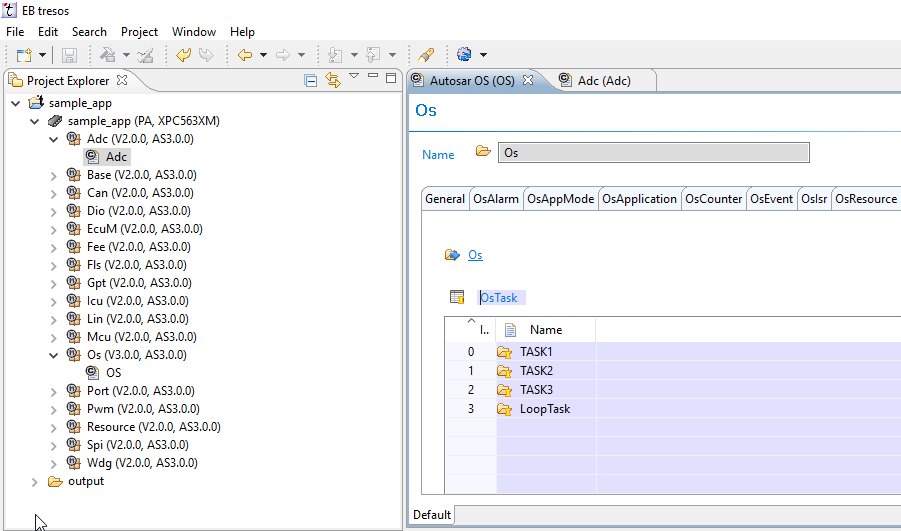

Best Regards,
Frantisek
frantisekdobes
- Mark as New
- Bookmark
- Subscribe
- Mute
- Subscribe to RSS Feed
- Permalink
- Report Inappropriate Content
Hello Arjun,
to the questions:
1) I see the same error if generating on Windows 10 64-bit. The error is reported because by default on 64-bit operating system there is used 64-bit java. The MPC5634M Autosar OS supports only 32-bit java so to generate it is needed to install the 32-bit java. Then it is also needed to put the path to the 32-bit java to the PATH environmental variable so that it will be found while generating in Tresos.
The version of java can be checked with command java -version executed from command prompt:
c:\>java -version
java version "1.8.0_201"
Java(TM) SE Runtime Environment (build 1.8.0_201-b09)
Java HotSpot(TM) 64-Bit Server VM (build 25.201-b09, mixed mode)
On my windows 10 computer there is used 64-bit java by default (see the string “64-Bit Server VM”).
I have modified the path variable with the following command to add path to 32-bit java:
c:\>path="c:\Program Files (x86)\Java\jre1.8.0_201\bin";%path%
So then the java version reported is 32-bit (string “Client VM”) as shown here:
c:\>java -version
java version "1.8.0_201"
Java(TM) SE Runtime Environment (build 1.8.0_201-b09)
Java HotSpot(TM) Client VM (build 25.201-b09, mixed mode)
After this I open the Tresos with this command (still in the same command prompt window):
c:\>c:\EB\tresos2010.a.sr4\bin\tresos_gui.exe
and I can generate correctly without any error.
If you prefer you can just add the path to the 32-bit java to your PATH environmental variable so that 32-bit java would be always used (but be careful that this could impact other programs that might require 64-bit java).
2) There can be used the newer version (Tresos 2010.sr4) to configure both MCAL and OS. See the MCAL sample application (located in c:\Freescale\AUTOSAR\MPC563XM_MCAL3.0_RTM_2.0.0_signed\MPC563XM_MCAL3.0_RTM_2.0.0_Integration_Application) where both MCAL and OS are integrated within one project. See here the screenshot from Tresos:
Best Regards,
Frantisek
- Mark as New
- Bookmark
- Subscribe
- Mute
- Subscribe to RSS Feed
- Permalink
- Report Inappropriate Content
Hello Frantisek,
Thanks a lot for the solution.
It has worked perfectly well and now I am able to generate code from Tresos studio.
Thanks a lot for taking the time out to answer this query in detail.
Good day to you.
Arjun.
 martin_kovar
- Mark as New
- Bookmark
- Subscribe
- Mute
- Subscribe to RSS Feed
- Permalink
- Report Inappropriate Content
Hello,
I escalated your question to automotive software team. They will contact you back directly by email.
Regards,
Martin
