
- Forums
- Product Forums
- General Purpose MicrocontrollersGeneral Purpose Microcontrollers
- i.MX Forumsi.MX Forums
- QorIQ Processing PlatformsQorIQ Processing Platforms
- Identification and SecurityIdentification and Security
- Power ManagementPower Management
- Wireless ConnectivityWireless Connectivity
- RFID / NFCRFID / NFC
- Advanced AnalogAdvanced Analog
- Neural Processing UnitsNeural Processing Units
- MCX Microcontrollers
- S32G
- S32K
- S32V
- MPC5xxx
- Other NXP Products
- S12 / MagniV Microcontrollers
- Powertrain and Electrification Analog Drivers
- Sensors
- Vybrid Processors
- Digital Signal Controllers
- 8-bit Microcontrollers
- ColdFire/68K Microcontrollers and Processors
- PowerQUICC Processors
- OSBDM and TBDML
- S32M
- S32Z/E
-
- Solution Forums
- Software Forums
- MCUXpresso Software and ToolsMCUXpresso Software and Tools
- CodeWarriorCodeWarrior
- MQX Software SolutionsMQX Software Solutions
- Model-Based Design Toolbox (MBDT)Model-Based Design Toolbox (MBDT)
- FreeMASTER
- eIQ Machine Learning Software
- Embedded Software and Tools Clinic
- S32 SDK
- S32 Design Studio
- GUI Guider
- Zephyr Project
- Voice Technology
- Application Software Packs
- Secure Provisioning SDK (SPSDK)
- Processor Expert Software
- Generative AI & LLMs
-
- Topics
- Mobile Robotics - Drones and RoversMobile Robotics - Drones and Rovers
- NXP Training ContentNXP Training Content
- University ProgramsUniversity Programs
- Rapid IoT
- NXP Designs
- SafeAssure-Community
- OSS Security & Maintenance
- Using Our Community
-
- Cloud Lab Forums
-
- Knowledge Bases
- ARM Microcontrollers
- i.MX Processors
- Identification and Security
- Model-Based Design Toolbox (MBDT)
- QorIQ Processing Platforms
- S32 Automotive Processing Platform
- Wireless Connectivity
- CodeWarrior
- MCUXpresso Suite of Software and Tools
- MQX Software Solutions
- RFID / NFC
- Advanced Analog
- Neural Processing Units
-
- NXP Tech Blogs
- RSS フィードを購読する
- トピックを新着としてマーク
- トピックを既読としてマーク
- このトピックを現在のユーザーにフロートします
- ブックマーク
- 購読
- ミュート
- 印刷用ページ

- 新着としてマーク
- ブックマーク
- 購読
- ミュート
- RSS フィードを購読する
- ハイライト
- 印刷
- 不適切なコンテンツを報告
Hello,
I am having an issue erasing flash. I am getting a bus error and it is causing a system reset when i perform the interlock write during an erase operation. Here is my code:
FLASH_A.LMLR.R = 0xA1A11111; // unlock flash
FLASH_A.LMLR.R = ~0x00010300;
FLASH_A.SLMLR.R = 0xC3C33333;
FLASH_A.SLMLR.R = ~0x00010300;
FLASH_A.MCR.B.ERS = 1; // set erase
FLASH_A.LMSR.R = 0x00010300; // select blocks
*(uint32_t*)0x20000 = 0xFFFFFFFF; // interlock write <--- FAILS HERE
FLASH_A.MCR.B.EHV = 1;
while(FLASH_A.MCR.B.DONE == 0); // wait for erase to signal DONE!
FLASH_A.MCR.B.EHV = 0;
FLASH_A.MCR.B.ERS = 0;
Is there anything that could be configured that may interfere with the interlock write such as a watchdog timer or some sort of flash configuration? I ask this because it seems that if this code is the very first thing that executes it works correctly.
Thanks,
Victor
解決済! 解決策の投稿を見る。

 lukaszadrapa
- 新着としてマーク
- ブックマーク
- 購読
- ミュート
- RSS フィードを購読する
- ハイライト
- 印刷
- 不適切なコンテンツを報告
Hi Victor,
MSR[EE] bit can be used to disable or enable all external interrupts (IVOR4):
asm("wrteei 0"); /* disable interrupts */
asm("wrteei 1"); /* enable interrupts */
Regards,
Lukas
lukaszadrapa
- 新着としてマーク
- ブックマーク
- 購読
- ミュート
- RSS フィードを購読する
- ハイライト
- 印刷
- 不適切なコンテンツを報告
Hi Victor,
the code is correct, no problem here.
What comes into mind:
- Memory Protection Unit - is it used? Could you make sure it is disabled?
- Memory Management Unit - is flash area covered?
- Are BIUCR registers configured appropriately?
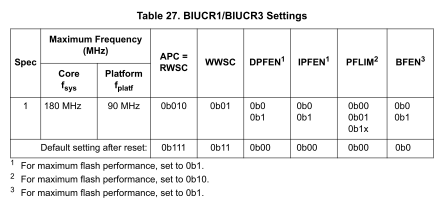
- Which exception is triggered? Is that IVOR1?
Regards,
Lukas
- 新着としてマーク
- ブックマーク
- 購読
- ミュート
- RSS フィードを購読する
- ハイライト
- 印刷
- 不適切なコンテンツを報告
Hi Lukas,
So after your feedback I checked and addressed the BIUCR registers and the memory management unit mapping. It appears that this is what prevented me from erasing flash. I am now able to erase flash after addressing those two areas.
I now have ran into a different issue where after it erases successfully the CPU resets.
FLASH_A.LMLR.R = 0xA1A11111; // unlock flash
FLASH_A.LMLR.R = ~0x00010300;
FLASH_A.SLMLR.R = 0xC3C33333;
FLASH_A.SLMLR.R = ~0x00010300;
FLASH_A.MCR.B.ERS = 1; // set erase
FLASH_A.LMSR.R = 0x00010300; // select blocks
*(uint32_t*)0x20000 = 0xFFFFFFFF; // interlock write <--- erases successfully
FLASH_A.MCR.B.EHV = 1;
while(FLASH_A.MCR.B.DONE == 0); // wait for erase to signal DONE! <-- FAILS here
FLASH_A.MCR.B.EHV = 0;
FLASH_A.MCR.B.ERS = 0;
After looking on the forums I thought this could be watchdog related so I used the following code to try and disable the watchdog:
SWT.SR.R = 0x0000D928;
SWT.MCR.B.WEN = 0;
asm("mtspr 340, %r3");
asm("sync");
lukaszadrapa
- 新着としてマーク
- ブックマーク
- 購読
- ミュート
- RSS フィードを購読する
- ハイライト
- 印刷
- 不適切なコンテンツを報告
Hi Victor,
where the code is running from? Be aware that Read-While-Write is supported only between partitions. It's not possible to access a partition which is being programmed or erased. The code must be executed from another partition or from RAM. It's also good idea to disable all interrupts (for debugging purposes, at least) to make sure that there's nothing what could access that flash.
Then I would check SIU_RSR register where you can find source of the last reset.
Regards,
Lukas
- 新着としてマーク
- ブックマーク
- 購読
- ミュート
- RSS フィードを購読する
- ハイライト
- 印刷
- 不適切なコンテンツを報告
Hi Lukas,
The code I have is running out of SRAM. I am seeing a Read While Write Error (RWE) from what the FLASH_A_MCR register says. It appears to erase successfully and trigger a read-while-write error. I am not sure how this could occur if I am running out of RAM?
Execution is not reaching the following lines as EHV and ERS are still 1:
FLASH_A.MCR.B.EHV = 0;
FLASH_A.MCR.B.ERS = 0;
I am unsure how a RWE error could be occurring while I am executing code out of RAM. Is there anything that could be causing this?
Thanks,
Victor
lukaszadrapa
- 新着としてマーク
- ブックマーク
- 購読
- ミュート
- RSS フィードを購読する
- ハイライト
- 印刷
- 不適切なコンテンツを報告
Hi Victor,
I can see only two things:
1. As I already mentioned - interrupts.
2. Other bus masters - is second core running? Do you use DMA?
Regards,
Lukas
- 新着としてマーク
- ブックマーク
- 購読
- ミュート
- RSS フィードを購読する
- ハイライト
- 印刷
- 不適切なコンテンツを報告
Hi Lukas,
I will have to continue investigating this. I do not believe there to be any DMA configuration with this design and the second core is not running.
As for interrupts it seems likely, however I thought I had disabled them for the most part. Is there any efficient way to disable most if not all software based interrupts? In previous projects I have just been able to disable the watchdog timer and continue, however that is not the case here. I believe this is most likely the issue.
Thanks,
Victor
lukaszadrapa
- 新着としてマーク
- ブックマーク
- 購読
- ミュート
- RSS フィードを購読する
- ハイライト
- 印刷
- 不適切なコンテンツを報告
Hi Victor,
MSR[EE] bit can be used to disable or enable all external interrupts (IVOR4):
asm("wrteei 0"); /* disable interrupts */
asm("wrteei 1"); /* enable interrupts */
Regards,
Lukas
