FRDM-MCXA153 Full Speed USB

cancel
Showing results for 
Show  only  | Search instead for 
Did you mean: 

FRDM-MCXA153 Full Speed USB

Jump to solution
3,273 Views
Gurunath
Contributor II

Hi, i tried running an USB example named "dev_cdc_vcom_bm" on FRDM-MCXA153 board, where it creates a virtual COM port, and echos back the characters sent though terminal using that specific VCOM port. 

i can see the VCOM appeared in device manager has a default name "USB Serial Device" as shown in the image attached, but i need to change this default name to a custom name, using example code usb files itself,  but not in device manager settings.

Please let me know the steps required to do this name change of VCOM , or any changes to be done in usb example driver files .

Thanks.

Labels (3)
0 Kudos
Reply
1 Solution
3,105 Views
Alice_Yang
NXP TechSupport
NXP TechSupport

Hello @Gurunath 

I don't think this can be changed in USB stack.  This is determined by the USB drive on PC.


BR

Alice

View solution in original post

0 Kudos
Reply
4 Replies
3,184 Views
Alice_Yang
NXP TechSupport
NXP TechSupport

Hello @Gurunath 

We need to change the driver configuration to change name. My PC is Win10, I will show the steps  about how to change this default name to a custom name on my side.

Step1. Right click "USB Serial Device" on Device Manager of PC.

Step2, Choose "Driver key" under Details view. Copy the Value.

Alice_Yang_0-1722236582305.png


Step3,  Open and run Registry as Administrator.

Alice_Yang_1-1722236752658.png


Step4, Search the "value" copied in step2.

Alice_Yang_2-1722236826796.png

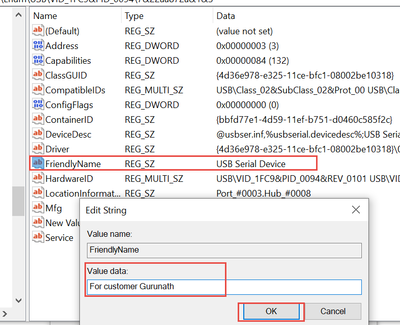
Step5, change name as below:

Alice_Yang_3-1722236890651.png


Step6, Reset board. Show as below.

Alice_Yang_4-1722236946318.png


If your PC is another system, you can also google like " how to change USB device name on xxx system".


BR

Alice


0 Kudos
Reply
3,139 Views
Gurunath
Contributor II
Thank you for the solution .
It would be great help to me if u can let me know if there is a way to do the same thing using usb stack code for frdm-mcxa153 in MCUXPRESSO IDE? .
0 Kudos
Reply
3,106 Views
Alice_Yang
NXP TechSupport
NXP TechSupport

Hello @Gurunath 

I don't think this can be changed in USB stack.  This is determined by the USB drive on PC.


BR

Alice

0 Kudos
Reply
3,084 Views
Gurunath
Contributor II

thank you for clearing the doubt

0 Kudos
Reply
%3CLINGO-SUB%20id%3D%22lingo-sub-1911838%22%20slang%3D%22en-US%22%20mode%3D%22CREATE%22%3EFRDM-MCXA153%20Full%20Speed%20USB%3C%2FLINGO-SUB%3E%3CLINGO-BODY%20id%3D%22lingo-body-1911838%22%20slang%3D%22en-US%22%20mode%3D%22CREATE%22%3E%3CP%3EHi%2C%20i%20tried%20running%20an%20USB%20example%20named%20%22dev_cdc_vcom_bm%22%20on%20FRDM-MCXA153%20board%2C%20where%20it%20creates%20a%20virtual%20COM%20port%2C%20and%20echos%20back%20the%20characters%20sent%20though%20terminal%20using%20that%20specific%20VCOM%20port.%26nbsp%3B%3C%2FP%3E%3CP%3Ei%20can%20see%20the%20VCOM%20appeared%20in%20device%20manager%20has%20a%20default%20name%20%22USB%20Serial%20Device%22%20as%20shown%20in%20the%20image%20attached%2C%20but%20i%20need%20to%20change%20this%20default%20name%20to%20a%20custom%20name%2C%20using%20example%20code%20usb%20files%20itself%2C%26nbsp%3B%20but%20not%20in%20device%20manager%20settings.%3C%2FP%3E%3CP%3EPlease%20let%20me%20know%20the%20steps%20required%20to%20do%20this%20name%20change%20of%20VCOM%20%2C%20or%20any%20changes%20to%20be%20done%20in%20usb%20example%20driver%20files%20.%3C%2FP%3E%3CP%3EThanks.%3C%2FP%3E%3C%2FLINGO-BODY%3E%3CLINGO-LABS%20id%3D%22lingo-labs-1911838%22%20slang%3D%22en-US%22%20mode%3D%22CREATE%22%3E%3CLINGO-LABEL%3EDevelopment%20Board%3C%2FLINGO-LABEL%3E%3CLINGO-LABEL%3EMCXA%3C%2FLINGO-LABEL%3E%3CLINGO-LABEL%3EUSB%3C%2FLINGO-LABEL%3E%3C%2FLINGO-LABS%3E%3CLINGO-SUB%20id%3D%22lingo-sub-1924913%22%20slang%3D%22en-US%22%20mode%3D%22CREATE%22%3ERe%3A%20FRDM-MCXA153%20Full%20Speed%20USB%3C%2FLINGO-SUB%3E%3CLINGO-BODY%20id%3D%22lingo-body-1924913%22%20slang%3D%22en-US%22%20mode%3D%22CREATE%22%3E%3CP%3Ethank%20you%20for%20clearing%20the%20doubt%3C%2FP%3E%3C%2FLINGO-BODY%3E%3CLINGO-SUB%20id%3D%22lingo-sub-1924614%22%20slang%3D%22en-US%22%20mode%3D%22CREATE%22%3ERe%3A%20FRDM-MCXA153%20Full%20Speed%20USB%3C%2FLINGO-SUB%3E%3CLINGO-BODY%20id%3D%22lingo-body-1924614%22%20slang%3D%22en-US%22%20mode%3D%22CREATE%22%3E%3CP%3EHello%26nbsp%3B%3CA%20href%3D%22https%3A%2F%2Fcommunity.nxp.com%2Ft5%2Fuser%2Fviewprofilepage%2Fuser-id%2F232236%22%20target%3D%22_blank%22%3E%40Gurunath%3C%2FA%3E%26nbsp%3B%3C%2FP%3E%0A%3CP%3EI%20don't%20think%20this%20can%20be%20changed%20in%20USB%20stack.%26nbsp%3B%26nbsp%3BThis%20is%20determined%20by%20the%20USB%20drive%20on%20PC.%3C%2FP%3E%0A%3CBR%20%2F%3E%0A%3CP%3EBR%3C%2FP%3E%0A%3CP%3EAlice%3C%2FP%3E%3C%2FLINGO-BODY%3E%3CLINGO-SUB%20id%3D%22lingo-sub-1923892%22%20slang%3D%22en-US%22%20mode%3D%22CREATE%22%3ERe%3A%20FRDM-MCXA153%20Full%20Speed%20USB%3C%2FLINGO-SUB%3E%3CLINGO-BODY%20id%3D%22lingo-body-1923892%22%20slang%3D%22en-US%22%20mode%3D%22CREATE%22%3EThank%20you%20for%20the%20solution%20.%3CBR%20%2F%3EIt%20would%20be%20great%20help%20to%20me%20if%20u%20can%20let%20me%20know%20if%20there%20is%20a%20way%20to%20do%20the%20same%20thing%20using%20usb%20stack%20code%20for%20frdm-mcxa153%20in%20MCUXPRESSO%20IDE%3F%20.%3CBR%20%2F%3E%3C%2FLINGO-BODY%3E%3CLINGO-SUB%20id%3D%22lingo-sub-1919137%22%20slang%3D%22en-US%22%20mode%3D%22CREATE%22%3ERe%3A%20FRDM-MCXA153%20Full%20Speed%20USB%3C%2FLINGO-SUB%3E%3CLINGO-BODY%20id%3D%22lingo-body-1919137%22%20slang%3D%22en-US%22%20mode%3D%22CREATE%22%3E%3CP%3EHello%26nbsp%3B%3CA%20href%3D%22https%3A%2F%2Fcommunity.nxp.com%2Ft5%2Fuser%2Fviewprofilepage%2Fuser-id%2F232236%22%20target%3D%22_blank%22%3E%40Gurunath%3C%2FA%3E%26nbsp%3B%3C%2FP%3E%0A%3CP%3EWe%20need%20to%20change%20the%20driver%20configuration%20to%20change%20name.%20My%20PC%20is%20Win10%2C%20I%20will%20show%20the%20steps%26nbsp%3B%20about%20how%20to%20change%20%3CSPAN%3Ethis%20default%20name%20to%20a%20custom%20name%26nbsp%3B%3C%2FSPAN%3Eon%20my%20side.%3C%2FP%3E%0A%3CP%3EStep1.%20Right%20click%20%22USB%20Serial%20Device%22%20on%20Device%20Manager%20of%20PC.%3C%2FP%3E%0A%3CP%3EStep2%2C%20Choose%20%22Driver%20key%22%20under%20Details%20view.%20Copy%20the%20Value.%3C%2FP%3E%0A%3CP%3E%3CSPAN%20class%3D%22lia-inline-image-display-wrapper%20lia-image-align-inline%22%20image-alt%3D%22Alice_Yang_0-1722236582305.png%22%20style%3D%22width%3A%20400px%3B%22%3E%3Cspan%20class%3D%22lia-inline-image-display-wrapper%22%20image-alt%3D%22Alice_Yang_0-1722236582305.png%22%20style%3D%22width%3A%20400px%3B%22%3E%3Cimg%20src%3D%22https%3A%2F%2Fcommunity.nxp.com%2Ft5%2Fimage%2Fserverpage%2Fimage-id%2F290675iB3BAEC253AB3EDF5%2Fimage-size%2Fmedium%3Fv%3Dv2%26amp%3Bpx%3D400%22%20role%3D%22button%22%20title%3D%22Alice_Yang_0-1722236582305.png%22%20alt%3D%22Alice_Yang_0-1722236582305.png%22%20%2F%3E%3C%2Fspan%3E%3C%2FSPAN%3E%3C%2FP%3E%0A%3CBR%20%2F%3E%0A%3CP%3EStep3%2C%26nbsp%3B%20Open%20and%20run%20Registry%20as%20Administrator.%3C%2FP%3E%0A%3CP%3E%3CSPAN%20class%3D%22lia-inline-image-display-wrapper%20lia-image-align-inline%22%20image-alt%3D%22Alice_Yang_1-1722236752658.png%22%20style%3D%22width%3A%20400px%3B%22%3E%3Cspan%20class%3D%22lia-inline-image-display-wrapper%22%20image-alt%3D%22Alice_Yang_1-1722236752658.png%22%20style%3D%22width%3A%20400px%3B%22%3E%3Cimg%20src%3D%22https%3A%2F%2Fcommunity.nxp.com%2Ft5%2Fimage%2Fserverpage%2Fimage-id%2F290676i88CCE86E965ED4FA%2Fimage-size%2Fmedium%3Fv%3Dv2%26amp%3Bpx%3D400%22%20role%3D%22button%22%20title%3D%22Alice_Yang_1-1722236752658.png%22%20alt%3D%22Alice_Yang_1-1722236752658.png%22%20%2F%3E%3C%2Fspan%3E%3C%2FSPAN%3E%3C%2FP%3E%0A%3CBR%20%2F%3E%0A%3CP%3EStep4%2C%20Search%20the%20%22value%22%20copied%20in%20step2.%3C%2FP%3E%0A%3CP%3E%3CSPAN%20class%3D%22lia-inline-image-display-wrapper%20lia-image-align-inline%22%20image-alt%3D%22Alice_Yang_2-1722236826796.png%22%20style%3D%22width%3A%20400px%3B%22%3E%3Cspan%20class%3D%22lia-inline-image-display-wrapper%22%20image-alt%3D%22Alice_Yang_2-1722236826796.png%22%20style%3D%22width%3A%20400px%3B%22%3E%3Cimg%20src%3D%22https%3A%2F%2Fcommunity.nxp.com%2Ft5%2Fimage%2Fserverpage%2Fimage-id%2F290677iB1F32B9E4FB5B78A%2Fimage-size%2Fmedium%3Fv%3Dv2%26amp%3Bpx%3D400%22%20role%3D%22button%22%20title%3D%22Alice_Yang_2-1722236826796.png%22%20alt%3D%22Alice_Yang_2-1722236826796.png%22%20%2F%3E%3C%2Fspan%3E%3C%2FSPAN%3E%3C%2FP%3E%0A%3CP%3EStep5%2C%20change%20name%20as%20below%3A%3C%2FP%3E%0A%3CP%3E%3CSPAN%20class%3D%22lia-inline-image-display-wrapper%20lia-image-align-inline%22%20image-alt%3D%22Alice_Yang_3-1722236890651.png%22%20style%3D%22width%3A%20400px%3B%22%3E%3Cspan%20class%3D%22lia-inline-image-display-wrapper%22%20image-alt%3D%22Alice_Yang_3-1722236890651.png%22%20style%3D%22width%3A%20400px%3B%22%3E%3Cimg%20src%3D%22https%3A%2F%2Fcommunity.nxp.com%2Ft5%2Fimage%2Fserverpage%2Fimage-id%2F290678i7408CA2FEAC6C7EF%2Fimage-size%2Fmedium%3Fv%3Dv2%26amp%3Bpx%3D400%22%20role%3D%22button%22%20title%3D%22Alice_Yang_3-1722236890651.png%22%20alt%3D%22Alice_Yang_3-1722236890651.png%22%20%2F%3E%3C%2Fspan%3E%3C%2FSPAN%3E%3C%2FP%3E%0A%3CBR%20%2F%3E%0A%3CP%3EStep6%2C%20Reset%20board.%20Show%20as%20below.%3C%2FP%3E%0A%3CP%3E%3CSPAN%20class%3D%22lia-inline-image-display-wrapper%20lia-image-align-inline%22%20image-alt%3D%22Alice_Yang_4-1722236946318.png%22%20style%3D%22width%3A%20400px%3B%22%3E%3Cspan%20class%3D%22lia-inline-image-display-wrapper%22%20image-alt%3D%22Alice_Yang_4-1722236946318.png%22%20style%3D%22width%3A%20325px%3B%22%3E%3Cimg%20src%3D%22https%3A%2F%2Fcommunity.nxp.com%2Ft5%2Fimage%2Fserverpage%2Fimage-id%2F290679iF7D7DF174550F264%2Fimage-size%2Fmedium%3Fv%3Dv2%26amp%3Bpx%3D400%22%20role%3D%22button%22%20title%3D%22Alice_Yang_4-1722236946318.png%22%20alt%3D%22Alice_Yang_4-1722236946318.png%22%20%2F%3E%3C%2Fspan%3E%3C%2FSPAN%3E%3C%2FP%3E%0A%3CBR%20%2F%3E%0A%3CP%3EIf%20your%20PC%20is%20another%20system%2C%20you%20can%20also%20google%20like%20%22%20how%20to%20change%20USB%20device%20name%20on%20xxx%20system%22.%3C%2FP%3E%0A%3CBR%20%2F%3E%0A%3CP%3EBR%3C%2FP%3E%0A%3CP%3EAlice%3C%2FP%3E%0A%3CBR%20%2F%3E%0A%3CBR%20%2F%3E%0A%3CBR%20%2F%3E%0A%3CBR%20%2F%3E%0A%3CBR%20%2F%3E%0A%3CBR%20%2F%3E%0A%3CBR%20%2F%3E%3C%2FLINGO-BODY%3E