
- Forums
- Product Forums
- General Purpose MicrocontrollersGeneral Purpose Microcontrollers
- i.MX Forumsi.MX Forums
- QorIQ Processing PlatformsQorIQ Processing Platforms
- Identification and SecurityIdentification and Security
- Power ManagementPower Management
- Wireless ConnectivityWireless Connectivity
- RFID / NFCRFID / NFC
- Advanced AnalogAdvanced Analog
- Neural Processing UnitsNeural Processing Units
- MCX Microcontrollers
- S32G
- S32K
- S32V
- MPC5xxx
- Other NXP Products
- S12 / MagniV Microcontrollers
- Powertrain and Electrification Analog Drivers
- Sensors
- Vybrid Processors
- Digital Signal Controllers
- 8-bit Microcontrollers
- ColdFire/68K Microcontrollers and Processors
- PowerQUICC Processors
- OSBDM and TBDML
- S32M
- S32Z/E
-
- Solution Forums
- Software Forums
- MCUXpresso Software and ToolsMCUXpresso Software and Tools
- CodeWarriorCodeWarrior
- MQX Software SolutionsMQX Software Solutions
- Model-Based Design Toolbox (MBDT)Model-Based Design Toolbox (MBDT)
- FreeMASTER
- eIQ Machine Learning Software
- Embedded Software and Tools Clinic
- S32 SDK
- S32 Design Studio
- GUI Guider
- Zephyr Project
- Voice Technology
- Application Software Packs
- Secure Provisioning SDK (SPSDK)
- Processor Expert Software
- Generative AI & LLMs
-
- Topics
- Mobile Robotics - Drones and RoversMobile Robotics - Drones and Rovers
- NXP Training ContentNXP Training Content
- University ProgramsUniversity Programs
- Rapid IoT
- NXP Designs
- SafeAssure-Community
- OSS Security & Maintenance
- Using Our Community
-
- Cloud Lab Forums
-
- Knowledge Bases
- ARM Microcontrollers
- i.MX Processors
- Identification and Security
- Model-Based Design Toolbox (MBDT)
- QorIQ Processing Platforms
- S32 Automotive Processing Platform
- Wireless Connectivity
- CodeWarrior
- MCUXpresso Suite of Software and Tools
- MQX Software Solutions
- RFID / NFC
- Advanced Analog
- Neural Processing Units
-
- NXP Tech Blogs
- Home
- :
- MCUXpressoソフトウェアとツール
- :
- MCUXpresso for VSCode
- :
- Creating Multicore project from scratch in VS Code using MCUXpresso for VS Code
Creating Multicore project from scratch in VS Code using MCUXpresso for VS Code
- RSS フィードを購読する
- トピックを新着としてマーク
- トピックを既読としてマーク
- このトピックを現在のユーザーにフロートします
- ブックマーク
- 購読
- ミュート
- 印刷用ページ
Creating Multicore project from scratch in VS Code using MCUXpresso for VS Code

- 新着としてマーク
- ブックマーク
- 購読
- ミュート
- RSS フィードを購読する
- ハイライト
- 印刷
- 不適切なコンテンツを報告
Hello,
As mentioned in the title, I'd like to create a new multi-core project for imxrt1176 microcontroller.
I already one working in the MCUXpresso IDE, but I'm transitioning to VS Code as an experiment.
I managed to successfully import an older multicore MCUXpresso IDE created projects, but both of them had some missing pieces in the configuration.
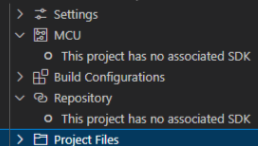
Just like on the picture below (there were 2 instances, each for every project: MASTER and SLAVE)
Both MCU and Repository options above were not detected. I do not know if that makes any difference or whether it's needed for further development, but it got me a little bit worried .
I also wanted to check if I can as easily recreate multicore project from scratch as I did for Eclipse based MCUXpresso IDE.
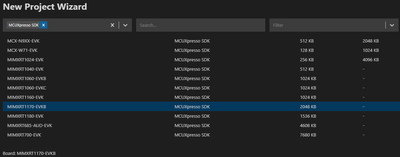
When I opened project Wizard I could see the following page:
1. Is it possible to create project based not on EVK BOARD but on the microcontroller instead?
i.e. I'd like the new project to be dedicated for a microcontroller like I did in the "old" way in IDE
The reason I want to do it this way is to avoid any "bloat" modules/files, etc. that is not relevant for my microcontroller, since I have my own custom board. It has nothing to do with evaluation kit. Unless I have some wrong understanding about that SDK EVK/EVKB part and I should not worry about it.
In MCUXpresso IDE I can do the following

After that, I can specify that I want the following project to have a role either of Standalone, MASTER or SLAVE

2. Since I do not see this option ATM, does it mean it's not yet supported (or never will be)?
3. Maybe I should create the project in the MCUXpresso IDE first, and then import it to the vscode?
Please let me know if I made some mistake in configuration or if you require so more information.
Best regards,
Michael

 EdwinHz
- 新着としてマーク
- ブックマーク
- 購読
- ミュート
- RSS フィードを購読する
- ハイライト
- 印刷
- 不適切なコンテンツを報告
Hi @mimlo,
1. Currently it is not possible to make a project based on a MCU SDK, since only the Board SDK are available.
2. I wouldn't be able to tell you whether this feature is going to be supported on the future.
3. Yes, I recommend you do that instead. Make sure to create the project and leave all of the files it is created with. Do not delete any of the files as this might result in missing dependencies.
BR,
Edwin.
