
- Forums
- Product Forums
- General Purpose MicrocontrollersGeneral Purpose Microcontrollers
- i.MX Forumsi.MX Forums
- QorIQ Processing PlatformsQorIQ Processing Platforms
- Identification and SecurityIdentification and Security
- Power ManagementPower Management
- Wireless ConnectivityWireless Connectivity
- RFID / NFCRFID / NFC
- Advanced AnalogAdvanced Analog
- Neural Processing UnitsNeural Processing Units
- MCX Microcontrollers
- S32G
- S32K
- S32V
- MPC5xxx
- Other NXP Products
- S12 / MagniV Microcontrollers
- Powertrain and Electrification Analog Drivers
- Sensors
- Vybrid Processors
- Digital Signal Controllers
- 8-bit Microcontrollers
- ColdFire/68K Microcontrollers and Processors
- PowerQUICC Processors
- OSBDM and TBDML
- S32M
- S32Z/E
-
- Solution Forums
- Software Forums
- MCUXpresso Software and ToolsMCUXpresso Software and Tools
- CodeWarriorCodeWarrior
- MQX Software SolutionsMQX Software Solutions
- Model-Based Design Toolbox (MBDT)Model-Based Design Toolbox (MBDT)
- FreeMASTER
- eIQ Machine Learning Software
- Embedded Software and Tools Clinic
- S32 SDK
- S32 Design Studio
- GUI Guider
- Zephyr Project
- Voice Technology
- Application Software Packs
- Secure Provisioning SDK (SPSDK)
- Processor Expert Software
- Generative AI & LLMs
-
- Topics
- Mobile Robotics - Drones and RoversMobile Robotics - Drones and Rovers
- NXP Training ContentNXP Training Content
- University ProgramsUniversity Programs
- Rapid IoT
- NXP Designs
- SafeAssure-Community
- OSS Security & Maintenance
- Using Our Community
-
- Cloud Lab Forums
-
- Knowledge Bases
- ARM Microcontrollers
- i.MX Processors
- Identification and Security
- Model-Based Design Toolbox (MBDT)
- QorIQ Processing Platforms
- S32 Automotive Processing Platform
- Wireless Connectivity
- CodeWarrior
- MCUXpresso Suite of Software and Tools
- MQX Software Solutions
- RFID / NFC
- Advanced Analog
- Neural Processing Units
-
- NXP Tech Blogs
- Home
- :
- MCUXpresso软件和工具
- :
- MCUXpresso安全指配工具
- :
- Re: Unable to find flashloader script init_flashloader_win.bat
Unable to find flashloader script init_flashloader_win.bat
Unable to find flashloader script init_flashloader_win.bat

I'm unable to use the SEC to do things like check OTP fuses, write an image, check flashloader... whenever these operations try to communicate with the flashloader the SEC will close instantly.
When checking the log, it looks like it tries to find the script "\secure_provisioning\gen_scripts\init_flashloader_win.bat" however this file doesn't exist in my installation and I'm not sure why?
Am I missing a step to build this?

 marek-trmac
Hi Aaron,
could you confirm what version of the tool are you using?
Could you start the tool with parameter -v (securep.exe -v) and check the console? There should be additional details about the problem. If this does not help you kindly share the console output.
Also I'd recommend to re-install the tool.
Marek
NOTE: If you find the answer useful, kindly click on [ACCEPT AS SOLUTION] button
 marek-trmac
Hi Aaron,
I do not see any problem in the log. What action were you doing in GUI? Have you seen any error in the GUI?
It would be good to report the problem more consistently so we can reproduce it. Is your board connected prior the operation? Can you start with connection configuration in "main menu > Target > Connection" and try to use "Test connection"? Does this work? Does build bootable image work?
We would need more context to be able to help.
Are you able to describe a step by step process how to reproduce the issue, for example:
- create workspace for RT117x
- assign any source image
- build
- connect the board
- switch board to ISP mode and reset
- hit Image Write button
- observation: error, see log attached, and screenshot from GUI
Marek
NOTE: If you find the answer useful, kindly click on [ACCEPT AS SOLUTION] button
There are no issues with when executing securep.exe -v, but these do not include the script init_flashloader_win.bat
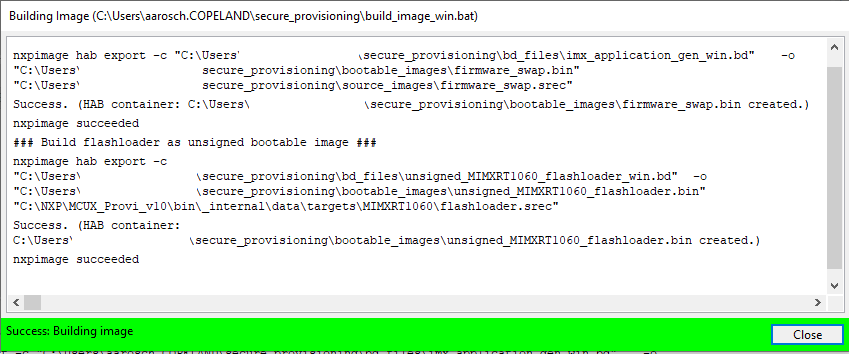
Please see the attached images. I am able to connect and build an image, but I am not able to write the image. I believe this is because the SEC is looking for the init_flashload_win.bat file but its missing.
I have reinstalled the SEC in Administrator mode but the issue still persists.

 marek-trmac
Hi Aaron,
so, summary of you issue:
- you can create workspace for i.MX RT106x processor
- you can build unsigned image
- you can connect the board
- when you hit Write Image button, it fails because the flashloader cannot be initialized
Is that right?
You said init_flashloader script is missing in your workspace, but on the screenshot named "no flashloader edit.png" I can see the script was started and it does some actions (for example Parse arguments). Also during the build I can see the flashloader app itself is prepared to your workspace.
Based on this info, I suppose you have some custom hardware and the flashloader does not start on your hardware. Can you please doublecheck the script and confirm?
I think the init_flashloader contains echo off, so we do not see all details what's executed. May be, you can comment-out the echo off and look at the details.
BTW: Still not confirmed, but I suppose you are using latest version of the tool.
Marek
NOTE: If you find the answer useful, kindly click on [ACCEPT AS SOLUTION] button
Marek, please see the following responses to your comment:
so, summary of you issue:
- you can create workspace for i.MX RT106x processor
- you can build unsigned image
- you can connect the board
- when you hit Write Image button, it fails because the flashloader cannot be initialized
Is that right?
Yes this is correct.
You said init_flashloader script is missing in your workspace, but on the screenshot named "no flashloader edit.png" I can see the script was started and it does some actions (for example Parse arguments). Also during the build I can see the flashloader app itself is prepared to your workspace.
The log may say that it is "Executing script" and parsing arguments however I am sure there is no script at the location 'secure_provisioning\gen_scripts\init_flashloader_win.bat'. Also, there is an error with return code 2 immediately after this statement. Maybe its possible the log would print that the script is executing even if the file didn't exist?
Based on this info, I suppose you have some custom hardware and the flashloader does not start on your hardware. Can you please doublecheck the script and confirm?
Yes it is custom hardware. It does look like the flashloader is not starting. I'm able to program the board using MCUXpresso... not sure if this would involve the flashloader or not...
I think the init_flashloader contains echo off, so we do not see all details what's executed. May be, you can comment-out the echo off and look at the details.
I don't have this file so I can't remove the echo off.
BTW: Still not confirmed, but I suppose you are using latest version of the tool.
It's version 10.0.
marek-trmac
Hi Aaron
I tried same use case on my computer, and the script is created. You can identify the script the following way: open the workspace, where flashloader failed, and go to "main menu > Target > Connection" and hit the black button on the bottom of the dialog to open terminal

This will start terminal in your workspace. In the terminal run the following commands:
cd gen_scripts
dir
On my computer the script was created in this folder. I do not have any board right now, so the script fails with the following error:

Also, during the write operation, (securep.exe -v), the console contains:

It would be good if you try the same and share the console output AFTER you reproduce the problem. Console content you sent previously contains only build operation, while the log from GUI shows the init_flashloader script was executed.
Also kindly confirm whether you could locate the script in your workspace.
Marek
NOTE: If you find the answer useful, kindly click on [ACCEPT AS SOLUTION] button
 liborukropec
Hi Aaron,
- could you please share more details, may be the whole log before it fails?
- Could you confirm whether you have "space" or other special character ()[]; in the workspace path? Please try create path without spaces and only with english alphabetical letters to limit the potential issues.
however this file doesn't exist in my installation and I'm not sure why?
This file is created in your SEC tool workspace.
Regards,
Libor
Libor,
Workspace path is C:\Users\username\secure_provisioning (I believe this is the default path)
Log when checking OTP fuses:
SDPHOST read 0x400d8262 2 >>> [108, 0]
Executing script C:\Users\username\secure_provisioning\gen_scripts\init_flashloader_win.bat
ERROR: Script failed with return code: [2]ERROR
### SCRIPT: Starting flashloader: C:\Users\username\secure_provisioning\gen_scripts\init_flashloader_win.bat
### Parse input arguments ###
### Check presence of FlashLoader ###
### RESULT of the script `Starting flashloader`: Failure (return code = [2]ERROR)
Status of the operation: Failure: Starting flashloader
Writing an image:
##########################################################################################################
Start flashloader - operation started at 2025-03-18 14:39:50
##########################################################################################################
Executing script C:\Users\username\secure_provisioning\gen_scripts\init_flashloader_win.bat
ERROR: Script failed with return code: [2]ERROR
### SCRIPT: Starting flashloader: C:\Users\username\secure_provisioning\gen_scripts\init_flashloader_win.bat
### Parse input arguments ###
### Check presence of FlashLoader ###
### RESULT of the script `Starting flashloader`: Failure (return code = [2]ERROR)
Status of the operation: Failure: Starting flashloader
