
- Forums
- Product Forums
- General Purpose MicrocontrollersGeneral Purpose Microcontrollers
- i.MX Forumsi.MX Forums
- QorIQ Processing PlatformsQorIQ Processing Platforms
- Identification and SecurityIdentification and Security
- Power ManagementPower Management
- Wireless ConnectivityWireless Connectivity
- RFID / NFCRFID / NFC
- Advanced AnalogAdvanced Analog
- MCX Microcontrollers
- S32G
- S32K
- S32V
- MPC5xxx
- Other NXP Products
- S12 / MagniV Microcontrollers
- Powertrain and Electrification Analog Drivers
- Sensors
- Vybrid Processors
- Digital Signal Controllers
- 8-bit Microcontrollers
- ColdFire/68K Microcontrollers and Processors
- PowerQUICC Processors
- OSBDM and TBDML
- S32M
- S32Z/E
-
- Solution Forums
- Software Forums
- MCUXpresso Software and ToolsMCUXpresso Software and Tools
- CodeWarriorCodeWarrior
- MQX Software SolutionsMQX Software Solutions
- Model-Based Design Toolbox (MBDT)Model-Based Design Toolbox (MBDT)
- FreeMASTER
- eIQ Machine Learning Software
- Embedded Software and Tools Clinic
- S32 SDK
- S32 Design Studio
- GUI Guider
- Zephyr Project
- Voice Technology
- Application Software Packs
- Secure Provisioning SDK (SPSDK)
- Processor Expert Software
- Generative AI & LLMs
-
- Topics
- Mobile Robotics - Drones and RoversMobile Robotics - Drones and Rovers
- NXP Training ContentNXP Training Content
- University ProgramsUniversity Programs
- Rapid IoT
- NXP Designs
- SafeAssure-Community
- OSS Security & Maintenance
- Using Our Community
-
- Cloud Lab Forums
-
- Knowledge Bases
- ARM Microcontrollers
- i.MX Processors
- Identification and Security
- Model-Based Design Toolbox (MBDT)
- QorIQ Processing Platforms
- S32 Automotive Processing Platform
- Wireless Connectivity
- CodeWarrior
- MCUXpresso Suite of Software and Tools
- MQX Software Solutions
- RFID / NFC
- Advanced Analog
-
- NXP Tech Blogs
- Home
- :
- MCUXpresso Software and Tools
- :
- MCUXpresso SDK Knowledge Base
- :
- Writing your first Azure RTOS application with MCUXpresso SDK
Writing your first Azure RTOS application with MCUXpresso SDK
- Subscribe to RSS Feed
- Mark as New
- Mark as Read
- Bookmark
- Subscribe
- Printer Friendly Page
- Report Inappropriate Content
Writing your first Azure RTOS application with MCUXpresso SDK
Writing your first Azure RTOS application with MCUXpresso SDK
1 Introduction
Azure RTOS is an embedded development suite including a small but powerful operating system that provides reliable, ultra-fast performance for resource-constrained devices.
Azure RTOS include 5 components. In project, it is compiled as 5 libs
- Azure RTOS ThreadX: It is the kernel of Azure RTOS, it provides advanced scheduling.
- Azure RTOS FileX(LevelX): An embedded FAT file system that offers optional fault tolerant features.
- Azure RTOS NetX Duo: An IPv4/IPv6 network stack.
- Azure RTOS GUIX: a complete design environment and run-time to create and maintain 2D graphical user interfaces
- Azure RTOS USBX: A USB stack that provides host, device and OTG support.
2 Basic Threadx Structure
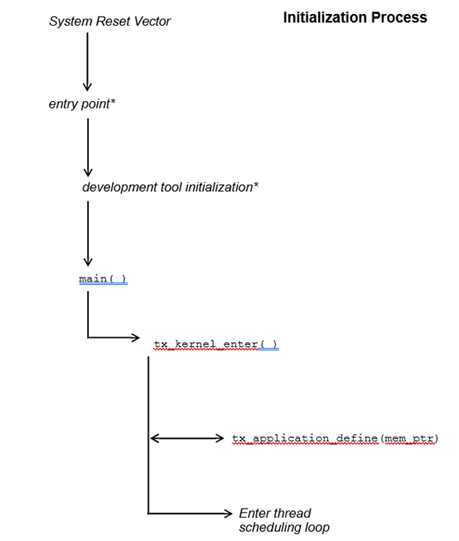
Below picture shows the initialization process of Azure RTOS.
2.1 main function
In main function, we can set up the processor, initialize the board. For most applications, the main function simply calls tx_kernel_enter, which is the entry into threadx.
2.2 tx_kernel_enter
This function is the first ThreadX function called during initialization. It is important to note that this routine never returns. The processing of this function is relatively simple. It calls several ThreadX initialization functions, calls the application define function, and then invokes the scheduler.
2.3 Application Definition Function
The tx_application_define function defines all of the initial application threads, queues, semaphores, mutexes, event flags, memory pools, and timers. It is also possible to create and delete system resources from threads during the normal operation of the application. However, all initial application resources are defined here.
When tx_application_define returns, control is transferred to the thread scheduling loop. This marks the end of initialization.
2.4 your thread entry
Every thread is just an infinite loop, that is what your code mainly about.
2.5 important files
tx_api.h : C header file containing all system equates, data structures, and service prototypes. All application files that use ThreadX api should include this header file.
tx_port.h : C header files containing all development-tool and target specific data definitions and structures.
3 Build a ThreadX application
There are four steps required to build a ThreadX application.
- Include the tx_api.h file in all application files that use ThreadX services or data structures.
- Create the standard C main function. This function must eventually call tx_kernel_enter to start ThreadX. Application-specific initialization that does not involve ThreadX may be added prior to entering the kernel.
- Create the tx_application_define function. This is where the initial system resources are created. Examples of system resources include threads, queues, memory pools, event flags groups, mutexes, and semaphores.
- Compile application source and link with the ThreadX run-time library tx.lib. The resulting image can be downloaded to the target and executed!
4 Simple demo
#include "tx_api.h"
unsigned long my_thread_counter = 0;
TX_THREAD my_thread;
main( )
{
/* Enter the ThreadX kernel. */
tx_kernel_enter( );
}
void tx_application_define(void *first_unused_memory)
{
/* Create my_thread! */
tx_thread_create(&my_thread, "My Thread",
my_thread_entry, 0x1234, first_unused_memory, 1024,
3, 3, TX_NO_TIME_SLICE, TX_AUTO_START);
}
void my_thread_entry(ULONG thread_input)
{
/* Enter into a forever loop. */
while(1)
{
/* Increment thread counter. */
my_thread_counter++;
/* Sleep for 1 tick. */
tx_thread_sleep(1);
}
}
5 Debug with TAD
The Thread Aware Debugging (TAD) tool is a useful and powerful instrument to debug the Azure RTOS application. With MCUXpresso IDE 11.4.1, we can show the Azure RTOS ThreasX TAD views. We take the evkmimxrt1060_threadx_demo as example.

Theads view shows the threads in a table, we can see the priority, state, stack usage for each thread.

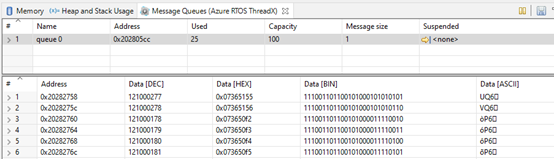
Message Queues view shows the message queues in a table
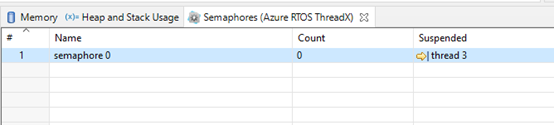
Semaphores view shows the semaphores in a table
Suspended means the threads that are suspended and waiting for access to current resource.
Mutexes View shows the information about mutexes used inside the application

Event flags view shows the event flags in a table. Suspended : threads that are suspended and waiting for access to current resource.

Reference doc:
https://docs.microsoft.com/en-us/azure/rtos/
