
- Forums
- Product Forums
- General Purpose MicrocontrollersGeneral Purpose Microcontrollers
- i.MX Forumsi.MX Forums
- QorIQ Processing PlatformsQorIQ Processing Platforms
- Identification and SecurityIdentification and Security
- Power ManagementPower Management
- Wireless ConnectivityWireless Connectivity
- RFID / NFCRFID / NFC
- Advanced AnalogAdvanced Analog
- Neural Processing UnitsNeural Processing Units
- MCX Microcontrollers
- S32G
- S32K
- S32V
- MPC5xxx
- Other NXP Products
- S12 / MagniV Microcontrollers
- Powertrain and Electrification Analog Drivers
- Sensors
- Vybrid Processors
- Digital Signal Controllers
- 8-bit Microcontrollers
- ColdFire/68K Microcontrollers and Processors
- PowerQUICC Processors
- OSBDM and TBDML
- S32M
- S32Z/E
-
- Solution Forums
- Software Forums
- MCUXpresso Software and ToolsMCUXpresso Software and Tools
- CodeWarriorCodeWarrior
- MQX Software SolutionsMQX Software Solutions
- Model-Based Design Toolbox (MBDT)Model-Based Design Toolbox (MBDT)
- FreeMASTER
- eIQ Machine Learning Software
- Embedded Software and Tools Clinic
- S32 SDK
- S32 Design Studio
- GUI Guider
- Zephyr Project
- Voice Technology
- Application Software Packs
- Secure Provisioning SDK (SPSDK)
- Processor Expert Software
- Generative AI & LLMs
-
- Topics
- Mobile Robotics - Drones and RoversMobile Robotics - Drones and Rovers
- NXP Training ContentNXP Training Content
- University ProgramsUniversity Programs
- Rapid IoT
- NXP Designs
- SafeAssure-Community
- OSS Security & Maintenance
- Using Our Community
-
- Cloud Lab Forums
-
- Knowledge Bases
- ARM Microcontrollers
- i.MX Processors
- Identification and Security
- Model-Based Design Toolbox (MBDT)
- QorIQ Processing Platforms
- S32 Automotive Processing Platform
- Wireless Connectivity
- CodeWarrior
- MCUXpresso Suite of Software and Tools
- MQX Software Solutions
- RFID / NFC
- Advanced Analog
- Neural Processing Units
-
- NXP Tech Blogs
- Home
- :
- MCUXpressoソフトウェアとツール
- :
- MCUXpresso IDE
- :
- Where does MCUX IDE get its default J-Link path from?
Where does MCUX IDE get its default J-Link path from?
- RSS フィードを購読する
- トピックを新着としてマーク
- トピックを既読としてマーク
- このトピックを現在のユーザーにフロートします
- ブックマーク
- 購読
- ミュート
- 印刷用ページ
Where does MCUX IDE get its default J-Link path from?

- 新着としてマーク
- ブックマーク
- 購読
- ミュート
- RSS フィードを購読する
- ハイライト
- 印刷
- 不適切なコンテンツを報告
Today I cleaned out all my old SEGGER J-Link software installations, then installed the latest (v8.12e) into C:\Program Files\SEGGER\JLink ("update existing installation"). I just went to debug one of my programs, and the IDE is complaining that J-Link support is unavailable (while conveniently not mentioning where it's looking).
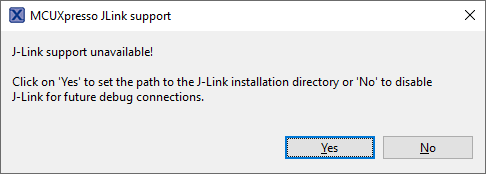
If I click Yes, I'm given a file dialog to select the J-Link folder, which gets filled into the J-Link options (see below). Alternately, if I go into Window / Preferences, search "J", and select J-Link Options, I can see the options dialog where at the top is listed what MCUX thinks is my default J-Link directory:
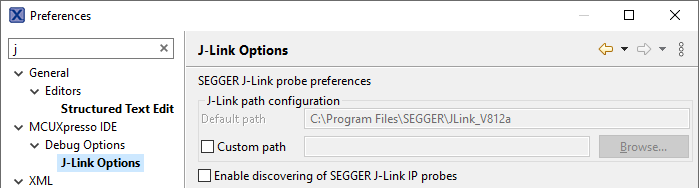
I did have J-Link installed to that path, but I removed it. And I now have "C:\Program Files\SEGGER\JLink" in the "Custom path" and everything works fine.
My question is... where does MCUX IDE get the "Default path" from? It's not an environment variable, I checked. Is it set when a given version of MCUX is installed, and you can't change it again for this installation? As I said, I've set a custom path to get myself working, but I'm just curious how MCUX picks the default path.
Dana M.

 Celeste_Liu
- 新着としてマーク
- ブックマーク
- 購読
- ミュート
- RSS フィードを購読する
- ハイライト
- 印刷
- 不適切なコンテンツを報告
Hello @dmarks_ls ,
Thanks for your post. You can refer to the "MCUXpresso IDE xx.x User Guide". Taking MCUXpresso 24.9 as an example, the path is C:\NXP\MCUXpressoIDE_24.9.25.

In the "13.9.1 SEGGER software installation" section, it provides a detailed description of how the IDE locates a SEGGER installation.

Hope it can help you. Any new issues, welcome to create the new post.
Have a good day,
Celeste
----------------------------------------------------------------------------------------------------------------------
Note: If this post answers your question, please click the "ACCEPT AS SOLUTION" button. Thank you!
----------------------------------------------------------------------------------------------------------------------
