
- Forums
- Product Forums
- General Purpose MicrocontrollersGeneral Purpose Microcontrollers
- i.MX Forumsi.MX Forums
- QorIQ Processing PlatformsQorIQ Processing Platforms
- Identification and SecurityIdentification and Security
- Power ManagementPower Management
- Wireless ConnectivityWireless Connectivity
- RFID / NFCRFID / NFC
- Advanced AnalogAdvanced Analog
- MCX Microcontrollers
- S32G
- S32K
- S32V
- MPC5xxx
- Other NXP Products
- S12 / MagniV Microcontrollers
- Powertrain and Electrification Analog Drivers
- Sensors
- Vybrid Processors
- Digital Signal Controllers
- 8-bit Microcontrollers
- ColdFire/68K Microcontrollers and Processors
- PowerQUICC Processors
- OSBDM and TBDML
- S32M
- S32Z/E
-
- Solution Forums
- Software Forums
- MCUXpresso Software and ToolsMCUXpresso Software and Tools
- CodeWarriorCodeWarrior
- MQX Software SolutionsMQX Software Solutions
- Model-Based Design Toolbox (MBDT)Model-Based Design Toolbox (MBDT)
- FreeMASTER
- eIQ Machine Learning Software
- Embedded Software and Tools Clinic
- S32 SDK
- S32 Design Studio
- GUI Guider
- Zephyr Project
- Voice Technology
- Application Software Packs
- Secure Provisioning SDK (SPSDK)
- Processor Expert Software
- Generative AI & LLMs
-
- Topics
- Mobile Robotics - Drones and RoversMobile Robotics - Drones and Rovers
- NXP Training ContentNXP Training Content
- University ProgramsUniversity Programs
- Rapid IoT
- NXP Designs
- SafeAssure-Community
- OSS Security & Maintenance
- Using Our Community
-
- Cloud Lab Forums
-
- Knowledge Bases
- ARM Microcontrollers
- i.MX Processors
- Identification and Security
- Model-Based Design Toolbox (MBDT)
- QorIQ Processing Platforms
- S32 Automotive Processing Platform
- Wireless Connectivity
- CodeWarrior
- MCUXpresso Suite of Software and Tools
- MQX Software Solutions
- RFID / NFC
- Advanced Analog
-
- NXP Tech Blogs
- Home
- :
- MCUXpresso Software and Tools
- :
- MCUXpresso IDE
- :
- Re: Weird screen layout issues
Weird screen layout issues
- Subscribe to RSS Feed
- Mark Topic as New
- Mark Topic as Read
- Float this Topic for Current User
- Bookmark
- Subscribe
- Mute
- Printer Friendly Page
Weird screen layout issues

- Mark as New
- Bookmark
- Subscribe
- Mute
- Subscribe to RSS Feed
- Permalink
- Report Inappropriate Content
I'm trying to make the switch to MCUXpresso (mostly from CW 10.7, but with a few KDS projects) and some of the screen layout issues are driving me nuts. Here's an example:
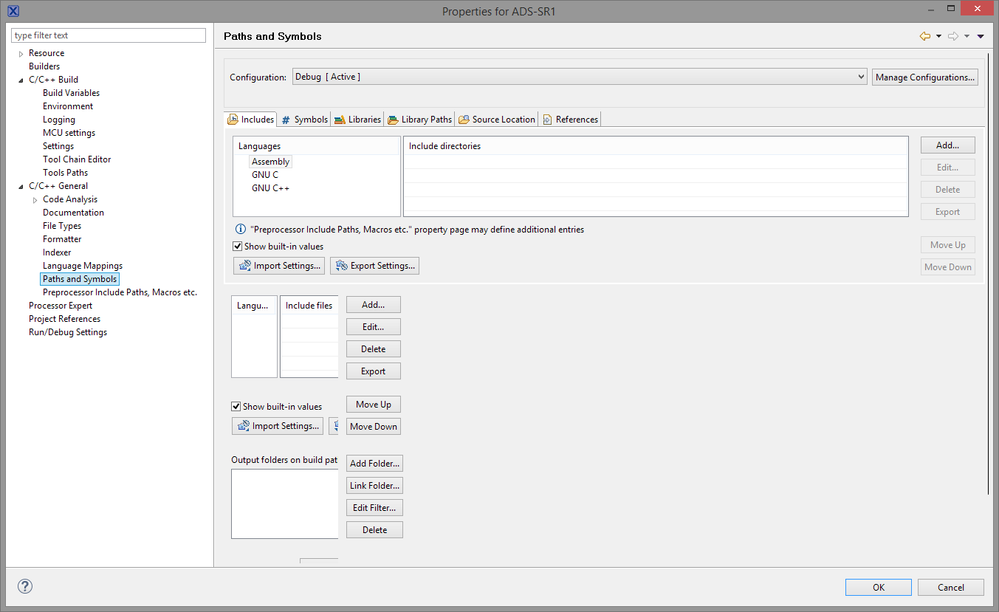
The lower half of the pane is all scrunched over and half invisible, and I can't seem to do anything to resize it. Does it show up this way for everyone, or is this something that happened when I changed themes? Changing back doesn't fix it. The annoying tiny scroll bars might be a theme issue, but that sounds like it's fixable.
KDS always had glitchy layout for me as well, particularly in Processor Expert. Nothing seems to retain window size or layout settings between uses, and the default layouts are almost universally unusable. Everything requires a frustrating amount of scrolling or resizing.
My greatest hope for MCUXpresso is that it'll keep us on a recent enough version of Eclipse that there will actually be fixes for it - I'm tired of paying an annual subscription for CodeWarrior and having to live with bugs that were fixed years ago in vanilla Eclipse. I can't cut and paste code without my breakpoints moving around, for example.
Thanks,
Scott

 BlackNight
- Mark as New
- Bookmark
- Subscribe
- Mute
- Subscribe to RSS Feed
- Permalink
- Report Inappropriate Content
Hi Scott,
I have never seen something like this you are showing in your screenshot.
This is how it should look:
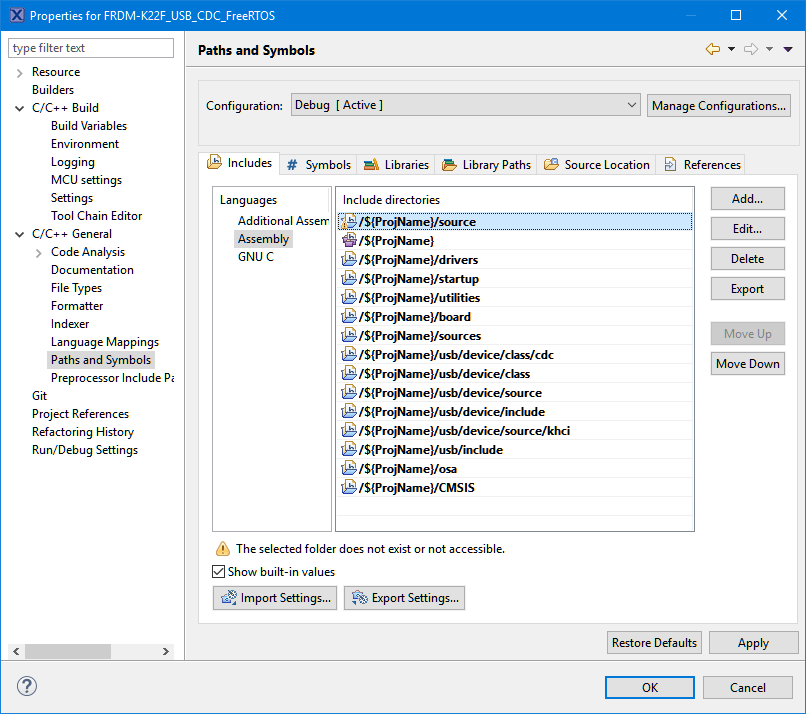
I'm wondering what is causing this strange arrangement on your end. I know that some rather exotic graphic cards/chips and drivers have caused issues, so maybe this could be a reason. One of my students had some UI elements not shown poperly, and the reason was an outdated BIOS (well, probably that was not the cause) and outdated/buggy display drives for his notebook graphic controller. Can you check that it is not that problem for you?
As you see similar things in KDS, this let me believe it is something on your machine and outside of Eclipse causing what you see.
About the layout settings/window sizes: these are stored inside your workspace .metadata folder. I have seen issues with users who have copied/moved their workspace .metadata (never, never, never ever move/change/copy/share the .meatadata folder, or have it shared over DropBox/etc): make sure you have a fresh new workspace, and do not share it between Eclipse versions.
Cut and pasting code with breakpoints: the breakpoints are retained (as you can see in the breakpoints view).
But the marker on the left side of the source view is removed if you cut the text which sounds like a logical thing.
And pasting the source text is pasting the source text (this is what you have copied), and not the breakpoints 'on the source', as they are really not part of the source text, but part of the breakpoint list. So to me this is expected behaviour, and is the same across all Eclipse versions up to Oxygen. If you want to copy/paste breakpoints, then you can do this in the breakpoints view. I hope this makes sense.
I hope this helps,
Erich
- Mark as New
- Bookmark
- Subscribe
- Mute
- Subscribe to RSS Feed
- Permalink
- Report Inappropriate Content
This was the first part of my reply, that kept generating an error when I tried to post:
First, thanks again for your blog. It's the only way I was able to get through importing a KDS project to MCUX. If you ever get a chance, I'd like to see a post describing some of the players - where all of the components come from, what they're for, and how they relate to the others. E.g., Eclipse is an open source IDE developed by the Eclipse Foundation and used as the basis of CW10, KDS, and MCUX (touching on CDT would be good), gcc comes from the FSF and ARM uses it in their toolchain, etc. I lose track of what some of the plugins are for and particularly with CodeWarrior I feel like Freescale tried hard to gloss over the whole thing. I don't know how much in any of the IDEs is specific to Freescale/NXP and how much is open source. Some of these things are fairly obvious (gcc has been around for decades and any developer probably knows about it) but there are a lot of pieces to keep track of.
BlackNight
- Mark as New
- Bookmark
- Subscribe
- Mute
- Subscribe to RSS Feed
- Permalink
- Report Inappropriate Content
Hi Scott,
about 'what is what': About Processor Expert I wrote something in Overview: Processor Expert | MCU on Eclipse
As for the other pieces, it depends on the actual IDE as things might be different.
As for KDS: this is pretty much stock Eclipse/FSF/ARM/GNU Arm Eclipse with the exception of Processor Expert, the NPW (New project wizard) plus a few rather small extensions made by Somnium (a UK company which does not exist any more), notably a patch when you press 'debug' to show up a dialog with the availble connections.
Other than that, you can put together the pieces yourself as a DIY eclipse toolchain.
There is a tutorial about how to do this with
- KEPLER: Constructing a Classroom IDE with Eclipse for ARM | MCU on Eclipse
- MARS: Going to Mars: Building a DIY Eclipse IDE for ARM Embedded Microcontrollers | MCU on Eclipse and with
- Oxygen: Breathing with Oxygen: DIY ARM Cortex-M C/C++ IDE and Toolchain with Eclipse Oxygen | MCU on Eclipse
As for the components: there are obviously the ones supplied by NXP, but there are as well the ones contributed by the McuOnEclipse university project (latest releease McuOnEclipse Components: 25-Sept-2017 Release | MCU on Eclipse )
I hope this helps,
Erich
- Mark as New
- Bookmark
- Subscribe
- Mute
- Subscribe to RSS Feed
- Permalink
- Report Inappropriate Content
Thanks. GNU MCU Eclipse is one of the components I'm still not clear on - and the name changed since your post about it. I can see what it's for but I'm not sure how it relates or compares to the build tools used by KDS and MCUX. No need to go into it here and now, though. I have firmware to get done in the next month and there's no way I'm switching a major project until next year - I'm out of hours in the day unless I can figure out how to stop needing sleep. I'm also having to tackle some front end web development for this project and I'm many years out of date, and I'm getting major tool fatigue trying to keep up already.
https://hackernoon.com/how-it-feels-to-learn-javascript-in-2016-d3a717dd577f
Thanks again,
Scott
- Mark as New
- Bookmark
- Subscribe
- Mute
- Subscribe to RSS Feed
- Permalink
- Report Inappropriate Content
Ok, apparently the word 'l o v e' is forbidden here. I would very much like to see a post about those components, but apparently I'm not permitted to like it that much.
WTF, NXP? Sheesh...
- Mark as New
- Bookmark
- Subscribe
- Mute
- Subscribe to RSS Feed
- Permalink
- Report Inappropriate Content
I updated the graphics driver (it was only a few months old since I had to upgrade it for Fusion 360) and rebooted, reset all of the theme settings, and it still comes up with that weird duplicated paths and symbols listing. In CW 10.7 it looks exactly like it's supposed to. KDS is fine as well. I just checked MCUX on the Windows 7 machine at the other desk and it looks OK there. I'm not too worried about it right now, but if there's a place to report a problem, I'll do that.
My workspace settings and window layouts are fine. It's preferences dialogs that don't consistently retain sizing. That seems to be universal to Eclipse, since my vanilla Mars install that I use for RSE does it too. It's just annoying, since the dialogs seem sized for about a 640x480 screen. (635 x 555 is actually how project properties comes up.)
KDS's layout isn't glitchy, exactly, it's just like it wasn't very well thought out:
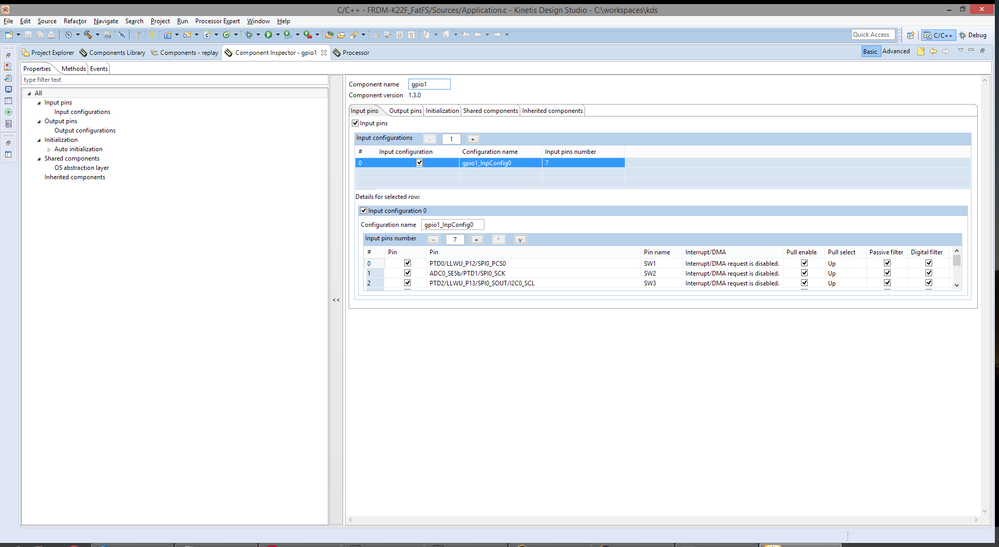
You can fit a whopping 3 I/O pins on the screen at a time, no matter how much space you have - it just doesn't resize, and you have to scroll around to see anything. It's like coding while looking through a drinking straw. There's no need for it, and it makes it feel like the tools were designed by people who never had to use them on a daily basis.
The CW 10 breakpoint behavior is definitely buggy. To illustrate: I set a breakpoint on line 292. I paste in a new line at 291. The breakpoint still appears to be at the right place, now like 293. If I go to line 293 and try to remove it, nothing happens. If I try to set one at 292, nothing happens the first time, but the second time it sets it. Now I can go to 293 and remove that breakpoint. If I run it after that paste operation, with the breakpoint now at 293, execution stops at line 292 - and in fact once the code display comes up in the debug perspective, the breakpoint is now shown to be at 292.
This bites me all the time. I'll have multiple breakpoints set further down the file, I'll move lines around up above, and now my code stops at all the wrong places. I just tried it in MCUX and the behavior is the same.
If I set a breakpoint at 293, paste at 292 (breakpoint now showing at 294), switch to another editor window and switch back, now I have two breakpoint markers, at 293 and 294. Removing the one at 293 removes both. If you try to remove the one at 294 first, no amount of toggling changes it until you remove the one at 293.
Scott
BlackNight
- Mark as New
- Bookmark
- Subscribe
- Mute
- Subscribe to RSS Feed
- Permalink
- Report Inappropriate Content
Hi Scott,
about the 3 I/O pins view: I recommend to use the classic 'no-tabs' view as it is much better imho: Switching between ‘tabs’ and ‘no-tabs’ UI in Processor Expert | MCU on Eclipse
Erich
- Mark as New
- Bookmark
- Subscribe
- Mute
- Subscribe to RSS Feed
- Permalink
- Report Inappropriate Content
Ah, I had no idea that was an option! That's much better. I'll have to add that to the tally of beers I owe you. :smileywink:
Scott
BlackNight
- Mark as New
- Bookmark
- Subscribe
- Mute
- Subscribe to RSS Feed
- Permalink
- Report Inappropriate Content
I l_o_v_e beer :-)
- Mark as New
- Bookmark
- Subscribe
- Mute
- Subscribe to RSS Feed
- Permalink
- Report Inappropriate Content
I wrote along response to this but I'm getting an error when I try to post it. Let me see if this goes through and I'll try again.
 Alice_Yang
- Mark as New
- Bookmark
- Subscribe
- Mute
- Subscribe to RSS Feed
- Permalink
- Report Inappropriate Content
Hello Scott,
There isn't a method directly porting KDS or CW project to MCUXpresso IDE.
Please create a new project on MCUXpresso IDE, then copy and paste your original code into it.
You can have a look at this :
Moving to MCUXpresso IDE from Kinetis Design Studio
Have a great day,
TIC
-----------------------------------------------------------------------------------------------------------------------
Note: If this post answers your question, please click the Correct Answer button. Thank you!
-----------------------------------------------------------------------------------------------------------------------
