
- Forums
- Product Forums
- General Purpose MicrocontrollersGeneral Purpose Microcontrollers
- i.MX Forumsi.MX Forums
- QorIQ Processing PlatformsQorIQ Processing Platforms
- Identification and SecurityIdentification and Security
- Power ManagementPower Management
- Wireless ConnectivityWireless Connectivity
- RFID / NFCRFID / NFC
- Advanced AnalogAdvanced Analog
- Neural Processing UnitsNeural Processing Units
- MCX Microcontrollers
- S32G
- S32K
- S32V
- MPC5xxx
- Other NXP Products
- S12 / MagniV Microcontrollers
- Powertrain and Electrification Analog Drivers
- Sensors
- Vybrid Processors
- Digital Signal Controllers
- 8-bit Microcontrollers
- ColdFire/68K Microcontrollers and Processors
- PowerQUICC Processors
- OSBDM and TBDML
- S32M
- S32Z/E
-
- Solution Forums
- Software Forums
- MCUXpresso Software and ToolsMCUXpresso Software and Tools
- CodeWarriorCodeWarrior
- MQX Software SolutionsMQX Software Solutions
- Model-Based Design Toolbox (MBDT)Model-Based Design Toolbox (MBDT)
- FreeMASTER
- eIQ Machine Learning Software
- Embedded Software and Tools Clinic
- S32 SDK
- S32 Design Studio
- GUI Guider
- Zephyr Project
- Voice Technology
- Application Software Packs
- Secure Provisioning SDK (SPSDK)
- Processor Expert Software
- Generative AI & LLMs
-
- Topics
- Mobile Robotics - Drones and RoversMobile Robotics - Drones and Rovers
- NXP Training ContentNXP Training Content
- University ProgramsUniversity Programs
- Rapid IoT
- NXP Designs
- SafeAssure-Community
- OSS Security & Maintenance
- Using Our Community
-
- Cloud Lab Forums
-
- Knowledge Bases
- ARM Microcontrollers
- i.MX Processors
- Identification and Security
- Model-Based Design Toolbox (MBDT)
- QorIQ Processing Platforms
- S32 Automotive Processing Platform
- Wireless Connectivity
- CodeWarrior
- MCUXpresso Suite of Software and Tools
- MQX Software Solutions
- RFID / NFC
- Advanced Analog
- Neural Processing Units
-
- NXP Tech Blogs
- Home
- :
- MCUXpresso Software and Tools
- :
- MCUXpresso IDE
- :
- Re: MCUxPresso Gui Flash programmer
MCUxPresso Gui Flash programmer
- Subscribe to RSS Feed
- Mark Topic as New
- Mark Topic as Read
- Float this Topic for Current User
- Bookmark
- Subscribe
- Mute
- Printer Friendly Page

- Mark as New
- Bookmark
- Subscribe
- Mute
- Subscribe to RSS Feed
- Permalink
- Report Inappropriate Content
I am using MCUxPresso 10.0.2 with a K66 Freedom board using segger jlink. Debugging works fine. When I try to start the flash programmer gui I get an error message "Selected project doesn't contain LinkServer launch configuration!"
Any ideas?
Thanx
Tim
Solved! Go to Solution.

 ZhangJennie
- Mark as New
- Bookmark
- Subscribe
- Mute
- Subscribe to RSS Feed
- Permalink
- Report Inappropriate Content
Hi Tim,
MCUXpresso integrates Flash programmer, but it only supports LinkServer connection with that dialog, because it uses its internal (LPCLink/LinkServer) specific flash programming, and does not rely on the flash programming e.g. Segger or P&E does with their probes.
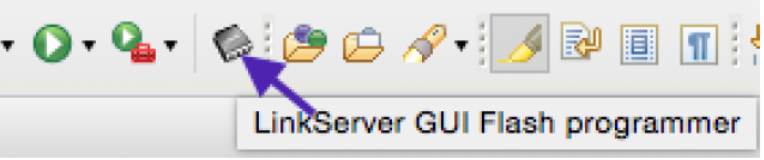
For more information, please refer "10.5 Using the LinkServer flash programmer" in MCUXpresso_IDE_User_Guide.pdf which is under MCUXpresso install.
Anyway, you can get the same functionality as KDS by configuring debug configurations. please refer Erich’s answer of this thread
https://community.nxp.com/message/896950?commentID=896950#comment-896950
Have a great day,
Jennie Zhang
-----------------------------------------------------------------------------------------------------------------------
Note: If this post answers your question, please click the Correct Answer button. Thank you!
-----------------------------------------------------------------------------------------------------------------------
- Mark as New
- Bookmark
- Subscribe
- Mute
- Subscribe to RSS Feed
- Permalink
- Report Inappropriate Content
Ok so does any one have any suggestions on how to program the flash on K66 freedom boards? I admit at this point I'm a bit lost.
 lpcxpresso_supp
- Mark as New
- Bookmark
- Subscribe
- Mute
- Subscribe to RSS Feed
- Permalink
- Report Inappropriate Content
We are investigating expanding the IDE's GUI Flash Programmer to support non-LinkServer debug probes in a future release. But in the immediate future, you have two possible ways forward - assuming your FRDM-K66 board has J-Link firmware programmed into its OpenSDA built in debug probe.
1) Replace the J-Link firmware with CMSIS-DAP (DAP-Link) firmware from : http://www.nxp.com/opensda. You will then be able to use the MCUXpresso IDE's built-in GUI Flash Programmer (as described in the MCUXpresso IDE User Guide).
2) Use the tools provided by SEGGER themselves to program flash. MCUXpresso IDE installs a version of the SEGGER software onto your PC and you can download and install the latest from SEGGER's website. For instance you can use the JLink executable (aka JLink Commander) with the "-CommandScript" to program flash from the command line (see section 3.2.3," Using command files" In the SEGGER J-Link User Guide for an example of this). And the "J-Link control panel" offers a way of doing this via a GUI interface.
3) The above two options should also be possible if you use an external debug probe too, such as an ~$20 LPC-Link2, which may give better programming speeds if this is something you are likely to do often (as well as improving debug performance).
Secondly, with respect to your comment "I power off the board and power back on the device will not run" this could be related to you creating/importing your project with Semihosting enabled to provide printf support via the debugger console(which requires a debugger connection to run).
One of the new features added in MCUXpresso IDE v10.1 was to provide a hard fault handler in projects which would allow them to execute even with no debugger in place. Please see the MCUXpresso IDE v10.1 User Guide for more details on this (for instance section13.4.1, "What is Semihosting?" and also section 10.3.1).
The other approach would be to create your projects with UART selected as the debug console mechanism rather than semihosting.
Regards,
MCUXpresso IDE Support
- Mark as New
- Bookmark
- Subscribe
- Mute
- Subscribe to RSS Feed
- Permalink
- Report Inappropriate Content
I have tried those suggestions. When I power off the board and power back on the device will not run. I have tried the reset button and no luck. My program will only run when attached to the debugger.
Any thing anyone can suggest?
Thanx
ZhangJennie
- Mark as New
- Bookmark
- Subscribe
- Mute
- Subscribe to RSS Feed
- Permalink
- Report Inappropriate Content
Hi Tim,
MCUXpresso integrates Flash programmer, but it only supports LinkServer connection with that dialog, because it uses its internal (LPCLink/LinkServer) specific flash programming, and does not rely on the flash programming e.g. Segger or P&E does with their probes.
For more information, please refer "10.5 Using the LinkServer flash programmer" in MCUXpresso_IDE_User_Guide.pdf which is under MCUXpresso install.
Anyway, you can get the same functionality as KDS by configuring debug configurations. please refer Erich’s answer of this thread
https://community.nxp.com/message/896950?commentID=896950#comment-896950
Have a great day,
Jennie Zhang
-----------------------------------------------------------------------------------------------------------------------
Note: If this post answers your question, please click the Correct Answer button. Thank you!
-----------------------------------------------------------------------------------------------------------------------
