
- Forums
- Product Forums
- General Purpose MicrocontrollersGeneral Purpose Microcontrollers
- i.MX Forumsi.MX Forums
- QorIQ Processing PlatformsQorIQ Processing Platforms
- Identification and SecurityIdentification and Security
- Power ManagementPower Management
- Wireless ConnectivityWireless Connectivity
- RFID / NFCRFID / NFC
- Advanced AnalogAdvanced Analog
- MCX Microcontrollers
- S32G
- S32K
- S32V
- MPC5xxx
- Other NXP Products
- S12 / MagniV Microcontrollers
- Powertrain and Electrification Analog Drivers
- Sensors
- Vybrid Processors
- Digital Signal Controllers
- 8-bit Microcontrollers
- ColdFire/68K Microcontrollers and Processors
- PowerQUICC Processors
- OSBDM and TBDML
- S32M
- S32Z/E
-
- Solution Forums
- Software Forums
- MCUXpresso Software and ToolsMCUXpresso Software and Tools
- CodeWarriorCodeWarrior
- MQX Software SolutionsMQX Software Solutions
- Model-Based Design Toolbox (MBDT)Model-Based Design Toolbox (MBDT)
- FreeMASTER
- eIQ Machine Learning Software
- Embedded Software and Tools Clinic
- S32 SDK
- S32 Design Studio
- GUI Guider
- Zephyr Project
- Voice Technology
- Application Software Packs
- Secure Provisioning SDK (SPSDK)
- Processor Expert Software
- Generative AI & LLMs
-
- Topics
- Mobile Robotics - Drones and RoversMobile Robotics - Drones and Rovers
- NXP Training ContentNXP Training Content
- University ProgramsUniversity Programs
- Rapid IoT
- NXP Designs
- SafeAssure-Community
- OSS Security & Maintenance
- Using Our Community
-
- Cloud Lab Forums
-
- Knowledge Bases
- ARM Microcontrollers
- i.MX Processors
- Identification and Security
- Model-Based Design Toolbox (MBDT)
- QorIQ Processing Platforms
- S32 Automotive Processing Platform
- Wireless Connectivity
- CodeWarrior
- MCUXpresso Suite of Software and Tools
- MQX Software Solutions
- RFID / NFC
- Advanced Analog
-
- NXP Tech Blogs
- Home
- :
- MCUXpresso软件和工具
- :
- MCUXpresso IDE
- :
- How to halt and resume execution of a program in debugger?
How to halt and resume execution of a program in debugger?

Above should occur continuously.
已解决! 转到解答。

 lpcxpresso_supp
Hi Amer,
From within the IDE there is no option to automatically force a target pause at a fixed time interval.
For Global Variables, you can monitor and log variables at frequencies from 1/2 to 10 seconds. Please see the Live Variables section in the MCUXpresso IDE User Guide.
For local variables, there is no similar solution due to the architecture of the underlying ARM core.
One approach might be to make use of some Eclipse advanced breakpoint properties. From here you can define and apply an action - such as resume (as shown below):
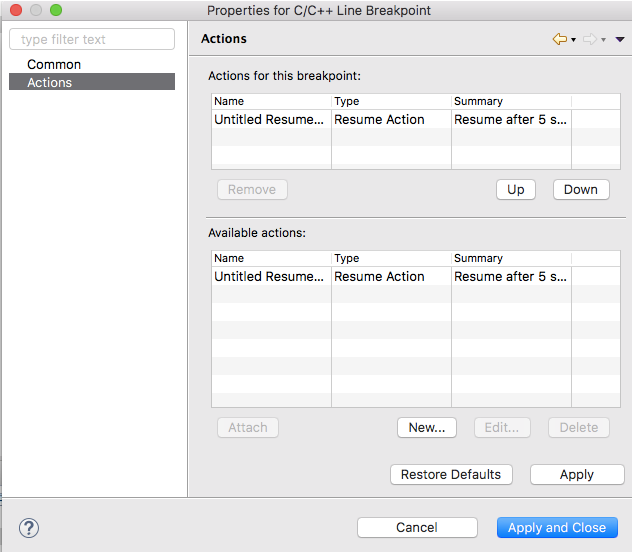
This will make the particular breakpoint resume execution once hit.
The next problem is to control when the breakpoint actually gets hit. Here you could force this by only entering the code with the breakpoint at a frequency of your choosing:
for example:
IF (some timed condition) {
<breakpoint this line with resume> ; sample local variable value
}
I have tested this using a LinkServer debug probe.
I hope this helps.
Yours,
MCUXpresso IDE Support
lpcxpresso_supp
Hi Amer,
From within the IDE there is no option to automatically force a target pause at a fixed time interval.
For Global Variables, you can monitor and log variables at frequencies from 1/2 to 10 seconds. Please see the Live Variables section in the MCUXpresso IDE User Guide.
For local variables, there is no similar solution due to the architecture of the underlying ARM core.
One approach might be to make use of some Eclipse advanced breakpoint properties. From here you can define and apply an action - such as resume (as shown below):
This will make the particular breakpoint resume execution once hit.
The next problem is to control when the breakpoint actually gets hit. Here you could force this by only entering the code with the breakpoint at a frequency of your choosing:
for example:
IF (some timed condition) {
<breakpoint this line with resume> ; sample local variable value
}
I have tested this using a LinkServer debug probe.
I hope this helps.
Yours,
MCUXpresso IDE Support
