
- Forums
- Product Forums
- General Purpose MicrocontrollersGeneral Purpose Microcontrollers
- i.MX Forumsi.MX Forums
- QorIQ Processing PlatformsQorIQ Processing Platforms
- Identification and SecurityIdentification and Security
- Power ManagementPower Management
- Wireless ConnectivityWireless Connectivity
- RFID / NFCRFID / NFC
- Advanced AnalogAdvanced Analog
- Neural Processing UnitsNeural Processing Units
- MCX Microcontrollers
- S32G
- S32K
- S32V
- MPC5xxx
- Other NXP Products
- S12 / MagniV Microcontrollers
- Powertrain and Electrification Analog Drivers
- Sensors
- Vybrid Processors
- Digital Signal Controllers
- 8-bit Microcontrollers
- ColdFire/68K Microcontrollers and Processors
- PowerQUICC Processors
- OSBDM and TBDML
- S32M
- S32Z/E
-
- Solution Forums
- Software Forums
- MCUXpresso Software and ToolsMCUXpresso Software and Tools
- CodeWarriorCodeWarrior
- MQX Software SolutionsMQX Software Solutions
- Model-Based Design Toolbox (MBDT)Model-Based Design Toolbox (MBDT)
- FreeMASTER
- eIQ Machine Learning Software
- Embedded Software and Tools Clinic
- S32 SDK
- S32 Design Studio
- GUI Guider
- Zephyr Project
- Voice Technology
- Application Software Packs
- Secure Provisioning SDK (SPSDK)
- Processor Expert Software
- Generative AI & LLMs
-
- Topics
- Mobile Robotics - Drones and RoversMobile Robotics - Drones and Rovers
- NXP Training ContentNXP Training Content
- University ProgramsUniversity Programs
- Rapid IoT
- NXP Designs
- SafeAssure-Community
- OSS Security & Maintenance
- Using Our Community
-
- Cloud Lab Forums
-
- Knowledge Bases
- ARM Microcontrollers
- i.MX Processors
- Identification and Security
- Model-Based Design Toolbox (MBDT)
- QorIQ Processing Platforms
- S32 Automotive Processing Platform
- Wireless Connectivity
- CodeWarrior
- MCUXpresso Suite of Software and Tools
- MQX Software Solutions
- RFID / NFC
- Advanced Analog
- Neural Processing Units
-
- NXP Tech Blogs
- Home
- :
- MCUXpressoソフトウェアとツール
- :
- MCUXpresso IDE
- :
- Re: Debugger crashes when target resets?
Debugger crashes when target resets?
- RSS フィードを購読する
- トピックを新着としてマーク
- トピックを既読としてマーク
- このトピックを現在のユーザーにフロートします
- ブックマーク
- 購読
- ミュート
- 印刷用ページ

- 新着としてマーク
- ブックマーク
- 購読
- ミュート
- RSS フィードを購読する
- ハイライト
- 印刷
- 不適切なコンテンツを報告
Hi,
When I start a debug session on my iMX RT 1020 board, I can step through code. All good.
When I set a breakpoint in my main e.g., and I stop the debugger, and press start again, it will hit the breakpoint.
But then, when I press resume, and I press the reset button on the board, the board obviously resets, but the breakpoint is never hit. When I then press pause, the debugger tells me that the connection is lost.
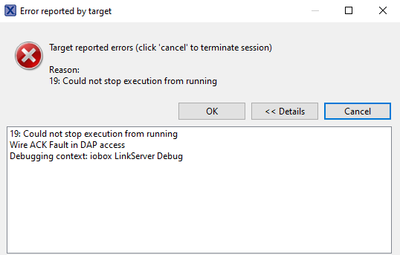
This is really annoying. This makes development cumbersome. There are many situations where you can simply debug through some behavior which occurs after reset. With STM dev boards (nucleo and such) this works perfectly.
Is this a known issue and is this going to be fixed?
Many thanks!
解決済! 解決策の投稿を見る。

- 新着としてマーク
- ブックマーク
- 購読
- ミュート
- RSS フィードを購読する
- ハイライト
- 印刷
- 不適切なコンテンツを報告
What debug interface are you using? For example LinkServer will set HW trigger points, and they are lost if you reset the target as the debug blog gets reset too.
If you use the J-Link connection, it sets the breakpoints in Flash and they are still there if you reset the target.
I hope this helps,
Erich
- 新着としてマーク
- ブックマーク
- 購読
- ミュート
- RSS フィードを購読する
- ハイライト
- 印刷
- 不適切なコンテンツを報告
What debug interface are you using? For example LinkServer will set HW trigger points, and they are lost if you reset the target as the debug blog gets reset too.
If you use the J-Link connection, it sets the breakpoints in Flash and they are still there if you reset the target.
I hope this helps,
Erich
- 新着としてマーク
- ブックマーク
- 購読
- ミュート
- RSS フィードを購読する
- ハイライト
- 印刷
- 不適切なコンテンツを報告
Aha! That's a perfectly good explanation ! Thx for the reply.
I am using LinkServer. I don't know if I can use JLink on a RT1020 evk board. I will look into that.
- 新着としてマーク
- ブックマーク
- 購読
- ミュート
- RSS フィードを購読する
- ハイライト
- 印刷
- 不適切なコンテンツを報告
I wrote an article here about how breakpoints work: https://mcuoneclipse.com/2012/07/29/software-and-hardware-breakpoints/
For the i.MX RT1020 you could use an external debug probe, see https://mcuoneclipse.com/2018/08/06/first-steps-with-the-i-mx-rt1020-evk-board/ if you happen to have one.
Anyway I recommend to use an external debug probe (much faster and more features). The J-Link EDU you can get for $20 (depending on your usage, check the license terms).
The RT1020 EVK has a K20 based circuit: I'm not sure if it can load the SEGGER firmware (did not try). But as the K20 is rather limited in speed, I would go for an external debug probe anyway (this is what I use for the RT1020).
I hope this helps,
Erich
