
- Forums
- Product Forums
- General Purpose MicrocontrollersGeneral Purpose Microcontrollers
- i.MX Forumsi.MX Forums
- QorIQ Processing PlatformsQorIQ Processing Platforms
- Identification and SecurityIdentification and Security
- Power ManagementPower Management
- Wireless ConnectivityWireless Connectivity
- RFID / NFCRFID / NFC
- Advanced AnalogAdvanced Analog
- Neural Processing UnitsNeural Processing Units
- MCX Microcontrollers
- S32G
- S32K
- S32V
- MPC5xxx
- Other NXP Products
- S12 / MagniV Microcontrollers
- Powertrain and Electrification Analog Drivers
- Sensors
- Vybrid Processors
- Digital Signal Controllers
- 8-bit Microcontrollers
- ColdFire/68K Microcontrollers and Processors
- PowerQUICC Processors
- OSBDM and TBDML
- S32M
- S32Z/E
-
- Solution Forums
- Software Forums
- MCUXpresso Software and ToolsMCUXpresso Software and Tools
- CodeWarriorCodeWarrior
- MQX Software SolutionsMQX Software Solutions
- Model-Based Design Toolbox (MBDT)Model-Based Design Toolbox (MBDT)
- FreeMASTER
- eIQ Machine Learning Software
- Embedded Software and Tools Clinic
- S32 SDK
- S32 Design Studio
- GUI Guider
- Zephyr Project
- Voice Technology
- Application Software Packs
- Secure Provisioning SDK (SPSDK)
- Processor Expert Software
- Generative AI & LLMs
-
- Topics
- Mobile Robotics - Drones and RoversMobile Robotics - Drones and Rovers
- NXP Training ContentNXP Training Content
- University ProgramsUniversity Programs
- Rapid IoT
- NXP Designs
- SafeAssure-Community
- OSS Security & Maintenance
- Using Our Community
-
- Cloud Lab Forums
-
- Knowledge Bases
- ARM Microcontrollers
- i.MX Processors
- Identification and Security
- Model-Based Design Toolbox (MBDT)
- QorIQ Processing Platforms
- S32 Automotive Processing Platform
- Wireless Connectivity
- CodeWarrior
- MCUXpresso Suite of Software and Tools
- MQX Software Solutions
- RFID / NFC
- Advanced Analog
- Neural Processing Units
-
- NXP Tech Blogs
- Home
- :
- MCUXpresso Software and Tools
- :
- MCUXpresso IDE
- :
- Re: Debug vs Release MCUXpresso IDE
Debug vs Release MCUXpresso IDE
- Subscribe to RSS Feed
- Mark Topic as New
- Mark Topic as Read
- Float this Topic for Current User
- Bookmark
- Subscribe
- Mute
- Printer Friendly Page

- Mark as New
- Bookmark
- Subscribe
- Mute
- Subscribe to RSS Feed
- Permalink
- Report Inappropriate Content
I was hoping someone could help me understand if programing my target (MKE16F using MCUXpresso IDE) using the the debug build somehow results in greater exposure of my code being reverse engineered vs using the release build. If there is greater exposure using the debug version, can someone guide me on how to configure the IDE to build the release with the "exact" same settings (optimization setting I'm guessing is key) as the debug version? My target runs correctly when programed with the debug version and not with the release version. I'm good a designing and debugging hardware and program flow to achieve the required functionality of my device in a tangible sense, but what I am not is a computer scientist or someone who knows all the nitty gritty of how code goes from readable C to hex living in my target. I hope someone can help in. Thanks in advance!
Best Regards
Ammar
Solved! Go to Solution.

- Mark as New
- Bookmark
- Subscribe
- Mute
- Subscribe to RSS Feed
- Permalink
- Report Inappropriate Content
Hi @ammarbazzaz ,
many questions or points, so I try to address them one by one:
I was hoping someone could help me understand if programing my target (MKE16F using MCUXpresso IDE) using the the debug build somehow results in greater exposure of my code being reverse engineered vs using the release build.
It depends what you are exposing. If you are exposing your device and someone can access the memory, then basically you have access to the code and constant data. How this looks you can see in https://mcuoneclipse.com/2019/05/26/reverse-engineering-of-a-not-so-secure-iot-device/ . Basically the information is on assembly instruction level, but still for reverse engineering good enough. You have to protect against this with securing this device, however don't trust too much as there are ways to get around this too on many devices.
but what I am not is a computer scientist or someone who knows all the nitty gritty of how code goes from readable C to hex living in my target
So basically if you 'share' your device memory or do not protect it, it is pretty much the same information as present in a 'Intel Hex' (or S19 or binary if you want) file. What this means or if you are unfamiliar with these, see https://mcuoneclipse.com/2012/09/27/s-record-intel-hex-and-binary-files/ . If you let someone else (e.g. in the production line) use these files, then you basically expose things as mentioned above. There are ways to mitigate this with so called 'secure provisioning' or vendors like P&E or SEGGER allowing you to send them encrypted images. Or that you use on-chip encryption (which the KE16 does not have imho).
I was hoping someone could help me understand if programing my target (MKE16F using MCUXpresso IDE) using the the debug build somehow results in greater exposure of my code being reverse engineered vs using the release build.
As mentioned above, the S19/Hex/Binary only contains the code and constant data. If you expose the ELF/Dwarf (.axf, .elf) file (which I hope you do not) it is a complete different story as includes debug information.
So basically it is about how easy it is to understand the assembly code. See https://mcuoneclipse.com/2012/06/01/debug-vs-release/ for the general concept. In short the debug version creates easier to understand assembly code, so it is easier to reverse engineer that one.
One aspect between debug and release builds usually is that the debug build includes asserts which can add your source file names to the binary, see https://community.nxp.com/t5/MCUXpresso-General/McuxPresso-Binary-file/td-p/1176194 and https://mcuoneclipse.com/2016/03/09/dealing-with-code-size-in-kinetis-sdk-v2-x-projects/
My target runs correctly when programed with the debug version and not with the release version.
There can be many reasons for this. One could be that your code has a bug (dangling pointer maybe? variable not initialized? or are you using semihosting/printf which does not work without a debug session?) which due the optimizations can result in different things. But you easily can simply keep the debug information in your 'release' build and then debug it: just remove the option to have the debug information removed. You can create a new build configuration (see https://mcuoneclipse.com/2016/05/19/build-configurations-in-eclipse/) from your release build and just add the debug information. Check your debug level and that -s is not activated.
I hope this helps,
Erich
- Mark as New
- Bookmark
- Subscribe
- Mute
- Subscribe to RSS Feed
- Permalink
- Report Inappropriate Content
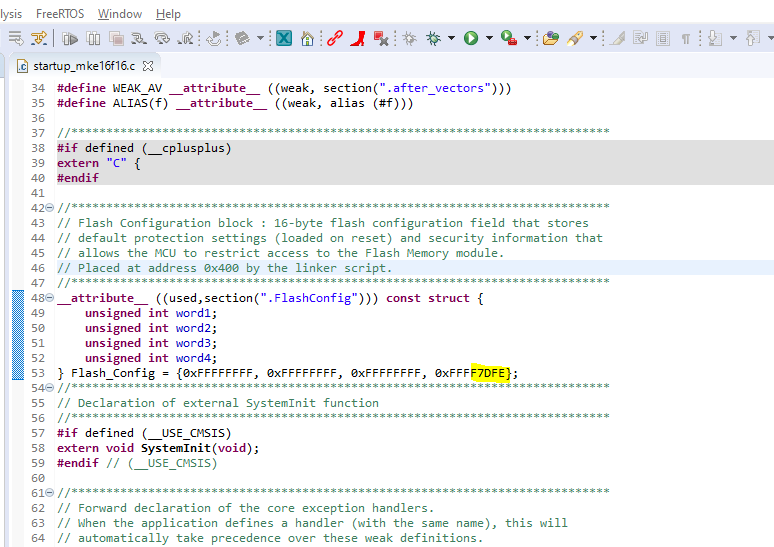
@ErichStyger Sorry for so many questions, but is it valid to modify the structure show in the attached image (YELLOW) to configure the security options on my device?
- Mark as New
- Bookmark
- Subscribe
- Mute
- Subscribe to RSS Feed
- Permalink
- Report Inappropriate Content
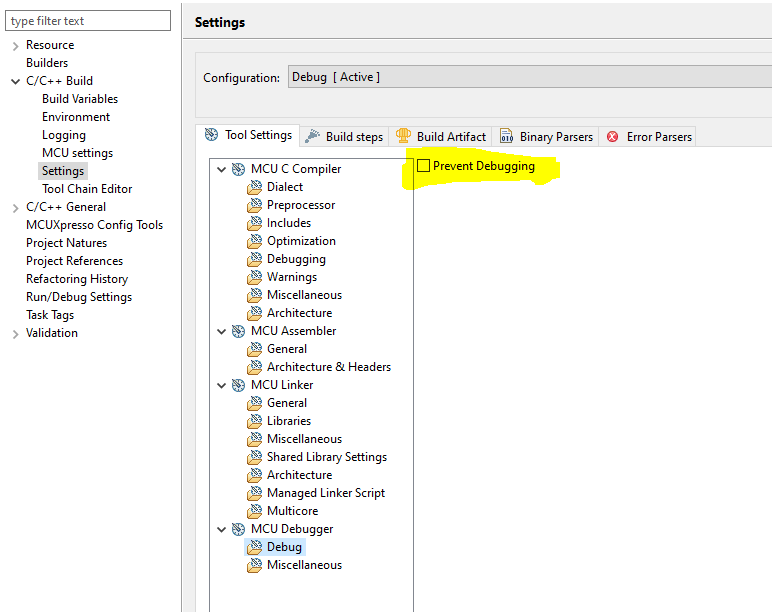
@ErichStyger Hi Erich, can you tell me what the checkbox highlighted in YELLOW does? Is This some kind of global switch that configures several different settings with one click? Please see attached image.
- Mark as New
- Bookmark
- Subscribe
- Mute
- Subscribe to RSS Feed
- Permalink
- Report Inappropriate Content
It does exactly what the tooltip says about it:
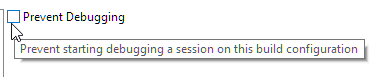
If you try to debug it in Eclipse, it will say that debugging is disabled.
Not sure how useful this should be, probably just to mark library projects not to be debugged.
It does not do any anything else.
- Mark as New
- Bookmark
- Subscribe
- Mute
- Subscribe to RSS Feed
- Permalink
- Report Inappropriate Content
@converse Thanks for the links, very informative. I try to be cognizant of the volatile keyword, but I will double check. How can I make sure that I am not using semi-hosting in the release build? Is there a simple switch? I can dig around for it, but please let me know where if it is not too much trouble. Thanks again!
- Mark as New
- Bookmark
- Subscribe
- Mute
- Subscribe to RSS Feed
- Permalink
- Report Inappropriate Content
Hi @ammarbazzaz ,
check your project settings:
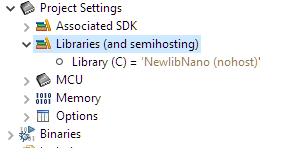
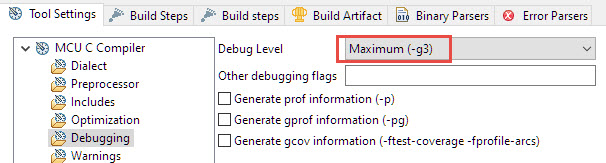
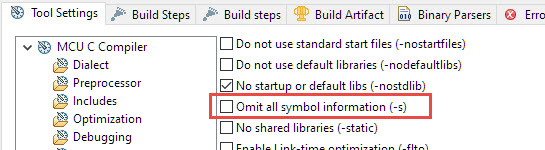
It should be (none) or (nohost).
About semihosting: later (I think from 2.7) SDKs have a dedicated hardfault handler included in the project which detect if a debugger is attached or not: with this handler you the application will still run with semihosting enabled and no debugger attached.
Another reason why it can work with the debugger and not without: If you disconnect with Flash breakpoints installed the target might run on the breakpoint and stop (see https://mcuoneclipse.com/2012/07/29/software-and-hardware-breakpoints/ for how breakpoint work).
Another reason why it could work with the debugger but not without is if you are using parts of the ARM debug or DWT like the cycle counter (see https://mcuoneclipse.com/2017/01/30/cycle-counting-on-arm-cortex-m-with-dwt/
I hope this helps,
Erich
- Mark as New
- Bookmark
- Subscribe
- Mute
- Subscribe to RSS Feed
- Permalink
- Report Inappropriate Content
Gentlemen, thank you both very much for your time to respond and for sharing your knowledge and helpful links! Let me digest and I will let you know how it goes. Thank you again!!
Kind Regards,
Ammar
- Mark as New
- Bookmark
- Subscribe
- Mute
- Subscribe to RSS Feed
- Permalink
- Report Inappropriate Content
Hi @ammarbazzaz ,
many questions or points, so I try to address them one by one:
I was hoping someone could help me understand if programing my target (MKE16F using MCUXpresso IDE) using the the debug build somehow results in greater exposure of my code being reverse engineered vs using the release build.
It depends what you are exposing. If you are exposing your device and someone can access the memory, then basically you have access to the code and constant data. How this looks you can see in https://mcuoneclipse.com/2019/05/26/reverse-engineering-of-a-not-so-secure-iot-device/ . Basically the information is on assembly instruction level, but still for reverse engineering good enough. You have to protect against this with securing this device, however don't trust too much as there are ways to get around this too on many devices.
but what I am not is a computer scientist or someone who knows all the nitty gritty of how code goes from readable C to hex living in my target
So basically if you 'share' your device memory or do not protect it, it is pretty much the same information as present in a 'Intel Hex' (or S19 or binary if you want) file. What this means or if you are unfamiliar with these, see https://mcuoneclipse.com/2012/09/27/s-record-intel-hex-and-binary-files/ . If you let someone else (e.g. in the production line) use these files, then you basically expose things as mentioned above. There are ways to mitigate this with so called 'secure provisioning' or vendors like P&E or SEGGER allowing you to send them encrypted images. Or that you use on-chip encryption (which the KE16 does not have imho).
I was hoping someone could help me understand if programing my target (MKE16F using MCUXpresso IDE) using the the debug build somehow results in greater exposure of my code being reverse engineered vs using the release build.
As mentioned above, the S19/Hex/Binary only contains the code and constant data. If you expose the ELF/Dwarf (.axf, .elf) file (which I hope you do not) it is a complete different story as includes debug information.
So basically it is about how easy it is to understand the assembly code. See https://mcuoneclipse.com/2012/06/01/debug-vs-release/ for the general concept. In short the debug version creates easier to understand assembly code, so it is easier to reverse engineer that one.
One aspect between debug and release builds usually is that the debug build includes asserts which can add your source file names to the binary, see https://community.nxp.com/t5/MCUXpresso-General/McuxPresso-Binary-file/td-p/1176194 and https://mcuoneclipse.com/2016/03/09/dealing-with-code-size-in-kinetis-sdk-v2-x-projects/
My target runs correctly when programed with the debug version and not with the release version.
There can be many reasons for this. One could be that your code has a bug (dangling pointer maybe? variable not initialized? or are you using semihosting/printf which does not work without a debug session?) which due the optimizations can result in different things. But you easily can simply keep the debug information in your 'release' build and then debug it: just remove the option to have the debug information removed. You can create a new build configuration (see https://mcuoneclipse.com/2016/05/19/build-configurations-in-eclipse/) from your release build and just add the debug information. Check your debug level and that -s is not activated.
I hope this helps,
Erich
- Mark as New
- Bookmark
- Subscribe
- Mute
- Subscribe to RSS Feed
- Permalink
- Report Inappropriate Content
Hi Erich thank you again. Please see my comments / questions below in bold magenta:
It depends what you are exposing. If you are exposing your device and someone can access the memory, then basically you have access to the code and constant data. How this looks you can see in https://mcuoneclipse.com/2019/05/26/reverse-engineering-of-a-not-so-secure-iot-device/ . Basically the information is on assembly instruction level, but still for reverse engineering good enough. You have to protect against this with securing this device, however don't trust too much as there are ways to get around this too on many devices. - Understood, I will use the Flash Security Features on the chip. This may generate more questions, but I will cross that bridge once I get a working release build of the current code.
So basically if you 'share' your device memory or do not protect it, it is pretty much the same information as present in a 'Intel Hex' (or S19 or binary if you want) file. What this means or if you are unfamiliar with these, see https://mcuoneclipse.com/2012/09/27/s-record-intel-hex-and-binary-files/ . If you let someone else (e.g. in the production line) use these files, then you basically expose things as mentioned above. There are ways to mitigate this with so called 'secure provisioning' or vendors like P&E or SEGGER allowing you to send them encrypted images. Or that you use on-chip encryption (which the KE16 does not have imho).- Understood, I have control of the files during production programming so this is less of a concern for my use case.
As mentioned above, the S19/Hex/Binary only contains the code and constant data. If you expose the ELF/Dwarf (.axf, .elf) file (which I hope you do not) it is a complete different story as includes debug information. - How would one expose the ELF/Dwarf information? More importantly, how do I make sure I do not?
So basically it is about how easy it is to understand the assembly code. See https://mcuoneclipse.com/2012/06/01/debug-vs-release/ for the general concept. In short the debug version creates easier to understand assembly code, so it is easier to reverse engineer that one. Are theses two statements below from your post above conflicting?
Debug and Release in the Embedded World
Embedded Debugging is different: If you debug your application, then the debug information remains on the host, while only the code gets downloaded to the target. The debug information is not loaded into the target memory. This means that advantage of a release version does not exist here
Making Reverse Engineering harder: removing the debug information pretty much means decoding and debugging things on assembly level. That makes reverse engineering harder. But only harder, but does not prevent it. So I see little value in this use case
One aspect between debug and release builds usually is that the debug build includes asserts which can add your source file names to the binary, see https://community.nxp.com/t5/MCUXpresso-General/McuxPresso-Binary-file/td-p/1176194 and https://mcuoneclipse.com/2016/03/09/dealing-with-code-size-in-kinetis-sdk-v2-x-projects/ - so NDEBUG switch is about removing asserts reducing code size and getting rid of troublesome printf statements, not necessarily hiding debug information? Later in this link it seems like the message is go ahead and enable debug in your release version since the info is kept on the host. Sorry if I am missing the subtleties, but which one is it? debug info is in the binary or not?
There can be many reasons for this. One could be that your code has a bug (dangling pointer maybe? variable not initialized? or are you using semihosting/printf which does not work without a debug session?) which due the optimizations can result in different things. But you easily can simply keep the debug information in your 'release' build and then debug it: just remove the option to have the debug information removed. You can create a new build configuration (see https://mcuoneclipse.com/2016/05/19/build-configurations-in-eclipse/) from your release build and just add the debug information. Check your debug level and that -s is not activated. This link was helpful for outlining the process here are some notes:
1) Sure enough I missed some printf statements (I thought I stripped them all out)
2) Debug settings are -O0 and -g3 for optimization and debugging respectively / for Release they are -Os and -g
3) I will change release ti -O0 (size and execution time are not a concern in this use case). Not sure what to do with debug settings
Thank you for again Erich!
- Mark as New
- Bookmark
- Subscribe
- Mute
- Subscribe to RSS Feed
- Permalink
- Report Inappropriate Content
Hi @ammarbazzaz ,
How would one expose the ELF/Dwarf information? More importantly, how do I make sure I do not?
simply do not share your .axf (or .elf) file, just your S19, bin or Intel hex as these do not contain any debug or symbol information.
Are theses two statements below from your post above conflicting?
No. You still can share the .axf/.elf so a debugger can load that file format, but you can strip of the debug information too.
so NDEBUG switch is about removing asserts reducing code size and getting rid of troublesome printf statements, not necessarily hiding debug information? Later in this link it seems like the message is go ahead and enable debug in your release version since the info is kept on the host. Sorry if I am missing the subtleties, but which one is it? debug info is in the binary or not?
NDEBUG disables the asserts and the output calls (usually printf()) assoziated with it. It is just about that and the file names listed with it. Have a read in assert(), __FILE__, Path and other cool GNU gcc Tricks to be aware of | MCU on Eclipse for a more detailed explanation.
There are two concepts: build configurations (e.g. debug and release) and debug information. They can be related, but are not the same. One is about custom settings for a build, the other is about the information provided to the debugger. The message of that article is to eat your own dog food: develop with what ends up in the final device. The debug information is in the ELF/Dwarf (Dwarf is the format for the debug information) file. Not in the .bin (binary) file.
I hope this helps,
Erich

- Mark as New
- Bookmark
- Subscribe
- Mute
- Subscribe to RSS Feed
- Permalink
- Report Inappropriate Content
To answer your (implied) question, "Why doesn't my code work in Release when it works in Debug?".
There can be many reasons for this - most likely a bug in your code...
I suggest you review these FAQs
https://community.nxp.com/t5/LPCXpresso-IDE-FAQs/Compiler-Optimization/m-p/468819
https://community.nxp.com/t5/LPCXpresso-IDE-FAQs/Optimize-for-Debug/m-p/472732
Pay particular attention to:
- using volatile on variables that can change externally to the main thread of execution (such as setting a variable in an interrupt handler that you interrogate in you mainline code)
- delay loops - these will often get optimised away (unless the loop counter is volatile) or be optimised so that they don't execute for as long as you expect
- As Erich says, make sure you are not using Semihosting (see https://community.nxp.com/t5/LPCXpresso-IDE-FAQs/What-is-Semihosting/m-p/475390)
Hope that helps!
