
- Forums
- Product Forums
- General Purpose MicrocontrollersGeneral Purpose Microcontrollers
- i.MX Forumsi.MX Forums
- QorIQ Processing PlatformsQorIQ Processing Platforms
- Identification and SecurityIdentification and Security
- Power ManagementPower Management
- Wireless ConnectivityWireless Connectivity
- RFID / NFCRFID / NFC
- Advanced AnalogAdvanced Analog
- Neural Processing UnitsNeural Processing Units
- MCX Microcontrollers
- S32G
- S32K
- S32V
- MPC5xxx
- Other NXP Products
- S12 / MagniV Microcontrollers
- Powertrain and Electrification Analog Drivers
- Sensors
- Vybrid Processors
- Digital Signal Controllers
- 8-bit Microcontrollers
- ColdFire/68K Microcontrollers and Processors
- PowerQUICC Processors
- OSBDM and TBDML
- S32M
- S32Z/E
-
- Solution Forums
- Software Forums
- MCUXpresso Software and ToolsMCUXpresso Software and Tools
- CodeWarriorCodeWarrior
- MQX Software SolutionsMQX Software Solutions
- Model-Based Design Toolbox (MBDT)Model-Based Design Toolbox (MBDT)
- FreeMASTER
- eIQ Machine Learning Software
- Embedded Software and Tools Clinic
- S32 SDK
- S32 Design Studio
- GUI Guider
- Zephyr Project
- Voice Technology
- Application Software Packs
- Secure Provisioning SDK (SPSDK)
- Processor Expert Software
- Generative AI & LLMs
-
- Topics
- Mobile Robotics - Drones and RoversMobile Robotics - Drones and Rovers
- NXP Training ContentNXP Training Content
- University ProgramsUniversity Programs
- Rapid IoT
- NXP Designs
- SafeAssure-Community
- OSS Security & Maintenance
- Using Our Community
-
- Cloud Lab Forums
-
- Knowledge Bases
- ARM Microcontrollers
- i.MX Processors
- Identification and Security
- Model-Based Design Toolbox (MBDT)
- QorIQ Processing Platforms
- S32 Automotive Processing Platform
- Wireless Connectivity
- CodeWarrior
- MCUXpresso Suite of Software and Tools
- MQX Software Solutions
- RFID / NFC
- Advanced Analog
- Neural Processing Units
-
- NXP Tech Blogs
- Home
- :
- MCUXpresso软件和工具
- :
- MCUXpresso通用功能
- :
- Duplicate Project in MCUXpresso 10.3
Duplicate Project in MCUXpresso 10.3

Recently we have Migrated to MCUXpresso 10.3. We have created One project also.
I have to replicate same project. So, I have created new workspace. using drag and drop method i have created new project.
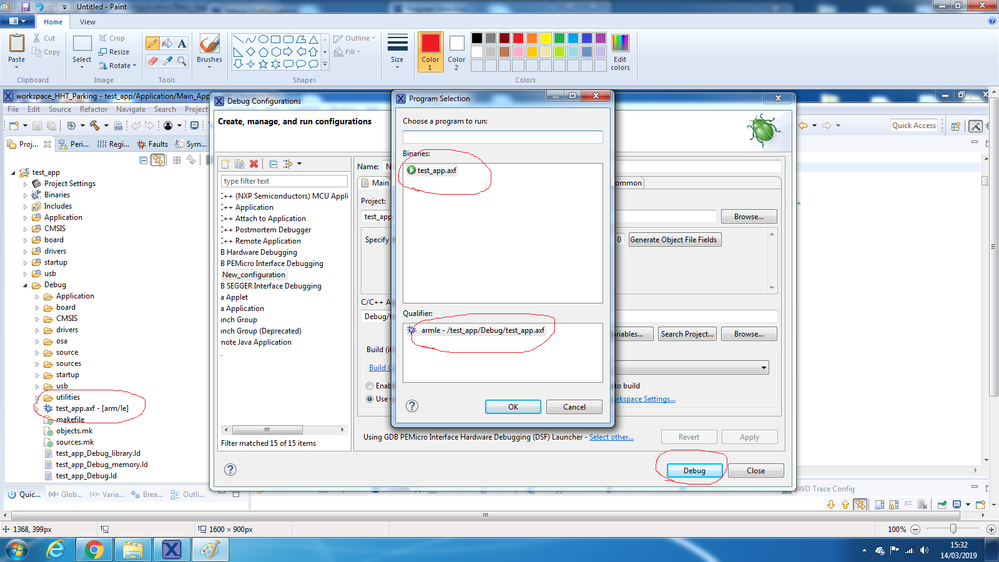
After changing only project name "Debug" option is not working. Find the below image for reference.
Before changing project Name:
After changed project Name
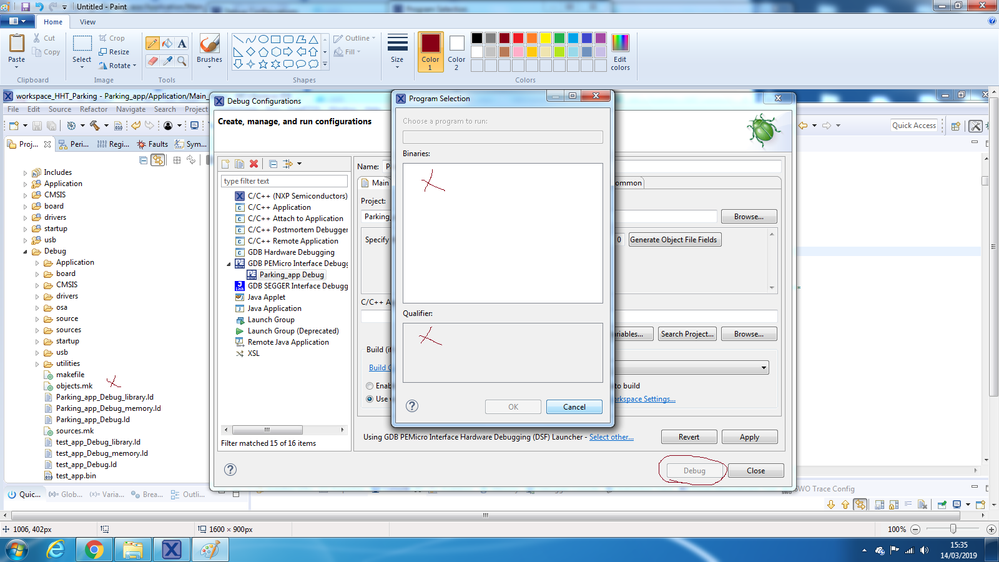
The issue is that after changes project name I unable to use "Debug" as its showing inactive and .axf file not creating.
Is there any setting missing? where i have done wrong?
Please help me out to resolve this issue.
Thanks in advance.
Regards,
Mayur Savaj
已解决! 转到解答。

 Alice_Yang
Hello Mayur Savaj,
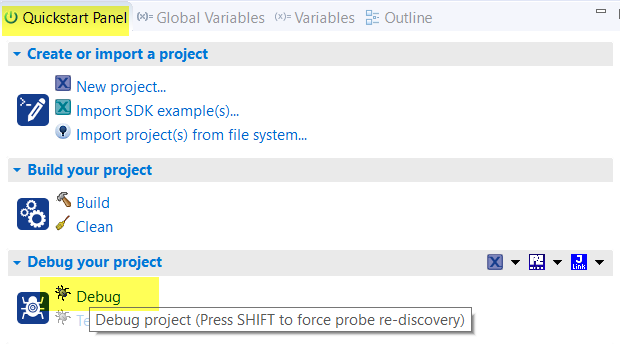
Try to clean your project, then build again.
And when debug, use the Debug button in Quick Start , at the same time press Shift .
Have a great day,
TIC
-------------------------------------------------------------------------------
Note:
- If this post answers your question, please click the "Mark Correct" button. Thank you!
- We are following threads for 7 weeks after the last post, later replies are ignored
Please open a new thread and refer to the closed one, if you have a related question at a later point in time.
-------------------------------------------------------------------------------
 BlackNight
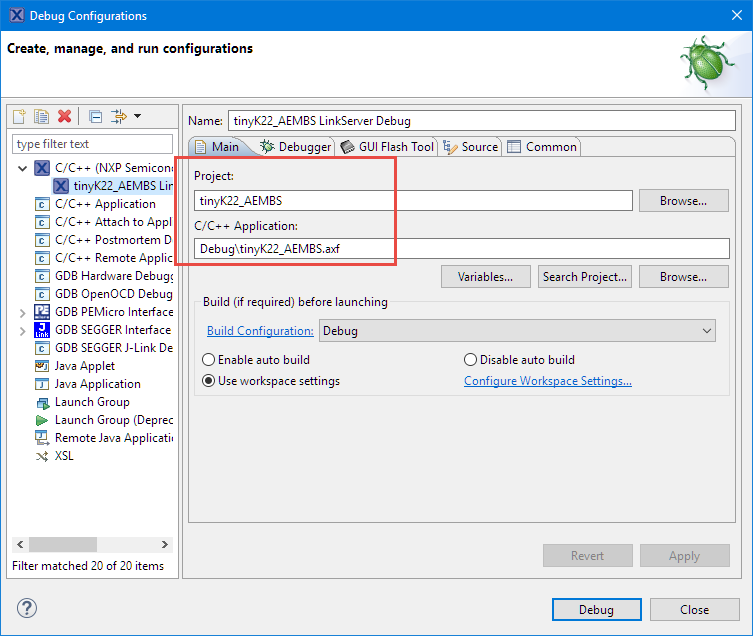
You need to change the debug configuration to point to the correct binary/project. Double-click on your .launch file in theproject, or use the menu Run > Debug Configuration, select your debug configuratinon and make sure it is pointing to the correct project and .axf file:
I hope this helps,
Erich
Hi Erich Styger,
Thank you for your quick reply.
I did as per your guidance. It's shows same thing.
In Project explorer window ".axf" file is not displaying. But project location ".axf" file is created.
Is there any setting need to change?
Regard,
Mayur Savaj
Alice_Yang
Hello Mayur Savaj,
Try to clean your project, then build again.
And when debug, use the Debug button in Quick Start , at the same time press Shift .
Have a great day,
TIC
-------------------------------------------------------------------------------
Note:
- If this post answers your question, please click the "Mark Correct" button. Thank you!
- We are following threads for 7 weeks after the last post, later replies are ignored
Please open a new thread and refer to the closed one, if you have a related question at a later point in time.
-------------------------------------------------------------------------------
