
- Forums
- Product Forums
- General Purpose MicrocontrollersGeneral Purpose Microcontrollers
- i.MX Forumsi.MX Forums
- QorIQ Processing PlatformsQorIQ Processing Platforms
- Identification and SecurityIdentification and Security
- Power ManagementPower Management
- Wireless ConnectivityWireless Connectivity
- RFID / NFCRFID / NFC
- Advanced AnalogAdvanced Analog
- MCX Microcontrollers
- S32G
- S32K
- S32V
- MPC5xxx
- Other NXP Products
- S12 / MagniV Microcontrollers
- Powertrain and Electrification Analog Drivers
- Sensors
- Vybrid Processors
- Digital Signal Controllers
- 8-bit Microcontrollers
- ColdFire/68K Microcontrollers and Processors
- PowerQUICC Processors
- OSBDM and TBDML
- S32M
- S32Z/E
-
- Solution Forums
- Software Forums
- MCUXpresso Software and ToolsMCUXpresso Software and Tools
- CodeWarriorCodeWarrior
- MQX Software SolutionsMQX Software Solutions
- Model-Based Design Toolbox (MBDT)Model-Based Design Toolbox (MBDT)
- FreeMASTER
- eIQ Machine Learning Software
- Embedded Software and Tools Clinic
- S32 SDK
- S32 Design Studio
- GUI Guider
- Zephyr Project
- Voice Technology
- Application Software Packs
- Secure Provisioning SDK (SPSDK)
- Processor Expert Software
- Generative AI & LLMs
-
- Topics
- Mobile Robotics - Drones and RoversMobile Robotics - Drones and Rovers
- NXP Training ContentNXP Training Content
- University ProgramsUniversity Programs
- Rapid IoT
- NXP Designs
- SafeAssure-Community
- OSS Security & Maintenance
- Using Our Community
-
- Cloud Lab Forums
-
- Knowledge Bases
- ARM Microcontrollers
- i.MX Processors
- Identification and Security
- Model-Based Design Toolbox (MBDT)
- QorIQ Processing Platforms
- S32 Automotive Processing Platform
- Wireless Connectivity
- CodeWarrior
- MCUXpresso Suite of Software and Tools
- MQX Software Solutions
- RFID / NFC
- Advanced Analog
-
- NXP Tech Blogs
- Home
- :
- MCUXpressoソフトウェアとツール
- :
- MCUXpresso 一般
- :
- Re: Debug error after Build Configurations -> Manage -> New from Existing Configuration
Debug error after Build Configurations -> Manage -> New from Existing Configuration
- RSS フィードを購読する
- トピックを新着としてマーク
- トピックを既読としてマーク
- このトピックを現在のユーザーにフロートします
- ブックマーク
- 購読
- ミュート
- 印刷用ページ
Debug error after Build Configurations -> Manage -> New from Existing Configuration

- 新着としてマーク
- ブックマーク
- 購読
- ミュート
- RSS フィードを購読する
- ハイライト
- 印刷
- 不適切なコンテンツを報告
I want to create a new build target. The simplest way to to this is via "Build Configurations" in the project context-sensitive menu
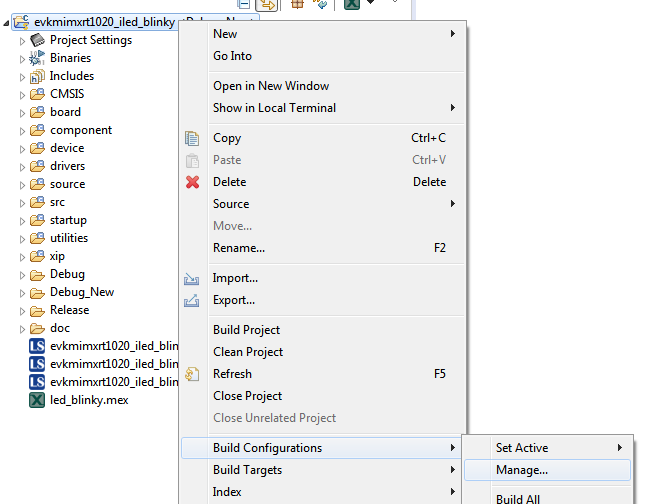
Selecting Manager then brings up the Manager dialog, and selecting New in this dialog allows you to create a new build target. If you select "Copy Settings from Existing Configuration" then the new project can be built, but there is an error when trying to debug, (I've only tested this using an LCP2). The error message is
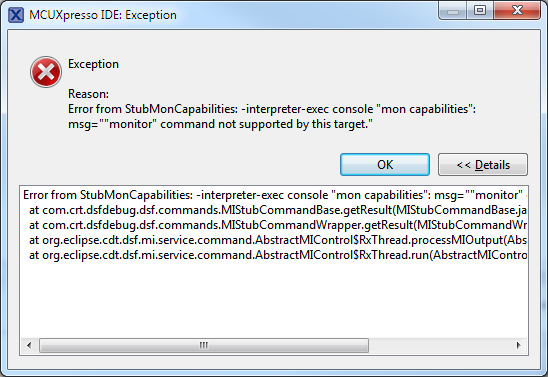
If you create a new build target from a default configuration then then this is OK, but then you have to manually copy all the initial settings from your reference project.
I've an example based on iled_blinky that demonstrates this problem.
In the attached .cproject file you can see that the configuration for Debug_New is strange when compared with the format for the Debug configuration in this same file.
Windows 7
MCUXpresso 11.0.1
IMXRT1021 Eval board.

 lpcxpresso_supp
- 新着としてマーク
- ブックマーク
- 購読
- ミュート
- RSS フィードを購読する
- ハイライト
- 印刷
- 不適切なコンテンツを報告
Thanks for the report. We've replicated the issue and are investigating.
Regards,
MCUXpresso IDE Support
- 新着としてマーク
- ブックマーク
- 購読
- ミュート
- RSS フィードを購読する
- ハイライト
- 印刷
- 不適切なコンテンツを報告
I've just tried manually "correcting" the faulty launch configuration and the debug still doesn't work.

- 新着としてマーク
- ブックマーク
- 購読
- ミュート
- RSS フィードを購読する
- ハイライト
- 印刷
- 不適切なコンテンツを報告
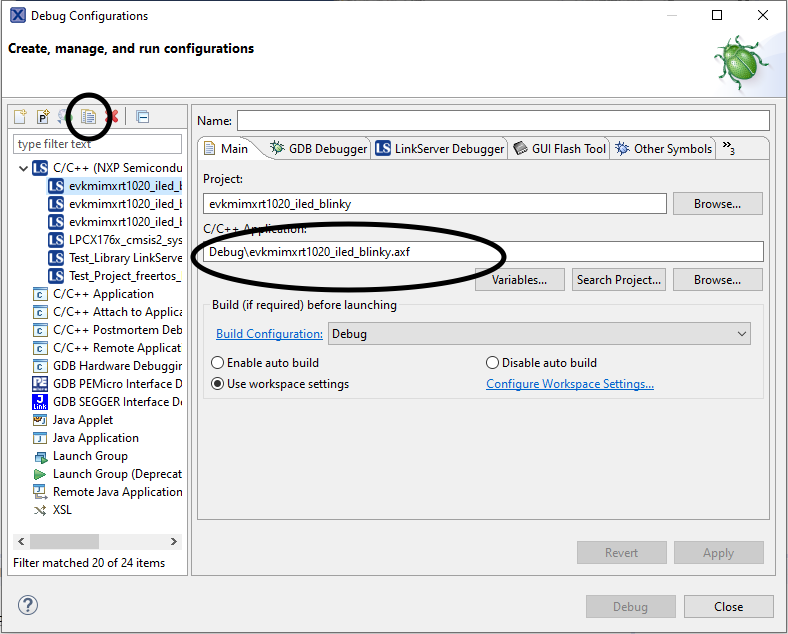
I suggest you use the Debug configurations dialog to
1. Copy a working launch configuration
2. Edit this copy (change it's name and change the location of the application)
See screenshot
- 新着としてマーク
- ブックマーク
- 購読
- ミュート
- RSS フィードを購読する
- ハイライト
- 印刷
- 不適切なコンテンツを報告
Con Verse,
Thanks for the tip and the diagnostics. This workaround is good! I made a new build config, copied and modified the known-good launch file, and was able to download and debug successfully.
That said, if there are any NXP folks still watching this, it sure would be nice to get a fix in the IDE for this issue. The shift-click on the "Debug" link to re-detect a new probe will still fail, and in environments with multiple engineers and workstations we make heavy use of that feature.
Thanks again.
- 新着としてマーク
- ブックマーク
- 購読
- ミュート
- RSS フィードを購読する
- ハイライト
- 印刷
- 不適切なコンテンツを報告
I created the launch configuration by clicking on "Debug" in the Quickstart Panel.
Your suggestion to compare and change the launch file is interesting for information, but my role in the team is to set up the workspace for others, and I don't think this is a very portable solution. Please would you investigate the root cause.
- 新着としてマーク
- ブックマーク
- 購読
- ミュート
- RSS フィードを購読する
- ハイライト
- 印刷
- 不適切なコンテンツを報告
I do not work for NXP. I'm giving you a suggestion to get your debug working!
 jorge_a_vazquez
- 新着としてマーク
- ブックマーク
- 購読
- ミュート
- RSS フィードを購読する
- ハイライト
- 印刷
- 不適切なコンテンツを報告
Hi John Aldridge
I'm not able to reproduce the issue that you mentioned, I successfully create a new build configuration with the "Copy Settings from Existing Configuration" from the debug config. Could you tried to update to the last firmware of the LPCLINK2, it could be a driver problem.
Hope this helps
Best regards
- 新着としてマーク
- ブックマーク
- 購読
- ミュート
- RSS フィードを購読する
- ハイライト
- 印刷
- 不適切なコンテンツを報告
Hi Jorge
Thanks for looking into this.
I've tried your suggestion as shown below, but this has made no
difference. Please also note that the debug and release configurations
build and debug correctly, the debug_New configuration I've created also
compiles and links correctly, but I cannot debug.
As you have not been able to re-create the problem I have attached my
example workspace for you to investigate, (example.zip at the end of this
email). The Debug and Release configurations are fine, the Debug_New
configuration is the one that I can't debug.
I have re-run "lpc_driver_setup.exe" version 2.0.2.0 to update / repair
the USB drivers on my PC. Checking the driver versions in device manager
gives
I have run LCPScrypt version 2.1.0_842 which re-programmed the LCPLINK2
probe. Here is the output from the command showing the version programmed.
*******************************
LPCScrypt - CMSIS-DAP firmware programming script v2.0.0 June 2018.
Connect an LPC-Link2 or LPCXpresso V2/V3 Board via USB then press Space.
Press any key to continue . . .
Booting LPCScrypt target with "LPCScrypt_227.bin.hdr"
LPCScrypt target booted
.
Programming LPC-Link2 with "LPC432x_CMSIS_DAP_V5_224.bin.hdr"
- LPC-Link2 programmed successfully and has the unique ID: NYBSDWIV
- To use: make link JP1 (nearest USB) and reboot.
Connect Next Board then press Space (or CTRL-C to Quit)
Press any key to continue . . .
*******************************
Best Regards
John Aldridge
John Aldridge CEng MIET - Senior Design Engineer - Direct: +44 1903 737353
- Fax: - E-Mail: JAldridge@parker.com
Parker Hannifin Manufacturing Ltd - Electromechanical & Drives Division
Europe - New Courtwick Lane · Littlehampton· West Sussex, UK · BN17 7RZ
Phone.: + 44 (0)1903 737000 - Fax: + 44 (0)1903 737 123
Parker Hannifin Manufacturing Ltd - Registered in London no 4806503
Registered Office - Parker House · 55 Maylands Ave · Hemel Hempstead · HP2
4SJ · United Kingdom
- 新着としてマーク
- ブックマーク
- 購読
- ミュート
- RSS フィードを購読する
- ハイライト
- 印刷
- 不適切なコンテンツを報告
p.s. The problem seems to be with the init Commands - it is missing all of the standard commands inserted by MCUXpresso...
- 新着としてマーク
- ブックマーク
- 購読
- ミュート
- RSS フィードを購読する
- ハイライト
- 印刷
- 不適切なコンテンツを報告
If you compare the launch configurations, you can see that there are a number of differences between them. I guess if you correct these difference, you will be able to launch correctly. To compare them, just select both launch configurations in the Project explorer, right-click and select Compare->With each other.
This leads to the question - how did you create the (non-working) launch configuration? Did you press the Blue debug button so that it auto generated?
- 新着としてマーク
- ブックマーク
- 購読
- ミュート
- RSS フィードを購読する
- ハイライト
- 印刷
- 不適切なコンテンツを報告
Thanks for posting this, we thought we might be going crazy here.
We have been fighting this issue in our codebase for the last week. Also Windows 7, MCUXpresso 11.0.1, LPCLink2. Custom hardware (MIMXRT1051) in our case. This has been a very nasty issue for us, since reverting the cproject and various settings files didn't seem to fix it, essentially trashing our projects and forcing us to recreate them, as you mentioned. In one case, our builds were working fine until we created a new configuration, and then it seemed like all of the configurations broke. We weren't sure if the original was corrupted but not showing issues yet, or if creating the new configuration corrupted everything.
Whatever the case, a fix from NXP would be much appreciated!
