
- Forums
- Product Forums
- General Purpose MicrocontrollersGeneral Purpose Microcontrollers
- i.MX Forumsi.MX Forums
- QorIQ Processing PlatformsQorIQ Processing Platforms
- Identification and SecurityIdentification and Security
- Power ManagementPower Management
- Wireless ConnectivityWireless Connectivity
- RFID / NFCRFID / NFC
- Advanced AnalogAdvanced Analog
- Neural Processing UnitsNeural Processing Units
- MCX Microcontrollers
- S32G
- S32K
- S32V
- MPC5xxx
- Other NXP Products
- S12 / MagniV Microcontrollers
- Powertrain and Electrification Analog Drivers
- Sensors
- Vybrid Processors
- Digital Signal Controllers
- 8-bit Microcontrollers
- ColdFire/68K Microcontrollers and Processors
- PowerQUICC Processors
- OSBDM and TBDML
- S32M
- S32Z/E
-
- Solution Forums
- Software Forums
- MCUXpresso Software and ToolsMCUXpresso Software and Tools
- CodeWarriorCodeWarrior
- MQX Software SolutionsMQX Software Solutions
- Model-Based Design Toolbox (MBDT)Model-Based Design Toolbox (MBDT)
- FreeMASTER
- eIQ Machine Learning Software
- Embedded Software and Tools Clinic
- S32 SDK
- S32 Design Studio
- GUI Guider
- Zephyr Project
- Voice Technology
- Application Software Packs
- Secure Provisioning SDK (SPSDK)
- Processor Expert Software
- Generative AI & LLMs
-
- Topics
- Mobile Robotics - Drones and RoversMobile Robotics - Drones and Rovers
- NXP Training ContentNXP Training Content
- University ProgramsUniversity Programs
- Rapid IoT
- NXP Designs
- SafeAssure-Community
- OSS Security & Maintenance
- Using Our Community
-
- Cloud Lab Forums
-
- Knowledge Bases
- ARM Microcontrollers
- i.MX Processors
- Identification and Security
- Model-Based Design Toolbox (MBDT)
- QorIQ Processing Platforms
- S32 Automotive Processing Platform
- Wireless Connectivity
- CodeWarrior
- MCUXpresso Suite of Software and Tools
- MQX Software Solutions
- RFID / NFC
- Advanced Analog
- Neural Processing Units
-
- NXP Tech Blogs
- Home
- :
- MCUXpressoソフトウェアとツール
- :
- MCUXpressoコンフィグツール
- :
- Re: MCUXpresso Config Tools Win 32bit Installation fails
MCUXpresso Config Tools Win 32bit Installation fails
- RSS フィードを購読する
- トピックを新着としてマーク
- トピックを既読としてマーク
- このトピックを現在のユーザーにフロートします
- ブックマーク
- 購読
- ミュート
- 印刷用ページ
MCUXpresso Config Tools Win 32bit Installation fails

- 新着としてマーク
- ブックマーク
- 購読
- ミュート
- RSS フィードを購読する
- ハイライト
- 印刷
- 不適切なコンテンツを報告
When installing by executing MCUXpresso_Config_Tools_v3_x86.exe, a dialog appears to indicate installation failure:

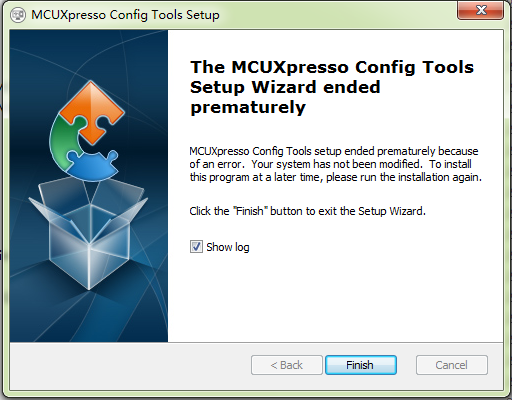
Attached log files it shows to me.
Environment: WIndows 7 32bit.
Installation file downloaded from this web page:
http://www.nxp.com/products/software-and-tools/run-time-software/mcuxpresso-software-and-tools/mcuxp...
Thanks.
Original Attachment has been moved to: MSIBDE7.LOG.zip

 martinformanek-
- 新着としてマーク
- ブックマーク
- 購読
- ミュート
- RSS フィードを購読する
- ハイライト
- 印刷
- 不適切なコンテンツを報告
Hello, please try our latest released version of MCUX Tools, issue should be fixed now.
MCUXpresso Config Tools, Windows 32bit package
Best Regards,
Martin
- 新着としてマーク
- ブックマーク
- 購読
- ミュート
- RSS フィードを購読する
- ハイライト
- 印刷
- 不適切なコンテンツを報告
Hi Martin,
Thanks for reminding, we will try it soon.
Walter
martinformanek-
- 新着としてマーク
- ブックマーク
- 購読
- ミュート
- RSS フィードを購読する
- ハイライト
- 印刷
- 不適切なコンテンツを報告
Hello Walter,
This failure is most often caused by the lack of or corrupted registration of the Microsoft OLE Automation library OLEAUT32.DLL.
You should confirm that this file is installed on your target system, and that is is correctly registered using regsvr32.exe.
Microsoft updated this file in Patch MS07-43 (KB921503) and MS08-08(KB943055). Since these are both important security updates, you should have both of them already installed. This file should be a protected system file, and any attempt to unregister it will return an access violation. However, it's registry signature could also be corrupted.
Microsoft provided solution as a part of Hotfix in May 2015: https://support.microsoft.com/en-us/kb/3020338
- 新着としてマーク
- ブックマーク
- 購読
- ミュート
- RSS フィードを購読する
- ハイライト
- 印刷
- 不適切なコンテンツを報告
Hi Martin,
Thank for reply.
This dll oleaut32.dll is in /Windows/System32.
I tried to run "regsvr32 oleaut32.dll" under cmd prompt and it shows that already succesfully registered by DllRegisterServer.
However I did not find KB921503 and KB943005 in the list of installed hundreds of security updates, also did not find them in Windows Update. Maybe it already included in Windows 7 SP1?
At last, I went to the link in your reply, downloaded the patch Windows6.1-KB3020338-x86.msu as instruction, and run it, but was told this patch is not applicable to your system...
Any other hints? Or do I need to re-install any supporting package?
martinformanek-
- 新着としてマーク
- ブックマーク
- 購読
- ミュート
- RSS フィードを購読する
- ハイライト
- 印刷
- 不適切なコンテンツを報告
Hello Walter,
1. Could you please try to register all the folllowing DLL files from administrator Command Prompt:
regsvr32.exe vbscript.dll
regsvr32.exe oleaut32.dll
regsvr32.exe jscript.dll
regsvr32.exe msxml3.dll
regsvr32.exe -i shell32.dllplease restart the machine and check if problem still persist.
2. You can also try to register the windows install service
C:\Windows\System32\msiexec.exe /regserver3. There is also some chance, that scripts run by installer might be blocked by antivirus program. Please try to disable it before installation.
4. If issue still persist, could you please send me your oleaut32.dll file? I will try to reproduce the issue on our machine.
- 新着としてマーク
- ブックマーク
- 購読
- ミュート
- RSS フィードを購読する
- ハイライト
- 印刷
- 不適切なコンテンツを報告
Hi Martin,
Unfortunately issue is still there after doing suggestion 1 and 2.
I have no anti-virus software installed because this is a quite pure environment only for developing.
By the way, my win7 is running in virtual machine VMWare player, not sure if this impacts. But, all other programs installation and running is good, like Codewarrior, KDS, IAR bench, etc, and the previous Processor Expert Pin Tools also runs well.
Attached the oleaut32.dll, FYI.
Thanks.
martinformanek-
- 新着としてマーク
- ブックマーク
- 購読
- ミュート
- RSS フィードを購読する
- ハイライト
- 印刷
- 不適切なコンテンツを報告
Hi Walter,
I have tried to reproduce your issue on our machine, unfortunately I was not successful in reproducing your issue.
I have tried following scenarios:
1. Standard engineering machine configuration - win 7 32-bit Enterprise version and try to install Config Tool
2. Standard engineering machine configuration - win 7 32-bit Enterprise version with your dll you sent and try to install Config Tool
3. Clean windows 7 Professional 32-bit installation in my Virtual box and try to install Config Tool
4. Clean windows 7 Professional 32-bit installation in my Virtual box with with your dll you sent and try to install Config Tool.
In all cases I have been successful to install and run the Config Tools without any issues.
Seems that there is some strange deep issue with oleaut32.dll and your system configuration.
As a last chance you can try to install new clean virtual windows machine and try to install Config Tools if it helps.
I have already logged this issue into our system as a bug.
Will you inform if any solution will be available for your case.
martinformanek-
- 新着としてマーク
- ブックマーク
- 購読
- ミュート
- RSS フィードを購読する
- ハイライト
- 印刷
- 不適切なコンテンツを報告
Hi Walter sorry for delay.
We issued new version of the tools.
The issue you reported should be fixed in new build now.

- 新着としてマーク
- ブックマーク
- 購読
- ミュート
- RSS フィードを購読する
- ハイライト
- 印刷
- 不適切なコンテンツを報告
The new (rev 3.0.2) tools cann't be installed with nothing happen but a background task
 martinformanek-
- 新着としてマーク
- ブックマーク
- 購読
- ミュート
- RSS フィードを購読する
- ハイライト
- 印刷
- 不適切なコンテンツを報告
Hi Kevin,
could you please let me know if you are suing for installation English or Chinese option?
Please also provide us the log from installation? To get the log from installation please run the installer by following way:
"MCUXpresso_Config_Tools_v3_x86.exe" /L*V "installation.log"
