
- Forums
- Product Forums
- General Purpose MicrocontrollersGeneral Purpose Microcontrollers
- i.MX Forumsi.MX Forums
- QorIQ Processing PlatformsQorIQ Processing Platforms
- Identification and SecurityIdentification and Security
- Power ManagementPower Management
- Wireless ConnectivityWireless Connectivity
- RFID / NFCRFID / NFC
- Advanced AnalogAdvanced Analog
- MCX Microcontrollers
- S32G
- S32K
- S32V
- MPC5xxx
- Other NXP Products
- S12 / MagniV Microcontrollers
- Powertrain and Electrification Analog Drivers
- Sensors
- Vybrid Processors
- Digital Signal Controllers
- 8-bit Microcontrollers
- ColdFire/68K Microcontrollers and Processors
- PowerQUICC Processors
- OSBDM and TBDML
- S32M
- S32Z/E
-
- Solution Forums
- Software Forums
- MCUXpresso Software and ToolsMCUXpresso Software and Tools
- CodeWarriorCodeWarrior
- MQX Software SolutionsMQX Software Solutions
- Model-Based Design Toolbox (MBDT)Model-Based Design Toolbox (MBDT)
- FreeMASTER
- eIQ Machine Learning Software
- Embedded Software and Tools Clinic
- S32 SDK
- S32 Design Studio
- GUI Guider
- Zephyr Project
- Voice Technology
- Application Software Packs
- Secure Provisioning SDK (SPSDK)
- Processor Expert Software
- Generative AI & LLMs
-
- Topics
- Mobile Robotics - Drones and RoversMobile Robotics - Drones and Rovers
- NXP Training ContentNXP Training Content
- University ProgramsUniversity Programs
- Rapid IoT
- NXP Designs
- SafeAssure-Community
- OSS Security & Maintenance
- Using Our Community
-
- Cloud Lab Forums
-
- Knowledge Bases
- ARM Microcontrollers
- i.MX Processors
- Identification and Security
- Model-Based Design Toolbox (MBDT)
- QorIQ Processing Platforms
- S32 Automotive Processing Platform
- Wireless Connectivity
- CodeWarrior
- MCUXpresso Suite of Software and Tools
- MQX Software Solutions
- RFID / NFC
- Advanced Analog
-
- NXP Tech Blogs
- Home
- :
- MCUXpressoソフトウェアとツール
- :
- MCUXpressoコンフィグツール
- :
- Re: Error: There is no core selected (on project created from "Makefile Project with Existing Code")
Error: There is no core selected (on project created from "Makefile Project with Existing Code")
- RSS フィードを購読する
- トピックを新着としてマーク
- トピックを既読としてマーク
- このトピックを現在のユーザーにフロートします
- ブックマーク
- 購読
- ミュート
- 印刷用ページ
Error: There is no core selected (on project created from "Makefile Project with Existing Code")

- 新着としてマーク
- ブックマーク
- 購読
- ミュート
- RSS フィードを購読する
- ハイライト
- 印刷
- 不適切なコンテンツを報告
On MCUXpresso IDE I created a new project using the wizard and selecting "Makefile Project with Existing Code".
Then when I attempt to use MCUXpresso Config tool, I get the error message: There is no core selected
and it won't generate any code.
I'm using MCUXpresso v11.0.0 on MAC OSX
CPU is LPC55S69 - which is dual core!
I guess the wizard failed to set some attribute that config tool uses.
Is there some way I can set this manually?
I've had a look through the MCU 'Edit' menu and all I can see is menu to set 'package' and 'chip'.
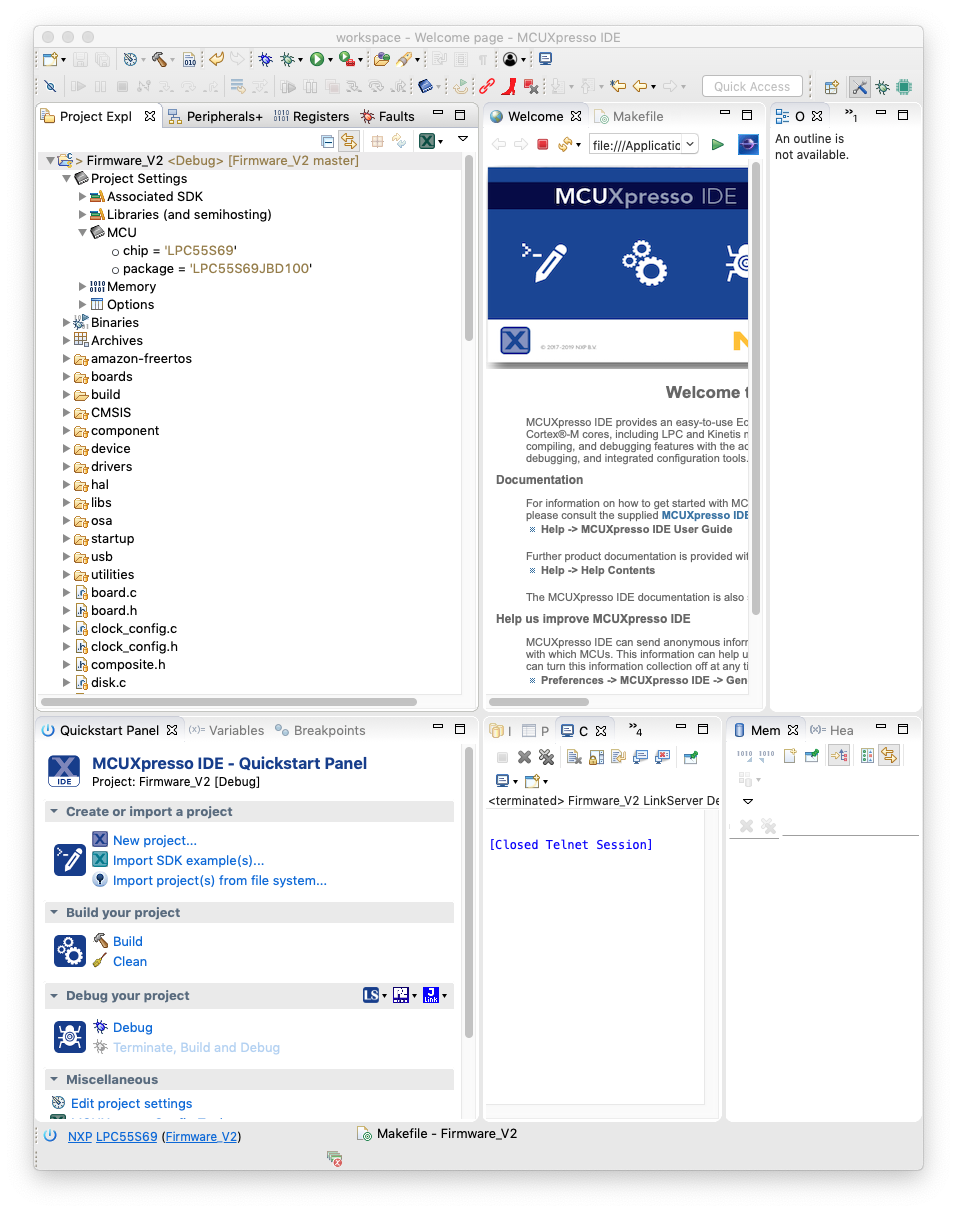
Comparing my Makefile project settings with the 'hello world' example, MCU settings for 'core' and 'processor' are set in 'hello world' but not in the project I created from Makefile.
See attached screenshots.


 marek-trmac
- 新着としてマーク
- ブックマーク
- 購読
- ミュート
- RSS フィードを購読する
- ハイライト
- 印刷
- 不適切なコンテンツを報告
Hi Jon,
from you description it is not clear, what sources were used to create Makefile project. I tried on my computer with hello-world SDK example and it seems "Makefile Project with Existing Code" wizard does not assign any SDK package to created project. MCUXpresso Config Tools rely on SDK project nature and projects without SDK are not supported.
I'd recommend to create new project using Quickstart panel (see commands New project or Import SDK example) and then replace project source files with your custom source files.
About your question, how to set core in Config Tools manually: the only possibility is to right click on the problem in Problems View and select quick fix, e.g. assign same core as is selected in MCU IDE project.
Hope this helps
Regards
Marek
Marek
NOTE: If you find the answer useful, kindly click on [ACCEPT AS SOLUTION] button
- 新着としてマーク
- ブックマーク
- 購読
- ミュート
- RSS フィードを購読する
- ハイライト
- 印刷
- 不適切なコンテンツを報告
> right click on the problem in Problems View and select quick fix, e.g. assign same core as is selected in MCU IDE project.
That worked well. Thanks for your help.
