
- Forums
- Product Forums
- General Purpose MicrocontrollersGeneral Purpose Microcontrollers
- i.MX Forumsi.MX Forums
- QorIQ Processing PlatformsQorIQ Processing Platforms
- Identification and SecurityIdentification and Security
- Power ManagementPower Management
- Wireless ConnectivityWireless Connectivity
- RFID / NFCRFID / NFC
- Advanced AnalogAdvanced Analog
- Neural Processing UnitsNeural Processing Units
- MCX Microcontrollers
- S32G
- S32K
- S32V
- MPC5xxx
- Other NXP Products
- S12 / MagniV Microcontrollers
- Powertrain and Electrification Analog Drivers
- Sensors
- Vybrid Processors
- Digital Signal Controllers
- 8-bit Microcontrollers
- ColdFire/68K Microcontrollers and Processors
- PowerQUICC Processors
- OSBDM and TBDML
- S32M
- S32Z/E
-
- Solution Forums
- Software Forums
- MCUXpresso Software and ToolsMCUXpresso Software and Tools
- CodeWarriorCodeWarrior
- MQX Software SolutionsMQX Software Solutions
- Model-Based Design Toolbox (MBDT)Model-Based Design Toolbox (MBDT)
- FreeMASTER
- eIQ Machine Learning Software
- Embedded Software and Tools Clinic
- S32 SDK
- S32 Design Studio
- GUI Guider
- Zephyr Project
- Voice Technology
- Application Software Packs
- Secure Provisioning SDK (SPSDK)
- Processor Expert Software
- Generative AI & LLMs
-
- Topics
- Mobile Robotics - Drones and RoversMobile Robotics - Drones and Rovers
- NXP Training ContentNXP Training Content
- University ProgramsUniversity Programs
- Rapid IoT
- NXP Designs
- SafeAssure-Community
- OSS Security & Maintenance
- Using Our Community
-
- Cloud Lab Forums
-
- Knowledge Bases
- ARM Microcontrollers
- i.MX Processors
- Identification and Security
- Model-Based Design Toolbox (MBDT)
- QorIQ Processing Platforms
- S32 Automotive Processing Platform
- Wireless Connectivity
- CodeWarrior
- MCUXpresso Suite of Software and Tools
- MQX Software Solutions
- RFID / NFC
- Advanced Analog
- Neural Processing Units
-
- NXP Tech Blogs
- Home
- :
- QorIQプロセッシングプラットフォーム
- :
- レイヤースケープ
- :
- Re: Starting guide for LS1046ARDB
Starting guide for LS1046ARDB
- RSS フィードを購読する
- トピックを新着としてマーク
- トピックを既読としてマーク
- このトピックを現在のユーザーにフロートします
- ブックマーク
- 購読
- ミュート
- 印刷用ページ
Starting guide for LS1046ARDB

- 新着としてマーク
- ブックマーク
- 購読
- ミュート
- RSS フィードを購読する
- ハイライト
- 印刷
- 不適切なコンテンツを報告
Hello,
I have managed to connect via USB/serial in Windows 10 (not easy...) with TeraTerm. So, now I could load some program and execute it, but I don´t know how to operate whit it. I don´t know how to load files in the system. I suppose it would be possible to do it through some port, but I don´t find any guide to configure it. If I connect the equipment to a router with DHCP, this doesn´t recognise a new equipment.
Is there any guide to start with these kind of issues?
Many thanks in advance.
Best regards,
- 新着としてマーク
- ブックマーク
- 購読
- ミュート
- RSS フィードを購読する
- ハイライト
- 印刷
- 不適切なコンテンツを報告
Thank you very much for your answer. I used that specific document to connect Teraterm in Windows 10. As you said me, I think That I have to configure some ethernet port to get access and install other software.
So, the problem now is that I am not able to configure that. I have had a look to all documents linked in the page you suggested me, but I haven´t found any guide to do this.
Many thanks and best regards,

 ufedor
- 新着としてマーク
- ブックマーク
- 購読
- ミュート
- RSS フィードを購読する
- ハイライト
- 印刷
- 不適切なコンテンツを報告
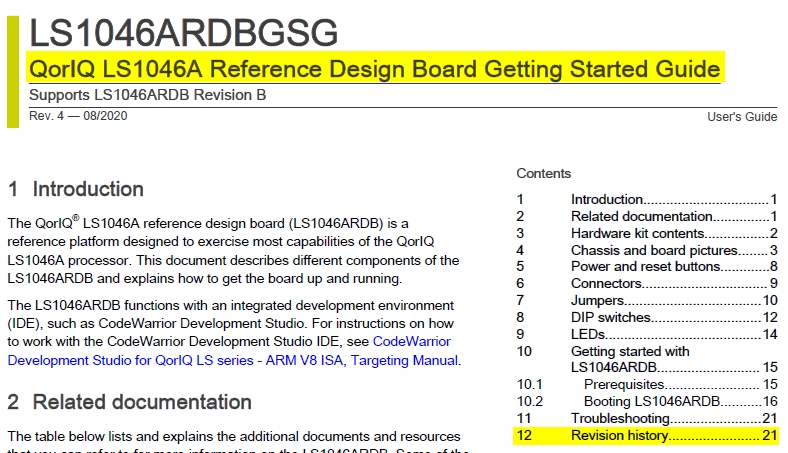
Please refer to the QorIQ LS1046A Reference Design Board Getting Started Guide, 14 Configuring U-Boot environment variables and (for TFTP usage) - 15 Flashing prebuilt SDK images on LS1046ARDB.
- 新着としてマーク
- ブックマーク
- 購読
- ミュート
- RSS フィードを購読する
- ハイライト
- 印刷
- 不適切なコンテンツを報告
Hello,
I have managed to connect RGMII1 to the network in U-Boot but not in Linux. Also, changes to the interfaces file in /etc/network directory disappear after reboot.
These are my steps:
Configuration previously saved in U-Boot:
ipaddr=192.168.1.180
netmask=255.255.255.0
serverip=192.168.1.40
gatewayip=192.168.1.1
ethaddr=00:04:9f:06:9c:f8
eth1addr=00:04:9f:06:9c:f9
eth2addr=00:04:9f:06:9c:f4
eth3addr=00:04:9f:06:9c:f5
eth4addr=00:04:9f:06:9c:f7
eth5addr=00:04:9f:06:9c:f6
ethact=FM1@DTSEC3
ethprime=FM1@DTSEC3
Ping from U-boot to my computer:
=> ping 192.168.1.40
Using FM1@DTSEC3 device
host 192.168.1.40 is alive
In linux just after reset:
root@TinyDistro:/etc/network# cat interfaces
# /etc/network/interfaces -- configuration file for ifup(8), ifdown(8)
# The loopback interface
auto lo
iface lo inet loopback
root@TinyDistro:/etc/network#
Interfaces file modified:
root@TinyDistro:/etc/network# cat interfaces
# /etc/network/interfaces -- configuration file for ifup(8), ifdown(8)
# The loopback interface
auto lo
iface lo inet loopback
iface eth0 inet static
address 192.168.1.180
netmask 255.255.255.0
network 192.168.1.0
gateway 192.168.1.1
root@TinyDistro:/etc/network#
Initialize networking:
root@TinyDistro:/etc/network# /etc/init.d/networking stop; /etc/init.d/networking start
Deconfiguring network interfaces... done.
Configuring network interfaces... done.
root@TinyDistro:/etc/network#
root@TinyDistro:/etc/network# ifconfig
lo Link encap:Local Loopback
inet addr:127.0.0.1 Mask:255.0.0.0
inet6 addr: ::1/128 Scope:Host
UP LOOPBACK RUNNING MTU:65536 Metric:1
RX packets:0 errors:0 dropped:0 overruns:0 frame:0
TX packets:0 errors:0 dropped:0 overruns:0 carrier:0
collisions:0 txqueuelen:1
RX bytes:0 (0.0 B) TX bytes:0 (0.0 B)
After shutdown and reset:
root@TinyDistro:/etc/network# cat interfaces
# /etc/network/interfaces -- configuration file for ifup(8), ifdown(8)
# The loopback interface
auto lo
iface lo inet loopback
root@TinyDistro:/etc/network#
According to this file, eth0 is correct, isn´t it?
Best regards,
- 新着としてマーク
- ブックマーク
- 購読
- ミュート
- RSS フィードを購読する
- ハイライト
- 印刷
- 不適切なコンテンツを報告
I'm sorry. It seems that you refer to this document, but I can't see chapter 14 (neither the number nor anything about "Configuring U-Boot environment variables"). Am I wrong with the document?
ufedor
- 新着としてマーク
- ブックマーク
- 購読
- ミュート
- RSS フィードを購読する
- ハイライト
- 印刷
- 不適切なコンテンツを報告
ufedor
- 新着としてマーク
- ブックマーク
- 購読
- ミュート
- RSS フィードを購読する
- ハイライト
- 印刷
- 不適切なコンテンツを報告
To transfer files it is needed to configure Ethernet environment variables and use TFTP - refer to the LS1046A Reference Design Board Getting Started Guide available here:
