
- Forums
- Product Forums
- General Purpose MicrocontrollersGeneral Purpose Microcontrollers
- i.MX Forumsi.MX Forums
- QorIQ Processing PlatformsQorIQ Processing Platforms
- Identification and SecurityIdentification and Security
- Power ManagementPower Management
- Wireless ConnectivityWireless Connectivity
- RFID / NFCRFID / NFC
- Advanced AnalogAdvanced Analog
- MCX Microcontrollers
- S32G
- S32K
- S32V
- MPC5xxx
- Other NXP Products
- S12 / MagniV Microcontrollers
- Powertrain and Electrification Analog Drivers
- Sensors
- Vybrid Processors
- Digital Signal Controllers
- 8-bit Microcontrollers
- ColdFire/68K Microcontrollers and Processors
- PowerQUICC Processors
- OSBDM and TBDML
- S32M
- S32Z/E
-
- Solution Forums
- Software Forums
- MCUXpresso Software and ToolsMCUXpresso Software and Tools
- CodeWarriorCodeWarrior
- MQX Software SolutionsMQX Software Solutions
- Model-Based Design Toolbox (MBDT)Model-Based Design Toolbox (MBDT)
- FreeMASTER
- eIQ Machine Learning Software
- Embedded Software and Tools Clinic
- S32 SDK
- S32 Design Studio
- GUI Guider
- Zephyr Project
- Voice Technology
- Application Software Packs
- Secure Provisioning SDK (SPSDK)
- Processor Expert Software
- Generative AI & LLMs
-
- Topics
- Mobile Robotics - Drones and RoversMobile Robotics - Drones and Rovers
- NXP Training ContentNXP Training Content
- University ProgramsUniversity Programs
- Rapid IoT
- NXP Designs
- SafeAssure-Community
- OSS Security & Maintenance
- Using Our Community
-
- Cloud Lab Forums
-
- Knowledge Bases
- ARM Microcontrollers
- i.MX Processors
- Identification and Security
- Model-Based Design Toolbox (MBDT)
- QorIQ Processing Platforms
- S32 Automotive Processing Platform
- Wireless Connectivity
- CodeWarrior
- MCUXpresso Suite of Software and Tools
- MQX Software Solutions
- RFID / NFC
- Advanced Analog
-
- NXP Tech Blogs
- Home
- :
- QorIQ处理平台
- :
- Layerscape
- :
- Re: LS1028a: secure boot and SRK fuse process
LS1028a: secure boot and SRK fuse process
LS1028a: secure boot and SRK fuse process

Hello,
After successfully fusing to OTPMK to the Layerscape LS1028A, I encountered few issues while programming SRKH :
1- I tried to put the LS1028A in RSP and write SRKH in SFP mirror registers to boot from SD card (secure image) following this guide layerscape_software_development_kit_user_guide_3-16-2023.pdf page 151.
Unfortunately, after finishing all the steps I failed to boot, most likely it's because one of the commands was only specified to boot from FlexSPI :
"puts [jtag::scan_io dr 64 0x0000010071FF001F]; // For FlexSPI boot"
- I would like to understand the commands used in the ccs (codewarrior connection server) since they are not explained properly within the guide.
- I tried to change 0x0000010071FF001F to 0x0000010071FF0011 since I read #Bits 1-9 signifies RCW source. page 150 but I'm not sure that this would be enough, I would be interested to know the meaning for all bits that I’m currently changing in this 64bit field.
2- It's a bit confusing to Program SRKH mirror registers in U-Boot environment specified in page 152
“NOTE: CST generates the SRKH in the same endianness as SFP. To program the SRKH in an ARM core running little endian mode, a byte swap is required.”
- should I do byte swap when using uboot commands to write memory (mm / mw) because while using ccs and codewarrior tap the byte swap was not mentioned ?
3- Is there a way to verify if my SRKH is valid within the generated headers from flex-builder (verifying using cst or any other tool) ?

 SebastianG
Hi @Hamza
"I tried to put the LS1028A in RSP and write SRKH in SFP mirror registers to boot from SD card (secure image) following this guide layerscape_software_development_kit_user_guide_3-16-2023.pdf page 151.
Unfortunately, after finishing all the steps I failed to boot, most likely it's because one of the commands was only specified to boot from FlexSPI :
"puts [jtag::scan_io dr 64 0x0000010071FF001F]; // For FlexSPI boot"
I would like to understand the commands used in the ccs (codewarrior connection server) since they are not explained properly within the guide.
I tried to change 0x0000010071FF001F to 0x0000010071FF0011 since I read #Bits 1-9 signifies RCW source. page 150 but I'm not sure that this would be enough, I would be interested to know the meaning for all bits that I’m currently changing in this 64bit field."
- According to the guide layerscape_software_development_kit_user_guide_3-16-2023.pdf when you change "0x0000010071FF001F" to "0x0000010071FF0011" you will change the boot source of the board
- 0x0000010071FF001F => NOR(FlexSPI boot)
- 0x0000010071FF0011 => SD Card
"It's a bit confusing to Program SRKH mirror registers in U-Boot environment specified in page 152
“NOTE: CST generates the SRKH in the same endianness as SFP. To program the SRKH in an ARM core running little endian mode, a byte swap is required.”
Should I do byte swap when using uboot commands to write memory (mm / mw) because while using ccs and codewarrior tap the byte swap was not mentioned ?"
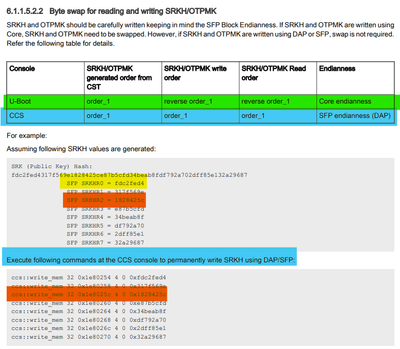
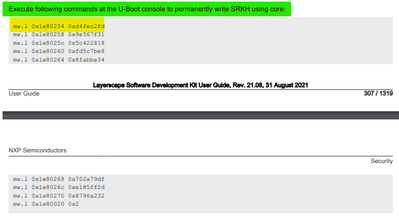
- You should use the Byte swap if you applied in U-boot, but if you use CCS you don’t have to do the Byte swap for write the Value in the registers SRKH:
- In the following table you can see the Offset of the registers of SRKH0 to SRKH7
|
Offset |
Register name |
|
01E8_0254 |
SRKH 0 255-224 |
|
01E8_0258 |
SRKH 1 223-192 |
|
01E8_025C |
SRKH 2 191-160 |
|
01E8_0260 |
SRKH 3 159-128 |
|
01E8_0264 |
SRKH 4 127- 96 |
|
01E8_0268 |
SRKH 5 95- 64 |
|
01E8_026C |
SRKH 6 63- 32 |
|
01E8_0270 |
SRKH 7 31- 0 |
- In the following image in the highlighted areas you can see an explanation of when you need to use the byte swap Information that you can find in the page 307 of LSDK attached here
"Is there a way to verify if my SRKH is valid within the generated headers from flex-builder (verifying using cst or any other tool)?"
- Principally you need to make sure to create the security image with the SRKH and OPTMK that will validate and complete the boot.
- In the attached file "LS1043A Secure Boot Hands on Secure Systems.pptx" on page 25 to 63 you will find the steps to follow in order to perform the secure boot.
Hi @SebastianG
Thank you for your reply !
I'm trying to boot from SD Card but 0x0000010071FF0011 doesn't seems to be the right value. I would appreciate it if there is any document that explain all the field within the 64bit field not only the boot source (bits 1:9)
Best Regards,
SebastianG
Hi @Hamza,
Are you using a custom board or LS1028ARDB?
If so, please make sure that have the appropriate SD card configuration in the switches.
On the other hand, if you are using a custom board, could you please be so kind to provide the schematics?
Regarding to the meaning of the value 0x0000010071FF0011:
Please also note that the following value represents the 64 bits of RCW 0x0000010071FF0011, at the moment when you change the 0x0000010071FF001F to 0x0000010071FF0011 you will only change the RCW SRC to SD card.
Regards,
Sebastian
