
- Forums
- Product Forums
- General Purpose MicrocontrollersGeneral Purpose Microcontrollers
- i.MX Forumsi.MX Forums
- QorIQ Processing PlatformsQorIQ Processing Platforms
- Identification and SecurityIdentification and Security
- Power ManagementPower Management
- Wireless ConnectivityWireless Connectivity
- RFID / NFCRFID / NFC
- Advanced AnalogAdvanced Analog
- Neural Processing UnitsNeural Processing Units
- MCX Microcontrollers
- S32G
- S32K
- S32V
- MPC5xxx
- Other NXP Products
- S12 / MagniV Microcontrollers
- Powertrain and Electrification Analog Drivers
- Sensors
- Vybrid Processors
- Digital Signal Controllers
- 8-bit Microcontrollers
- ColdFire/68K Microcontrollers and Processors
- PowerQUICC Processors
- OSBDM and TBDML
- S32M
- S32Z/E
-
- Solution Forums
- Software Forums
- MCUXpresso Software and ToolsMCUXpresso Software and Tools
- CodeWarriorCodeWarrior
- MQX Software SolutionsMQX Software Solutions
- Model-Based Design Toolbox (MBDT)Model-Based Design Toolbox (MBDT)
- FreeMASTER
- eIQ Machine Learning Software
- Embedded Software and Tools Clinic
- S32 SDK
- S32 Design Studio
- GUI Guider
- Zephyr Project
- Voice Technology
- Application Software Packs
- Secure Provisioning SDK (SPSDK)
- Processor Expert Software
- Generative AI & LLMs
-
- Topics
- Mobile Robotics - Drones and RoversMobile Robotics - Drones and Rovers
- NXP Training ContentNXP Training Content
- University ProgramsUniversity Programs
- Rapid IoT
- NXP Designs
- SafeAssure-Community
- OSS Security & Maintenance
- Using Our Community
-
- Cloud Lab Forums
-
- Knowledge Bases
- ARM Microcontrollers
- i.MX Processors
- Identification and Security
- Model-Based Design Toolbox (MBDT)
- QorIQ Processing Platforms
- S32 Automotive Processing Platform
- Wireless Connectivity
- CodeWarrior
- MCUXpresso Suite of Software and Tools
- MQX Software Solutions
- RFID / NFC
- Advanced Analog
- Neural Processing Units
-
- NXP Tech Blogs
- Home
- :
- QorIQプロセッシングプラットフォーム
- :
- レイヤースケープ
- :
- JTAG probe connection
JTAG probe connection
- RSS フィードを購読する
- トピックを新着としてマーク
- トピックを既読としてマーク
- このトピックを現在のユーザーにフロートします
- ブックマーク
- 購読
- ミュート
- 印刷用ページ
JTAG probe connection

- 新着としてマーク
- ブックマーク
- 購読
- ミュート
- RSS フィードを購読する
- ハイライト
- 印刷
- 不適切なコンテンツを報告
Unable to connect to the LS1043ARBD with code warrior Tap Probe.
Nothing in the connection window in Code Warrior.
Red light on probe illuminated
Device manage show the NXP probe working
Is there some help getting CW and the TAP configured?
- 新着としてマーク
- ブックマーク
- 購読
- ミュート
- RSS フィードを購読する
- ハイライト
- 印刷
- 不適切なコンテンツを報告
As I stated earlier in this, the Case 00469788 better describes the blank RCW problem I am having. And in that case I have documented the fact that I have tried what you have suggesting, and have followed all of the instructions on How to enter RCW override mode and have not been successful

- 新着としてマーク
- ブックマーク
- 購読
- ミュート
- RSS フィードを購読する
- ハイライト
- 印刷
- 不適切なコンテンツを報告
I am also having difficulty with this, but I'm using the 1046ardb. Using the example you gave, and substituting for my configuration, I get the following:
(bin) 36 % delete all
(bin) 37 % config cc cwtap:192.168.0.15
(bin) 38 % show cc
0: CodeWarrior TAP (cwtap:192.168.0.15) CC software ver. {0.0}
(bin) 39 % ccs::config_chain {ls1046a dap sap2}
can't read "::ccs::core(ls1046a)": no such element in array
(bin) 40 % ccs::reset_to_debug
There is no chain configured - chain size is zero
(bin) 41 %
- 新着としてマーク
- ブックマーク
- 購読
- ミュート
- RSS フィードを購読する
- ハイライト
- 印刷
- 不適切なコンテンツを報告
@Daves_Garage did you get your problem of the erased Boot Flash solved on the RDB. If not I can help. I've learned much since I first filed this case, but still haven't solved my problem. But for the LS1043A RDB I can help solve the Blank Boot Flash problem. Assuming the LA1046A RDB is similar enough to the LS1043A RDB. Let me know if you need help
- 新着としてマーク
- ブックマーク
- 購読
- ミュート
- RSS フィードを購読する
- ハイライト
- 印刷
- 不適切なコンテンツを報告
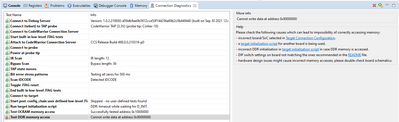
It now appears my DDR4 initialization isn't quite right:
- 新着としてマーク
- ブックマーク
- 購読
- ミュート
- RSS フィードを購読する
- ハイライト
- 印刷
- 不適切なコンテンツを報告
I finally got my board connection working, but now I have DDR4 configuration issues. Did you get past your DDR configuration issue.
Any insight or helpful hints?
- 新着としてマーク
- ブックマーク
- 購読
- ミュート
- RSS フィードを購読する
- ハイライト
- 印刷
- 不適切なコンテンツを報告
How's it going?
- 新着としてマーク
- ブックマーク
- 購読
- ミュート
- RSS フィードを購読する
- ハイライト
- 印刷
- 不適切なコンテンツを報告
Hi Richard,
Since I don't have the custom hardware yet, I've only been playing around with the DDR settings for the LS1046ARD, and they seem to be working fine.
I modified the U-BOOT source also, and reflashed it at 0x0010_0000, and it works as expected also:
```
U-Boot 2019.04-dirty (Jul 06 2022 - 11:28:24 -0700)
***********************************
* MODIFIED UBOOT - HI DAVE... *
***********************************
SoC: LS1046AE Rev1.0 (0x87070010)
Clock Configuration:
CPU0(A72):1800 MHz CPU1(A72):1800 MHz CPU2(A72):1800 MHz
CPU3(A72):1800 MHz
Bus: 700 MHz DDR: 2100 MT/s FMAN: 800 MHz
Reset Configuration Word (RCW):
00000000: 0e150012 10000000 00000000 00000000
00000010: 11335559 40005012 40025000 c1000000
00000020: 00000000 00000000 00000000 00238800
00000030: 20124000 00003101 00000096 00000001
Model: LS1046A RDB Board
Board: LS1046ARDB, boot from QSPI vBank 0
CPLD: V2.3
PCBA: V3.0
SERDES Reference Clocks:
SD1_CLK1 = 156.25MHZ, SD1_CLK2 = 100.00MHZ
I2C: ready
DRAM: Initializing DDR....using SPD
Detected UDIMM 18ADF2G72AZ-2G6E1
15.9 GiB (DDR4, 64-bit, CL=15, ECC on)
DDR Chip-Select Interleaving Mode: CS0+CS1
SEC0: RNG instantiated
SEC Firmware: Bad firmware image (not a FIT image)
Waking secondary cores to start from fbd30000
All (4) cores are up.
Using SERDES1 Protocol: 4403 (0x1133)
Using SERDES2 Protocol: 21849 (0x5559)
NAND: 512 MiB
MMC: FSL_SDHC: 0
Loading Environment from SPI Flash... SF: Detected s25fl512s with page size 256 Bytes, erase size 256 KiB, total 64 MiB
*** Warning - bad CRC, using default environment
```
The last line about the CRC has me puzzled though...
Looking into that now.
- 新着としてマーク
- ブックマーク
- 購読
- ミュート
- RSS フィードを購読する
- ハイライト
- 印刷
- 不適切なコンテンツを報告
Looks like you have gotten past the Flashing the QSPI NOR flash. If you didn't get a valid RCW form the boot device you would not have gotten to the memory tests. I haven't gotten to the DDR tuning tool yet so not much help right now, until I can get this far.
- 新着としてマーク
- ブックマーク
- 購読
- ミュート
- RSS フィードを購読する
- ハイライト
- 印刷
- 不適切なコンテンツを報告
I'm hoping @yipingwang reads this thread, and offers advice on how to proceed. So frustrating that it takes days to send messages back and forth, when a simple phone call could probably resolve the issue in minutes... lol - modern worldwide communications.
-Dave
 yipingwang
- 新着としてマーク
- ブックマーク
- 購読
- ミュート
- RSS フィードを購読する
- ハイライト
- 印刷
- 不適切なコンテンツを報告
The flash programing algorithm is downloaded to run in OCRAM, it doesn't use DDR.
You could comment the following section and click the flash programing icon under "Target Connections" to do flash programing directly.
DDR_freq = Detect_DDR_Freq()
Init_DDRC(DDR_freq)
- 新着としてマーク
- ブックマーク
- 購読
- ミュート
- RSS フィードを購読する
- ハイライト
- 印刷
- 不適切なコンテンツを報告
Hi Richard,
Not quite fixed yet. I did however make progress in resolving the JTAG interface issue I was having, and now can connect to the target system. I even ran the DDR tuning utility, which is kinda cool to watch do it's thing...
I'm more than willing to discuss the reflash of QSPI memory with you.
I found this img file online (firmware_ls1046ardb_qspiboot.img) and flashed it to 0x0000 0000 successfully, but still no response from the serial port like before (when it was new, and UBOOT would come up).
Any pointers appreciated.
-Dave
- 新着としてマーク
- ブックマーク
- 購読
- ミュート
- RSS フィードを購読する
- ハイライト
- 印刷
- 不適切なコンテンツを報告
@Daves_Garage You've made it farther than I have, but I'm working on our custom board. It sounds like you are on the Reference Design Board, which is a more stable platform. But you have confirmed one thing for me the LS1046 RDB was QSPI NOR Flash boot device. The LS1043 RDB has a parallel NOR Flash boot device. Our custom board has a QSPI NOR Flash boot device. My problem is I can't get it to enter RCW Recovery mode. Because my board in new it has a blank NOR flash device, so when it reads the RCW (first thing in the boot device) it's not valid and the LS1043 will not come out of reset without a valid RCW. I need the LS1043 to come out of reset to connect to the JTAG debugger so I can run the Flash programmer tool to put a valid image in the NOR Flash. NXP provides a mechanism to use a Hardcoded RCW to recover from this situation (corrupt or blank RCW) but I can not get it to work on my board. I can get it work on the LS1043 RDB, but not the custom board. Their building a new FPAG image to help with the reset visibility and I will try that next (it's about the third change required so far). I wish I could get some response from NXP about how to setup the custom board.
- 新着としてマーク
- ブックマーク
- 購読
- ミュート
- RSS フィードを購読する
- ハイライト
- 印刷
- 不適切なコンテンツを報告
Richard,
It looks to me that the "Target Connections", which holds the target configurations, is the key to your problem. This can be used to overwrite the RCW during debugging... Of course, you'll probably need to figure out how to make it permanent (probably by using the configuration project - something I'm playing with right now).
I duplicated the existing LS1046A_RDB configuration, and named it LS1046A_RDB(1)
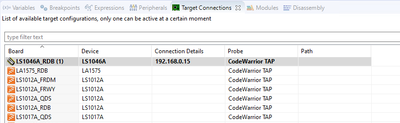
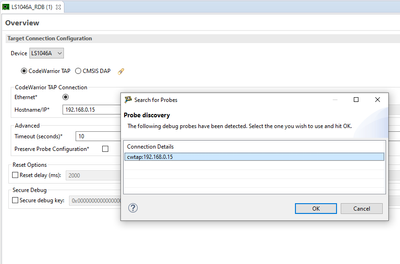
I set it up to used the LS1046A processor, and set it's IP address, and used the "little flashlight" icon at the top right to verify connectivity:
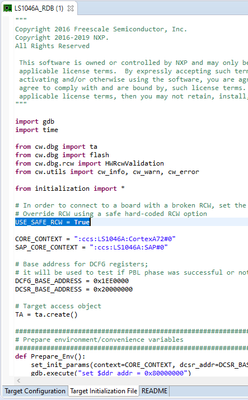
Then, I modified the initialization script by setting the flag USE_SAFE_RCW to "True":
In the README tab at the bottom, there's a lot of useful information about this RDB...
Anyway, after saving this Target Connection, and making sure it was being used in my debugging session (by selecting it in the Debug Configurations, under Debugger tab), the debugger should be using the default RCW instead of the corrupted one (or non-existent in your case):
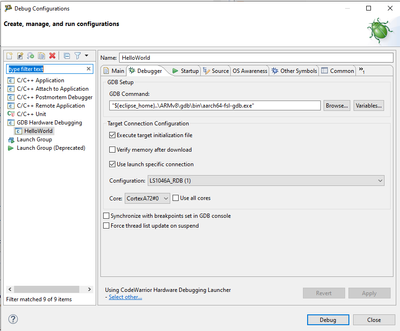
At least, that's how I'm reading it...
- 新着としてマーク
- ブックマーク
- 購読
- ミュート
- RSS フィードを購読する
- ハイライト
- 印刷
- 不適切なコンテンツを報告
Thanks, I have been doing all of that except the last step the Debug Configuration window. I had been selecting the target specific configuration in the target connection window (as it was saying in the instructions 9.4.1 and 9.4.2 of the LS1043 RM -- no metion of the debugger configuration window. I will go check it out in the lab now.
yipingwang
- 新着としてマーク
- ブックマーク
- 購読
- ミュート
- RSS フィードを購読する
- ハイライト
- 印刷
- 不適切なコンテンツを報告
Please invoke CCS console from C:\Freescale\CW4NET_v2020.06\Common\CCS\bin\ccs.exe, and type the following commands to do verification.
(bin) 8 % delete all
(bin) 9 % config cc cwtap:10.193.20.57
(bin) 10 % show cc
0: CodeWarrior TAP (cwtap:10.193.20.57) CC software ver. {0.0}
(bin) 13 % ccs::config_chain {ls1043a dap sap2}
(bin) 14 % ccs::reset_to_debug
- 新着としてマーク
- ブックマーク
- 購読
- ミュート
- RSS フィードを購読する
- ハイライト
- 印刷
- 不適切なコンテンツを報告
I am using the CW-TAP connect with USN and not network. Will the CCS tool work with the USB connection?
This case is over two weeks old and reality has changed it that time. The problem I was having when This case was written was due to a poorly constructed cable. We fixed the cable and we were able to move forward until the blank NOR flash boot device stopped our progress completely. Because The NOR flash device is blank the RCW is blank, and the CPU will not boot with a blank RCW. I have followed all the instruction and videos that address this issue (blank/corrupt RCW) but have not been able to fix the problem. If you have any insight on how to fix this issue please share.
Case 00469788 better describes the blank RCW problem.
- 新着としてマーク
- ブックマーク
- 購読
- ミュート
- RSS フィードを購読する
- ハイライト
- 印刷
- 不適切なコンテンツを報告
This is the results of the ccs commands you asked me tp run. Since I have a USB device and do not have an IP address, I used the (what looks like a MAC address) value returned form the findcc cwtaps command. The final command response "Core not responding", corresponds with the problem I am having because of the Blank/corrupt RCW. The CPU will not come out of reset.
(bin) 3 % findcc cwtaps
FSL03386A (00:04:9f:03:38:6a): CodeWarrior TAP
Cortex-10 Probe Tip
Boot Loader v1.0.1
Operating System v1.0.4
(bin) 4 % delete all
(bin) 6 % config cc cwtap:00:04:9f:03:38:6a
(bin) 7 % show cc
0: CodeWarrior TAP (cwtap:00:04:9f:03:38:6a) CC software ver. {0.0}
(bin) 8 % ccs::config_chain {ls1043a dap sap2}
(bin) 9 % ccs::reset_to_debug
LS1043A: Core not responding
(bin) 10 %
yipingwang
- 新着としてマーク
- ブックマーク
- 購読
- ミュート
- RSS フィードを購読する
- ハイライト
- 印刷
- 不適切なコンテンツを報告
In CodeWarrior IDE Target Connections panel, please duplicate LS1043A_RDB and edit it, in Target Initialization file, please modify "USE_SAFE_RCW = False" to "USE_SAFE_RCW = True" to use hard-coded RCW. Then execute "Diagnose Connections" task under "Target Connections".
- 新着としてマーク
- ブックマーク
- 購読
- ミュート
- RSS フィードを購読する
- ハイライト
- 印刷
- 不適切なコンテンツを報告
I will try using the Flash Programmer directly as you described on one if the boards that hasn't had the FPGA removed from the JTAG chain. I this work it will save us a lot of rework of the boards. It's good it uses OCRAM since DDR4 isn't working yet.
- 新着としてマーク
- ブックマーク
- 購読
- ミュート
- RSS フィードを購読する
- ハイライト
- 印刷
- 不適切なコンテンツを報告
I have set USE_SAFE_RCW to True and it was not working.
I had previously informed you I had followed all of the instruction in 9.4.1 and 9.4.2 of the LS1043ARM, and it was not working. Setting USE_SAFE_RCW to True is from the instruction in 9.4.2
The problem turned out to be the JTAG chain. The LS1043 was not the first device in the JTAG chain. Our board design has the FPGA first in the JTAG chain. Once we removed the FPGA from the JTAG chain. The instruction for RCW override mode described in 9.4.1 and 9.4.2 both worked. I can connect to our board and was able to use the Flash programming tool to program our QSPI NOR Flash with a valid RCW, and the board booted. Now I my problem is getting the DDR4 to work.
WHY does NXP feel it is unnecessary to inform customers that the LS1043A MUST be first in the JTAG chain for RCW Override to work????
Although my board is still not UP because of the DDR4 issue you can close this case since I can now enter RCW Override mode and connect to the processor with JTAG. Which was my original complaint.
