WinUSB driver installation (LPC18xx/LPC43xx)

cancel
Showing results for 
Show  only  | Search instead for 
Did you mean: 

WinUSB driver installation (LPC18xx/LPC43xx)

WinUSB driver installation (LPC18xx/LPC43xx)

This procedure no longer applies to DFUSec/LCT. As of v2.00 of the LCT, you no longer need to manually install .NET or the WinUSB driver package - the LCT installer will do that for you if it already isn't installed. WinUSB only needs to be installed on Windows XP machines - it is already part of Win 7/8. All you need to do is download and install the LCT.

To install the WinUSB drivers for the LPC18xx/43xx boards, first configure the board for USB boot. Plug in the USB connector to the board (add external power to the board if necessary) and a new USB device (LPC) should appear.
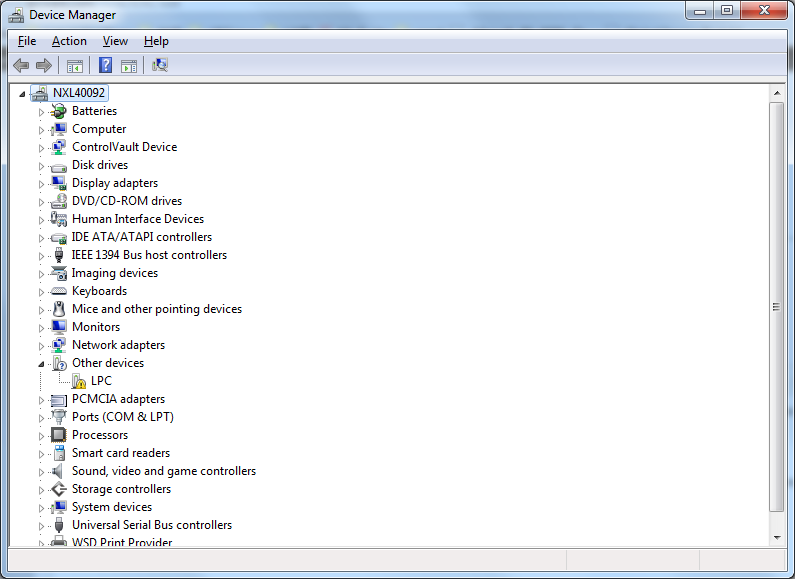
winusb_inst1.png

Download the drivers at http://www.lpcware.com/content/nxpfile/lpc18xx43xx-winusb-drivers-dfu-boot

Un-compress the drivers and point the driver installation dialog to the INF file in the uncompressed package. After installation is complete, you should have a new device available for the LPC18xx or LPC43x.
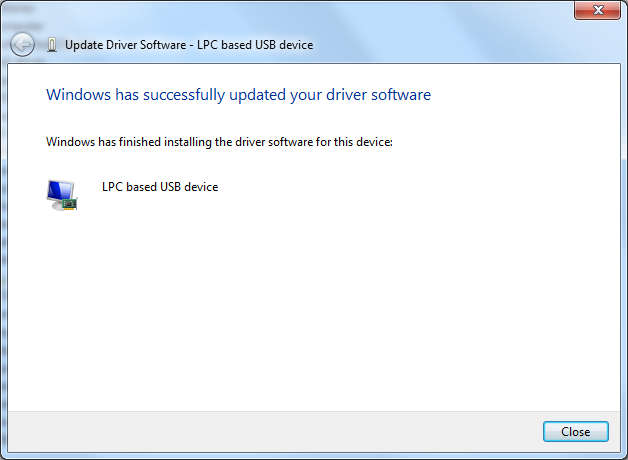
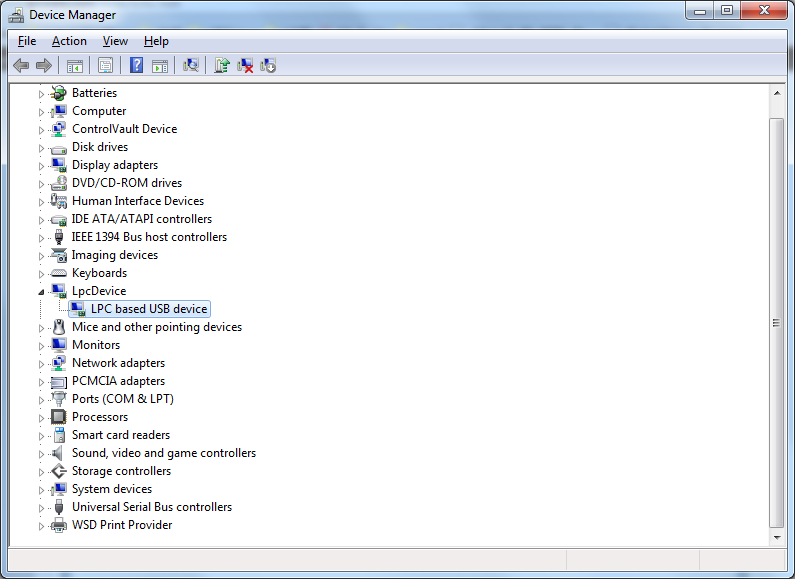
winusb_inst3.png

winusb_inst4.png

Attachments
Comments

Hi,

WinUSB driver is working for windows 7 not for windows 10.

can you please suggest winUSB (LPC 18xx) driver for windows 10??

Thanks,

Hari.

%3CLINGO-SUB%20id%3D%22lingo-sub-1123483%22%20slang%3D%22en-US%22%20mode%3D%22CREATE%22%3EWinUSB%20driver%20installation%20(LPC18xx%2FLPC43xx)%3C%2FLINGO-SUB%3E%3CLINGO-BODY%20id%3D%22lingo-body-1123483%22%20slang%3D%22en-US%22%20mode%3D%22CREATE%22%3E%3CP%20style%3D%22color%3A%20%23646464%3B%20font-family%3A%20Arial%2C%20sans-serif%3B%20font-size%3A%2012px%3B%22%3E%3CSPAN%20style%3D%22font-size%3A%2012pt%3B%20font-family%3A%20helvetica%3B%22%3E%3CEM%3E%3CSTRONG%3EThis%20procedure%20no%20longer%20applies%20to%20DFUSec%2FLCT.%20As%20of%20v2.00%20of%20the%20LCT%2C%20you%20no%20longer%20need%20to%20manually%20install%20.NET%20or%20the%20WinUSB%20driver%20package%20-%20the%20LCT%20installer%20will%20do%20that%20for%20you%20if%20it%20already%20isn't%20installed.%20WinUSB%20only%20needs%20to%20be%20installed%20on%20Windows%20XP%20machines%20-%20it%20is%20already%20part%20of%20Win%207%2F8.%20All%20you%20need%20to%20do%20is%20download%20and%20install%20the%20LCT.%3CBR%20%2F%3E%3C%2FSTRONG%3E%3C%2FEM%3E%3C%2FSPAN%3E%3C%2FP%3E%3CP%20style%3D%22color%3A%20%23646464%3B%20font-family%3A%20Arial%2C%20sans-serif%3B%20font-size%3A%2012px%3B%22%3E%3CSPAN%20style%3D%22font-size%3A%2012pt%3B%20font-family%3A%20helvetica%3B%22%3ETo%20install%20the%20WinUSB%20drivers%20for%20the%20LPC18xx%2F43xx%20boards%2C%20first%20configure%20the%20board%20for%20USB%20boot.%20Plug%20in%20the%20USB%20connector%20to%20the%20board%20(add%20external%20power%20to%20the%20board%20if%20necessary)%20and%20a%20new%20USB%20device%20(LPC)%20should%20appear.%3C%2FSPAN%3E%3C%2FP%3E%3CP%20style%3D%22color%3A%20%23646464%3B%20font-family%3A%20Arial%2C%20sans-serif%3B%20font-size%3A%2012px%3B%22%3E%3CSPAN%20class%3D%22lia-inline-image-display-wrapper%22%20image-alt%3D%22winusb_inst1.png%22%3E%3Cspan%20class%3D%22lia-inline-image-display-wrapper%22%20image-alt%3D%22winusb_inst1.png%22%20style%3D%22width%3A%20795px%3B%22%3E%3Cimg%20src%3D%22https%3A%2F%2Fcommunity.nxp.com%2Ft5%2Fimage%2Fserverpage%2Fimage-id%2F110798iAA988F745991415B%2Fimage-size%2Flarge%3Fv%3Dv2%26amp%3Bpx%3D999%22%20role%3D%22button%22%20title%3D%22winusb_inst1.png%22%20alt%3D%22winusb_inst1.png%22%20%2F%3E%3C%2Fspan%3E%3C%2FSPAN%3E%3C%2FP%3E%3CP%20style%3D%22min-height%3A%208pt%3B%20padding%3A%200px%3B%20color%3A%20%23646464%3B%20font-family%3A%20Arial%2C%20sans-serif%3B%20font-size%3A%2012px%3B%22%3E%3C%2FP%3E%3CP%20style%3D%22color%3A%20%23646464%3B%20font-family%3A%20Arial%2C%20sans-serif%3B%20font-size%3A%2012px%3B%22%3E%3CSPAN%20style%3D%22font-size%3A%2012pt%3B%20font-family%3A%20helvetica%3B%22%3EDownload%20the%20drivers%20at%20%3CA%20_jive_internal%3D%22true%22%20href%3D%22https%3A%2F%2Fcommunity.nxp.com%2Fexternal-link.jspa%3Furl%3Dhttp%253A%252F%252Fwww.lpcware.com%252Fcontent%252Fnxpfile%252Flpc18xx43xx-winusb-drivers-dfu-boot%22%20target%3D%22_blank%22%3Ehttp%3A%2F%2Fwww.lpcware.com%2Fcontent%2Fnxpfile%2Flpc18xx43xx-winusb-drivers-dfu-boot%3C%2FA%3E%3C%2FSPAN%3E%3C%2FP%3E%3CP%20style%3D%22color%3A%20%23646464%3B%20font-family%3A%20Arial%2C%20sans-serif%3B%20font-size%3A%2012px%3B%22%3E%3CSPAN%20style%3D%22font-size%3A%2012pt%3B%20font-family%3A%20helvetica%3B%22%3EUn-compress%20the%20drivers%20and%20point%20the%20driver%20installation%20dialog%20to%20the%20INF%20file%20in%20the%20uncompressed%20package%3CEM%3E.%20%3C%2FEM%3EAfter%20installation%20is%20complete%2C%20you%20should%20have%20a%20new%20device%20available%20for%20the%20LPC18xx%20or%20LPC43x.%3C%2FSPAN%3E%3C%2FP%3E%3CP%20style%3D%22color%3A%20%23646464%3B%20font-family%3A%20Arial%2C%20sans-serif%3B%20font-size%3A%2012px%3B%22%3E%3CSPAN%20class%3D%22lia-inline-image-display-wrapper%22%20image-alt%3D%22winusb_inst3.png%22%3E%3Cspan%20class%3D%22lia-inline-image-display-wrapper%22%20image-alt%3D%22winusb_inst3.png%22%20style%3D%22width%3A%20628px%3B%22%3E%3Cimg%20src%3D%22https%3A%2F%2Fcommunity.nxp.com%2Ft5%2Fimage%2Fserverpage%2Fimage-id%2F54346iFA6EB3D15A742282%2Fimage-size%2Flarge%3Fv%3Dv2%26amp%3Bpx%3D999%22%20role%3D%22button%22%20title%3D%22winusb_inst3.png%22%20alt%3D%22winusb_inst3.png%22%20%2F%3E%3C%2Fspan%3E%3C%2FSPAN%3E%3C%2FP%3E%3CP%20style%3D%22color%3A%20%23646464%3B%20font-family%3A%20Arial%2C%20sans-serif%3B%20font-size%3A%2012px%3B%22%3E%3CSPAN%20class%3D%22lia-inline-image-display-wrapper%22%20image-alt%3D%22winusb_inst4.png%22%3E%3Cspan%20class%3D%22lia-inline-image-display-wrapper%22%20image-alt%3D%22winusb_inst4.png%22%20style%3D%22width%3A%20795px%3B%22%3E%3Cimg%20src%3D%22https%3A%2F%2Fcommunity.nxp.com%2Ft5%2Fimage%2Fserverpage%2Fimage-id%2F110797iB4BFCEE966594BD3%2Fimage-size%2Flarge%3Fv%3Dv2%26amp%3Bpx%3D999%22%20role%3D%22button%22%20title%3D%22winusb_inst4.png%22%20alt%3D%22winusb_inst4.png%22%20%2F%3E%3C%2Fspan%3E%3C%2FSPAN%3E%3C%2FP%3E%3CDIV%20class%3D%22form-item%22%3E%3CP%20style%3D%22min-height%3A%208pt%3B%20padding%3A%200px%3B%22%3E%3C%2FP%3E%3C%2FDIV%3E%3C%2FLINGO-BODY%3E%3CLINGO-SUB%20id%3D%22lingo-sub-1123484%22%20slang%3D%22en-US%22%20mode%3D%22CREATE%22%3ERe%3A%20WinUSB%20driver%20installation%20(LPC18xx%2FLPC43xx)%3C%2FLINGO-SUB%3E%3CLINGO-BODY%20id%3D%22lingo-body-1123484%22%20slang%3D%22en-US%22%20mode%3D%22CREATE%22%3E%3CP%3EHi%2C%3C%2FP%3E%3CP%3EWinUSB%20driver%20is%20working%20for%20windows%207%20not%20for%20windows%2010.%3C%2FP%3E%3CP%3Ecan%20you%20please%20suggest%20winUSB%20(LPC%2018xx)%20driver%20for%20windows%2010%3F%3F%3C%2FP%3E%3CP%3E%3C%2FP%3E%3CP%3EThanks%2C%3C%2FP%3E%3CP%3EHari.%3C%2FP%3E%3C%2FLINGO-BODY%3E
No ratings
Version history
Last update:
‎04-25-2016 02:52 PM
Updated by: