
- Forums
- Product Forums
- General Purpose MicrocontrollersGeneral Purpose Microcontrollers
- i.MX Forumsi.MX Forums
- QorIQ Processing PlatformsQorIQ Processing Platforms
- Identification and SecurityIdentification and Security
- Power ManagementPower Management
- Wireless ConnectivityWireless Connectivity
- RFID / NFCRFID / NFC
- Advanced AnalogAdvanced Analog
- Neural Processing UnitsNeural Processing Units
- MCX Microcontrollers
- S32G
- S32K
- S32V
- MPC5xxx
- Other NXP Products
- S12 / MagniV Microcontrollers
- Powertrain and Electrification Analog Drivers
- Sensors
- Vybrid Processors
- Digital Signal Controllers
- 8-bit Microcontrollers
- ColdFire/68K Microcontrollers and Processors
- PowerQUICC Processors
- OSBDM and TBDML
- S32M
- S32Z/E
-
- Solution Forums
- Software Forums
- MCUXpresso Software and ToolsMCUXpresso Software and Tools
- CodeWarriorCodeWarrior
- MQX Software SolutionsMQX Software Solutions
- Model-Based Design Toolbox (MBDT)Model-Based Design Toolbox (MBDT)
- FreeMASTER
- eIQ Machine Learning Software
- Embedded Software and Tools Clinic
- S32 SDK
- S32 Design Studio
- GUI Guider
- Zephyr Project
- Voice Technology
- Application Software Packs
- Secure Provisioning SDK (SPSDK)
- Processor Expert Software
- Generative AI & LLMs
-
- Topics
- Mobile Robotics - Drones and RoversMobile Robotics - Drones and Rovers
- NXP Training ContentNXP Training Content
- University ProgramsUniversity Programs
- Rapid IoT
- NXP Designs
- SafeAssure-Community
- OSS Security & Maintenance
- Using Our Community
-
- Cloud Lab Forums
-
- Knowledge Bases
- ARM Microcontrollers
- i.MX Processors
- Identification and Security
- Model-Based Design Toolbox (MBDT)
- QorIQ Processing Platforms
- S32 Automotive Processing Platform
- Wireless Connectivity
- CodeWarrior
- MCUXpresso Suite of Software and Tools
- MQX Software Solutions
- RFID / NFC
- Advanced Analog
- Neural Processing Units
-
- NXP Tech Blogs
- Home
- :
- 汎用マイクロコントローラ
- :
- LPCマイクロコントローラ
- :
- LPC546xx MASS ERASE ulink2?
LPC546xx MASS ERASE ulink2?
- RSS フィードを購読する
- トピックを新着としてマーク
- トピックを既読としてマーク
- このトピックを現在のユーザーにフロートします
- ブックマーク
- 購読
- ミュート
- 印刷用ページ
LPC546xx MASS ERASE ulink2?

- 新着としてマーク
- ブックマーク
- 購読
- ミュート
- RSS フィードを購読する
- ハイライト
- 印刷
- 不適切なコンテンツを報告
Hi, I installed eCRP on the controller (LPC54606) and it blocked SWD, but the documentation says it is necessary to run the Mass Erase command.
How do I use the Ulink2 Pro to execute the Mass Erase command.
For example, seeger programmer can do it, but now I don’t have it
- 新着としてマーク
- ブックマーク
- 購読
- ミュート
- RSS フィードを購読する
- ハイライト
- 印刷
- 不適切なコンテンツを報告
Thanks for the answer.
How I solved the problem.
I have a lpc-link2 debugger, I installed the latest segger firmware in it.
Dismantled Ulink, took out the cable and connected to lpc link 2 and sent the unlock lpc5460x command via SWD
It is a pity that ARM did not solve this problem. A segger well done
Sorry for bad english

 xiangjun_rong
- 新着としてマーク
- ブックマーク
- 購読
- ミュート
- RSS フィードを購読する
- ハイライト
- 印刷
- 不適切なコンテンツを報告
Hi, Ahtoh,
I think you can use blhost tools to mass erasing the flash during boot-up stage after power-up.
If you use uart0 to boot application code:
USART mode
FC0_TXD PIO0_30
FC0_RXD PIO0_29
You can use the following blhost command to erase the flash:
1)download blhost tools
Bootloader Host Application (blhost)
2)execute blhost command
You can use the command on PC side:
blhost -p comxx get-property 2
blhost -p comxx flash-erase-all
Pls have a try
BR
Xiangjun Rong
ISP pins configuration during Reset state so taht you can enter bootloader mode:
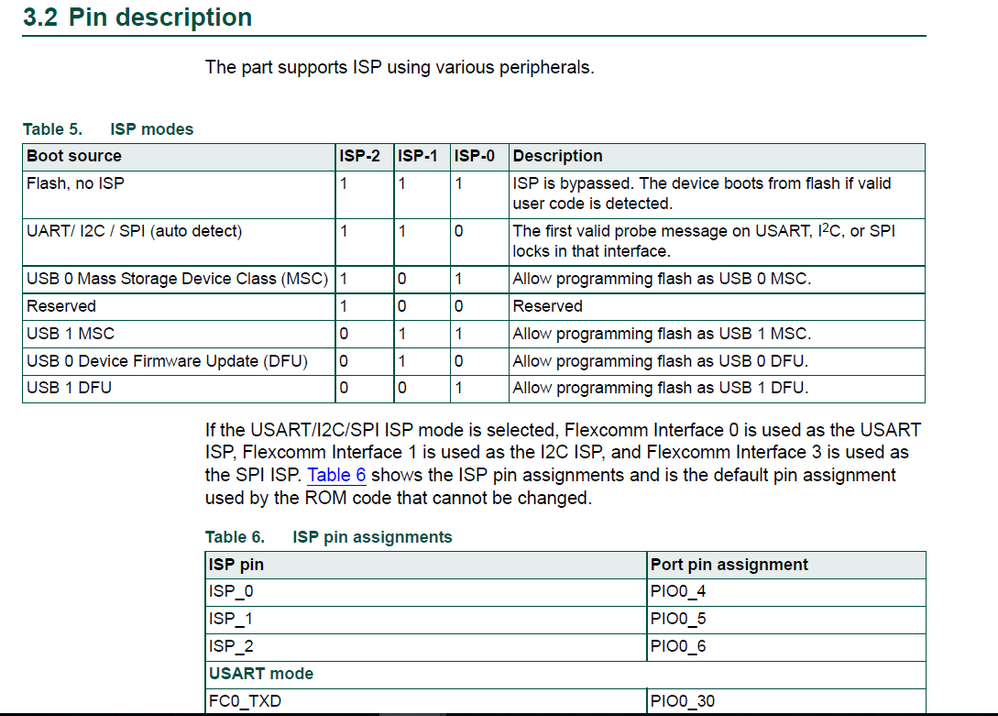 xiangjun_rong
- 新着としてマーク
- ブックマーク
- 購読
- ミュート
- RSS フィードを購読する
- ハイライト
- 印刷
- 不適切なコンテンツを報告
Hi, all,
I appologize for the wrong information, the blhost tools does NOT support LPC56xxx family. Customer can use Flash Magic tools to erase on-chip flash and download code to flash.
Currently, the blhost tools only support LPC55xx/LPC55Sxx sub-family for all LPC family, because the flash-loader tools is integrated in the on-chip flash of LPC55xx family.
BR
XiangJun Rong
- 新着としてマーク
- ブックマーク
- 購読
- ミュート
- RSS フィードを購読する
- ハイライト
- 印刷
- 不適切なコンテンツを報告
Thanks for the answer.
ISP is also blocked through eCRP. The controller is visible only through SWD
eCRP value set at 0x00019800 in vector table.
xiangjun_rong
- 新着としてマーク
- ブックマーク
- 購読
- ミュート
- RSS フィードを購読する
- ハイライト
- 印刷
- 不適切なコンテンツを報告
Hi, Ahtoh,
If your ECRP data blocks both the SWD and ISP, I do not think there is any way to run the mass erasing command, in the case, you have to remove the old LPC54606 on board and populate a new one.
BR
XiangJun Rong

- 新着としてマーク
- ブックマーク
- 購読
- ミュート
- RSS フィードを購読する
- ハイライト
- 印刷
- 不適切なコンテンツを報告
I have tested ERCP on LPC54605 and disabled enter ISP from pins, ISP from IAP call, disabled SWD, and set protected sector count to the whole flash sector count. And was surprised that this state is still recoverable by J-Link commander command - unlock LPC5460x. Got lucky to found this topic.

