
- Forums
- Product Forums
- General Purpose MicrocontrollersGeneral Purpose Microcontrollers
- i.MX Forumsi.MX Forums
- QorIQ Processing PlatformsQorIQ Processing Platforms
- Identification and SecurityIdentification and Security
- Power ManagementPower Management
- Wireless ConnectivityWireless Connectivity
- RFID / NFCRFID / NFC
- Advanced AnalogAdvanced Analog
- Neural Processing UnitsNeural Processing Units
- MCX Microcontrollers
- S32G
- S32K
- S32V
- MPC5xxx
- Other NXP Products
- S12 / MagniV Microcontrollers
- Powertrain and Electrification Analog Drivers
- Sensors
- Vybrid Processors
- Digital Signal Controllers
- 8-bit Microcontrollers
- ColdFire/68K Microcontrollers and Processors
- PowerQUICC Processors
- OSBDM and TBDML
- S32M
- S32Z/E
-
- Solution Forums
- Software Forums
- MCUXpresso Software and ToolsMCUXpresso Software and Tools
- CodeWarriorCodeWarrior
- MQX Software SolutionsMQX Software Solutions
- Model-Based Design Toolbox (MBDT)Model-Based Design Toolbox (MBDT)
- FreeMASTER
- eIQ Machine Learning Software
- Embedded Software and Tools Clinic
- S32 SDK
- S32 Design Studio
- GUI Guider
- Zephyr Project
- Voice Technology
- Application Software Packs
- Secure Provisioning SDK (SPSDK)
- Processor Expert Software
- Generative AI & LLMs
-
- Topics
- Mobile Robotics - Drones and RoversMobile Robotics - Drones and Rovers
- NXP Training ContentNXP Training Content
- University ProgramsUniversity Programs
- Rapid IoT
- NXP Designs
- SafeAssure-Community
- OSS Security & Maintenance
- Using Our Community
-
- Cloud Lab Forums
-
- Knowledge Bases
- ARM Microcontrollers
- i.MX Processors
- Identification and Security
- Model-Based Design Toolbox (MBDT)
- QorIQ Processing Platforms
- S32 Automotive Processing Platform
- Wireless Connectivity
- CodeWarrior
- MCUXpresso Suite of Software and Tools
- MQX Software Solutions
- RFID / NFC
- Advanced Analog
- Neural Processing Units
-
- NXP Tech Blogs
- Home
- :
- General Purpose Microcontrollers
- :
- LPC Microcontrollers
- :
- Re: LPC54618J512 with SDRAM Interface
LPC54618J512 with SDRAM Interface
- Subscribe to RSS Feed
- Mark Topic as New
- Mark Topic as Read
- Float this Topic for Current User
- Bookmark
- Subscribe
- Mute
- Printer Friendly Page
LPC54618J512 with SDRAM Interface

- Mark as New
- Bookmark
- Subscribe
- Mute
- Subscribe to RSS Feed
- Permalink
- Report Inappropriate Content
Hello everyone,
I have a custom PCB mounted with an LPC54618J512, interfaced via EMC to an external SDRAM IS42S32160D-6BL of 512Mbit. It operates within a frequency range of 37 MHz to 45 MHz. However, when I attempt to use a higher frequency, data corruption occurs with the current configuration.
For reference, here are the details:
1)System clock:150 MHz
2)Dynamic memory timing configuration
- SDRAM_REFRESHPERIOD_NS`: (64 * 1000000 / 8192)
- SDRAM_TRP_NS: 18u
- SDRAM_TRAS_NS: 38u
- SDRAM_TSREX_NS: 70u
- SDRAM_TAPR_NS: 18u
- SDRAM_TWRDELT_NS: 12u
- SDRAM_TRC_NS: 60u
- SDRAM_RFC_NS: 60u
- SDRAM_XSR_NS: 70u
- SDRAM_RRD_NS: 12u
- SDRAM_MRD_NCLK: 2u
- SDRAM_RAS_NCLK: 7u
- SDRAM_MODEREG_VALUE: 0x32u
- SDRAM_DEV_MEMORYMAP: 0x8Du
Has anyone experienced similar issues or have suggestions on how to resolve the data corruption at higher frequencies? Any insights or advice would be greatly appreciated!
Thank you

 Harry_Zhang
- Mark as New
- Bookmark
- Subscribe
- Mute
- Subscribe to RSS Feed
- Permalink
- Report Inappropriate Content
Hi @nithin3200
Data corruption at higher frequencies when interfacing with SDRAM is often related to timing issues, signal integrity, or incorrect configuration settings. Here are some things to check and consider:
1. Verify SDRAM Timing Configuration:
• Ensure that all timing parameters are set according to the SDRAM datasheet specifications, especially when operating at higher frequencies. Double-check the values like SDRAM_TRP_NS, SDRAM_TRAS_NS, SDRAM_TRC_NS, etc., and make sure they meet the minimum requirements.
2. Check Signal Integrity:
• Higher frequencies can cause issues like signal reflections, crosstalk, and other integrity problems. Ensure that your PCB layout follows best practices, such as maintaining proper trace impedance, minimizing trace length mismatches, and ensuring proper decoupling.
3. Review Clock Configuration:
• Ensure that the SDRAM clock is stable and meets the required timing for both the controller and the SDRAM device. Double-check the system clock settings and any PLL configurations.
4. Test with Lower Latency Settings:
• Experiment with adjusting the CAS latency or other memory configuration parameters to see if the SDRAM performs better at different settings.
Hope this will help you.
BR
Hang
- Mark as New
- Bookmark
- Subscribe
- Mute
- Subscribe to RSS Feed
- Permalink
- Report Inappropriate Content
Hi Hang,
Could you possibly share the configuration settings in LPC54618J512 for the SDRAM chip IS42S32160D-6BL like SDRAM_TRP_NS, SDRAM_TRAS_NS, SDRAM_TRC_NS, etc. I still see data corruption even at lower frequency which implies that it's not a hardware issue.
I did try with different timing parameters as per the datasheet. but was not able to arrive at the right values. Looking forward to your prompt reply.
BR
Nithin
Harry_Zhang
- Mark as New
- Bookmark
- Subscribe
- Mute
- Subscribe to RSS Feed
- Permalink
- Report Inappropriate Content
Hi @nithin3200
Recommended SDRAM Timing Configuration for LPC54618J512 with IS42S32160D-6BL:
1. SDRAM_TRP_NS (Row Precharge Time):
• Value: 18ns
2. SDRAM_TRAS_NS (Row Active Time):
• Value: 38ns
3. SDRAM_TRC_NS (Row Cycle Time):
• Value: 60ns
4. SDRAM_TWRDELT_NS (Write Recovery Time):
• Value: 12ns
5. SDRAM_RFC_NS (Refresh Cycle Time):
• Value: 60ns
6. SDRAM_XSR_NS (Exit Self-Refresh to Active Command Time):
• Value: 70ns
7. SDRAM_RRD_NS (Row to Row Delay):
• Value: 12ns
8. SDRAM_MRD_NCLK (Mode Register Set Cycle Time):
• Value: 2 clock cycles
9. SDRAM_RAS_NCLK (Row Address Strobe):
• Value: 7 clock cycles
10. SDRAM_MODEREG_VALUE:
• Value: 0x32u
11. SDRAM_DEV_MEMORYMAP:
• Value: 0x8Du
BR
Hang
- Mark as New
- Bookmark
- Subscribe
- Mute
- Subscribe to RSS Feed
- Permalink
- Report Inappropriate Content
Hi Hang,
Thanks for sharing the SDRAM timing configuration. I made the changes as you suggested, but I am still experiencing data corruption. I noticed that SDRAM_TSREX_NS and SDRAM_TAPR_NS are missing in the timing configuration you shared.
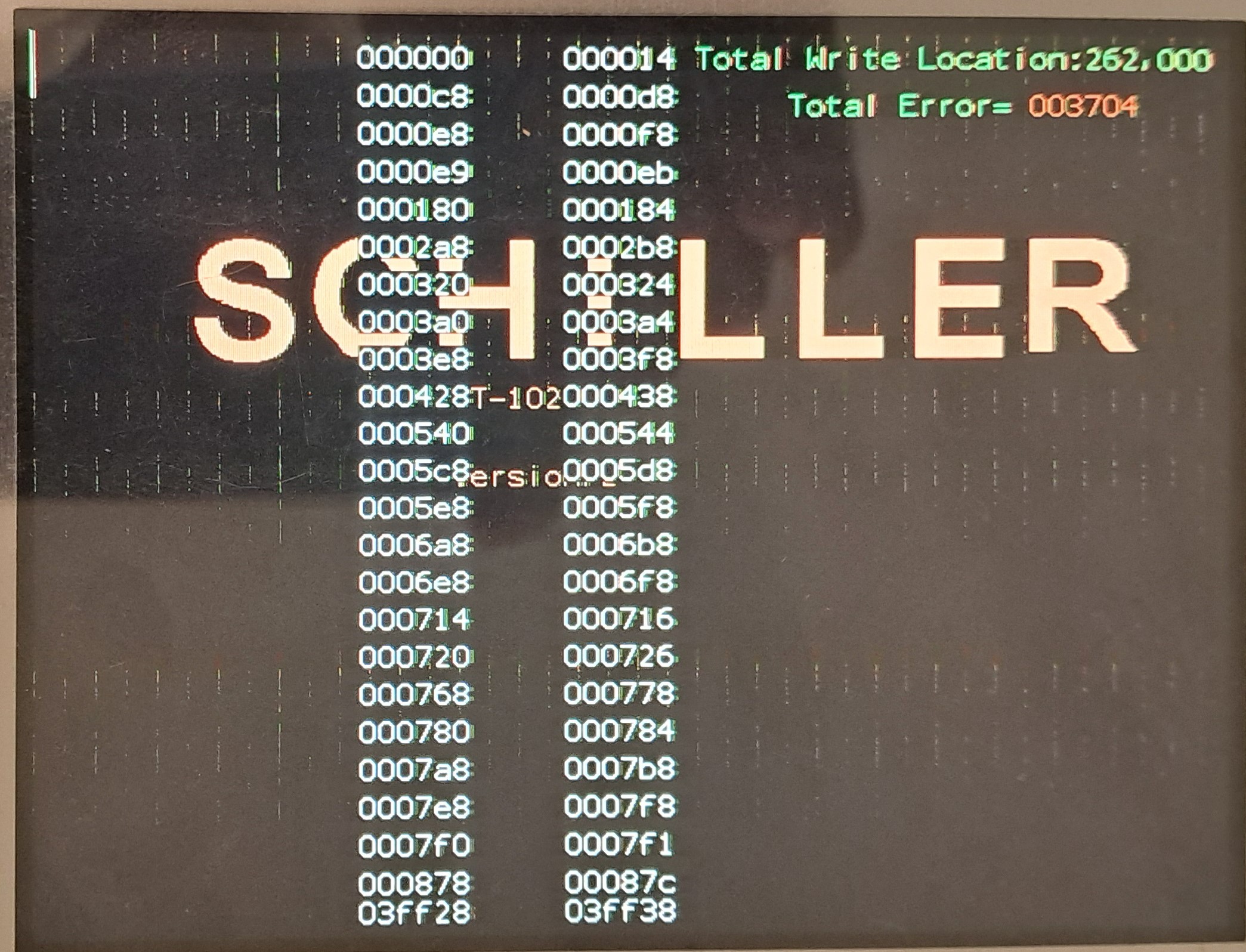
For your information, I am using both SDRAM and SRAM via EMC. SRAM is used for the keypad application, which is working fine, while SDRAM is used for the display, where I can seeing data corruption and patches. I tested the SDRAM read and write operations using the SDK sample code emc_sdram.c and observed errors in the read operation (~1% error).
BR
Nithin
Harry_Zhang
- Mark as New
- Bookmark
- Subscribe
- Mute
- Subscribe to RSS Feed
- Permalink
- Report Inappropriate Content
Hi @nithin3200
“I tested the SDRAM read and write operations using the SDK sample code emc_sdram.c and observed errors in the read operation (~1% error).”
Can this problem be reproduced?
Can you share your testing method?
BR
Hang
- Mark as New
- Bookmark
- Subscribe
- Mute
- Subscribe to RSS Feed
- Permalink
- Report Inappropriate Content
Hi @Harry_Zhang,
1) "Can this problem be reproduced?"
As per your request, I have reproduced the problem and am sharing the screenshots for 37.5MHz and 50MHz.
2)"Can you share your testing method?"
I am also attaching the screenshots for the SDRAM read and write functions.
Please have a look at the attachments.
Best regards,
Nithin
Harry_Zhang
- Mark as New
- Bookmark
- Subscribe
- Mute
- Subscribe to RSS Feed
- Permalink
- Report Inappropriate Content
HI @nithin3200
I tested it on board LPC54628 based on your code.
You can see the test results.


I'm sorry I didn't reproduce this issue.
BR
Hang
- Mark as New
- Bookmark
- Subscribe
- Mute
- Subscribe to RSS Feed
- Permalink
- Report Inappropriate Content
The LPC54628 board works fine with my code, but I can't get the same results on my custom PCB. The problems seem to be with my custom board because the LPC54628 board works well. For your reference, my custom board uses the SDRAM IS42S32160D-6BL, while the LPC54628 board uses the W9812G6JB-6I. I've already shared my code and the dynamic memory timing settings with you.
Could you please check my dynamic memory timing settings to see if I missed anything?
I don’t think there’s a hardware issue, but I might be making a mistake in the software. At an EMC clock speed of 37.5 MHz, I’m seeing some data corruption and a few display issues. When I try 50 MHz or 75 MHz, the data corruption and display problems get worse.
Harry_Zhang
- Mark as New
- Bookmark
- Subscribe
- Mute
- Subscribe to RSS Feed
- Permalink
- Report Inappropriate Content
Hi @nithin3200
It is likely that there is a discrepancy in hardware, signal integrity, or SDRAM timing settings.
1. Check SDRAM Timing Configurations
I checked and I think most of them are fine, can you try to change the SDRAM_TRAS_NS (Row Active Time) to 40?
2. Verify Electrical Signal Integrity
Data corruption at higher frequencies often points to signal integrity issues, such as reflections, crosstalk, or inadequate power delivery. Consider these aspects:
• PCB Layout: Ensure the signal traces for SDRAM lines are properly designed. They should be of controlled impedance, ideally routed as differential pairs for critical signals (like clock lines). Length matching between address and data lines can be crucial to prevent skew.
LPC54628 board with the the W9812G6JB-6I works fine, can you change LPC54628 board to IS42S32160D-6BL, or change custom board to W9812G6JB-6I?
BR
Hang
- Mark as New
- Bookmark
- Subscribe
- Mute
- Subscribe to RSS Feed
- Permalink
- Report Inappropriate Content
Hi @Harry_Zhang,
As per your suggestion, I changed the SDRAM_TRAS_NS values to 40, but I am still facing the same issues.
You mentioned, "LPC54628 board with the W9812G6JB-6I works fine, can you change LPC54628 board to IS42S32160D-6BL, or change the custom board to W9812G6JB-6I?" How can I change the LPC54628 board to IS42S32160D-6BL when there are no connectors for the SDRAM interface? Could you please provide more clarity on this?
Best regards,
Nithin
Harry_Zhang
- Mark as New
- Bookmark
- Subscribe
- Mute
- Subscribe to RSS Feed
- Permalink
- Report Inappropriate Content
Hi @nithin3200




According to the schematic diagram of the board, You can replace 'W9812G6JB-6I' with 'IS42S16800F-6BLI', If it can work normally after replacement, it indicates that there may be a problem with the customer's board.
BR
Hang
- Mark as New
- Bookmark
- Subscribe
- Mute
- Subscribe to RSS Feed
- Permalink
- Report Inappropriate Content
Sorry, practically, I cannot make the hardware changes you suggested.
While studying the AN12026 application note, I found the following: "Using 32-bit SDRAMs with cell layout not supported by EMC. There are 256 Mbit (8M x 32), 512 Mbit (16M x 32), and 1 Gbit (32M x 32) SDR SDRAMs that have a row and column configuration that is not listed in Table 3. These devices can be used by setting the EMCDynamicConfig Address Mapping (AM) field as if two 16-bit devices with the same bank/row/column mapping are being used."
Based on this, I made the following changes:
1. Changed `#define SDRAM_DEV_MEMORYMAP (0x8Du)` to `0x2Du`
2. Changed `#define SDRAM_MODEREG_VALUE (0x32u)` to `0x23u`
3. Additionally, added to the `EMC_Init(EMC, &basicConfig)` function: `SYSCON->EMCDLYCTRL = 0x0001010;`
However, I am still experiencing data correction issues, although they have reduced. Can you verify if I am following the AN12026 application note correctly and explain the configuration?
BR
Nithin
 Harry_Zhang
- Mark as New
- Bookmark
- Subscribe
- Mute
- Subscribe to RSS Feed
- Permalink
- Report Inappropriate Content
Hi @nithin3200
The application note suggests treating the 32-bit SDRAM as two 16-bit devices by configuring the EMCDynamicConfig register accordingly. This effectively tells the controller to map the SDRAM’s rows, columns, and banks as though it’s interfacing with two smaller 16-bit devices. If the AM field is not configured properly to match the SDRAM layout, data corruption can occur due to incorrect addressing.
I think SDRAM_DEV_MEMORYMAP and SDRAM_MODEREG_VALUE are right.
About SYSCON->EMCDLYCTRL, , to properly adjust this, you may need to experiment with various delay values or consult the SDRAM’s timing requirements and your PCB layout characteristics (e.g., trace lengths).
BR
Hang
