
- Forums
- Product Forums
- General Purpose MicrocontrollersGeneral Purpose Microcontrollers
- i.MX Forumsi.MX Forums
- QorIQ Processing PlatformsQorIQ Processing Platforms
- Identification and SecurityIdentification and Security
- Power ManagementPower Management
- Wireless ConnectivityWireless Connectivity
- RFID / NFCRFID / NFC
- Advanced AnalogAdvanced Analog
- Neural Processing UnitsNeural Processing Units
- MCX Microcontrollers
- S32G
- S32K
- S32V
- MPC5xxx
- Other NXP Products
- S12 / MagniV Microcontrollers
- Powertrain and Electrification Analog Drivers
- Sensors
- Vybrid Processors
- Digital Signal Controllers
- 8-bit Microcontrollers
- ColdFire/68K Microcontrollers and Processors
- PowerQUICC Processors
- OSBDM and TBDML
- S32M
- S32Z/E
-
- Solution Forums
- Software Forums
- MCUXpresso Software and ToolsMCUXpresso Software and Tools
- CodeWarriorCodeWarrior
- MQX Software SolutionsMQX Software Solutions
- Model-Based Design Toolbox (MBDT)Model-Based Design Toolbox (MBDT)
- FreeMASTER
- eIQ Machine Learning Software
- Embedded Software and Tools Clinic
- S32 SDK
- S32 Design Studio
- GUI Guider
- Zephyr Project
- Voice Technology
- Application Software Packs
- Secure Provisioning SDK (SPSDK)
- Processor Expert Software
- Generative AI & LLMs
-
- Topics
- Mobile Robotics - Drones and RoversMobile Robotics - Drones and Rovers
- NXP Training ContentNXP Training Content
- University ProgramsUniversity Programs
- Rapid IoT
- NXP Designs
- SafeAssure-Community
- OSS Security & Maintenance
- Using Our Community
-
- Cloud Lab Forums
-
- Knowledge Bases
- ARM Microcontrollers
- i.MX Processors
- Identification and Security
- Model-Based Design Toolbox (MBDT)
- QorIQ Processing Platforms
- S32 Automotive Processing Platform
- Wireless Connectivity
- CodeWarrior
- MCUXpresso Suite of Software and Tools
- MQX Software Solutions
- RFID / NFC
- Advanced Analog
- Neural Processing Units
-
- NXP Tech Blogs
- Home
- :
- General Purpose Microcontrollers
- :
- LPC Microcontrollers
- :
- Identified core does not match configuration. (Found: Cortex-M0, Configured: Cortex-M4)
Identified core does not match configuration. (Found: Cortex-M0, Configured: Cortex-M4)
- Subscribe to RSS Feed
- Mark Topic as New
- Mark Topic as Read
- Float this Topic for Current User
- Bookmark
- Subscribe
- Mute
- Printer Friendly Page

- Mark as New
- Bookmark
- Subscribe
- Mute
- Subscribe to RSS Feed
- Permalink
- Report Inappropriate Content
I have an LPC5410J256BD64QL that I am attempting to connect to with a J-Link Ultra+ for the purpose of flashing. However, I cannot connect to the device at all.
When I try to connect, I get the following error message in MCUXpresso:
S/N: 504302790
License(s): RDI, FlashBP, FlashDL, JFlash, GDB
VTref=3.321V
Target connection not established yet but required for command.
Device "LPC54101J256_M4" selected.
Connecting to target via SWD
Found SW-DP with ID 0x0BB11477
Scanning AP map to find all available APs
AP[1]: Stopped AP scan as end of AP map has been reached
AP[0]: AHB-AP (IDR: 0x04770021)
Iterating through AP map to find AHB-AP to use
AP[0]: Core found
AP[0]: AHB-AP ROM base: 0xF0000000
CPUID register: 0x410CC200. Implementer code: 0x41 (ARM)
Found Cortex-M0 r0p0, Little endian.
**************************
WARNING: Identified core does not match configuration. (Found: Cortex-M0, Configured: Cortex-M4)
**************************
FPUnit: 4 code (BP) slots and 0 literal slots
CoreSight components:
ROMTbl[0] @ F0000000
ROMTbl[0][0]: E00FF000, CID: B105100D, PID: 000BB471 ROM Table
ROMTbl[1] @ E00FF000
ROMTbl[1][0]: E000E000, CID: B105E00D, PID: 000BB008 SCS
ROMTbl[1][1]: E0001000, CID: B105E00D, PID: 000BB00A DWT
ROMTbl[1][2]: E0002000, CID: B105E00D, PID: 000BB00B FPB
Cortex-M0 identified.
Reset delay: 0 ms
Reset type NORMAL: Resets core & peripherals via SYSRESETREQ & VECTRESET bit.
Reset: Halt core after reset via DEMCR.VC_CORERESET.
Reset: Reset device via AIRCR.SYSRESETREQ.
**************************
WARNING: CPU did not halt after bootloader.
**************************
**************************
WARNING: CPU did not halt after bootloader.
**************************
PC = 0000224E, CycleCnt = 00000000
R0 = 0004CC45, R1 = 80000000, R2 = 80470000, R3 = 00B71B00
R4 = 00000002, R5 = 00000001, R6 = 00014594, R7 = 20003FA0
R8 = C80C2840, R9 = 380C0800, R10= AC082811, R11= 0C098100
R12= 00000000
SP(R13)= 20003FA0, MSP= 20003FA0, PSP= 04240220, R14(LR) = 0000002F
XPSR = 21000000: APSR = nzCvq, EPSR = 01000000, IPSR = 000 (NoException)
CFBP = 00000001, CONTROL = 00, FAULTMASK = 00, BASEPRI = 00, PRIMASK = 01
FPU regs: FPU not enabled / not implemented on connected CPU.
Downloading file [D:\code\MusicTribe\TH_P0DBD\springboard-dice3\springboard-mcu\Boot\springboard-mcu.hex]...
Writing target memory failed.
Script processing completed.
Unable to perform operation!
Command failed with exit code 1
The LPC5410 chip we are using has an M4 and does not have an M0.
I am able to debug with the J-Link debugger and step through code, so I believe the debugger is connected properly. In addition, at some point in the past I was able to flash the MCU but I had to change computers and now cannot get it working.
I am using the GUI Flash Tool in MCUXpresso to do the flashing. Here is a screen capture of the command that is being sent.
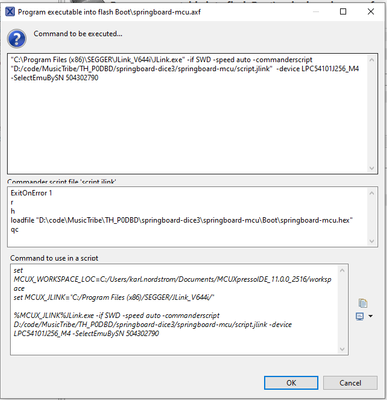
I am running MCUXpresso IDE v11.0.0 [Build 2516] [2019-06-05]. We are using a slightly older version of MCUXpresso for compatibility reasons, but I have also tried the most recent version v.11.2.1 and received the same output.
I have broken it down further by trying to connect to the chip using J-Link Commander and it is clear that I cannot connect to the chip. I received similar output.
SEGGER J-Link Commander V6.86 (Compiled Sep 24 2020 17:33:12)
DLL version V6.86, compiled Sep 24 2020 17:31:31

Connecting to J-Link via USB...O.K.
Firmware: J-Link Ultra V4 compiled Sep 21 2020 16:58:33
Hardware version: V4.00
S/N: 504302790
License(s): RDI, FlashBP, FlashDL, JFlash, GDB
VTref=3.321V

J-Link>connect
Please specify device / core. <Default>: LPC54101J256_M4
Type '?' for selection dialog
Device>connect default
Please specify target interface:
J) JTAG (Default)
S) SWD
F) FINE
I) ICSP
C) C2
T) cJTAG
TIF>s
Specify target interface speed [kHz]. <Default>: 4000 kHz
Speed>
Device "LPC54101J256_M4" selected.

Connecting to target via SWD
Found SW-DP with ID 0x0BB11477
DPIDR: 0x0BB11477
Scanning AP map to find all available APs
AP[1]: Stopped AP scan as end of AP map has been reached
AP[0]: AHB-AP (IDR: 0x04770021)
Iterating through AP map to find AHB-AP to use
AP[0]: Core found
AP[0]: AHB-AP ROM base: 0xF0000000
CPUID register: 0x410CC200. Implementer code: 0x41 (ARM)
Found Cortex-M0 r0p0, Little endian.
Identified core does not match configuration. (Found: Cortex-M0, Configured: Cortex-M4)
FPUnit: 4 code (BP) slots and 0 literal slots
CoreSight components:
ROMTbl[0] @ F0000000
ROMTbl[0][0]: E00FF000, CID: B105100D, PID: 000BB471 ROM Table
ROMTbl[1] @ E00FF000
ROMTbl[1][0]: E000E000, CID: B105E00D, PID: 000BB008 SCS
ROMTbl[1][1]: E0001000, CID: B105E00D, PID: 000BB00A DWT
ROMTbl[1][2]: E0002000, CID: B105E00D, PID: 000BB00B FPB
I have checked reset pin 64 and it is being held high as it is supposed to be.
I have tried connecting to multiple chips, including hardware that has worked in the past.
Does anyone have a clue as to what might be going wrong? Any help would be greatly appreciated.
Solved! Go to Solution.
- Mark as New
- Bookmark
- Subscribe
- Mute
- Subscribe to RSS Feed
- Permalink
- Report Inappropriate Content
Thank you for your response. I'm embarrassed to say that it was user error. We were connecting to the wrong debug header. All good now.
- Mark as New
- Bookmark
- Subscribe
- Mute
- Subscribe to RSS Feed
- Permalink
- Report Inappropriate Content
Further information. I enabled J-Link logging and captured the following while attempting to connect.
T5E50 081:950.652 JLINK_ExecCommand("device=LPC54101J256_M4", ...).
T5E50 081:951.282   Device "LPC54101J256_M4" selected.
T5E50 081:955.050 - 4.368ms returns 0x00
T5E50 081:955.120 JLINK_EnableLog(...)
T5E50 081:955.164 - 0.056ms
T5E50 081:955.424 JLINK_GetEmuCaps()
T5E50 081:955.458 - 0.046ms returns 0xB9FF7BBF
T5E50 081:955.488 JLINK_TIF_GetAvailable(...)
T5E50 081:955.696 - 0.244ms
T5E50 081:955.751 JLINK_TIF_Select(JLINKARM_TIF_SWD)
T5E50 081:956.377 - 0.666ms returns 0x00
T5E50 081:956.643 JLINK_IsConnected()
T5E50 081:956.676 - 0.045ms returns FALSE
T5E50 081:956.709 JLINK_SetSpeed(2000)
T5E50 081:956.840 - 0.179ms
T5E50 081:956.907 JLINK_Connect()
T5E50 081:957.697   Found SW-DP with ID 0x0BB11477
T5E50 081:960.001   DPIDR: 0x0BB11477
T5E50 081:960.330   Scanning AP map to find all available APs
T5E50 081:960.928   AP[1]: Stopped AP scan as end of AP map has been reached
T5E50 081:961.117   AP[0]: AHB-AP (IDR: 0x04770021)
T5E50 081:961.324   Iterating through AP map to find AHB-AP to use
T5E50 081:961.961   AP[0]: Core found
T5E50 081:962.132   AP[0]: AHB-AP ROM base: 0xF0000000
T5E50 081:962.545   CPUID register: 0x410CC200. Implementer code: 0x41 (ARM)
T5E50 081:962.744   Found Cortex-M0 r0p0, Little endian.
T5E50 082:063.801   Identified core does not match configuration. (Found: Cortex-M0, Configured: Cortex-M4)
T5E50 082:064.242   -- Max. mem block: 0x0000DD28
T5E50 082:064.323   CPU_ReadMem(4 bytes @ 0xE000EDF0)
T5E50 082:064.775   CPU_WriteMem(4 bytes @ 0xE000EDF0)
T5E50 082:065.227   CPU_ReadMem(4 bytes @ 0xE0002000)
T5E50 082:065.835   FPUnit: 4 code (BP) slots and 0 literal slots
T5E50 082:065.894   CPU_ReadMem(4 bytes @ 0xE000EDFC)
T5E50 082:066.222   CPU_WriteMem(4 bytes @ 0xE000EDFC)
T5E50 082:066.600   CPU_ReadMem(4 bytes @ 0xE0001000)
T5E50 082:066.990   CPU_WriteMem(4 bytes @ 0xE0001000)
T5E50 082:067.622   CoreSight components:
T5E50 082:067.844   ROMTbl[0] @ F0000000
T5E50 082:067.924   CPU_ReadMem(64 bytes @ 0xF0000000)
T5E50 082:068.632   CPU_ReadMem(32 bytes @ 0xE00FFFE0)
T5E50 082:069.417   ROMTbl[0][0]: E00FF000, CID: B105100D, PID: 000BB471 ROM Table
T5E50 082:069.781   ROMTbl[1] @ E00FF000
T5E50 082:069.851   CPU_ReadMem(64 bytes @ 0xE00FF000)
T5E50 082:070.569   CPU_ReadMem(32 bytes @ 0xE000EFE0)
T5E50 082:071.491   ROMTbl[1][0]: E000E000, CID: B105E00D, PID: 000BB008 SCS
T5E50 082:071.574   CPU_ReadMem(32 bytes @ 0xE0001FE0)
T5E50 082:072.939   ROMTbl[1][1]: E0001000, CID: B105E00D, PID: 000BB00A DWT
T5E50 082:073.001   CPU_ReadMem(32 bytes @ 0xE0002FE0)
T5E50 082:073.822   ROMTbl[1][2]: E0002000, CID: B105E00D, PID: 000BB00B FPB
T5E50 082:073.906 - 117.016ms returns 0x00
T5E50 082:073.951 JLINK_GetIdData(pIdData)
T5E50 082:074.203   pIdData->ScanLen=4
T5E50 082:074.296   pIdData->NumDevices=1
T5E50 082:074.360   pIdData->aId[0]=0x0BB11477
T5E50 082:074.423   pIdData->aIrRead[0]=0
T5E50 082:074.486   pIdData->aScanLen[0]=0
T5E50 082:074.549   pIdData->aScanRead[0]=0
T5E50 082:074.612 - 0.673ms
T5E50 082:074.753 JLINK_GetMemZones(...)
T5E50 082:074.793 - 0.053ms returns 0
T5E50 082:074.824 JLINK_HasError()
T5E50 082:074.855 JLINK_CORE_GetFound()
T5E50 082:074.881 - 0.039ms returns 0x60000FF

 Alice_Yang
- Mark as New
- Bookmark
- Subscribe
- Mute
- Subscribe to RSS Feed
- Permalink
- Report Inappropriate Content
Hello,
Could you please retry with the latest version of J-Link software package?
https://www.segger.com/downloads/jlink/#J-LinkSoftwareAndDocumentationPack
Regards,
Alice
- Mark as New
- Bookmark
- Subscribe
- Mute
- Subscribe to RSS Feed
- Permalink
- Report Inappropriate Content
Thank you for your response. I'm embarrassed to say that it was user error. We were connecting to the wrong debug header. All good now.
