
- Forums
- Product Forums
- General Purpose MicrocontrollersGeneral Purpose Microcontrollers
- i.MX Forumsi.MX Forums
- QorIQ Processing PlatformsQorIQ Processing Platforms
- Identification and SecurityIdentification and Security
- Power ManagementPower Management
- Wireless ConnectivityWireless Connectivity
- RFID / NFCRFID / NFC
- Advanced AnalogAdvanced Analog
- Neural Processing UnitsNeural Processing Units
- MCX Microcontrollers
- S32G
- S32K
- S32V
- MPC5xxx
- Other NXP Products
- S12 / MagniV Microcontrollers
- Powertrain and Electrification Analog Drivers
- Sensors
- Vybrid Processors
- Digital Signal Controllers
- 8-bit Microcontrollers
- ColdFire/68K Microcontrollers and Processors
- PowerQUICC Processors
- OSBDM and TBDML
- S32M
- S32Z/E
-
- Solution Forums
- Software Forums
- MCUXpresso Software and ToolsMCUXpresso Software and Tools
- CodeWarriorCodeWarrior
- MQX Software SolutionsMQX Software Solutions
- Model-Based Design Toolbox (MBDT)Model-Based Design Toolbox (MBDT)
- FreeMASTER
- eIQ Machine Learning Software
- Embedded Software and Tools Clinic
- S32 SDK
- S32 Design Studio
- GUI Guider
- Zephyr Project
- Voice Technology
- Application Software Packs
- Secure Provisioning SDK (SPSDK)
- Processor Expert Software
- Generative AI & LLMs
-
- Topics
- Mobile Robotics - Drones and RoversMobile Robotics - Drones and Rovers
- NXP Training ContentNXP Training Content
- University ProgramsUniversity Programs
- Rapid IoT
- NXP Designs
- SafeAssure-Community
- OSS Security & Maintenance
- Using Our Community
-
- Cloud Lab Forums
-
- Knowledge Bases
- ARM Microcontrollers
- i.MX Processors
- Identification and Security
- Model-Based Design Toolbox (MBDT)
- QorIQ Processing Platforms
- S32 Automotive Processing Platform
- Wireless Connectivity
- CodeWarrior
- MCUXpresso Suite of Software and Tools
- MQX Software Solutions
- RFID / NFC
- Advanced Analog
- Neural Processing Units
-
- NXP Tech Blogs
- Home
- :
- MCUXpressoソフトウェアとツール
- :
- Kinetisソフトウェア開発キット
- :
- Re: FRDM-K64 Target Connection Fail
FRDM-K64 Target Connection Fail
- RSS フィードを購読する
- トピックを新着としてマーク
- トピックを既読としてマーク
- このトピックを現在のユーザーにフロートします
- ブックマーク
- 購読
- ミュート
- 印刷用ページ
FRDM-K64 Target Connection Fail

- 新着としてマーク
- ブックマーク
- 購読
- ミュート
- RSS フィードを購読する
- ハイライト
- 印刷
- 不適切なコンテンツを報告
Hi All,
Good day.
I have just bought a FRDM-K64 evaluation kits and following the tutorial step by step to test on it. Unfortunately, I am having the communication issue between the evaluation kits to the mcuXpresso IDE.
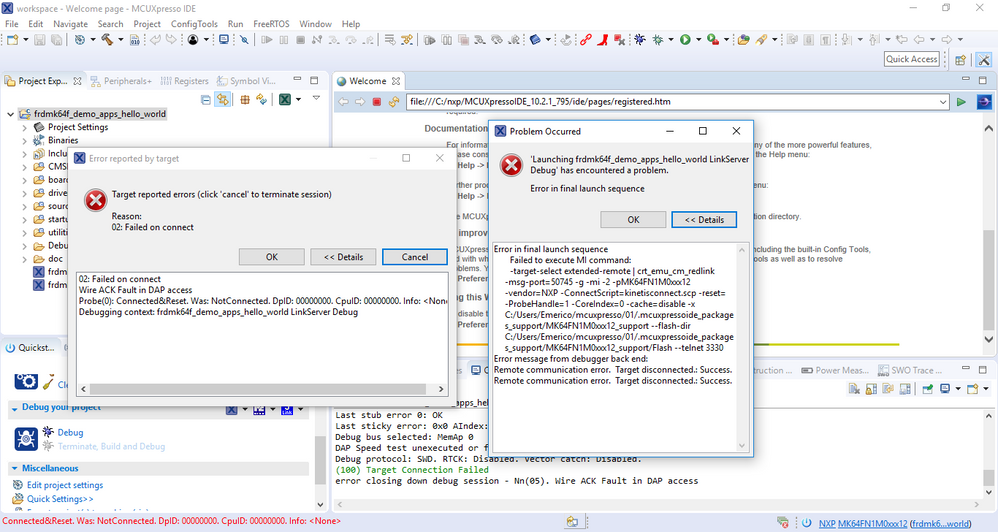
anyone can assist on this issue or anyone is facing the same problem?
please advice, Thank you very much.
Regards,
Ben.

 Carlos_Mendoza
- 新着としてマーク
- ブックマーク
- 購読
- ミュート
- RSS フィードを購読する
- ハイライト
- 印刷
- 不適切なコンテンツを報告
Hello Ben Cheong,
Please make sure you are using the latest MCUXpresso IDE and the latest OpenSDA firmware application in your board:
MCUXpresso IDE|Eclipse-based Integrated Development Environment (IDE)|NXP
OpenSDA Serial and Debug Adapter|NXP
Once you update the OpenSDA firmware application you will need to delete the Launch Configuration files in your project ({projname}{debug solution}Debug.launch and {projname}{debug solution}Release.launch) and create them again, simply highlight the appropriate project in the ‘Project Explorer’, and then in the Quickstart Panel click on Debug 'Project Name', alternatively click the blue bug icon to perform the same action.
Also, please make sure there are no hanging debug processes by clicking on the "Clean up debug" icon:
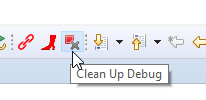
Hope it helps!
Best Regards,
Carlos Mendoza
Technical Support Engineer

- 新着としてマーク
- ブックマーク
- 購読
- ミュート
- RSS フィードを購読する
- ハイライト
- 印刷
- 不適切なコンテンツを報告
I have this same problem every single time I reconnect my dev board to the USB debugging port. There is a workaround but you have to perform it EVERY SINGE TIME, so it is frustrating and time consuming when you are working on something that requires you to disconnect and reconnect the USB! Hopefully someone has a more permanent fix. It's honestly kinda ridiculous that a problem like this exists and remains undocumented with a development kit! It doesn't give one much confidence in the ecosystem as a whole!:smileyangry:
In order to get around this:
- Open the "GUI Flash Tool" in the toolbar (the DIP looking icon)
- Select OK when it finds the target ("MBED CMSIS-DAP" for my K22 freedom board)
- In the "Target Operations" section click on "Resurrect locked Kinetis device"
- Hit "Run"
It will connect, complete the script and now you'll be able to run the samples.
Oh yeah another peculiarity: On my K22 board at least, the LED is a 3-color and the firmware seems to be written for a different iteration of the board/LED. So it doesn't change colors like you'd expect when you run the demos that change the LED; blinky, level, etc... But if you look at the schematics it's pretty easy to figure out how to change the GPIO settings to get it to change to the correct colors. It's actually a pretty good, easy activity to learn how the pins/ports work.
If anyone knows a permanent fix for the debug port that would allow us to avoid running the resurrect script every time we connect, it would be much appreciated!!!
Carlos_Mendoza
- 新着としてマーク
- ブックマーク
- 購読
- ミュート
- RSS フィードを購読する
- ハイライト
- 印刷
- 不適切なコンテンツを報告
Hello Andrew,
I have not seen the behavior you mention, does this happen to you with any project? Have you tried using other OpenSDA applications?
Best Regards,
Carlos Mendoza
Technical Support Engineer
- 新着としてマーク
- ブックマーク
- 購読
- ミュート
- RSS フィードを購読する
- ハイライト
- 印刷
- 不適切なコンテンツを報告
Carlos,
This happens with every project that I have imported from the SDK examples. (Both modified and not) I am using the latest version of MCUExpresso. I have not tried any other OpenSDA applications nor have I attempted to update OpenSDA firmware yet. I will do that when I have time.
Much like Ben, I first encountered this running the tutorials after I first got my board. I have multiple FRDM-K22F kits that I ordered at a later date and they all exhibit the same symptoms! I also recently installed the toolchain on my laptop and faced the same issue, so I know it's not a particular problem with my development machine or a specific dev kit.
