
- Forums
- Product Forums
- General Purpose MicrocontrollersGeneral Purpose Microcontrollers
- i.MX Forumsi.MX Forums
- QorIQ Processing PlatformsQorIQ Processing Platforms
- Identification and SecurityIdentification and Security
- Power ManagementPower Management
- Wireless ConnectivityWireless Connectivity
- RFID / NFCRFID / NFC
- Advanced AnalogAdvanced Analog
- Neural Processing UnitsNeural Processing Units
- MCX Microcontrollers
- S32G
- S32K
- S32V
- MPC5xxx
- Other NXP Products
- S12 / MagniV Microcontrollers
- Powertrain and Electrification Analog Drivers
- Sensors
- Vybrid Processors
- Digital Signal Controllers
- 8-bit Microcontrollers
- ColdFire/68K Microcontrollers and Processors
- PowerQUICC Processors
- OSBDM and TBDML
- S32M
- S32Z/E
-
- Solution Forums
- Software Forums
- MCUXpresso Software and ToolsMCUXpresso Software and Tools
- CodeWarriorCodeWarrior
- MQX Software SolutionsMQX Software Solutions
- Model-Based Design Toolbox (MBDT)Model-Based Design Toolbox (MBDT)
- FreeMASTER
- eIQ Machine Learning Software
- Embedded Software and Tools Clinic
- S32 SDK
- S32 Design Studio
- GUI Guider
- Zephyr Project
- Voice Technology
- Application Software Packs
- Secure Provisioning SDK (SPSDK)
- Processor Expert Software
- Generative AI & LLMs
-
- Topics
- Mobile Robotics - Drones and RoversMobile Robotics - Drones and Rovers
- NXP Training ContentNXP Training Content
- University ProgramsUniversity Programs
- Rapid IoT
- NXP Designs
- SafeAssure-Community
- OSS Security & Maintenance
- Using Our Community
-
- Cloud Lab Forums
-
- Knowledge Bases
- ARM Microcontrollers
- i.MX Processors
- Identification and Security
- Model-Based Design Toolbox (MBDT)
- QorIQ Processing Platforms
- S32 Automotive Processing Platform
- Wireless Connectivity
- CodeWarrior
- MCUXpresso Suite of Software and Tools
- MQX Software Solutions
- RFID / NFC
- Advanced Analog
- Neural Processing Units
-
- NXP Tech Blogs
- Home
- :
- General Purpose Microcontrollers
- :
- Kinetis Microcontrollers
- :
- Re: clock() Always Returns 32. Bug or Feature?
clock() Always Returns 32. Bug or Feature?
- Subscribe to RSS Feed
- Mark Topic as New
- Mark Topic as Read
- Float this Topic for Current User
- Bookmark
- Subscribe
- Mute
- Printer Friendly Page
clock() Always Returns 32. Bug or Feature?

- Mark as New
- Bookmark
- Subscribe
- Mute
- Subscribe to RSS Feed
- Permalink
- Report Inappropriate Content
Hello Everyone,
I've been experiencing some strangeness w.r.t. using clock() in Kinetis projects. I'm using MCUXpresso IDE 11.3.0 with a FRDM-KE15Z & FRDM-KL26Z in C++. I'm using clock() as a means of measuring processing work. When I call it while running the program on the board using the IDE and onboard debug probe through GDB, everything's just fine—I get meaningful results from clock(). When I disconnect the probe and run the program on its own, but view output using the IDE's Terminal tab, clock() ALWAYS returns 32.
This is odd behaviour! But it kind-of looks like a feature: you can tell if you've got an active probe into the program this way.
Do you know what's going on?
To reproduce this you'll need a Kinetis board like I'm using. Create a New C++ project in MCUXpresso using the wizard. Use the defaults for everything, except choose "C++ Project" and then: "NewlibNano (semihost)" in the Advanced project settings.
Replace the PRINTF… line in main() to:
printf("Hello World, let's check clock()\n");
DbgConsole_Printf("Dbg:Hello World, let's check clock()\r\n");
while(1) {
clock_t cpuTime=clock();
if (cpuTime==32) {
printf("clock is thirty-two!\n");
DbgConsole_Printf("Dbg:clock is thirty-two!\r\n");
} else {
printf("clock is:%ld\n",cpuTime);
DbgConsole_Printf("Dbg:clock is:%ld\r\n",cpuTime);
}
}
Make sure SDK_DEBUGCONSOLE is defined as 1 somewhere so DbgConsole_Printf will work. (Near the very top of fsl_debug_console.h is a good place.) Finally, add: #include <time.h> at the top of the file with main().
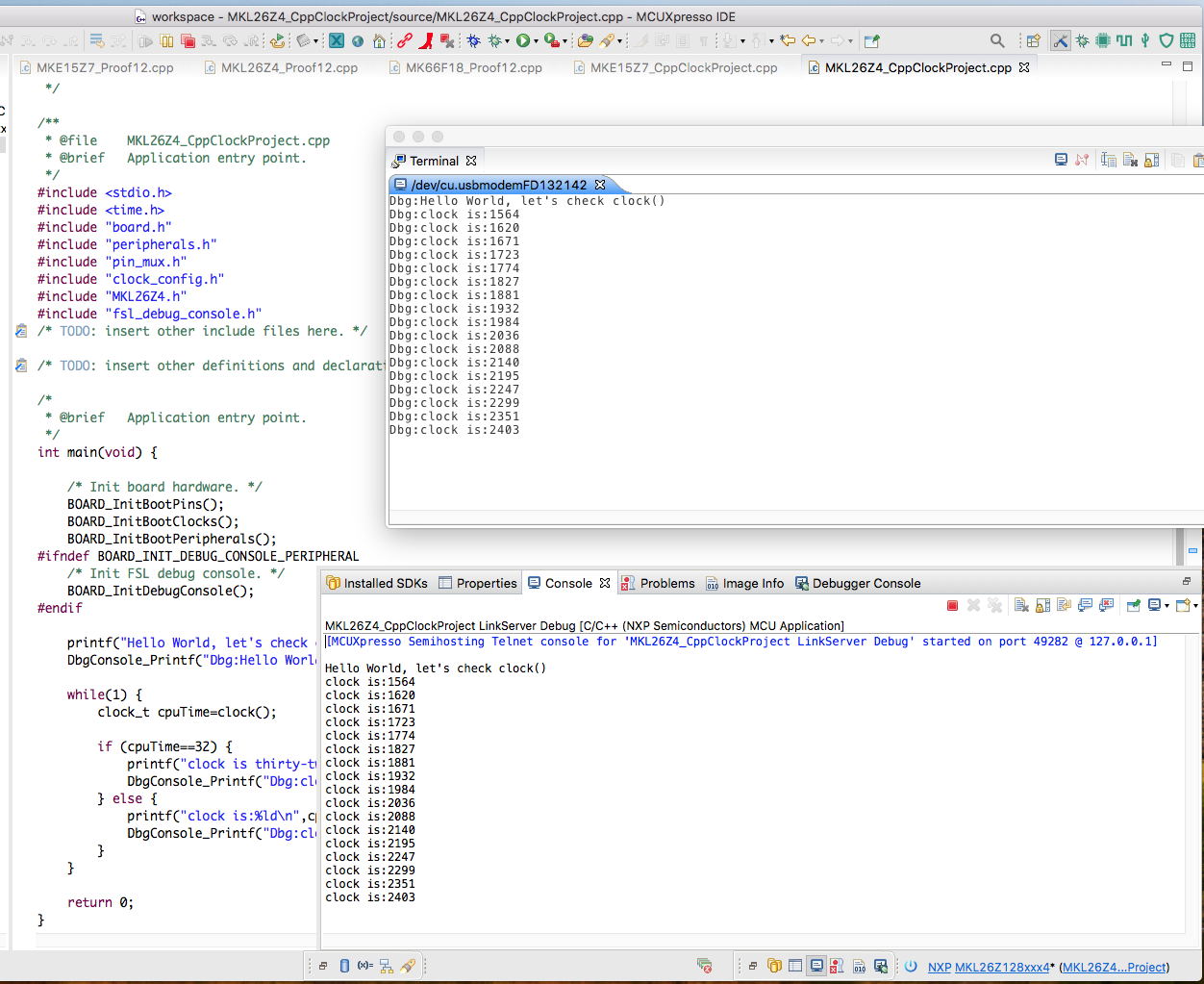
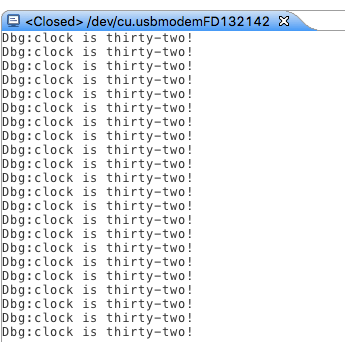
Before running it, hook up the board to your computer and run Terminal with the IDE. Connect it to the board and keep the window handy. Now run the app using the IDE and show the console. You'll see something that looks a whole lot like the picture below—both Console & Terminal are in perfect sync. Once you have that, stop the debugger in the IDE by hitting the red square "stop" button. Don't reset the board or anything like that—the program is still running. The console stops printing, but the Terminal continues. Except now the terminal prints only "Dbg:clock is thirty two!" If you disconnect the board and shut down the IDE and use some other terminal program attached to the now fully power-cycled board, you'll also ONLY see "Dbg:clock is thirty two!" as shown in the second picture below.
I'd like to get clock() working as it should. But I can't figure this one out.
Your help is REALLY appreciated.
Thank you very much,
Andre.

 nxf77486
- Mark as New
- Bookmark
- Subscribe
- Mute
- Subscribe to RSS Feed
- Permalink
- Report Inappropriate Content
Hi @Frotz ,
Let me express myself in the right way, is correct, the application should continue to run fine. But as your application is running a clock function it can be affected by the delays of the operation of the Semihost printf. This could be causing the clock message that you are receiving, I really recommend for your application the use UART configuration rather than Semihosting.
nxf77486
- Mark as New
- Bookmark
- Subscribe
- Mute
- Subscribe to RSS Feed
- Permalink
- Report Inappropriate Content
Hello @Frotz ,
When you have linked with the semihosting library, your application will no longer work standalone - it will only work when connected to the debugger. So this might be causing the discrepancies during your performance, if you will like to work out of a debug session I will recommend to use a terminal mode instead of the semihosting.
Semihosting operations cause the CPU to drop into "debug state", which means that for the duration of the data transfer between the target and the host PC no code (including interrupts) will get executed on the target.
- Mark as New
- Bookmark
- Subscribe
- Mute
- Subscribe to RSS Feed
- Permalink
- Report Inappropriate Content
Hi,
Thanks for your reply.
If the program wasn't working because it wasn't disconnected from the debugger, why is it still working? The printing continues as before, just the clock() function doesn't work properly. If I had LED's blinking, they would blink with the debugger attached or not. It seems the program is partly working. Why is it just the clock() function (in this example) that doesn't work? What else doesn't work properly in this "mode."
Thank you very much,
Andre.

- Mark as New
- Bookmark
- Subscribe
- Mute
- Subscribe to RSS Feed
- Permalink
- Report Inappropriate Content
