
- Forums
- Product Forums
- General Purpose MicrocontrollersGeneral Purpose Microcontrollers
- i.MX Forumsi.MX Forums
- QorIQ Processing PlatformsQorIQ Processing Platforms
- Identification and SecurityIdentification and Security
- Power ManagementPower Management
- Wireless ConnectivityWireless Connectivity
- RFID / NFCRFID / NFC
- Advanced AnalogAdvanced Analog
- Neural Processing UnitsNeural Processing Units
- MCX Microcontrollers
- S32G
- S32K
- S32V
- MPC5xxx
- Other NXP Products
- S12 / MagniV Microcontrollers
- Powertrain and Electrification Analog Drivers
- Sensors
- Vybrid Processors
- Digital Signal Controllers
- 8-bit Microcontrollers
- ColdFire/68K Microcontrollers and Processors
- PowerQUICC Processors
- OSBDM and TBDML
- S32M
- S32Z/E
-
- Solution Forums
- Software Forums
- MCUXpresso Software and ToolsMCUXpresso Software and Tools
- CodeWarriorCodeWarrior
- MQX Software SolutionsMQX Software Solutions
- Model-Based Design Toolbox (MBDT)Model-Based Design Toolbox (MBDT)
- FreeMASTER
- eIQ Machine Learning Software
- Embedded Software and Tools Clinic
- S32 SDK
- S32 Design Studio
- GUI Guider
- Zephyr Project
- Voice Technology
- Application Software Packs
- Secure Provisioning SDK (SPSDK)
- Processor Expert Software
- Generative AI & LLMs
-
- Topics
- Mobile Robotics - Drones and RoversMobile Robotics - Drones and Rovers
- NXP Training ContentNXP Training Content
- University ProgramsUniversity Programs
- Rapid IoT
- NXP Designs
- SafeAssure-Community
- OSS Security & Maintenance
- Using Our Community
-
- Cloud Lab Forums
-
- Knowledge Bases
- ARM Microcontrollers
- i.MX Processors
- Identification and Security
- Model-Based Design Toolbox (MBDT)
- QorIQ Processing Platforms
- S32 Automotive Processing Platform
- Wireless Connectivity
- CodeWarrior
- MCUXpresso Suite of Software and Tools
- MQX Software Solutions
- RFID / NFC
- Advanced Analog
- Neural Processing Units
-
- NXP Tech Blogs
- Home
- :
- General Purpose Microcontrollers
- :
- Kinetis Microcontrollers
- :
- Using Two A/D's FRDM-K22F
Using Two A/D's FRDM-K22F
- Subscribe to RSS Feed
- Mark Topic as New
- Mark Topic as Read
- Float this Topic for Current User
- Bookmark
- Subscribe
- Mute
- Printer Friendly Page
Using Two A/D's FRDM-K22F

- Mark as New
- Bookmark
- Subscribe
- Mute
- Subscribe to RSS Feed
- Permalink
- Report Inappropriate Content
I created a program using one A/D (i know my question above states 2) and based on whether the A/D value is < 0x7fff (turn Red led on) and if the A/D value is >0x7fff (turn Yellow led on).
Now that I'm using two A/D's, I see a pointer is being used for each stored A/D value.
I'm not sure how to read "value[0]" and "value[1]". I will use two leds for "value[0]" result, and another two for "value[1]" result. The Red and Yellow criteria will be the same as above.
I commented out my LED-Code so I can step-through the program and observe what happens during the A/D process.
Here's what I observed:
When I hovered over 'word' (in red) the 'value' was 0x0000 which is correct, since I adjusted pot1 so the input pin will read 0 volts.
Likewise, when I hovered over 'word' (in blue) the 'value' was approximately 0xffff which is correct, since I adjusted pot2 so the input pin will read 3.3 volts.

This confirmed to me, that the program I created using two A/D's is working correctly.
Here's my struggle:
I'm not clear how to use the result from "value[0]", then light the led that determines if it's less than or greater than 0x7fff. Similarly, the same holds true how to read "value[1]".
Below is my code for a successful measurement with two A/D channels. You'll notice I have the LED-code commented out that was related to my single channel led test. Of course, the uncommented code does not reflect the single channel A/D I used previously.
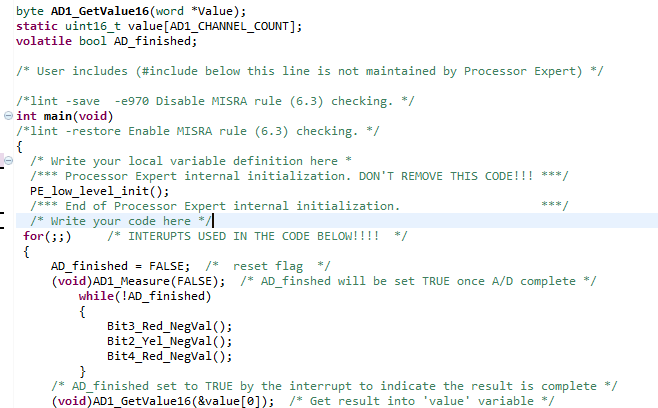
Note: I overlapped (void)AD1_GetValue16(&value[0]) in the screen capture for clarity to the reader.
Also, you will notice, below, in the commented code, how I determined whether the Red or Yellow led should turn on/off based on the A/D measurement. This code did work for the signal A/D measurements.
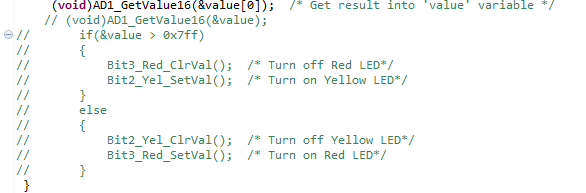
Thanks,
Brian

 Robin_Shen
- Mark as New
- Bookmark
- Subscribe
- Mute
- Subscribe to RSS Feed
- Permalink
- Report Inappropriate Content
Please try to test the code below:
word value[AD1_CHANNEL_COUNT];
while(1)
{
AD1_Measure(TRUE);
AD1_GetValue16(value);
if(value[0]>0x7ff)Bit1_SetVal(bit1Ptr);
else Bit1_ClrVal(bit1Ptr);
if(value[1]>0x7ff)Bit2_SetVal(bit2Ptr);
else Bit2_ClrVal(bit2Ptr);
}
Best Regards,
Robin
-----------------------------------------------------------------------------------------------------------------------
Note: If this post answers your question, please click the Correct Answer button. Thank you!
-----------------------------------------------------------------------------------------------------------------------
- Mark as New
- Bookmark
- Subscribe
- Mute
- Subscribe to RSS Feed
- Permalink
- Report Inappropriate Content
I did not analyze all of your code, look for places where an address is being used where a value is needed or the other way around.
Note that in C for an array 'value' and &value[0] return the same address.
if( &value > 0x7FF )
Should read:
if( value[0] > 0x7FF )
