
- Forums
- Product Forums
- General Purpose MicrocontrollersGeneral Purpose Microcontrollers
- i.MX Forumsi.MX Forums
- QorIQ Processing PlatformsQorIQ Processing Platforms
- Identification and SecurityIdentification and Security
- Power ManagementPower Management
- Wireless ConnectivityWireless Connectivity
- RFID / NFCRFID / NFC
- Advanced AnalogAdvanced Analog
- Neural Processing UnitsNeural Processing Units
- MCX Microcontrollers
- S32G
- S32K
- S32V
- MPC5xxx
- Other NXP Products
- S12 / MagniV Microcontrollers
- Powertrain and Electrification Analog Drivers
- Sensors
- Vybrid Processors
- Digital Signal Controllers
- 8-bit Microcontrollers
- ColdFire/68K Microcontrollers and Processors
- PowerQUICC Processors
- OSBDM and TBDML
- S32M
- S32Z/E
-
- Solution Forums
- Software Forums
- MCUXpresso Software and ToolsMCUXpresso Software and Tools
- CodeWarriorCodeWarrior
- MQX Software SolutionsMQX Software Solutions
- Model-Based Design Toolbox (MBDT)Model-Based Design Toolbox (MBDT)
- FreeMASTER
- eIQ Machine Learning Software
- Embedded Software and Tools Clinic
- S32 SDK
- S32 Design Studio
- GUI Guider
- Zephyr Project
- Voice Technology
- Application Software Packs
- Secure Provisioning SDK (SPSDK)
- Processor Expert Software
- Generative AI & LLMs
-
- Topics
- Mobile Robotics - Drones and RoversMobile Robotics - Drones and Rovers
- NXP Training ContentNXP Training Content
- University ProgramsUniversity Programs
- Rapid IoT
- NXP Designs
- SafeAssure-Community
- OSS Security & Maintenance
- Using Our Community
-
- Cloud Lab Forums
-
- Knowledge Bases
- ARM Microcontrollers
- i.MX Processors
- Identification and Security
- Model-Based Design Toolbox (MBDT)
- QorIQ Processing Platforms
- S32 Automotive Processing Platform
- Wireless Connectivity
- CodeWarrior
- MCUXpresso Suite of Software and Tools
- MQX Software Solutions
- RFID / NFC
- Advanced Analog
- Neural Processing Units
-
- NXP Tech Blogs
- Home
- :
- General Purpose Microcontrollers
- :
- Kinetis Microcontrollers
- :
- Problem when loading USB stack to DDR memory
Problem when loading USB stack to DDR memory
- Subscribe to RSS Feed
- Mark Topic as New
- Mark Topic as Read
- Float this Topic for Current User
- Bookmark
- Subscribe
- Mute
- Printer Friendly Page

- Mark as New
- Bookmark
- Subscribe
- Mute
- Subscribe to RSS Feed
- Permalink
- Report Inappropriate Content
I am having troble loading k 70 USB Stack to DDR memory.
When loading to DDR my program is getting halted at PLLINIT.
Please can any one help me with this issue
I am running bare board project in code warrior . Also i have used linker file and init file from KINETIS_120MHZ_SC .
Solved! Go to Solution.

 Kan_Li
- Mark as New
- Bookmark
- Subscribe
- Mute
- Subscribe to RSS Feed
- Permalink
- Report Inappropriate Content
Hi abhilash,
Since I have provide a solution for this topic based on IAR, so the CW solution is similar, and even more simple. Please kindly refer to this thread first https://community.freescale.com/thread/308783, and modify the source code as it mentioned.
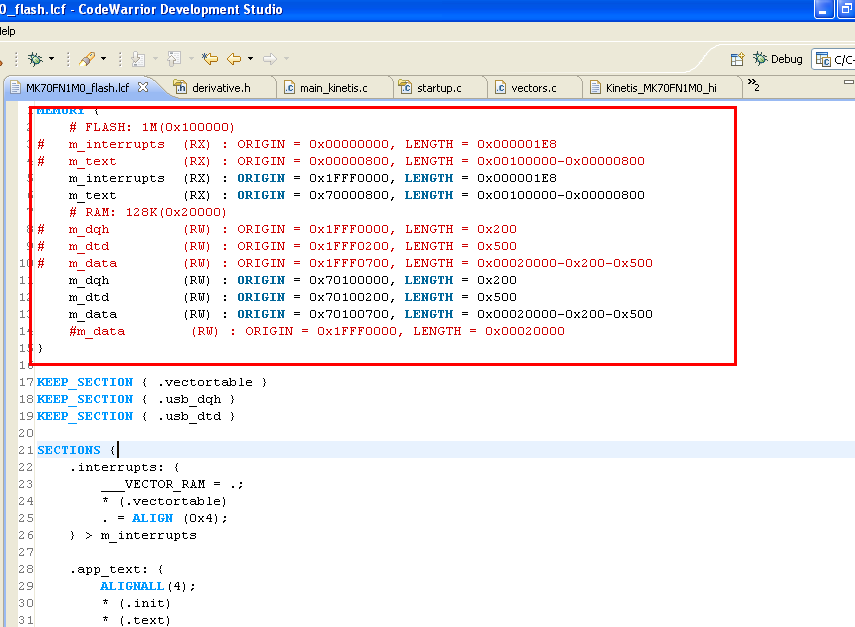
Then, change the linker file as below:
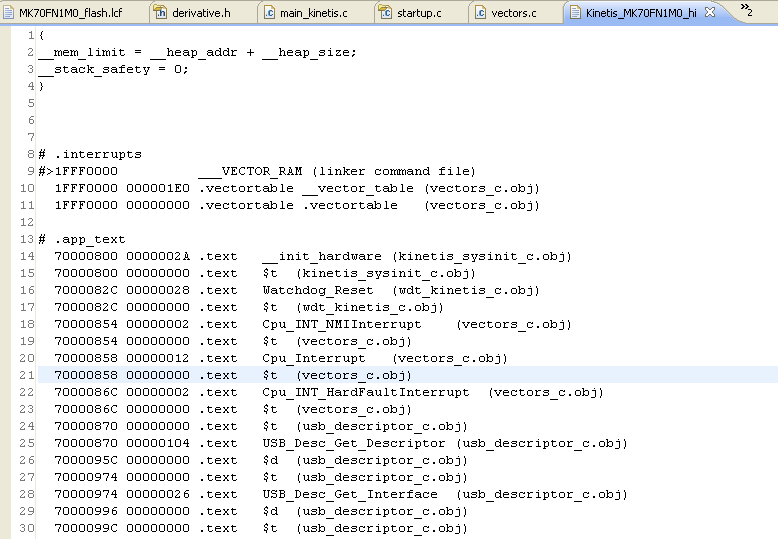
After compiling, you will have an output map file like that:
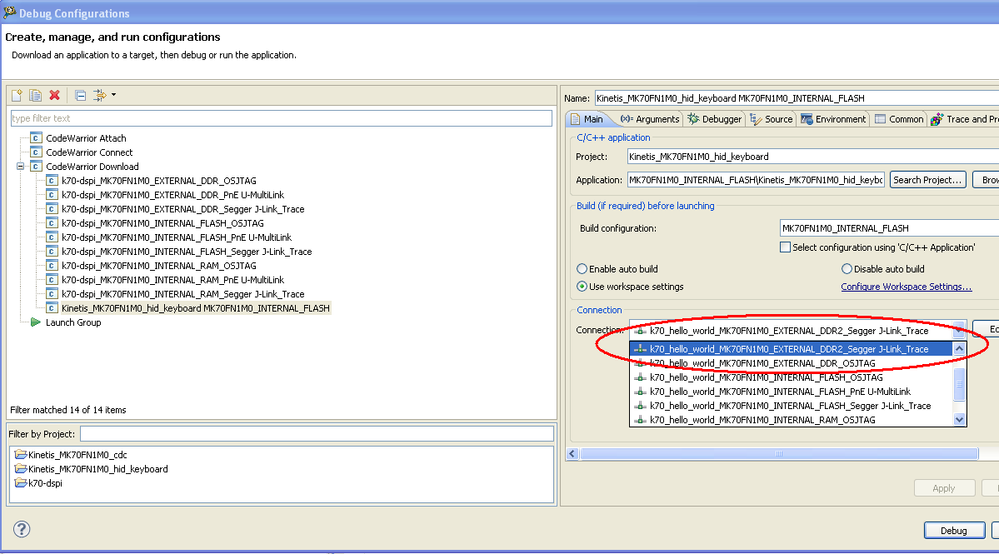
before downloading the application, you will have to modify the connection type of the debug configuration, there is a trick for it, you may open another CW project from KINETIS_120MHZ_SC, which contain the connection configuration for DDR debug, in the same workspace. then you may select the proper connection type based on the JTAG type you are using.
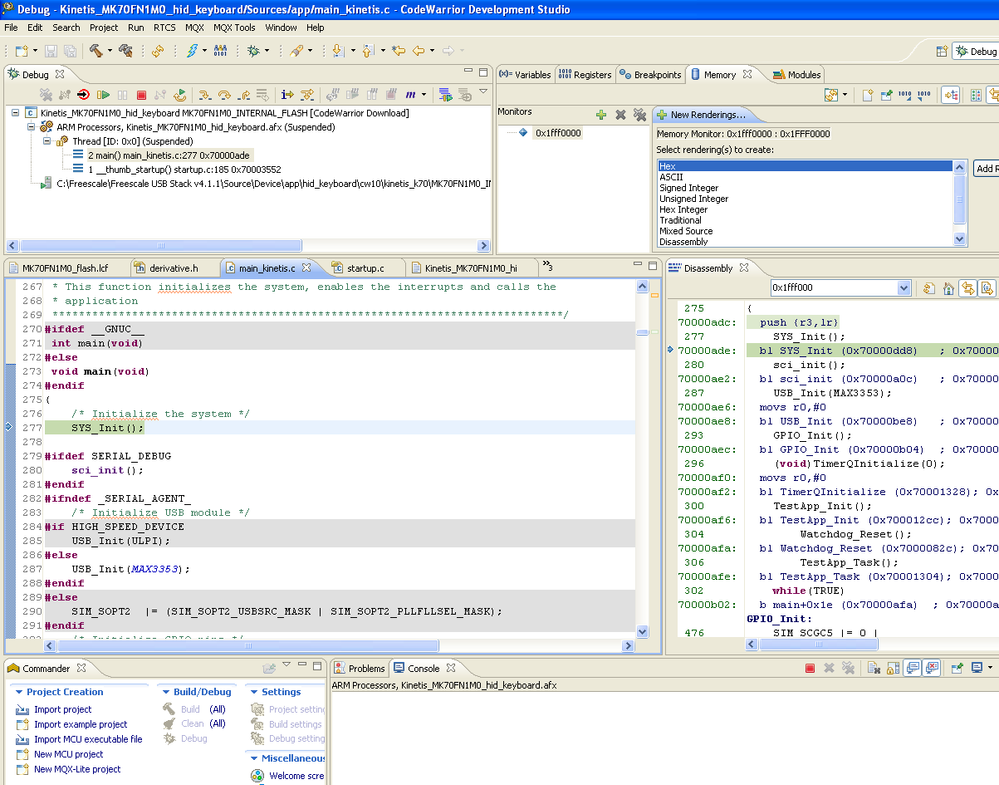
OK, with above steps, you may download the image into TWR-K70's DDR2 RAM, and run the application.
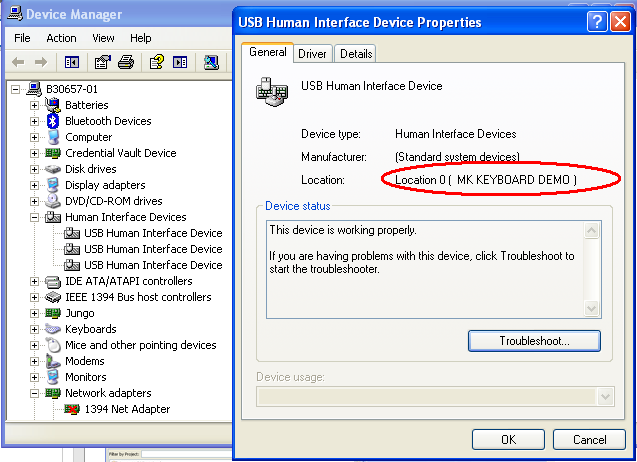
and found the device in the Device Manager:
Hope that helps,
B.R
Kan
Kan_Li
- Mark as New
- Bookmark
- Subscribe
- Mute
- Subscribe to RSS Feed
- Permalink
- Report Inappropriate Content
Hi abhilash,
Since I have provide a solution for this topic based on IAR, so the CW solution is similar, and even more simple. Please kindly refer to this thread first https://community.freescale.com/thread/308783, and modify the source code as it mentioned.
Then, change the linker file as below:
After compiling, you will have an output map file like that:
before downloading the application, you will have to modify the connection type of the debug configuration, there is a trick for it, you may open another CW project from KINETIS_120MHZ_SC, which contain the connection configuration for DDR debug, in the same workspace. then you may select the proper connection type based on the JTAG type you are using.
OK, with above steps, you may download the image into TWR-K70's DDR2 RAM, and run the application.
and found the device in the Device Manager:
Hope that helps,
B.R
Kan
- Mark as New
- Bookmark
- Subscribe
- Mute
- Subscribe to RSS Feed
- Permalink
- Report Inappropriate Content
Tanks Kan
Thanks for your help.
