
- Forums
- Product Forums
- General Purpose MicrocontrollersGeneral Purpose Microcontrollers
- i.MX Forumsi.MX Forums
- QorIQ Processing PlatformsQorIQ Processing Platforms
- Identification and SecurityIdentification and Security
- Power ManagementPower Management
- Wireless ConnectivityWireless Connectivity
- RFID / NFCRFID / NFC
- Advanced AnalogAdvanced Analog
- Neural Processing UnitsNeural Processing Units
- MCX Microcontrollers
- S32G
- S32K
- S32V
- MPC5xxx
- Other NXP Products
- S12 / MagniV Microcontrollers
- Powertrain and Electrification Analog Drivers
- Sensors
- Vybrid Processors
- Digital Signal Controllers
- 8-bit Microcontrollers
- ColdFire/68K Microcontrollers and Processors
- PowerQUICC Processors
- OSBDM and TBDML
- S32M
- S32Z/E
-
- Solution Forums
- Software Forums
- MCUXpresso Software and ToolsMCUXpresso Software and Tools
- CodeWarriorCodeWarrior
- MQX Software SolutionsMQX Software Solutions
- Model-Based Design Toolbox (MBDT)Model-Based Design Toolbox (MBDT)
- FreeMASTER
- eIQ Machine Learning Software
- Embedded Software and Tools Clinic
- S32 SDK
- S32 Design Studio
- GUI Guider
- Zephyr Project
- Voice Technology
- Application Software Packs
- Secure Provisioning SDK (SPSDK)
- Processor Expert Software
- Generative AI & LLMs
-
- Topics
- Mobile Robotics - Drones and RoversMobile Robotics - Drones and Rovers
- NXP Training ContentNXP Training Content
- University ProgramsUniversity Programs
- Rapid IoT
- NXP Designs
- SafeAssure-Community
- OSS Security & Maintenance
- Using Our Community
-
- Cloud Lab Forums
-
- Knowledge Bases
- ARM Microcontrollers
- i.MX Processors
- Identification and Security
- Model-Based Design Toolbox (MBDT)
- QorIQ Processing Platforms
- S32 Automotive Processing Platform
- Wireless Connectivity
- CodeWarrior
- MCUXpresso Suite of Software and Tools
- MQX Software Solutions
- RFID / NFC
- Advanced Analog
- Neural Processing Units
-
- NXP Tech Blogs
- Home
- :
- 汎用マイクロコントローラ
- :
- Kinetisマイクロコントローラ
- :
- Re: New devices KE02 KE04 error programing
New devices KE02 KE04 error programing
- RSS フィードを購読する
- トピックを新着としてマーク
- トピックを既読としてマーク
- このトピックを現在のユーザーにフロートします
- ブックマーク
- 購読
- ミュート
- 印刷用ページ
New devices KE02 KE04 error programing

- 新着としてマーク
- ブックマーク
- 購読
- ミュート
- RSS フィードを購読する
- ハイライト
- 印刷
- 不適切なコンテンツを報告
I have problems programming Kinetis KE02 and KE04 devices when they are new!
I tried with J-link and Ulink and nothing.
The reset pin has oscillations.
I have tested with KEIL-MDK and KDS and nothing.
The already programmed devices are programmed correctly only happens with the new ones!
Does anyone know what is going on?
in spanish
Tengo problemas para programar lo dispositivos Kinetis KE02 y KE04 cuando estan nuevos!
He probado con J-link y Ulink y nada.
El pin de reset presenta oscilasiones.
He probado con KEIL-MDK y KDS y nada.
Los dispositivos ya programados se programan correctamente solo sucede con los nuevos!
Alguien sabe que esta pasando?

- 新着としてマーク
- ブックマーク
- 購読
- ミュート
- RSS フィードを購読する
- ハイライト
- 印刷
- 不適切なコンテンツを報告
Hi Carlos,
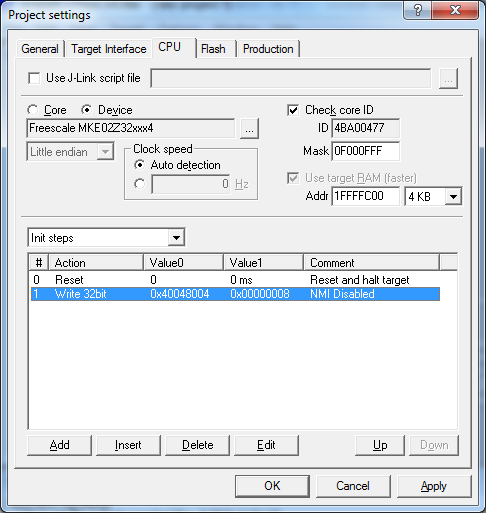
If your NMI is LOW ([edit] assuming NMI is gorunded due to HW) at REST you can try programming devices by first clearing the NMIE bit in SIM_SOPT (0x40048004 for MKE02).
When using J-Link this can be easily done as an Init Step: Write 32bit 40048004 00000008
Thanks and Regards
Ankur Mittal

 kerryzhou
- 新着としてマーク
- ブックマーク
- 購読
- ミュート
- RSS フィードを購読する
- ハイライト
- 印刷
- 不適切なコンテンツを報告
Hello CARLOS PICHARDO,
Thank you for your interest in NXP kinetis product, I would like to provide service for you.
1. You can use the JLINK debugger, and open the JLINK commander window
To check, whether you can find the ARM Cortex m0+ core, if you can't find the core after connect it, you need to check your hardware, especially your SWD interface.
Before you are using the JLINK, you need to install the JLINk driver at first, download the jlink driver from this link and install it:
SEGGER - The Embedded Experts - Downloads
After you install it, please open the JLINK commander window, and connect your KE board, this is the picture from my side.
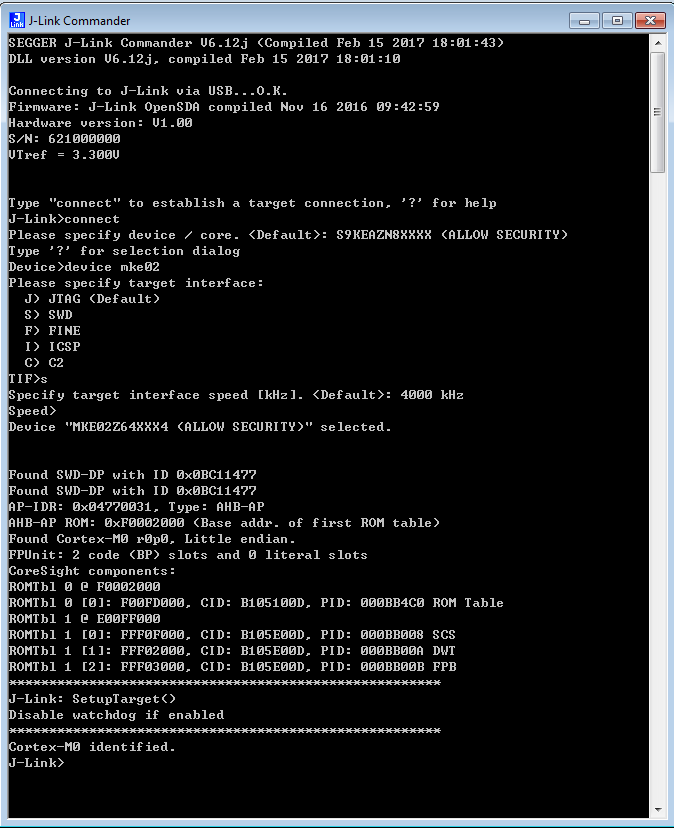
You can find the cortex m0 core is identified.
This means I can use the JLINK to download the code.
2. Use MDK to download the code with JLINK
You must configure the debugger as JLINK at first.
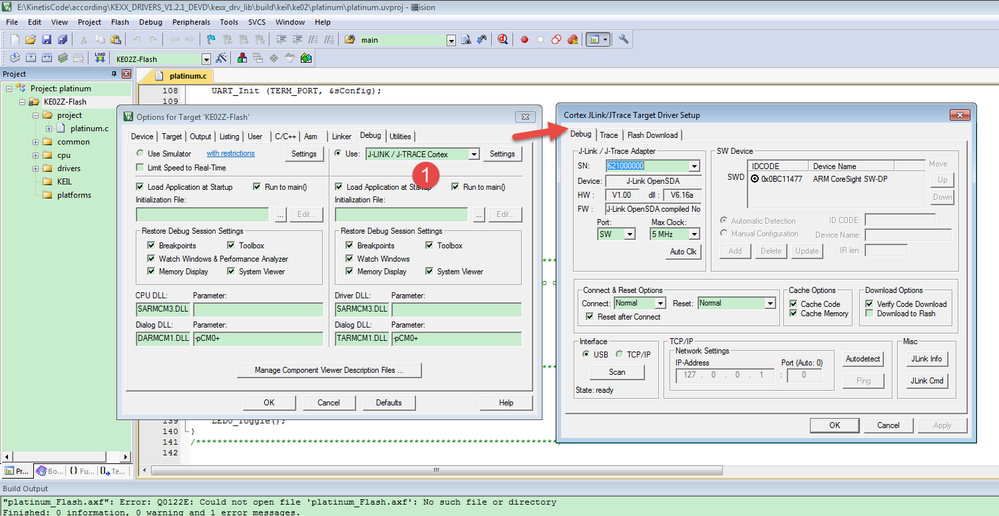
After configure the options, then you can download it.
Please follow my way and try again.
If you still have question, please let me know!
Have a great day,
Kerry
-----------------------------------------------------------------------------------------------------------------------
Note: If this post answers your question, please click the Correct Answer button. Thank you!
-----------------------------------------------------------------------------------------------------------------------
- 新着としてマーク
- ブックマーク
- 購読
- ミュート
- RSS フィードを購読する
- ハイライト
- 印刷
- 不適切なコンテンツを報告
The problem is solved!!!!
It is the NMI pin that can not be at 0 during the programming process on the new devices!
Thanks
Carlos Pichardo
kerryzhou
- 新着としてマーク
- ブックマーク
- 購読
- ミュート
- RSS フィードを購読する
- ハイライト
- 印刷
- 不適切なコンテンツを報告
Hello CARLOS PICHARDO,
If your problem is caused by the NMI, you need to add external 4.7K to 10K external pull up resistor in the NMI pin, because the internal pull up is weak. And when you do the problem, you must make sure your NMI is high.
Wish it helps you!
If you still have question, please let me know!
If your question is solved, please mark the correct answer to close this post.
Have a great day,
Kerry
-----------------------------------------------------------------------------------------------------------------------
Note: If this post answers your question, please click the Correct Answer button. Thank you!
-----------------------------------------------------------------------------------------------------------------------
