
- Forums
- Product Forums
- General Purpose MicrocontrollersGeneral Purpose Microcontrollers
- i.MX Forumsi.MX Forums
- QorIQ Processing PlatformsQorIQ Processing Platforms
- Identification and SecurityIdentification and Security
- Power ManagementPower Management
- Wireless ConnectivityWireless Connectivity
- RFID / NFCRFID / NFC
- Advanced AnalogAdvanced Analog
- Neural Processing UnitsNeural Processing Units
- MCX Microcontrollers
- S32G
- S32K
- S32V
- MPC5xxx
- Other NXP Products
- S12 / MagniV Microcontrollers
- Powertrain and Electrification Analog Drivers
- Sensors
- Vybrid Processors
- Digital Signal Controllers
- 8-bit Microcontrollers
- ColdFire/68K Microcontrollers and Processors
- PowerQUICC Processors
- OSBDM and TBDML
- S32M
- S32Z/E
-
- Solution Forums
- Software Forums
- MCUXpresso Software and ToolsMCUXpresso Software and Tools
- CodeWarriorCodeWarrior
- MQX Software SolutionsMQX Software Solutions
- Model-Based Design Toolbox (MBDT)Model-Based Design Toolbox (MBDT)
- FreeMASTER
- eIQ Machine Learning Software
- Embedded Software and Tools Clinic
- S32 SDK
- S32 Design Studio
- GUI Guider
- Zephyr Project
- Voice Technology
- Application Software Packs
- Secure Provisioning SDK (SPSDK)
- Processor Expert Software
- Generative AI & LLMs
-
- Topics
- Mobile Robotics - Drones and RoversMobile Robotics - Drones and Rovers
- NXP Training ContentNXP Training Content
- University ProgramsUniversity Programs
- Rapid IoT
- NXP Designs
- SafeAssure-Community
- OSS Security & Maintenance
- Using Our Community
-
- Cloud Lab Forums
-
- Knowledge Bases
- ARM Microcontrollers
- i.MX Processors
- Identification and Security
- Model-Based Design Toolbox (MBDT)
- QorIQ Processing Platforms
- S32 Automotive Processing Platform
- Wireless Connectivity
- CodeWarrior
- MCUXpresso Suite of Software and Tools
- MQX Software Solutions
- RFID / NFC
- Advanced Analog
- Neural Processing Units
-
- NXP Tech Blogs
- Home
- :
- General Purpose Microcontrollers
- :
- Kinetis Microcontrollers
- :
- Re: KL27Z128 USB HID Mouse remote wakeup issue
KL27Z128 USB HID Mouse remote wakeup issue
- Subscribe to RSS Feed
- Mark Topic as New
- Mark Topic as Read
- Float this Topic for Current User
- Bookmark
- Subscribe
- Mute
- Printer Friendly Page

- Mark as New
- Bookmark
- Subscribe
- Mute
- Subscribe to RSS Feed
- Permalink
- Report Inappropriate Content
Dear
KL27 support remote wake but I use KL27Z128 I can’t find remote wake in KL43 sample code is this function ready in KL43 and support KL27Z128.
Best regards,
Wayne
Solved! Go to Solution.

 cutworth
- Mark as New
- Bookmark
- Subscribe
- Mute
- Subscribe to RSS Feed
- Permalink
- Report Inappropriate Content
Hi Wayne,
I have finished testing the HID mouse remote wakeup demo on FRDM-KL43 board. Attached the demo project in IAR.
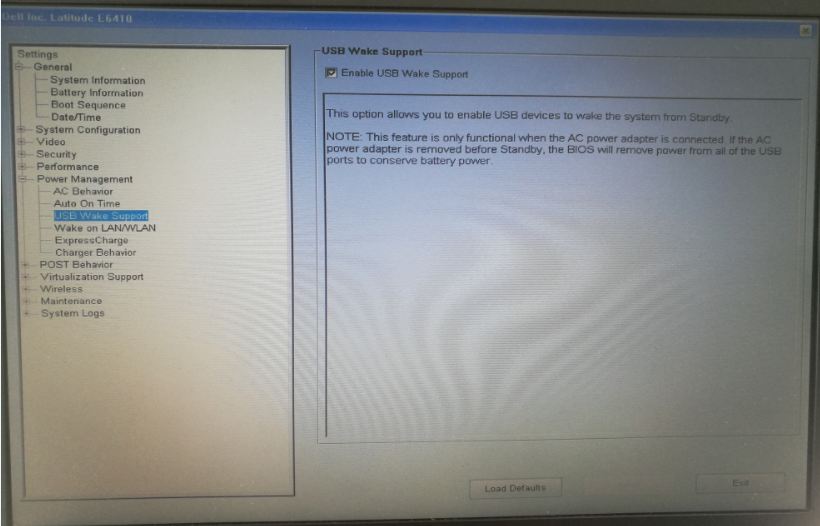
Before you run the demo, please make sure you have enabled USB wakeup support in PC BIOS. Also you need to plug in AC power with your laptop, otherwise you will not be able to wakeup laptop with HID mouse. See below image for example.
When you run the demo, you will see console output as follows first and HID mouse detected on PC and it circles in one square.
USB device HID mouse demo
When you close your laptop lid, you will see PC suspended and console output as follows.
USB device remote wakeup state: 1
USB device start suspend
USB device suspended.
Please Press 'SW3' to remote wakeup the host.
When you press SW3 on FRDM-KL43 board, you will see console output as follows and PC waking up by HID mouse.
Remote wakeup the host.
USB device start resume
USB device resumed.
USB device remote wakeup state: 0
Finally please note you need to power OPENSDA USB port to another PC which does not suspend at all, otherwise the board will be removed power when the laptop suspends
Hao
cutworth
- Mark as New
- Bookmark
- Subscribe
- Mute
- Subscribe to RSS Feed
- Permalink
- Report Inappropriate Content
Hi Wayne,
I have one demo which works on K65 tower board for showing suspend/resume feature. I am working on porting this to FRDM KL43 board. Will post it here once I finished testing the demo.
Hao
cutworth
- Mark as New
- Bookmark
- Subscribe
- Mute
- Subscribe to RSS Feed
- Permalink
- Report Inappropriate Content
Hi Wayne,
I have finished testing the HID mouse remote wakeup demo on FRDM-KL43 board. Attached the demo project in IAR.
Before you run the demo, please make sure you have enabled USB wakeup support in PC BIOS. Also you need to plug in AC power with your laptop, otherwise you will not be able to wakeup laptop with HID mouse. See below image for example.
When you run the demo, you will see console output as follows first and HID mouse detected on PC and it circles in one square.
USB device HID mouse demo
When you close your laptop lid, you will see PC suspended and console output as follows.
USB device remote wakeup state: 1
USB device start suspend
USB device suspended.
Please Press 'SW3' to remote wakeup the host.
When you press SW3 on FRDM-KL43 board, you will see console output as follows and PC waking up by HID mouse.
Remote wakeup the host.
USB device start resume
USB device resumed.
USB device remote wakeup state: 0
Finally please note you need to power OPENSDA USB port to another PC which does not suspend at all, otherwise the board will be removed power when the laptop suspends
Hao
- Mark as New
- Bookmark
- Subscribe
- Mute
- Subscribe to RSS Feed
- Permalink
- Report Inappropriate Content
In one of the other treads a while ago:
"Kan_Li Employee:
The AE team has reported this issue to the doc team, this
version will be updated soon, bit 2-3 of USBx_CTL are
available just as other parts with OTG, and bit3 has some
description issue, which will be updated as well. bit3 of
USBx_CTL isn't used for Host only, and KL27 can support remote
wakeup feature."
from notes in my USB code.
