
- Forums
- Product Forums
- General Purpose MicrocontrollersGeneral Purpose Microcontrollers
- i.MX Forumsi.MX Forums
- QorIQ Processing PlatformsQorIQ Processing Platforms
- Identification and SecurityIdentification and Security
- Power ManagementPower Management
- Wireless ConnectivityWireless Connectivity
- RFID / NFCRFID / NFC
- Advanced AnalogAdvanced Analog
- Neural Processing UnitsNeural Processing Units
- MCX Microcontrollers
- S32G
- S32K
- S32V
- MPC5xxx
- Other NXP Products
- S12 / MagniV Microcontrollers
- Powertrain and Electrification Analog Drivers
- Sensors
- Vybrid Processors
- Digital Signal Controllers
- 8-bit Microcontrollers
- ColdFire/68K Microcontrollers and Processors
- PowerQUICC Processors
- OSBDM and TBDML
- S32M
- S32Z/E
-
- Solution Forums
- Software Forums
- MCUXpresso Software and ToolsMCUXpresso Software and Tools
- CodeWarriorCodeWarrior
- MQX Software SolutionsMQX Software Solutions
- Model-Based Design Toolbox (MBDT)Model-Based Design Toolbox (MBDT)
- FreeMASTER
- eIQ Machine Learning Software
- Embedded Software and Tools Clinic
- S32 SDK
- S32 Design Studio
- GUI Guider
- Zephyr Project
- Voice Technology
- Application Software Packs
- Secure Provisioning SDK (SPSDK)
- Processor Expert Software
- Generative AI & LLMs
-
- Topics
- Mobile Robotics - Drones and RoversMobile Robotics - Drones and Rovers
- NXP Training ContentNXP Training Content
- University ProgramsUniversity Programs
- Rapid IoT
- NXP Designs
- SafeAssure-Community
- OSS Security & Maintenance
- Using Our Community
-
- Cloud Lab Forums
-
- Knowledge Bases
- ARM Microcontrollers
- i.MX Processors
- Identification and Security
- Model-Based Design Toolbox (MBDT)
- QorIQ Processing Platforms
- S32 Automotive Processing Platform
- Wireless Connectivity
- CodeWarrior
- MCUXpresso Suite of Software and Tools
- MQX Software Solutions
- RFID / NFC
- Advanced Analog
- Neural Processing Units
-
- NXP Tech Blogs
- Home
- :
- 汎用マイクロコントローラ
- :
- Kinetisマイクロコントローラ
- :
- KL27 32-PIN UART ROM UPDATE - What pins are mapped?
KL27 32-PIN UART ROM UPDATE - What pins are mapped?
- RSS フィードを購読する
- トピックを新着としてマーク
- トピックを既読としてマーク
- このトピックを現在のユーザーにフロートします
- ブックマーク
- 購読
- ミュート
- 印刷用ページ
KL27 32-PIN UART ROM UPDATE - What pins are mapped?

- 新着としてマーク
- ブックマーク
- 購読
- ミュート
- RSS フィードを購読する
- ハイライト
- 印刷
- 不適切なコンテンツを報告
I have inherited a KL25Z design and I am looking into using the KL27 ROM part instead to make it so that we can download and update inside the product. In looking through the 32 Pin version I see the UART0 can be brought out on many pins.
- How do I find which UART pins the ROM boot loader initializes to?
- Is there source code for the ROM or is the KL25Z bootloader source the same thing?
I have tried to get the FRDM-KL27Z to talk to the KinetisUpdater by holding down the NMI while resetting with no luck. From the KL25Z Bootloader 1.2.0 source below it appears as if the incorrect pins for ROM boot were selected in designing the FRDM-KL27Z.
#ifdef FREEDOM
#define UART0_RX_GPIO_PIN_NUM 1 // PIN 1 in the PTA group
#define UART0_RX_ALT_MODE 2 // ALT mode for UART0 functionality for pin 1
#define UART0_RX_GPIO_ALT_MODE 1 // ALT mode for GPIO functionality for pin 1
#define UART0_TX_GPIO_PIN_NUM 2 // PIN 2 in the PTA group
#define UART0_TX_ALT_MODE 2 // ALT mode for UART0 TX functionality for pin 2
#else
#define UART0_RX_GPIO_PIN_NUM 15 // PIN 15 in the PTA group
#define UART0_RX_ALT_MODE 3 // ALT mode for UART0 functionality for pin 15
#define UART0_RX_GPIO_ALT_MODE 1 // ALT mdoe for GPIO functionality for pin 15
#define UART0_TX_GPIO_PIN_NUM 14 // PIN 14 in the PTA group
#define UART0_TX_ALT_MODE 3 // ALT mode for UART0 TX functionality for pin 14
#endif
#define PORT_IRQC_INTERRUPT_FALLING_EDGE 0xA
#define PORT_IRQC_INTERRUPT_DISABLE 0
#define BOOT_PIN_NUMBER 3
#define BOOT_PIN_PORT PORTC
#define BOOT_PIN_GPIO PTC
#define BOOT_PIN_ALT_MODE 1
#define BOOT_PIN_DEBOUNCE_READ_COUNT 500
Thanks in advance,
Don

 kerryzhou
- 新着としてマーク
- ブックマーク
- 購読
- ミュート
- RSS フィードを購読する
- ハイライト
- 印刷
- 不適切なコンテンツを報告
Hi Donald Russ,
KL27 have the UART ROM bootloader, so you don't need to use the flash bootloader which like the KL25.
Please refer to the KBOOT 1.2.0 document Getting Started with the Kinetis ROM Bootloader.pdf, which you can find in the folder:FSL_Kinetis_Bootloader_1_2_0\FSL_Kinetis_Bootloader_1_2_0\doc
You can find the UART pins in the KL27 reference manual, chapter 13, kinetis ROM bootloader.
KL27 is using PTA1, and PTA2 as the UART bootloader pin.
You can try to use the blhost.exe in folder :FSL_Kinetis_Bootloader_1_2_0\FSL_Kinetis_Bootloader_1_2_0\bin\win
This can download the application code to the KL27, the following is the successful download picture from my FRDM-KL27:
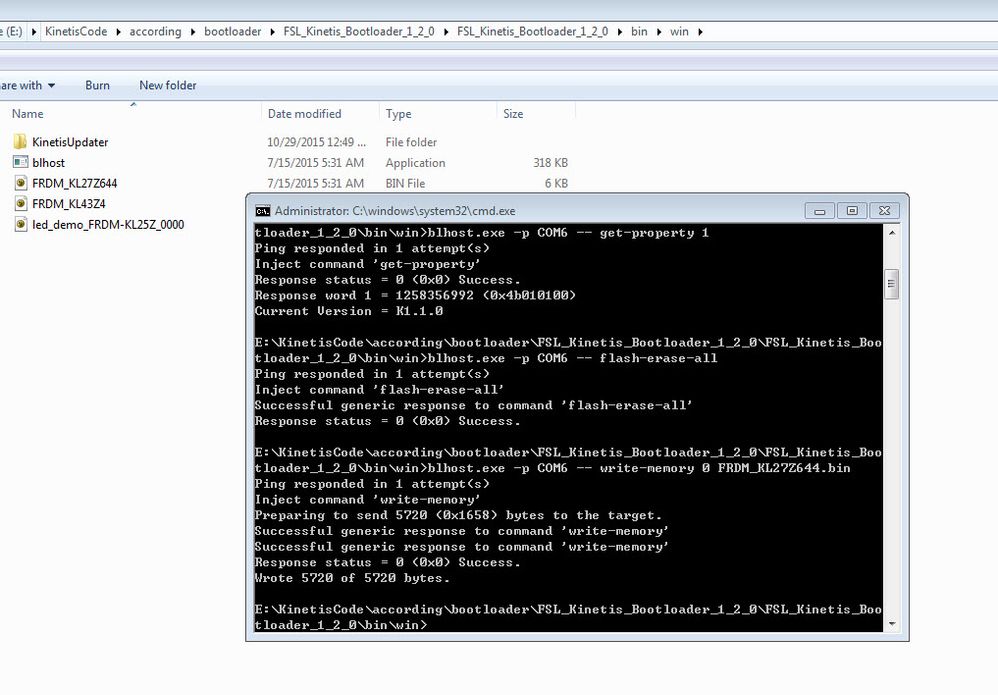
Wish it helps you!
If you still have question, please contact me!
Have a great day,
Jingjing
-----------------------------------------------------------------------------------------------------------------------
Note: If this post answers your question, please click the Correct Answer button. Thank you!
-----------------------------------------------------------------------------------------------------------------------
