
- Forums
- Product Forums
- General Purpose MicrocontrollersGeneral Purpose Microcontrollers
- i.MX Forumsi.MX Forums
- QorIQ Processing PlatformsQorIQ Processing Platforms
- Identification and SecurityIdentification and Security
- Power ManagementPower Management
- Wireless ConnectivityWireless Connectivity
- RFID / NFCRFID / NFC
- Advanced AnalogAdvanced Analog
- Neural Processing UnitsNeural Processing Units
- MCX Microcontrollers
- S32G
- S32K
- S32V
- MPC5xxx
- Other NXP Products
- S12 / MagniV Microcontrollers
- Powertrain and Electrification Analog Drivers
- Sensors
- Vybrid Processors
- Digital Signal Controllers
- 8-bit Microcontrollers
- ColdFire/68K Microcontrollers and Processors
- PowerQUICC Processors
- OSBDM and TBDML
- S32M
- S32Z/E
-
- Solution Forums
- Software Forums
- MCUXpresso Software and ToolsMCUXpresso Software and Tools
- CodeWarriorCodeWarrior
- MQX Software SolutionsMQX Software Solutions
- Model-Based Design Toolbox (MBDT)Model-Based Design Toolbox (MBDT)
- FreeMASTER
- eIQ Machine Learning Software
- Embedded Software and Tools Clinic
- S32 SDK
- S32 Design Studio
- GUI Guider
- Zephyr Project
- Voice Technology
- Application Software Packs
- Secure Provisioning SDK (SPSDK)
- Processor Expert Software
- Generative AI & LLMs
-
- Topics
- Mobile Robotics - Drones and RoversMobile Robotics - Drones and Rovers
- NXP Training ContentNXP Training Content
- University ProgramsUniversity Programs
- Rapid IoT
- NXP Designs
- SafeAssure-Community
- OSS Security & Maintenance
- Using Our Community
-
- Cloud Lab Forums
-
- Knowledge Bases
- ARM Microcontrollers
- i.MX Processors
- Identification and Security
- Model-Based Design Toolbox (MBDT)
- QorIQ Processing Platforms
- S32 Automotive Processing Platform
- Wireless Connectivity
- CodeWarrior
- MCUXpresso Suite of Software and Tools
- MQX Software Solutions
- RFID / NFC
- Advanced Analog
- Neural Processing Units
-
- NXP Tech Blogs
- Home
- :
- General Purpose Microcontrollers
- :
- Kinetis Microcontrollers
- :
- Re: K22 flash section erasing problem
K22 flash section erasing problem
- Subscribe to RSS Feed
- Mark Topic as New
- Mark Topic as Read
- Float this Topic for Current User
- Bookmark
- Subscribe
- Mute
- Printer Friendly Page
K22 flash section erasing problem

- Mark as New
- Bookmark
- Subscribe
- Mute
- Subscribe to RSS Feed
- Permalink
- Report Inappropriate Content
Hey,
have problems to erase a flash section. I'm using MK22FN512VLH12.
i'm using the C90TFS Driver. The erase command is set correct in the FCCOB-registers and the flash machine responses no errors. But the flash section isn't erased. It's untouched.
-> MemoryAndFTFA-Registers.PNG
The flash command sequence is copied to ram and is performed.It's the same disassembly like the "FlashCommandSequence" - function
-> FunctionInRam.PNG
-> RamDissassembly.PNG
If i put a wrong section address in the FCCOB-register it responses with an ACCERR.
The code seems to work if i erase/write section in the other block ( address > 0x3FFFF).
I can't share the code.
- Mark as New
- Bookmark
- Subscribe
- Mute
- Subscribe to RSS Feed
- Permalink
- Report Inappropriate Content
Hello Kerry,
This is exactly what i mean. As you can see in my screenshots the memory browser keeps it values, even when i refresh it or when i reenter the address (0x2800 in this case).
regards Sören
- Mark as New
- Bookmark
- Subscribe
- Mute
- Subscribe to RSS Feed
- Permalink
- Report Inappropriate Content
I had a similar issue on a KE18. It was not the debugger at all, but it was because the region of flash I was erasing was cached. I had to clear the cache after erasing to force it to refresh. You might have to refer to the cache controls for the K22 to see how to do that.

 kerryzhou
- Mark as New
- Bookmark
- Subscribe
- Mute
- Subscribe to RSS Feed
- Permalink
- Report Inappropriate Content
Hi Soeren Birth,
It should be caused by the KDS bug.
In my memory, this problem should already be report.
So, normally, if you find the data is not the data what you want in the IDE memory, you also can use the variable to read the according flash address, then you just need to read the variable, or printf it out, this is also the way what I like to check.
Wish it helps you!
Have a great day,
Kerry
-----------------------------------------------------------------------------------------------------------------------
Note: If this post answers your question, please click the Correct Answer button. Thank you!
-----------------------------------------------------------------------------------------------------------------------
- Mark as New
- Bookmark
- Subscribe
- Mute
- Subscribe to RSS Feed
- Permalink
- Report Inappropriate Content
Hey Kerry,
I got it. The code works!!!! It's just the ?%&.§$ debugger that do not. I read the code with the J-Flash tool and there is a clean section.
Please fix the debugger problems, its really annoying.
Regards Sören
kerryzhou
- Mark as New
- Bookmark
- Subscribe
- Mute
- Subscribe to RSS Feed
- Permalink
- Report Inappropriate Content
Hello Soeren Birth,
What do you mean: It's just the ?%&.§$ debugger that do not.
Do you mean the KDS memory display is not correct?
Have a great day,
Kerry
-----------------------------------------------------------------------------------------------------------------------
Note: If this post answers your question, please click the Correct Answer button. Thank you!
-----------------------------------------------------------------------------------------------------------------------

- Mark as New
- Bookmark
- Subscribe
- Mute
- Subscribe to RSS Feed
- Permalink
- Report Inappropriate Content
Hi
Always maintain a healthy mistrust of the debugging tools since believing everything yo see can result n loss of time.
Some debuggers also need the memory view refreshing to be sure that they keep in sync. with Flash content.
This is the interface used in the uTasker project which ensures no such confusions can occur and testing/verification can be done at any time without a debugger:
https://www.youtube.com/watch?v=Pe9A8qsefzQ&t=28s
Regards
Mark
kerryzhou
- Mark as New
- Bookmark
- Subscribe
- Mute
- Subscribe to RSS Feed
- Permalink
- Report Inappropriate Content
Hi Soeren Birth,
Please try our KSDK2.2_FRDM-K22F120M flash code.
You can download the KSDK2.2 code from this link:
Welcome to MCUXpresso | MCUXpresso Config Tools
Click SDK builder, choose board as FRDM-K22F, this board's chip is MK22FN512VLH12, after generate the code, and download it, you can find the flash code in folder:
SDK_2.2_FRDM-K22F\boards\frdmk22f\driver_examples\flash\pflash\iar
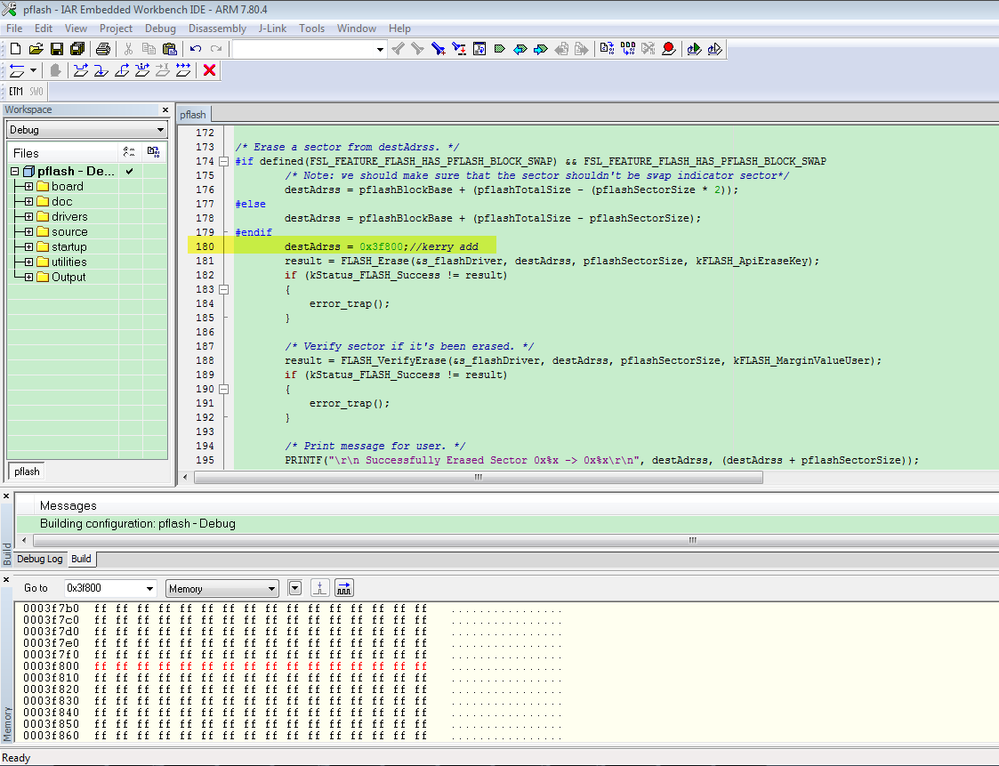
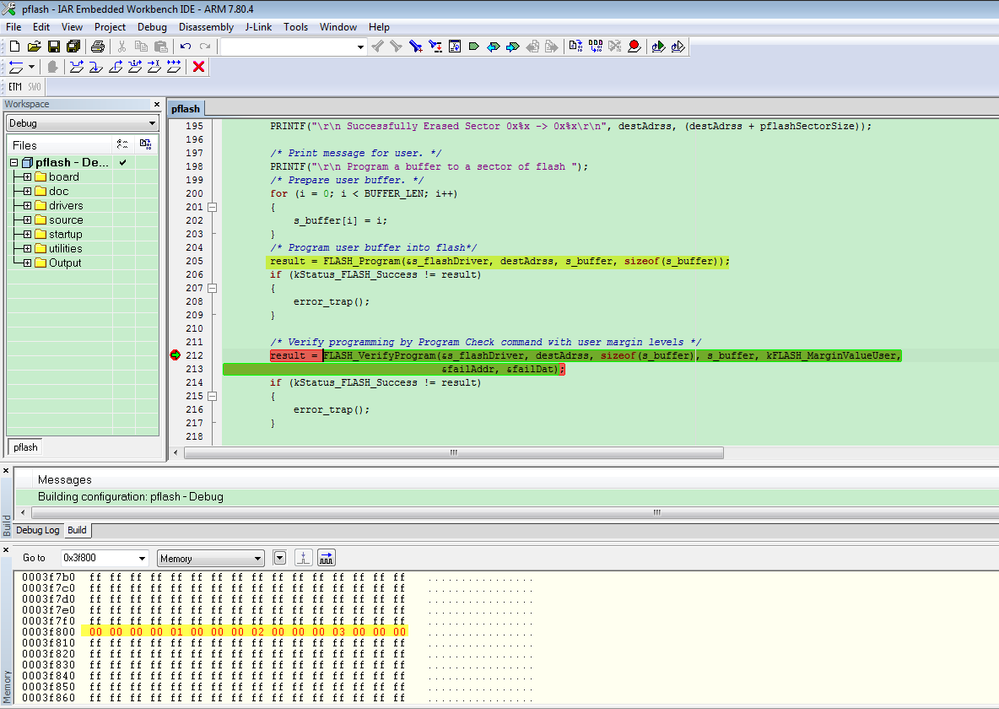
I changed the erase flash sector address below 0x3FFFF, take an example:0x3f800, I can do the flash sector erase, program, erase again succesflly.
So, please try this code.
Modify the pflash.c line destAdrss to 0X3F800, like this:
After program the 0X3F800, the according address will have data:
Do the flash sector erase again
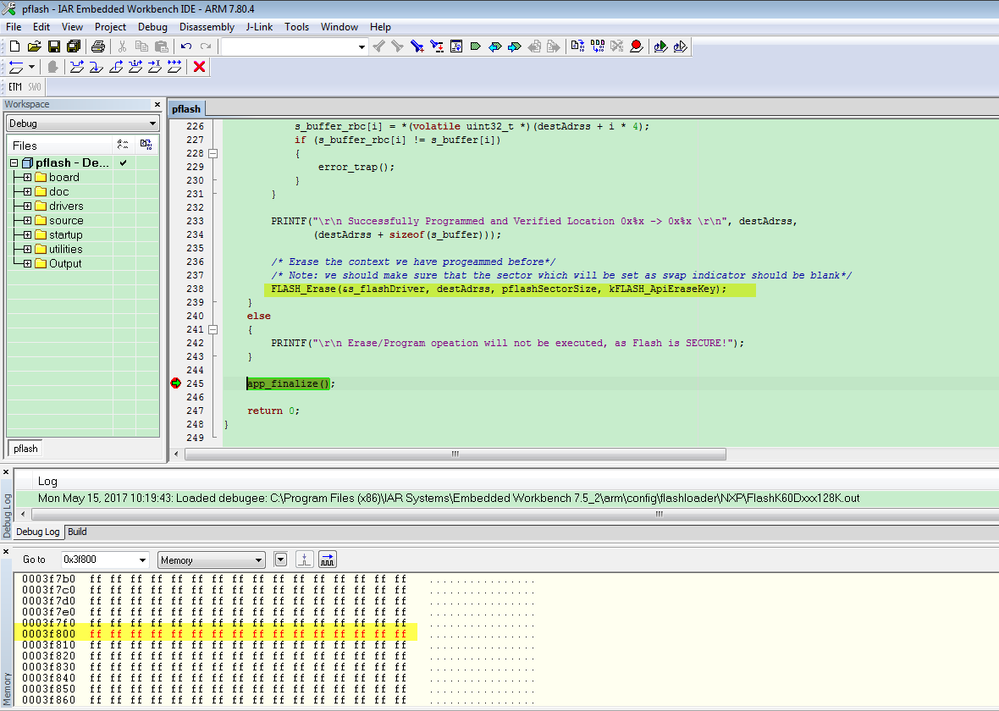


You can find the sector in address 0x3f800 is erased again.
When you run the code in the flash, please make sure your erased sector is not in the code sector, otherwise it may damaged your application code, you can check the code size whether it is in your erased flash sector.
Wish it helps you!
Have a great day,
Kerry
-----------------------------------------------------------------------------------------------------------------------
Note: If this post answers your question, please click the Correct Answer button. Thank you!
-----------------------------------------------------------------------------------------------------------------------
