
- Forums
- Product Forums
- General Purpose MicrocontrollersGeneral Purpose Microcontrollers
- i.MX Forumsi.MX Forums
- QorIQ Processing PlatformsQorIQ Processing Platforms
- Identification and SecurityIdentification and Security
- Power ManagementPower Management
- Wireless ConnectivityWireless Connectivity
- RFID / NFCRFID / NFC
- Advanced AnalogAdvanced Analog
- MCX Microcontrollers
- S32G
- S32K
- S32V
- MPC5xxx
- Other NXP Products
- S12 / MagniV Microcontrollers
- Powertrain and Electrification Analog Drivers
- Sensors
- Vybrid Processors
- Digital Signal Controllers
- 8-bit Microcontrollers
- ColdFire/68K Microcontrollers and Processors
- PowerQUICC Processors
- OSBDM and TBDML
- S32M
- S32Z/E
-
- Solution Forums
- Software Forums
- MCUXpresso Software and ToolsMCUXpresso Software and Tools
- CodeWarriorCodeWarrior
- MQX Software SolutionsMQX Software Solutions
- Model-Based Design Toolbox (MBDT)Model-Based Design Toolbox (MBDT)
- FreeMASTER
- eIQ Machine Learning Software
- Embedded Software and Tools Clinic
- S32 SDK
- S32 Design Studio
- GUI Guider
- Zephyr Project
- Voice Technology
- Application Software Packs
- Secure Provisioning SDK (SPSDK)
- Processor Expert Software
- Generative AI & LLMs
-
- Topics
- Mobile Robotics - Drones and RoversMobile Robotics - Drones and Rovers
- NXP Training ContentNXP Training Content
- University ProgramsUniversity Programs
- Rapid IoT
- NXP Designs
- SafeAssure-Community
- OSS Security & Maintenance
- Using Our Community
-
- Cloud Lab Forums
-
- Knowledge Bases
- ARM Microcontrollers
- i.MX Processors
- Identification and Security
- Model-Based Design Toolbox (MBDT)
- QorIQ Processing Platforms
- S32 Automotive Processing Platform
- Wireless Connectivity
- CodeWarrior
- MCUXpresso Suite of Software and Tools
- MQX Software Solutions
- RFID / NFC
- Advanced Analog
-
- NXP Tech Blogs
- Home
- :
- 汎用マイクロコントローラ
- :
- Kinetisマイクロコントローラ
- :
- Re: How to flash the MKM34Z265xxx7 ?
How to flash the MKM34Z265xxx7 ?
- RSS フィードを購読する
- トピックを新着としてマーク
- トピックを既読としてマーク
- このトピックを現在のユーザーにフロートします
- ブックマーク
- 購読
- ミュート
- 印刷用ページ
How to flash the MKM34Z265xxx7 ?

- 新着としてマーク
- ブックマーク
- 購読
- ミュート
- RSS フィードを購読する
- ハイライト
- 印刷
- 不適切なコンテンツを報告
Hello,
I would like to flash a microcontroller from NXP. It is more precisely the MKM34Z256VLQ7.
Here is a link: https://www.nxp.com/part/MKM34Z256VLQ7#/
In my case, this is on an EVAL board and specifically on the TWR-KM34Z75M.
I want to flash this microcontroller via the SWD / JTAG interface.
On the board this is the interface J24.
I have bought the LCP-Link 2.
Here is the link: https://www.nxp.com/design/microcontrollers-developer-resources/lpc-link2:OM13054
At the supported devices also the "KM Series Cortex-M0+" is listed.
A description is given for this:
"KM3x : 50-75 MHz Precision Metrology MCUs with Segment LCDs based on Arm® Cortex®-M0+"
The flasher software "Flash magic" is also listed on the page.
However, this does not have the setting to flash the MKM34Z256VLQ7.
On the homepage of "Flash magic" are also no information about the resources that can be downloaded.
In my IDE "MCUXpresso" exisitert however an integrietes "GUI Flash Tool".
I have created and integrated the required µC configurations in "MCUXpresso Config Tool".
Also the SDK for my µC was downloaded and installed in the IDE.
Now I connect the LCP-Link 2 with the JTAG/SWD interface J27 on the EVAL board and press the GUI icon.

The following window appears:
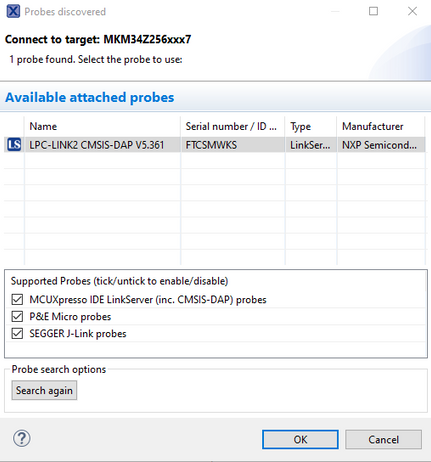
The LPC-Link 2 is detected
When confirming the window with "OK" the following window appears:
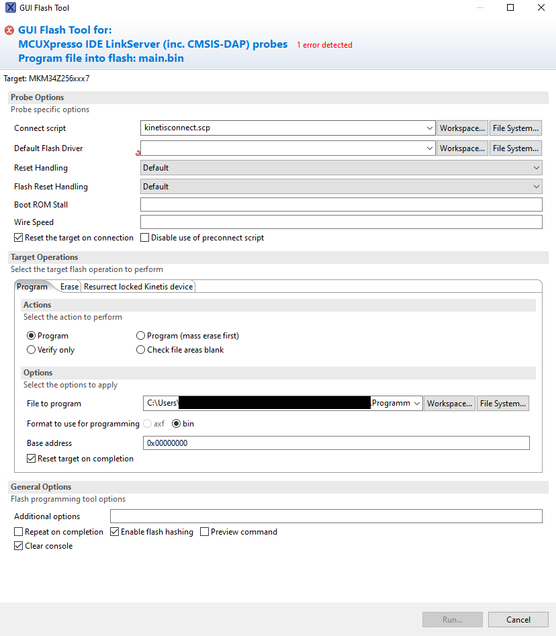
After I have selected my compiled program (as .bin file)
The program asks me for a "Deafult Flash Driver" this is a .cfx file. When I click on "File System..." there is no cfx file for my µC.
My previous searches have also found nothing where I can get this file. I have also searched for .axf files as these are renamed .cfx files.
Can someone give me a hint or help?

 diego_charles
- 新着としてマーク
- ブックマーク
- 購読
- ミュート
- RSS フィードを購読する
- ハイライト
- 印刷
- 不適切なコンテンツを報告
Hi @Nobis1
I hope you are doing well!
Regarding the Flash Magic Firmware : Unfortunately this tool does not have support for Kinetis MCUS. It has SWD support and USB, but not for all parts ; Its manly used for ISP programming by UART.
About the CFX file, which is required for the MCUXpresso to know how to program the internal flash,
one way to find where it is , below:
From a previously imported SDK project, do a left click (1) and navigate through the next steps from the below image. In step (5) you will find the .cfx file for your project : FTFA_KM.cfx . Actually you will be able to see it in a similar path :
C:\nxp\MCUXpressoIDE_11.4.0_6237\ide\plugins\com.nxp.mcuxpresso.tools.bin.win32_11.4.0.202108051708\binaries\Flash
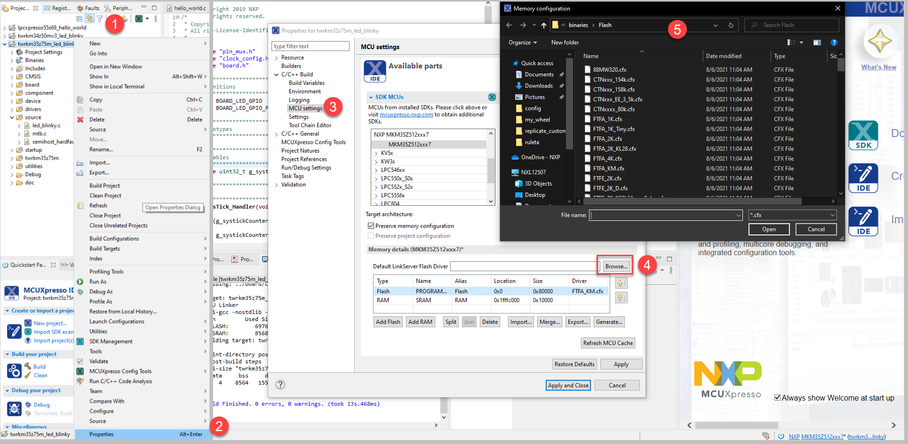
In a similar way, as shown in the above image , you can specify the KM35 .cfx driver for your project.
I am not aware the reason why your project does not have the CFX file for the KM35 , maybe you are doing a code migration , but I recommend you to start from a new project and perform code migration manually, if that is the case.
Another thing, the TWR-KM35 has an on-board debugger, if you are attempting to program the board for the first time, make sure that you are setting the board jumpers correctly , to enable debug with an external target. Please refer to the board board user guide for more details.
I hope this could help you.
Let me know if you have any problems.
Diego.
___________________________________________________________________________________
Do not forget to mark a reply as a SOLUTION , if solves your inquiry.
We are not following threads after 7 weeks.
- 新着としてマーク
- ブックマーク
- 購読
- ミュート
- RSS フィードを購読する
- ハイライト
- 印刷
- 不適切なコンテンツを報告
First of all, thank you for your help.
The flashing does not work for me yet.
Before that, a few side information:
1. the program code was moved from "IAR Embedded Workbench" to MCUXpresso. The "makefiles" were adapted and the project is built in the IDE without any problems.
2. i don't know if it makes a significant difference but it is the KM34 and not the KM35.
3. i know that there is an on-board debugger on the board, but the debug function is not my goal. I want to build the µC on an own board and be able to flash it there.
I adapted their steps and got a little further than before.
Here is a picture of the settings:
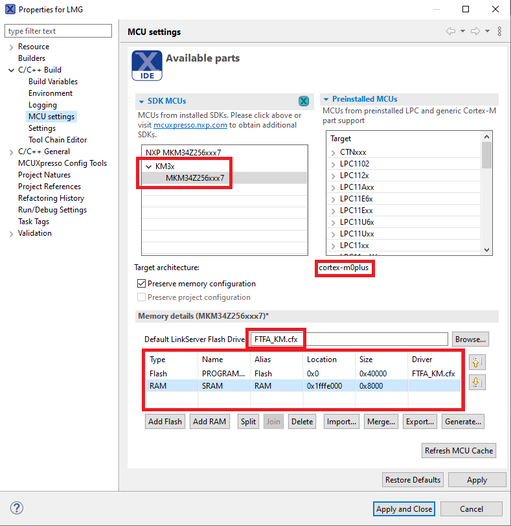
At first glance, the specifications regarding flash and RAM memory correspond to the specifications in the data sheet. The specifications concerning "UPPER SRAM" are missing.
Here is some information about the cabling of the individual devices:
the LCP-Link 2 is connected to the PC with a USB cable.
The EVAL board TWR-KM34Z75M is connected to the PC with a USB cable for power supply.
On the board of the LPC-Link 2 the "J7: JTAG/SWD for Target" interface is connected 1:1 with the J24 "KM34 JTAG / SWD CONNECTOR" of the EVAL board.
If now the "GUI Flash Tool" 
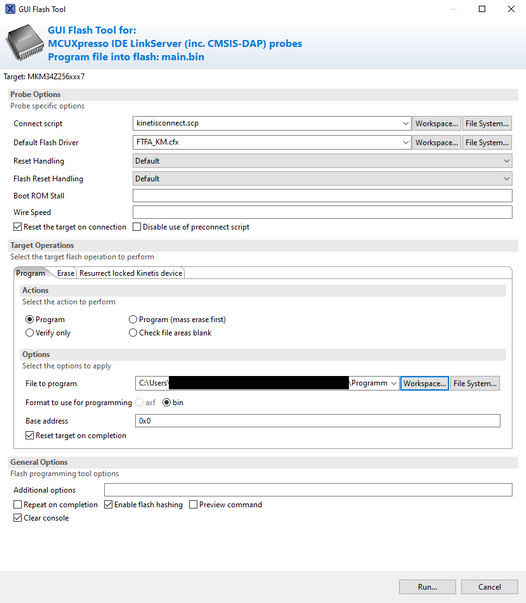
When pressing "RUN" an enormous "NullPointerExeption" appears which I will not show completely.
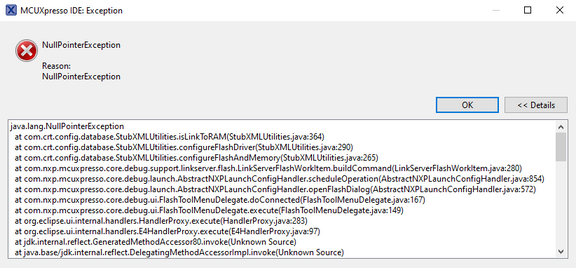
If this window is acknowledged with "OK" the following error messages appear:
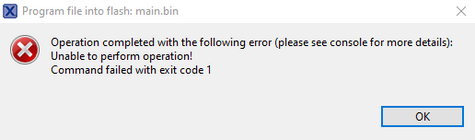
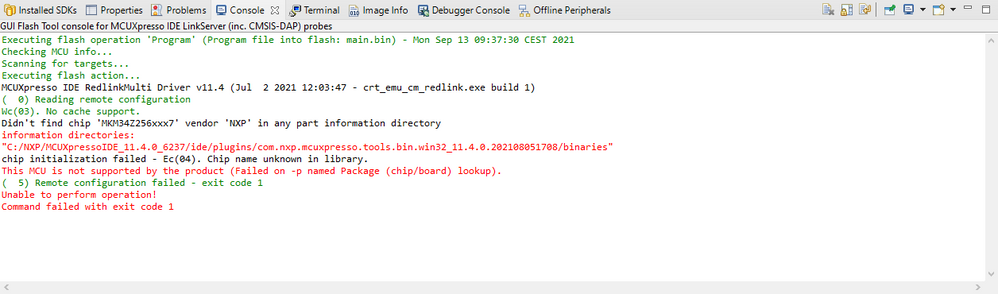
Unfortunately I do not know further and hope you can help me, that I can flash the µC.
Please for further support.
diego_charles
- 新着としてマーク
- ブックマーク
- 購読
- ミュート
- RSS フィードを購読する
- ハイライト
- 印刷
- 不適切なコンテンツを報告
Hi @Nobis1
Thank you for your detailed reply!
The memory settings for the KM34 are ok, as they are the ones defined in the SDK examples.
There is a migration guide from the Kinetis KM34 to the KM35 ( AN12847 ) that gives us useful migration considerations . An example of them , is from the SDK perspective, there several changes related to APIS , and some of them are in regards to the flash memory drivers.
If I understood well your migration process ( if did not let me know ) the above app note could be followed straightforward , in your case backwards to the KM34 , if your original KM35 project were made with MCUXpresso IDE. To migrate an IAR project to the MCUXpresso IDE, or vice versa, the less error prone way is to start in a fresh project and manually add your application files.
For your current errors with the Flash GUI tool , it is likely that you are having problems related to the migration of your project from the IAR IDE , as I am not currently seeing an error with the configs that you showed me . A quick test is to try to debug an SDK example project or a new project , if you are still having similar issues to debug , maybe something in the workspace went wrong ; in that situation , an easy way to avoid the error is to start in a new workspace environment.
Do not hesitate to let me know if I can do something else for you . Thank you for your patience by the way.
All the best,
Diego.
