
- Forums
- Product Forums
- General Purpose MicrocontrollersGeneral Purpose Microcontrollers
- i.MX Forumsi.MX Forums
- QorIQ Processing PlatformsQorIQ Processing Platforms
- Identification and SecurityIdentification and Security
- Power ManagementPower Management
- Wireless ConnectivityWireless Connectivity
- RFID / NFCRFID / NFC
- Advanced AnalogAdvanced Analog
- Neural Processing UnitsNeural Processing Units
- MCX Microcontrollers
- S32G
- S32K
- S32V
- MPC5xxx
- Other NXP Products
- S12 / MagniV Microcontrollers
- Powertrain and Electrification Analog Drivers
- Sensors
- Vybrid Processors
- Digital Signal Controllers
- 8-bit Microcontrollers
- ColdFire/68K Microcontrollers and Processors
- PowerQUICC Processors
- OSBDM and TBDML
- S32M
- S32Z/E
-
- Solution Forums
- Software Forums
- MCUXpresso Software and ToolsMCUXpresso Software and Tools
- CodeWarriorCodeWarrior
- MQX Software SolutionsMQX Software Solutions
- Model-Based Design Toolbox (MBDT)Model-Based Design Toolbox (MBDT)
- FreeMASTER
- eIQ Machine Learning Software
- Embedded Software and Tools Clinic
- S32 SDK
- S32 Design Studio
- GUI Guider
- Zephyr Project
- Voice Technology
- Application Software Packs
- Secure Provisioning SDK (SPSDK)
- Processor Expert Software
- Generative AI & LLMs
-
- Topics
- Mobile Robotics - Drones and RoversMobile Robotics - Drones and Rovers
- NXP Training ContentNXP Training Content
- University ProgramsUniversity Programs
- Rapid IoT
- NXP Designs
- SafeAssure-Community
- OSS Security & Maintenance
- Using Our Community
-
- Cloud Lab Forums
-
- Knowledge Bases
- ARM Microcontrollers
- i.MX Processors
- Identification and Security
- Model-Based Design Toolbox (MBDT)
- QorIQ Processing Platforms
- S32 Automotive Processing Platform
- Wireless Connectivity
- CodeWarrior
- MCUXpresso Suite of Software and Tools
- MQX Software Solutions
- RFID / NFC
- Advanced Analog
- Neural Processing Units
-
- NXP Tech Blogs
- Home
- :
- General Purpose Microcontrollers
- :
- Kinetis Microcontrollers
- :
- Re: FRDM-KE15Z Inactive (Continuously in RST)
FRDM-KE15Z Inactive (Continuously in RST)
- Subscribe to RSS Feed
- Mark Topic as New
- Mark Topic as Read
- Float this Topic for Current User
- Bookmark
- Subscribe
- Mute
- Printer Friendly Page
FRDM-KE15Z Inactive (Continuously in RST)

- Mark as New
- Bookmark
- Subscribe
- Mute
- Subscribe to RSS Feed
- Permalink
- Report Inappropriate Content
About development board: FRDM-KE15Z
If for any reason (probably bad programming of bootloader) the development kit is retained with the RST Led On forever (The Computer don't recognize it anymore): Exist some method to resolve/reprogram it or the solution is the acquisition of new development board?

 kerryzhou
- Mark as New
- Bookmark
- Subscribe
- Mute
- Subscribe to RSS Feed
- Permalink
- Report Inappropriate Content
Do you do the mass erase?
If the chip is mass erased, then the flash doesn't have the code, the reset pin will have the reset wave continuously, that is the correct phenomena.
Could you firmware your board with JLINK firmware debugger, then you can use the JLINK commander to connect your board, if the jlink can find the ARM core, then your board still works.
About the on board debugger change detail information, please check this link:
OpenSDA Serial and Debug Adapter | NXP
Wish it helps you!
If you still have question about it, please kindly let me know.
Have a great day,
Kerry
-------------------------------------------------------------------------------
Note:
- If this post answers your question, please click the "Mark Correct" button. Thank you!
- We are following threads for 7 weeks after the last post, later replies are ignored
Please open a new thread and refer to the closed one, if you have a related question at a later point in time.
-------------------------------------------------------------------------------
- Mark as New
- Bookmark
- Subscribe
- Mute
- Subscribe to RSS Feed
- Permalink
- Report Inappropriate Content
The Only Method to do Mass Erase ( that I know) is by Formating the Board.
When I connect the board (to usb) in Normal Mode the Reset Led is active
and the Board is not recognized by computer. (All Leds are On)
When I connect the Board to usb with Reset Button Pressed the board is
recognized by Computer. (Only Yellow Led is On)
When in this second case I try to Format the Board and after some
progress Windows says: "Can't Complete the Format"
In any case when connected with Reset pressed and recognized if I copy
the Open SDA software to Board directory it apparently copies it and
then it goes to situation with Reset Led On. (all Leds On)
I'm considering the Board defective now.
I have more boards that work correctly.
But if you have some explanation for it send it to me, because each
defect of this kind costs 33.00 Euro.
Thanks
T.P.
kerryzhou
- Mark as New
- Bookmark
- Subscribe
- Mute
- Subscribe to RSS Feed
- Permalink
- Report Inappropriate Content
Do you mean your on board D1 is always on?
Anyway, please follow my way to check your board at first.
1. Download the Segger JLINK driver and install it
SEGGER - The Embedded Experts - Downloads
2. Downloader the JLINK firmware
https://www.segger.com/downloads/jlink/OpenSDA_FRDM-KE15Z
You will get: 08_OpenSDA_FRDM-KE15Z.bin
3,Make your FRDM-KE15Z board enter the bootloader mode.
1) Power off the board by unplug the usb cable
2) Make sure the J10_1 and J10_2 is connected,
Press the SW1, and hold it, plug the usb cable to J5, you will find your board is a device named as: "DAPLINKBOOT"
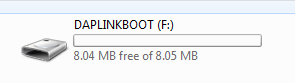
Then you can release the SW1 button.
3) Send "08_OpenSDA_FRDM-KE15Z.bin" to your "DAPLINKBOOT", wait the sending is finished.
4) unplug the USB cable, plug it again. Wait a moment, you will find your board is a device named as: FRDM-KE15ZJ
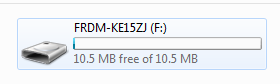
5)Open the JLINK commander window, you can find it from the JLINK driver install path:
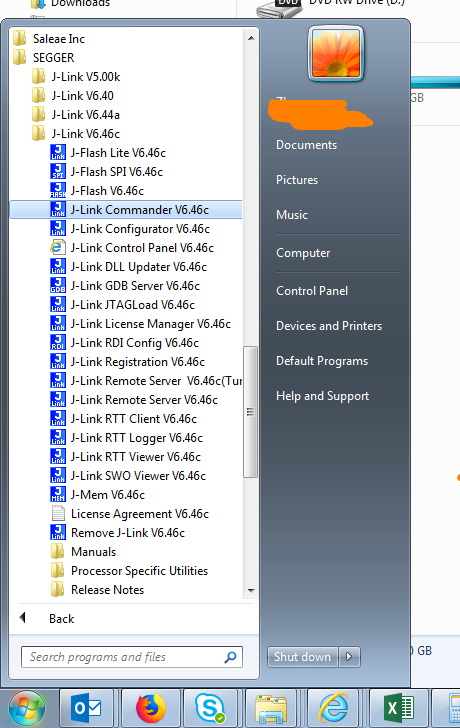
Now, follow my steps to connect your board, can you find the ARM cortex M0+ or not?
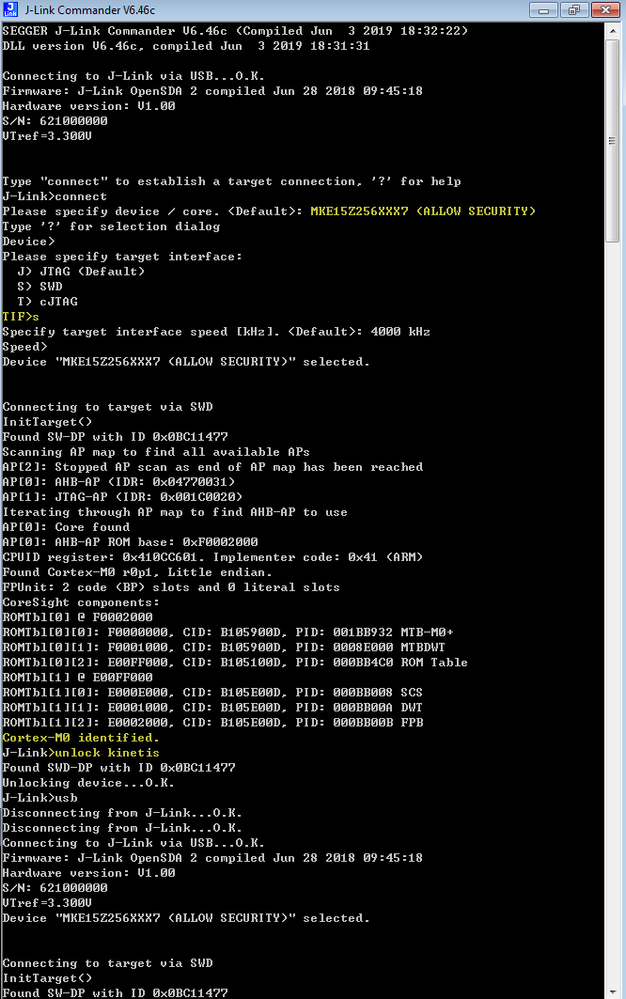
If you can find the ARM core, it means your hardware doesn't have the problems.
Now, you can try to use the JLINK download the official SDK code to your board.
The sdk can be downloaded from this link:
Welcome | MCUXpresso SDK Builder
Please try it on your side.
Any updated information, please kindly let me know.
Wish it helps you!
If you still have question about it, please kindly let me know.
Have a great day,
Kerry
-------------------------------------------------------------------------------
Note:
- If this post answers your question, please click the "Mark Correct" button. Thank you!
- We are following threads for 7 weeks after the last post, later replies are ignored
Please open a new thread and refer to the closed one, if you have a related question at a later point in time.
-------------------------------------------------------------------------------
- Mark as New
- Bookmark
- Subscribe
- Mute
- Subscribe to RSS Feed
- Permalink
- Report Inappropriate Content
Excuse me for my lack of attention. I informed you mistakenly in
previous email/post:
The Situation is : With the Jlink Commander with the 3 Leds On the PC
recognizes the processor.
When I used MCUXpresso, loaded some application and tried to debug,
debug was not possible and I had the message bellow:
Could not connect to target.
SEGGER J-Link GDB Server V6.40 Command Line Version
JLinkARM.dll V6.40 (DLL compiled Oct 26 2018 15:06:02)
Command line: -nosilent -swoport 2332 -select USB=123456 -telnetport
2333 -singlerun -endian little -noir -speed auto -port 2331 -vd -device
MKE15Z256xxx7 -if SWD -halt -reportuseraction
kerryzhou
- Mark as New
- Bookmark
- Subscribe
- Mute
- Subscribe to RSS Feed
- Permalink
- Report Inappropriate Content
Hi customer,
Thank you for your updated information.
Please give me the JLINK commander window information when you connect the board, it is very useful to my analysis, you don't need to use the MCUXPresso IDE to connect or download the code now.
Please share your JLINK commander result.
Have a great day,
Kerry
-------------------------------------------------------------------------------
Note:
- If this post answers your question, please click the "Mark Correct" button. Thank you!
- We are following threads for 7 weeks after the last post, later replies are ignored
Please open a new thread and refer to the closed one, if you have a related question at a later point in time.
-------------------------------------------------------------------------------
- Mark as New
- Bookmark
- Subscribe
- Mute
- Subscribe to RSS Feed
- Permalink
- Report Inappropriate Content
It not works in this board:
after item 3 (Send 08_OPEN_SDA.......) lights the RST Led D1 and the PWR
Led D3, the SDA Led D2 was On from item 2 (Plug USB with Reset Pressed...)
(The same sequence works perfectly on my other board)
T.P.
kerryzhou
- Mark as New
- Bookmark
- Subscribe
- Mute
- Subscribe to RSS Feed
- Permalink
- Report Inappropriate Content
Hi T.P.
Do you follow my last reply and test it on your side?
If it is not working, please share your JLINK commander window after you change the JLINK firmware.
Please do it, instead of just check the led status, the JLINK commander will help you whether your on board chip is OK or not.
Please try it on your side, then share your test result!
Have a great day,
Kerry
-------------------------------------------------------------------------------
Note:
- If this post answers your question, please click the "Mark Correct" button. Thank you!
- We are following threads for 7 weeks after the last post, later replies are ignored
Please open a new thread and refer to the closed one, if you have a related question at a later point in time.
-------------------------------------------------------------------------------
- Mark as New
- Bookmark
- Subscribe
- Mute
- Subscribe to RSS Feed
- Permalink
- Report Inappropriate Content
I follow your last reply.
Not exist any JLINK Commander Window.
The Board Is not Recognized by PC when Plugged at USB port.
The PC only recognize it when plugged with Reset Button pressed.
T.P.
