
- Forums
- Product Forums
- General Purpose MicrocontrollersGeneral Purpose Microcontrollers
- i.MX Forumsi.MX Forums
- QorIQ Processing PlatformsQorIQ Processing Platforms
- Identification and SecurityIdentification and Security
- Power ManagementPower Management
- Wireless ConnectivityWireless Connectivity
- RFID / NFCRFID / NFC
- Advanced AnalogAdvanced Analog
- Neural Processing UnitsNeural Processing Units
- MCX Microcontrollers
- S32G
- S32K
- S32V
- MPC5xxx
- Other NXP Products
- S12 / MagniV Microcontrollers
- Powertrain and Electrification Analog Drivers
- Sensors
- Vybrid Processors
- Digital Signal Controllers
- 8-bit Microcontrollers
- ColdFire/68K Microcontrollers and Processors
- PowerQUICC Processors
- OSBDM and TBDML
- S32M
- S32Z/E
-
- Solution Forums
- Software Forums
- MCUXpresso Software and ToolsMCUXpresso Software and Tools
- CodeWarriorCodeWarrior
- MQX Software SolutionsMQX Software Solutions
- Model-Based Design Toolbox (MBDT)Model-Based Design Toolbox (MBDT)
- FreeMASTER
- eIQ Machine Learning Software
- Embedded Software and Tools Clinic
- S32 SDK
- S32 Design Studio
- GUI Guider
- Zephyr Project
- Voice Technology
- Application Software Packs
- Secure Provisioning SDK (SPSDK)
- Processor Expert Software
- Generative AI & LLMs
-
- Topics
- Mobile Robotics - Drones and RoversMobile Robotics - Drones and Rovers
- NXP Training ContentNXP Training Content
- University ProgramsUniversity Programs
- Rapid IoT
- NXP Designs
- SafeAssure-Community
- OSS Security & Maintenance
- Using Our Community
-
- Cloud Lab Forums
-
- Knowledge Bases
- ARM Microcontrollers
- i.MX Processors
- Identification and Security
- Model-Based Design Toolbox (MBDT)
- QorIQ Processing Platforms
- S32 Automotive Processing Platform
- Wireless Connectivity
- CodeWarrior
- MCUXpresso Suite of Software and Tools
- MQX Software Solutions
- RFID / NFC
- Advanced Analog
- Neural Processing Units
-
- NXP Tech Blogs
- Home
- :
- General Purpose Microcontrollers
- :
- Kinetis Microcontrollers
- :
- Re: Email with FRDM-K64
Email with FRDM-K64
- Subscribe to RSS Feed
- Mark Topic as New
- Mark Topic as Read
- Float this Topic for Current User
- Bookmark
- Subscribe
- Mute
- Printer Friendly Page
Email with FRDM-K64

- Mark as New
- Bookmark
- Subscribe
- Mute
- Subscribe to RSS Feed
- Permalink
- Report Inappropriate Content
Hi, i'm want to send an email with frdm-k64f. Someone have some example? Or a text? I'm working with KDS SDK 2.0.
Thank you.
André

- Mark as New
- Bookmark
- Subscribe
- Mute
- Subscribe to RSS Feed
- Permalink
- Report Inappropriate Content
Hi André
See the links below. There are binary demos there where you can send emails from the FRDM-K64F board from its web server.
All code is in the Open Source uTasker project in case anything is missing in SDK 2.0 (mail code is in smtp.c - attached as reference).
Regards
Mark
http://www.utasker.com/kinetis.html
http://www.utasker.com/kinetis/FRDM-K64F.html
- Mark as New
- Bookmark
- Subscribe
- Mute
- Subscribe to RSS Feed
- Permalink
- Report Inappropriate Content
Hi Mark. Thanks for the help. I have another question. Do you have some tutorial to use this code?
Thanks.
André.
- Mark as New
- Bookmark
- Subscribe
- Mute
- Subscribe to RSS Feed
- Permalink
- Report Inappropriate Content
Hi André
SMTP is very simple and I don't have a tutorial specifically for it.
You can follow the Kinetis tutorial at http://www.utasker.com/docs/KINETIS/uTaskerV1.4_Kinetis.pdf which explains the web server control pages. If you enable USE_SMTP in config.h it will then include the mail support and you can send an email on the start page:
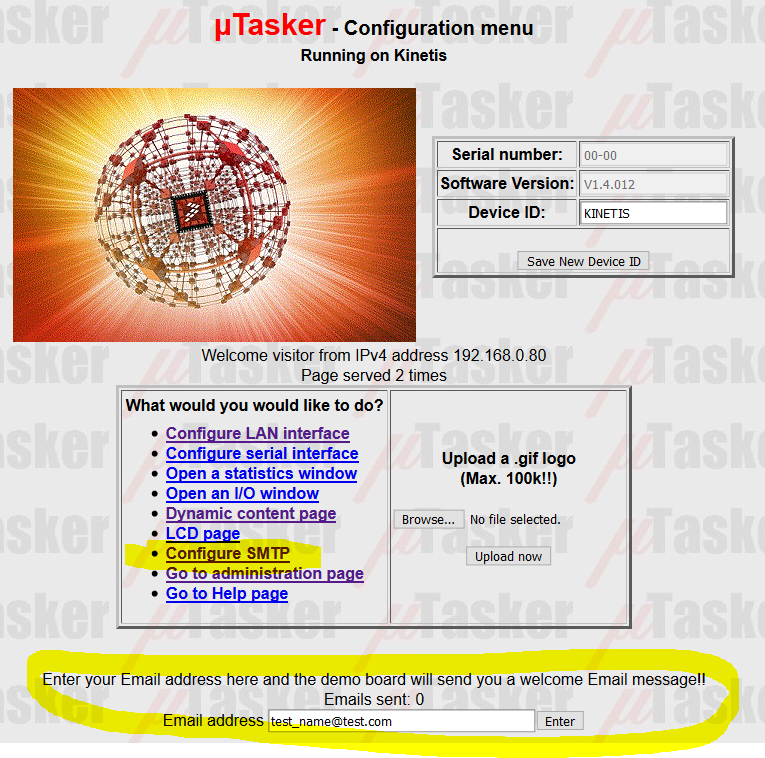
This uses either hard-coded settings:
#define OUR_USER_DOMAIN "my_domain.com";
#define DEFAULT_DESTINATION_EMAIL_ADDRESS {'t','e','s','t','_','n','a','m','e','@','t','e','s','t','.','c','o','m',0};
#define SMTP_PROVIDER_IP_ADDRESS { 194,158,229,11 }
#define SMTP_PROVIDER_ADDRESS "mail.provider.com"
#define USE_SMTP_AUTHENTICATION
or you can enable parameters with
#define SMTP_PARAMETERS
and set them up dynamically on the SMTP page.
You can test in the uTasker K64 simulator and set break-point in the SMTP file to get to get to know any additional details as required.
Regards
Mark
- Mark as New
- Bookmark
- Subscribe
- Mute
- Subscribe to RSS Feed
- Permalink
- Report Inappropriate Content
Hi Mark, thanks for the help again and again i need youtrhelp. How i configure the ftp to work in frdm k64? I try to use this software but i have problem with ftp.
Thanks again.
André.
- Mark as New
- Bookmark
- Subscribe
- Mute
- Subscribe to RSS Feed
- Permalink
- Report Inappropriate Content
André
The only requirement for FTP is the define USE_FTP (assuming ETH_INTERFACE and USE_TCP are enabled).
There is a guide at http://www.utasker.com/docs/uTasker/uTaskerFTP.PDF
Regards
Mark
- Mark as New
- Bookmark
- Subscribe
- Mute
- Subscribe to RSS Feed
- Permalink
- Report Inappropriate Content
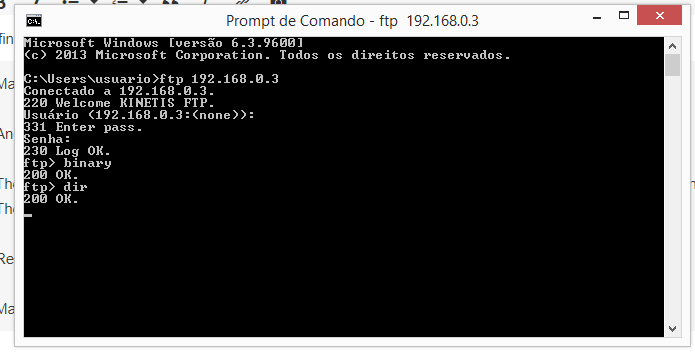
I define ETH_INTERFACE and USE_TCP. But when i send dir to FTP command, he block. If i use FireFox or FileZilla i have the same problem.
Mark Butcher escreveu:
André
The only requirement for FTP is the define USE_FTP (assuming ETH_INTERFACE and USE_TCP are enabled).
There is a guide at http://www.utasker.com/docs/uTasker/uTaskerFTP.PDF
Regards
Mark
- Mark as New
- Bookmark
- Subscribe
- Mute
- Subscribe to RSS Feed
- Permalink
- Report Inappropriate Content
André
I just tested the Open Source version on a FRDM-K64F and didn't have a problem:
D:\MJBC\temporary\>ftp 192.168.0.3
Connected to 192.168.0.3.
220 Welcome KINETIS FTP.
500 What?.
User (192.168.0.3:(none)):
331 Enter pass.
Password:
230 Log OK.
ftp> dir
200 OK.
150 Data.
-r Empty
226 OK.
ftp: 13 bytes received in 0.04Seconds 0.32Kbytes/sec.
ftp>
ftp> quit
221 Bye
(this is with empty uFileSystem rather than SD card).
Could you try loading a reference from here to check its behavior?
http://www.utasker.com/kinetis/FRDM-K64F.html
Note that the FTP data connection (which is failing) uses a random TCP port and you may have a firewall issue with this (temporarily disable the firewall in the PC to check). Also record the traffic using Wireshark so that you can see what happens exactly.
Regards
Mark
- Mark as New
- Bookmark
- Subscribe
- Mute
- Subscribe to RSS Feed
- Permalink
- Report Inappropriate Content
Hi Mark, i get this example uTaskerV1.4.8_FRDM-K64F_LAN.bin yesterday, and work. But the send email dont work. Just the configure SMTP.
So i use the Open Source e try to connect but this dont work. I make like this video to configure.
uTasker SHORT Getting Started - From GIT to KDS build - YouTube
I thank you for the help.
André.
- Mark as New
- Bookmark
- Subscribe
- Mute
- Subscribe to RSS Feed
- Permalink
- Report Inappropriate Content
André
There are many things that can go wrong (Firewalls, incorrect IP or SMTP settings, etc.) so you will need to supply more information for me to be able to help. The best way is to record attempts with Wireshark so that the complete details are visible.
Regards
Mark
