
- Forums
- Product Forums
- General Purpose MicrocontrollersGeneral Purpose Microcontrollers
- i.MX Forumsi.MX Forums
- QorIQ Processing PlatformsQorIQ Processing Platforms
- Identification and SecurityIdentification and Security
- Power ManagementPower Management
- Wireless ConnectivityWireless Connectivity
- RFID / NFCRFID / NFC
- Advanced AnalogAdvanced Analog
- Neural Processing UnitsNeural Processing Units
- MCX Microcontrollers
- S32G
- S32K
- S32V
- MPC5xxx
- Other NXP Products
- S12 / MagniV Microcontrollers
- Powertrain and Electrification Analog Drivers
- Sensors
- Vybrid Processors
- Digital Signal Controllers
- 8-bit Microcontrollers
- ColdFire/68K Microcontrollers and Processors
- PowerQUICC Processors
- OSBDM and TBDML
- S32M
- S32Z/E
-
- Solution Forums
- Software Forums
- MCUXpresso Software and ToolsMCUXpresso Software and Tools
- CodeWarriorCodeWarrior
- MQX Software SolutionsMQX Software Solutions
- Model-Based Design Toolbox (MBDT)Model-Based Design Toolbox (MBDT)
- FreeMASTER
- eIQ Machine Learning Software
- Embedded Software and Tools Clinic
- S32 SDK
- S32 Design Studio
- GUI Guider
- Zephyr Project
- Voice Technology
- Application Software Packs
- Secure Provisioning SDK (SPSDK)
- Processor Expert Software
- Generative AI & LLMs
-
- Topics
- Mobile Robotics - Drones and RoversMobile Robotics - Drones and Rovers
- NXP Training ContentNXP Training Content
- University ProgramsUniversity Programs
- Rapid IoT
- NXP Designs
- SafeAssure-Community
- OSS Security & Maintenance
- Using Our Community
-
- Cloud Lab Forums
-
- Knowledge Bases
- ARM Microcontrollers
- i.MX Processors
- Identification and Security
- Model-Based Design Toolbox (MBDT)
- QorIQ Processing Platforms
- S32 Automotive Processing Platform
- Wireless Connectivity
- CodeWarrior
- MCUXpresso Suite of Software and Tools
- MQX Software Solutions
- RFID / NFC
- Advanced Analog
- Neural Processing Units
-
- NXP Tech Blogs
- Home
- :
- General Purpose Microcontrollers
- :
- Kinetis Microcontrollers
- :
- Re: Can KL26Z RTC be operated from internal 32KHz source for 1 second counts?
Can KL26Z RTC be operated from internal 32KHz source for 1 second counts?
- Subscribe to RSS Feed
- Mark Topic as New
- Mark Topic as Read
- Float this Topic for Current User
- Bookmark
- Subscribe
- Mute
- Printer Friendly Page

- Mark as New
- Bookmark
- Subscribe
- Mute
- Subscribe to RSS Feed
- Permalink
- Report Inappropriate Content
Hi I have a FRDM-KL26Z that I'm using to prototype a new design using KDS2.0.0
I’m trying to use the RTCx:RTC_LDD & the internal 32KHz clock. In the final design I've got an external 32Khz Osc 10ppm, but for prototyping I'm trying to use the internal 32KHz
In the RTC Properties the “Input Clock frequency” can only be set to 32.768sec – even though the “Clock Path” suggest that it should be able to access the RTC_Counter.
However the RTC_Counter souces seems to be wrong at “0.031Hz” – possibly should be -.”0.031Khz”
On the CPU:MKL26Z128VMC4 component I have the RTC clock input disabled.
System Osc – Enabled – 8Mhz &
ERCLK32K Auto Select – LPO 1KHz
I haven't been able to find any errata associated with a KL26Z
Any insights appreciated.
thanks.
Solved! Go to Solution.

 Kan_Li
- Mark as New
- Bookmark
- Subscribe
- Mute
- Subscribe to RSS Feed
- Permalink
- Report Inappropriate Content
Hi Neil,
RTC can not operate with internal slow ref clock, because RM says"RTC prescaler is clocked by ERCLK32K.", and if you refer to "Chapter 5 Clock Distribution", you may find there are only three options for ERCLK32K, but nothing to do with the internal 32KHz clock , please refer to the following for details:
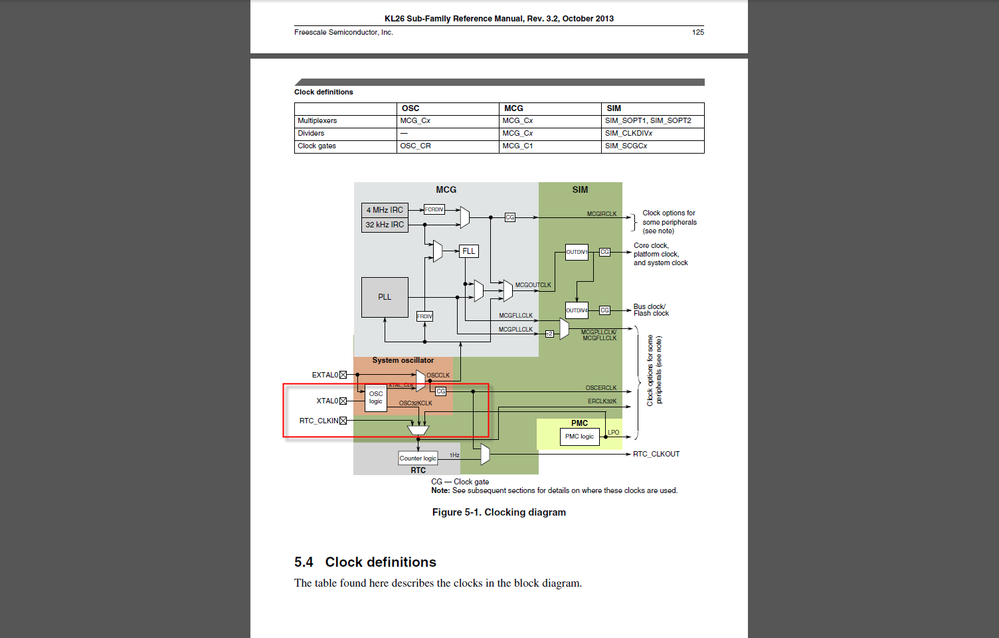
and by default it uses LPO as the internal clock, and as RTC_TPR increments every 32.768 kHz clock cycle, so you may think it has a prescaler of 1/32768, so going down the clock path , the input 1KHz has the output of around 0.031Hz, just as below:
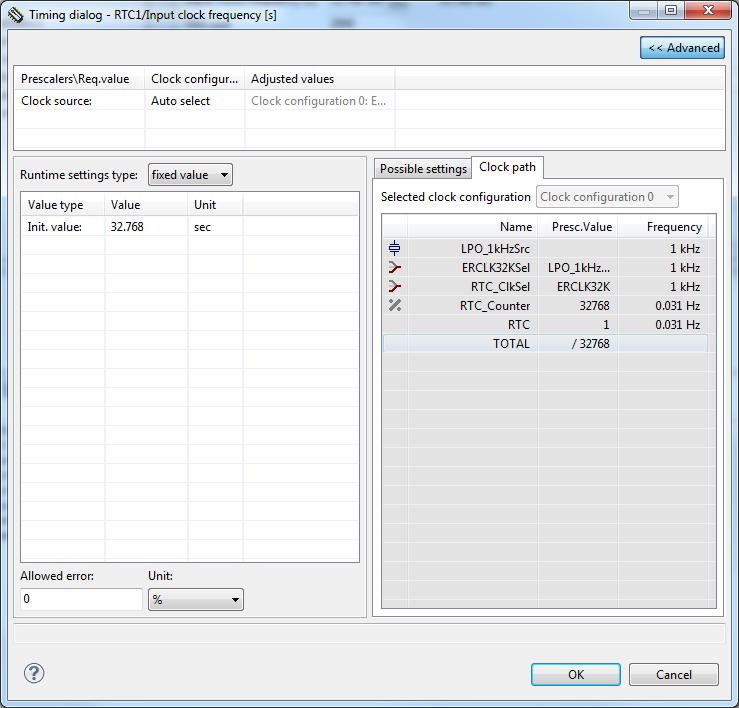
Hope that makes sense,
Have a great day,
Kan
-----------------------------------------------------------------------------------------------------------------------
Note: If this post answers your question, please click the Correct Answer button. Thank you!
-----------------------------------------------------------------------------------------------------------------------
Kan_Li
- Mark as New
- Bookmark
- Subscribe
- Mute
- Subscribe to RSS Feed
- Permalink
- Report Inappropriate Content
Hi Neil,
RTC can not operate with internal slow ref clock, because RM says"RTC prescaler is clocked by ERCLK32K.", and if you refer to "Chapter 5 Clock Distribution", you may find there are only three options for ERCLK32K, but nothing to do with the internal 32KHz clock , please refer to the following for details:
and by default it uses LPO as the internal clock, and as RTC_TPR increments every 32.768 kHz clock cycle, so you may think it has a prescaler of 1/32768, so going down the clock path , the input 1KHz has the output of around 0.031Hz, just as below:
Hope that makes sense,
Have a great day,
Kan
-----------------------------------------------------------------------------------------------------------------------
Note: If this post answers your question, please click the Correct Answer button. Thank you!
-----------------------------------------------------------------------------------------------------------------------
- Mark as New
- Bookmark
- Subscribe
- Mute
- Subscribe to RSS Feed
- Permalink
- Report Inappropriate Content
Many thanks for the detailed answer. Got it now.

- Mark as New
- Bookmark
- Subscribe
- Mute
- Subscribe to RSS Feed
- Permalink
- Report Inappropriate Content
Neil
You may find some relevant information for your usage case at http://www.utasker.com/kinetis/KL_RTC.html
Regards
Mark
Kinetis: µTasker Kinetis support
KL26: µTasker Kinetis FRDM-KL26Z support / µTasker Kinetis Teensy LC support
For the complete "out-of-the-box" Kinetis experience and faster time to market
- Mark as New
- Bookmark
- Subscribe
- Mute
- Subscribe to RSS Feed
- Permalink
- Report Inappropriate Content
Hello Mark
Thanks very much for your link. Very useful write up.
Hadn't figured out all the possibilities of using Xtal as 32Khz source - need to look into that.
I had figured out that I could use an external accurate low power osc module like SIT1552AI-JF-DCC-32.768D 10ppm on the RTC_CLKIN which effectively only uses one pin over the normal two pins for an Xtal.
However, I was trying prototyping some clocking values with KDS2.0.0 PE CPU:MKL26Z128VMC4 to derive a LPO clock for the RTC.
It turns out I'm on the steep learning curve - and was using the external Xtal at 16Mhz - and the clock divider chains couldn't deliver an LPO 1KHz to the RTC_LDD for some reason.
Setting the external Xtal at 8Mhz, suddenly the RTC_LDD logic is allowing a 1sec input clock frequency.
So my requirement is to use minimum power - low power with RTC clocking and generating a periodic interrupt (every 300secs), do some high speed processing including float calculations and go back to sleep.
While awake I need to poll an I2C device and also update a flash based SPI
Seems like a possible version of this is have a 0.032768Mhz Xtal0 for Low Power relatively accurate time keeping to RTC - sleeping and low power running,
then switch to higher mode when processing.
However I'm not sure I understand the limitations and benefits of Clocking Sources/Configs - so am just using the VLP Mode Enable/Off
So using this and trying the Clocks with Component Inspector seems like I should be able to switch in processor cycles when needed,
Clock Settings Clock, Source 0 -MCG settings.mode, BLPI - 4MHz
Clock Config
Clock Config 0 VLP mode Enabled Auto , Clock Source - Configuration 0, BLPI , System Clocks Core Clock 4Mhz, Bus 0.8Hz
Clock config 1 VLP mode OFF, Clock Source - Configuration 1, BLPI, System Clocks.Core Clock 4Mhz Bus 4MhzHz.
I2C_LDD Settings (can only do it with clock config 1 enabled) Internal Freq 2MHz for SCL frequency 100KHz
Ouch its all pretty complicated, but seems to have the KDS2.0.0 Component Inspector happy. Need to see what values are now generated.
Many thanks for the pointers
- Mark as New
- Bookmark
- Subscribe
- Mute
- Subscribe to RSS Feed
- Permalink
- Report Inappropriate Content
Neil
The LPO 1kHz has nothing to do with the input clock - it can be used as RTC clock source by selecting it with
SIM_SOPT1 = ((SIM_SOPT1 & ~SIM_SOPT1_OSC32KSEL_MASK) | SIM_SOPT1_OSC32KSEL_LPO_1kHz);
The RTC actually runs 1/32.6 times slower than normal but this can be compensated for.
You should look at the TWR-KL25Z48M as reference since it uses a low power 32kHz oscillator.
http://www.utasker.com/kinetis/TWR-KL25Z48M.html
For low power see also : http://www.utasker.com/kinetis/LLWU.html
To do what you want in the uTasker framework you just need to select your board and the defines:
#define SUPPORT_RTC // enables RTC and time keeping (see http://www.utasker.com/docs/uTasker/uTasker_Time.pdf)
#define RTC_USES_RTC_CLKIN // to use the RTC_IN pin
#define SUPPORT_LOW_POWER // enable low power support
#define SUPPORT_LLWU // enable LLWU
In code, enable a wakeup on the RTC alarm using (see LLWU link above) with:
INTERRUPT_SETUP interrupt_setup; // interrupt configuration parameters
interrupt_setup.int_port = PORT_MODULE; // define a wakeup interrupt on a module (rather than LLWU port input)
interrupt_setup.int_port_bits = (MODULE_RTC_ALARM); // wakeup on RTC alarm interrupts
fnConfigureInterrupt((void *)&interrupt_setup); // configure wakeup interrupt
To move to LLS with wakeup in 300s:
fnSetShowTime(SET_RTC_ALARM_TIME, "+300"); // program an alarm to fire in +300s and wake the processor [this can also be an absolute time or date/time]
fnSetLowPowerMode(LLS_MODE); // move to LLS mode as soon as no more local communication activity
This is a non-blocking function and will allow any communication that is presently in progress to complete before making the switch. The processor will reduce power consumption to about 1.7uA.
After 300s the processor will wake and interrupt routine interrupt_setup() will be called (which doesn't need to do anything if it doesn't want to signal anything specific), and the processor will continue at full speed again until the shut down sequence is called again.
When not sleeping you can run everything at full power to keep the processing as short as possible so no need to do anything special with clocks.
As you can see this functionality is completely developed and can be built with KDS2.0 for any KE,KL,KV or K parts.
I2C and SPI Flash is included too - just enable the defines
#define IIC_INTERFACE // enable I2C driver (use explained in http://www.utasker.com/docs/uTasker/uTaskerIIC.PDF)
#define SPI_FILE_SYSTEM // enable SPI Flash driver (see http://www.utasker.com/docs/uTasker/uTaskerFileSystemSPI_FLASH_003.PDF)
- the SPI chips supported are
- AT45DBxxxB/C (optionally power-of-twos mode)
- STM25Pxxx (data and program types)
- SST25xxx
- Winbond W25Qxx
You can also run the project in the uTasker Kinetis simulator (simulates also I2C and SPI Flash as well as all Kinetis peripherals in (approx.) real-time).
The only down side would be that you possibly wouldn't be able to experiment with the various components that you are piecing together at the moment because with the defines above you will probably have most of the work completed ;-)
Regards
Mark
P.S. If you have a FRDM-KL26Z board and load the mbed debugger (rather than the P&E one) it generates a 32kHz input for the RTC_CLKIN (see SDA_PTD6 and R22). this is useful for preparing SW for designs that later have an external clock generator.
Kinetis: µTasker Kinetis support
KL26: µTasker Kinetis FRDM-KL26Z support / µTasker Kinetis Teensy LC support
For the complete "out-of-the-box" Kinetis experience and faster time to market
