
- Forums
- Product Forums
- General Purpose MicrocontrollersGeneral Purpose Microcontrollers
- i.MX Forumsi.MX Forums
- QorIQ Processing PlatformsQorIQ Processing Platforms
- Identification and SecurityIdentification and Security
- Power ManagementPower Management
- Wireless ConnectivityWireless Connectivity
- RFID / NFCRFID / NFC
- Advanced AnalogAdvanced Analog
- Neural Processing UnitsNeural Processing Units
- MCX Microcontrollers
- S32G
- S32K
- S32V
- MPC5xxx
- Other NXP Products
- S12 / MagniV Microcontrollers
- Powertrain and Electrification Analog Drivers
- Sensors
- Vybrid Processors
- Digital Signal Controllers
- 8-bit Microcontrollers
- ColdFire/68K Microcontrollers and Processors
- PowerQUICC Processors
- OSBDM and TBDML
- S32M
- S32Z/E
-
- Solution Forums
- Software Forums
- MCUXpresso Software and ToolsMCUXpresso Software and Tools
- CodeWarriorCodeWarrior
- MQX Software SolutionsMQX Software Solutions
- Model-Based Design Toolbox (MBDT)Model-Based Design Toolbox (MBDT)
- FreeMASTER
- eIQ Machine Learning Software
- Embedded Software and Tools Clinic
- S32 SDK
- S32 Design Studio
- GUI Guider
- Zephyr Project
- Voice Technology
- Application Software Packs
- Secure Provisioning SDK (SPSDK)
- Processor Expert Software
- Generative AI & LLMs
-
- Topics
- Mobile Robotics - Drones and RoversMobile Robotics - Drones and Rovers
- NXP Training ContentNXP Training Content
- University ProgramsUniversity Programs
- Rapid IoT
- NXP Designs
- SafeAssure-Community
- OSS Security & Maintenance
- Using Our Community
-
- Cloud Lab Forums
-
- Knowledge Bases
- ARM Microcontrollers
- i.MX Processors
- Identification and Security
- Model-Based Design Toolbox (MBDT)
- QorIQ Processing Platforms
- S32 Automotive Processing Platform
- Wireless Connectivity
- CodeWarrior
- MCUXpresso Suite of Software and Tools
- MQX Software Solutions
- RFID / NFC
- Advanced Analog
- Neural Processing Units
-
- NXP Tech Blogs
- Home
- :
- MCUXpressoソフトウェアとツール
- :
- Kinetisデザインスタジオ
- :
- P&E Debugger Not Working After Low Power Mode
P&E Debugger Not Working After Low Power Mode
- RSS フィードを購読する
- トピックを新着としてマーク
- トピックを既読としてマーク
- このトピックを現在のユーザーにフロートします
- ブックマーク
- 購読
- ミュート
- 印刷用ページ
P&E Debugger Not Working After Low Power Mode

- 新着としてマーク
- ブックマーク
- 購読
- ミュート
- RSS フィードを購読する
- ハイライト
- 印刷
- 不適切なコンテンツを報告
I am having trouble using the P&E debugger (Multilink Universal FX) with a K20FN1M0 after the device has entered and exited a low power mode (VLLS1 to be specific). Here is what I am trying to do...
- The device enters the low power mode. I am using the Processor Expert call Cpu_SetOperationMode(DOM_STOP, NULL, NULL);
- The device restarts after a period with the LPTimer wakeup.
This all works just fine. However, after having entered the VLLS1 state, I can no longer use the debugger. Here is the scenario...
- Device is in VLLS1 or back to normal run mode (I can keep it from re-entering VLLS1 via a GPIO input).
- Connect the debugger to the target.
- Run the Debug command in Kinetis Design Studio.
The target runs (I have an LED that flashes), however I have no debugger action. In the "Debug" window, I have..
Thread #1 <main> (Suspended: User Request)
__vect_table() at 0x0
0x0
The only way to get out of this is power cycle the target. This is fine on the bench, but in my application, I am not able to power cycle the device. I can reset the device, but this does not fix the problem. I have checked my version of P&E debugger pluggin and it is the latest...2.8.5.201702221447.
Has anyone else seen this behavior, and is there a solution to recovering debugger functionality without power cycling the device?

 Alice_Yang
- 新着としてマーク
- ブックマーク
- 購読
- ミュート
- RSS フィードを購読する
- ハイライト
- 印刷
- 不適切なコンテンツを報告
Hello Patrick,
I have a test on my side, when run into VLLS1 mode, the KDS will disconnected .
all the debug buttons will be grey:
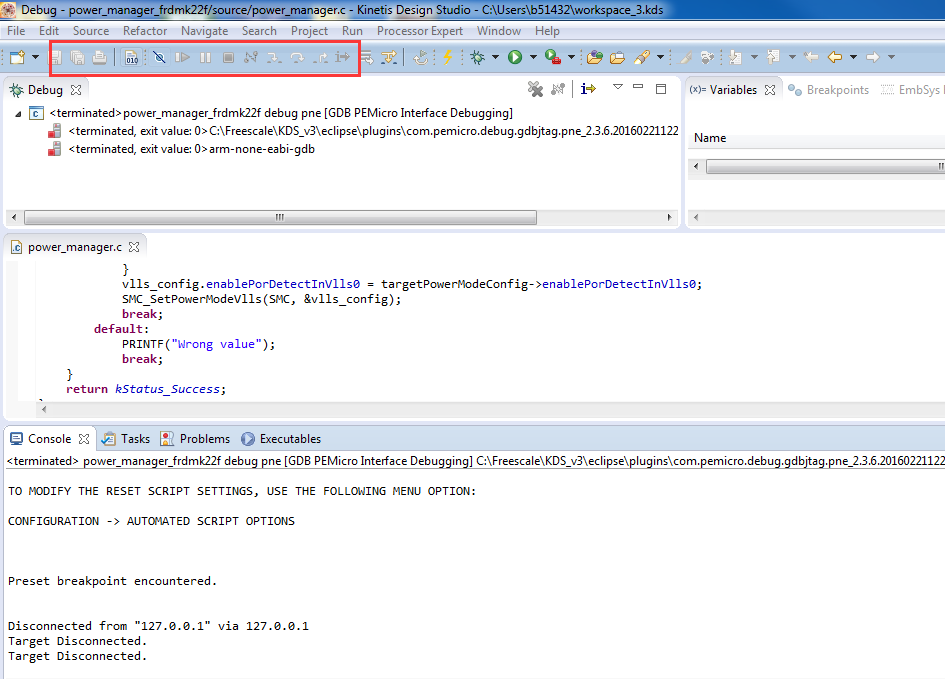
So in KDS, after exist from VLLS1 mode , we can not continue debug use KDS .
By the way, exist from VLLS1, it will reset , that is to say it will run from start ,
so I think it is the same for debug continue with reconnect by hand to debug .
BR
Alice
- 新着としてマーク
- ブックマーク
- 購読
- ミュート
- RSS フィードを購読する
- ハイライト
- 印刷
- 不適切なコンテンツを報告
Thank you for the response. Ok, I understand when entering/exiting from VLLS1, I can no longer debug. This makes sense.
However, lets say that after exiting VLLS1, I then upload some updated firmware into the device. I do this without ever power cycling the device (this is the key). The new firmware loads just fine. However, when the debugger starts, it immediately stops. The buttons at the top (green arrow, pause, red stop) are not grayed out anymore. If I press the green 'run' button, it appears to try to run in debug, but immediately stops. This whole time though, the device is running.
At this point, the only way I can get the device to run in debug mode is to power cycle the device. I am hoping there is a way to not require a power cycle to get the debugger running again after uploading new firmware (after the device has been in VLLS1).
If you could run a new test where you enter VLLS1, then exit like before. Now try to start a new debugging session and see if you can actually debug. My "Debug" window in KDS shows (under Thread #1), "Suspended: User Request", then under that "__vect_table() at 0x0" when I try to start a new debug session after the device has been through a VLLS1 'cycle'.
Alice_Yang
- 新着としてマーク
- ブックマーク
- 購読
- ミュート
- RSS フィードを購読する
- ハイライト
- 印刷
- 不適切なコンテンツを報告
Hello Patrick,
Could you please send your project to me , and also take a video or screenshot
about the steps, or I can't know your question obvious .
BR
Alice
